• Pl chevron_right

      Dino: Dino 0.4 Release

      news.movim.eu / PlanetJabber • 7 February 2023 • 2 minutes

    Dino is a secure and open-source messaging application. It uses the XMPP (Jabber) protocol for decentralized communication. We aim to provide an intuitive and enjoyable user interface.

    The 0.4 release adds support for message reactions and replies. We also switched from GTK3 to GTK4 and make use of libadwaita now.

    Reactions and Replies

    reaction.png

    Reactions give you a quick and light-weight way to respond to a message with an emoji. They can be used to express agreement or disagreement 👍️👎️, for voting, to express a feeling 🥳🤯, and much more 🦕. You can react with any emoji you want and with as many as you want!

    The new Dino release also adds another way for you to interact with messages: Replies. The original message is displayed alongside the reply, and you can click on it to jump up to the original message.
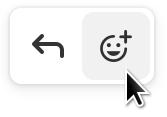
    message_menu.png

    You can add a reaction or reply to a message via the message menu. To access the message menu, hover the message or tap it on touch-screens.
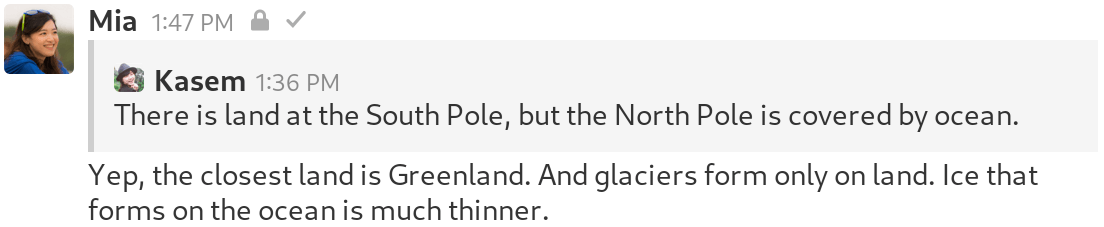
    Screenshot of a reply

    Reactions and replies are always possible in direct conversations. In group chats and channels, the admin decides whether to support the features.

    GTK4 and libadwaita

    Dino now uses GTK4 instead of GTK3 to display its user interface. To the outside there are no big UI changes. However, we can now make use of new or improved GTK features.

    Furthermore, we started using libadwaita, which contains specialized Widgets and provides tools to build mobile-friendly UIs. We already adjusted Dino’s main view for usage on mobile devices.

    Ilulissat

    Glaciers are fascinating landscapes of flowing ice. We named this Dino release “Ilulissat” after a glacier in Greenland to help spread information on the effects of global warming on glaciers.

    Glaciers are created over a span of centuries from fallen snow that compacts and transforms into glacial ice. When the ice reaches a certain thickness, it starts to behave like a liquid. Thus, glaciers are in constant movement, driven downhill by gravity under their own weight.
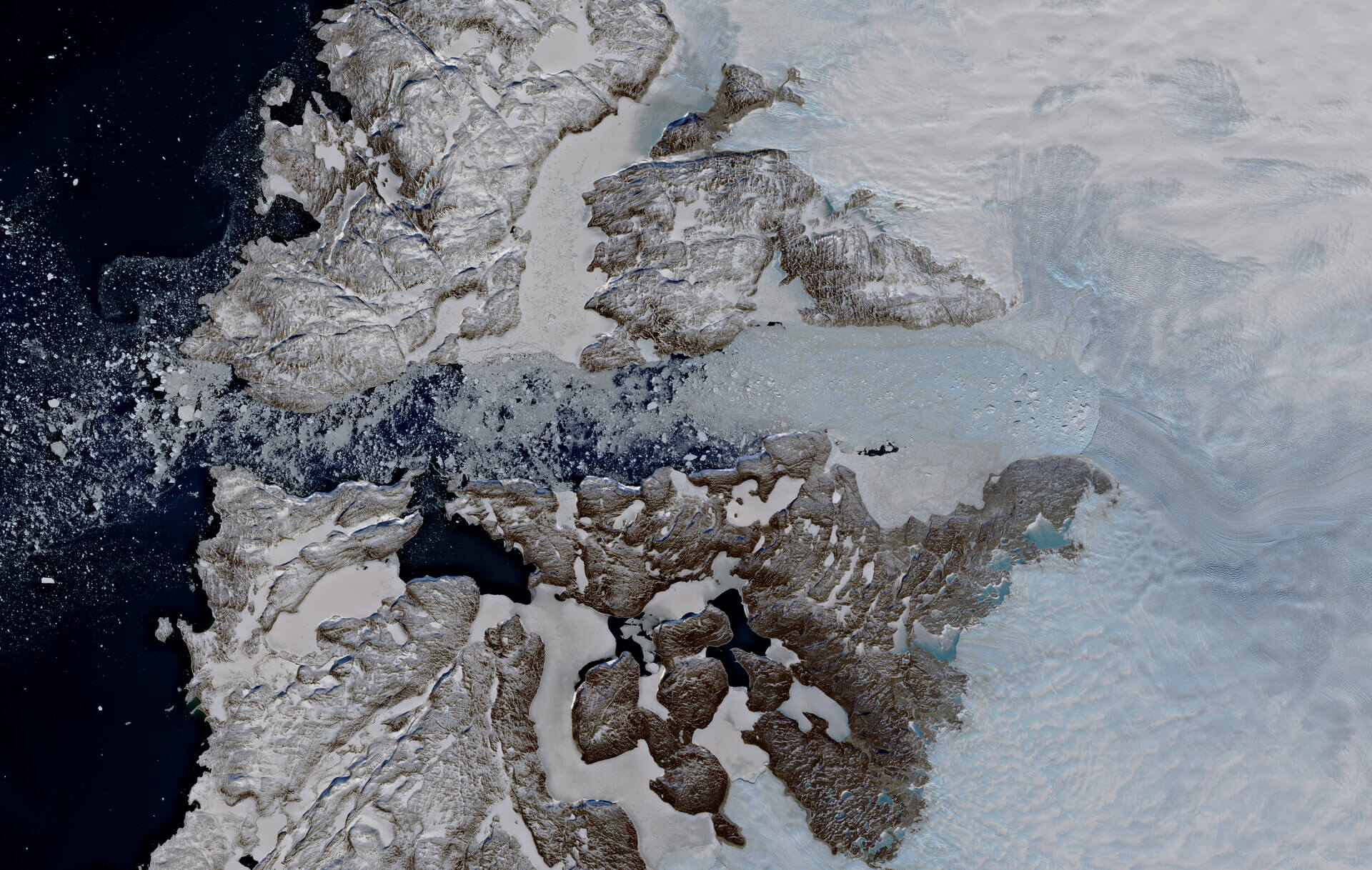
    Satellite view of the Ilulissat glacier and icefjord

    Satellite view of the Ilulissat glacier and icefjord

    Very large glaciers, also known as ice sheets, exist on Antarctica and Greenland. Greenland’s ice sheet covers about 80% of the island and has an average thickness of 1,5 km.

    The Greenland Ice Sheet, like all glaciers, is constantly in motion. It accumulates ice in the interior of the island and flows outwards, eventually reaching the ocean through so-called outlet glaciers. One such outlet glacier is the Ilulissat glacier in West Greenland, the fastest draining outlet of the Greenland Ice Sheet with a flow speed of over 20 meters per day.

    Unfortunately, the Greenland Ice Sheet has been shrinking for past 26 years [ 1 ]. Rising water and air temperatures are causing outlet glaciers to melt at an accelerating pace, draining the ice sheet more quickly and resulting in increased sea levels [ 2 ]. Between 1992 and 2020, meltwater from the Greenland Ice Sheet alone increased global sea levels by over 1,3 cm, where every centimeter of sea level rise is estimated to expose 6 Million people to coastal flooding [ 3 ].

    • Pl chevron_right

      Dino: Dino 0.4 Release

      news.movim.eu / PlanetJabber • 7 February 2023 • 2 minutes

    Dino is a secure and open-source messaging application. It uses the XMPP (Jabber) protocol for decentralized communication. We aim to provide an intuitive and enjoyable user interface.

    The 0.4 release adds support for message reactions and replies. We also switched from GTK3 to GTK4 and make use of libadwaita now.

    Reactions and Replies

    reaction.png

    Reactions give you a quick and light-weight way to respond to a message with an emoji. They can be used to express agreement or disagreement 👍️👎️, for voting, to express a feeling 🥳🤯, and much more 🦕. You can react with any emoji you want and with as many as you want!

    The new Dino release also adds another way for you to interact with messages: Replies. The original message is displayed alongside the reply, and you can click on it to jump up to the original message.

    message_menu.png

    You can add a reaction or reply to a message via the message menu. To access the message menu, hover the message or tap it on touch-screens.

    Screenshot of a reply

    Reactions and replies are always possible in direct conversations. In group chats and channels, the admin decides whether to support the features.

    GTK4 and libadwaita

    Dino now uses GTK4 instead of GTK3 to display its user interface. To the outside there are no big UI changes. However, we can now make use of new or improved GTK features.

    Furthermore, we started using libadwaita, which contains specialized Widgets and provides tools to build mobile-friendly UIs. We already adjusted Dino’s main view for usage on mobile devices.

    Ilulissat

    Glaciers are fascinating landscapes of flowing ice. We named this Dino release “Ilulissat” after a glacier in Greenland to help spread information on the effects of global warming on glaciers.

    Glaciers are created over a span of centuries from fallen snow that compacts and transforms into glacial ice. When the ice reaches a certain thickness, it starts to behave like a liquid. Thus, glaciers are in constant movement, driven downhill by gravity under their own weight.

    Satellite view of the Ilulissat glacier and icefjord

    Satellite view of the Ilulissat glacier and icefjord

    Very large glaciers, also known as ice sheets, exist on Antarctica and Greenland. Greenland’s ice sheet covers about 80% of the island and has an average thickness of 1,5 km.

    The Greenland Ice Sheet, like all glaciers, is constantly in motion. It accumulates ice in the interior of the island and flows outwards, eventually reaching the ocean through so-called outlet glaciers. One such outlet glacier is the Ilulissat glacier in West Greenland, the fastest draining outlet of the Greenland Ice Sheet with a flow speed of over 20 meters per day.

    Unfortunately, the Greenland Ice Sheet has been shrinking for past 26 years [ 1 ]. Rising water and air temperatures are causing outlet glaciers to melt at an accelerating pace, draining the ice sheet more quickly and resulting in increased sea levels [ 2 ]. Between 1992 and 2020, meltwater from the Greenland Ice Sheet alone increased global sea levels by over 1,3 cm, where every centimeter of sea level rise is estimated to expose 6 Million people to coastal flooding [ 3 ].

    • Pl chevron_right

      Dino: Dino 0.4 Release

      news.movim.eu / PlanetJabber • 7 February 2023 • 2 minutes

    Dino is a secure and open-source messaging application. It uses the XMPP (Jabber) protocol for decentralized communication. We aim to provide an intuitive and enjoyable user interface.

    The 0.4 release adds support for message reactions and replies. We also switched from GTK3 to GTK4 and make use of libadwaita now.

    Reactions and Replies

    reaction.png

    Reactions give you a quick and light-weight way to respond to a message with an emoji. They can be used to express agreement or disagreement 👍️👎️, for voting, to express a feeling 🥳🤯, and much more 🦕. You can react with any emoji you want and with as many as you want!

    The new Dino release also adds another way for you to interact with messages: Replies. The original message is displayed alongside the reply, and you can click on it to jump up to the original message.

    message_menu.png

    You can add a reaction or reply to a message via the message menu. To access the message menu, hover the message or tap it on touch-screens.

    Screenshot of a reply

    Reactions and replies are always possible in direct conversations. In group chats and channels, the admin decides whether to support the features.

    GTK4 and libadwaita

    Dino now uses GTK4 instead of GTK3 to display its user interface. To the outside there are no big UI changes. However, we can now make use of new or improved GTK features.

    Furthermore, we started using libadwaita, which contains specialized Widgets and provides tools to build mobile-friendly UIs. We already adjusted Dino’s main view for usage on mobile devices.

    Ilulissat

    Glaciers are fascinating landscapes of flowing ice. We named this Dino release “Ilulissat” after a glacier in Greenland to help spread information on the effects of global warming on glaciers.

    Glaciers are created over a span of centuries from fallen snow that compacts and transforms into glacial ice. When the ice reaches a certain thickness, it starts to behave like a liquid. Thus, glaciers are in constant movement, driven downhill by gravity under their own weight.

    Satellite view of the Ilulissat glacier and icefjord

    Satellite view of the Ilulissat glacier and icefjord

    Very large glaciers, also known as ice sheets, exist on Antarctica and Greenland. Greenland’s ice sheet covers about 80% of the island and has an average thickness of 1,5 km.

    The Greenland Ice Sheet, like all glaciers, is constantly in motion. It accumulates ice in the interior of the island and flows outwards, eventually reaching the ocean through so-called outlet glaciers. One such outlet glacier is the Ilulissat glacier in West Greenland, the fastest draining outlet of the Greenland Ice Sheet with a flow speed of over 20 meters per day.

    Unfortunately, the Greenland Ice Sheet has been shrinking for past 26 years [ 1 ]. Rising water and air temperatures are causing outlet glaciers to melt at an accelerating pace, draining the ice sheet more quickly and resulting in increased sea levels [ 2 ]. Between 1992 and 2020, meltwater from the Greenland Ice Sheet alone increased global sea levels by over 1,3 cm, where every centimeter of sea level rise is estimated to expose 6 Million people to coastal flooding [ 3 ].

    • Pl chevron_right

      Isode: Icon-5066 3.0 – New Capabilities

      news.movim.eu / PlanetJabber • 2 February 2023 • 2 minutes

    We are thrilled to announce the latest update to our STANAG 5066 server, Icon-5066. With this new release, we’ve incorporated a host of exciting features and enhancements, designed to not only add new functionality to your deployment but also increase the performance of your HF Radio Network.

    The below is a list of the changes, and updates that can be found within Icon-5066 v3.0.

    ALE Management

    This major new feature enables management of ALE configuration independent of ALE implementation and allows easy sharing of configuration between nodes.  This capability is supported for modems where Isode provides ALE support.  Key features:

    • Web configuration of HF Network for each Icon-5066 node.
    • Configuration of Node ALE addressing, with support for 2G, 3G and 4G.
    • Support for fixed frequency (not using ALE for a network)
    • Configuration of HF Frequency list with options for narrowband and wideband
    • Configuration of schedules for used with ALE or fixed frequency.   This enables the frequencies used to be changed at configured times so that appropriate frequencies are used for an ALE network throughout the 24 hour cycle.
    • Import/Export of configuration, to enable easy sharing of configuration between nodes.   Model is that you configure ALE setup on one node and the transfer to other nodes.

    Security

    Two important security enhancements are included:

    1. Use of OAuth to control which operators can access Icon-5066.
    2. Support of TLS which includes:
      1. HTTPS Web Access
      2. TLS Support for GCXP to support Modem Proxy (crypto bypass) across a Red/Black boundary
      3. Web configuration of PKI setup of TLS

    STANAG 5066 Ed4 Compliance

    Icon-5066 is compliant to STANAG 5066 Ed4.   An overview of Ed4 is here .   Detailed Icon-5066 compliance is specified here .

    Most of these capabilities were in the previous release, but described as STANAG 5066 proposed extensions.   Interoperability has been tested with another Ed4 implementation.

    SNR Monitor

    A new option is provided to configure Icon-5066 as a modem monitor with a simple TCP monitoring protocol.  This is a general purpose capability, but is specifically targeted to support the ACP 127 FAB (Frequency Assignment Broadcast) capability in M-Switch to enable the FAB broadcast to report on measured link quality using a modem at a remote location.

    New Modem/ALE Support

    The following ALE capabilities are added:

    • 3G ALE support for RapidM RM8 and RM10.
    • 4G ALE support for RapidM RM10

    A new “Raw TCP” data option, which sends and receives data over simple TCP connection.   This generic capability can be used to exchange data with RapidM RM10 modem.

    Management

    Support for independent control of multiple STANAG 5066 nodes, so that on a system with multiple nodes nodes can be independently enabled and disabled by the Icon-5066 operator.

    Red/Black Driver

    A driver is provided for Isode’s Red/Black product to monitor Icon-5066.   Like the Red/Black driver for Isode supported Modems, this driver is distributed with Icon-5066, but will be picked up by a collocated Red/Black server.   It enables a Red/Black operator to enable/disable an Icon-5066 node and to monitor key parameters.

    Product Activation

    Icon-5066 servers are now controlled by Isode Product Activation.  This control includes:

    • Optional enabling of TLS.  This is helpful for export.
    • Control of the number of nodes available

    • Pl chevron_right

      Isode: Icon-5066 3.0 – New Capabilities

      news.movim.eu / PlanetJabber • 2 February 2023 • 2 minutes

    We are thrilled to announce the latest update to our STANAG 5066 server, Icon-5066. With this new release, we’ve incorporated a host of exciting features and enhancements, designed to not only add new functionality to your deployment but also increase the performance of your HF Radio Network.

    The below is a list of the changes, and updates that can be found within Icon-5066 v3.0.

    ALE Management

    This major new feature enables management of ALE configuration independent of ALE implementation and allows easy sharing of configuration between nodes.  This capability is supported for modems where Isode provides ALE support.  Key features:

    • Web configuration of HF Network for each Icon-5066 node.
    • Configuration of Node ALE addressing, with support for 2G, 3G and 4G.
    • Support for fixed frequency (not using ALE for a network)
    • Configuration of HF Frequency list with options for narrowband and wideband
    • Configuration of schedules for used with ALE or fixed frequency.   This enables the frequencies used to be changed at configured times so that appropriate frequencies are used for an ALE network throughout the 24 hour cycle.
    • Import/Export of configuration, to enable easy sharing of configuration between nodes.   Model is that you configure ALE setup on one node and the transfer to other nodes.

    Security

    Two important security enhancements are included:

    1. Use of OAuth to control which operators can access Icon-5066.
    2. Support of TLS which includes:
      1. HTTPS Web Access
      2. TLS Support for GCXP to support Modem Proxy (crypto bypass) across a Red/Black boundary
      3. Web configuration of PKI setup of TLS

    STANAG 5066 Ed4 Compliance

    Icon-5066 is compliant to STANAG 5066 Ed4.   An overview of Ed4 is here .   Detailed Icon-5066 compliance is specified here .

    Most of these capabilities were in the previous release, but described as STANAG 5066 proposed extensions.   Interoperability has been tested with another Ed4 implementation.

    SNR Monitor

    A new option is provided to configure Icon-5066 as a modem monitor with a simple TCP monitoring protocol.  This is a general purpose capability, but is specifically targeted to support the ACP 127 FAB (Frequency Assignment Broadcast) capability in M-Switch to enable the FAB broadcast to report on measured link quality using a modem at a remote location.

    New Modem/ALE Support

    The following ALE capabilities are added:

    • 3G ALE support for RapidM RM8 and RM10.
    • 4G ALE support for RapidM RM10

    A new “Raw TCP” data option, which sends and receives data over simple TCP connection.   This generic capability can be used to exchange data with RapidM RM10 modem.

    Management

    Support for independent control of multiple STANAG 5066 nodes, so that on a system with multiple nodes nodes can be independently enabled and disabled by the Icon-5066 operator.

    Red/Black Driver

    A driver is provided for Isode’s Red/Black product to monitor Icon-5066.   Like the Red/Black driver for Isode supported Modems, this driver is distributed with Icon-5066, but will be picked up by a collocated Red/Black server.   It enables a Red/Black operator to enable/disable an Icon-5066 node and to monitor key parameters.

    Product Activation

    Icon-5066 servers are now controlled by Isode Product Activation.  This control includes:

    • Optional enabling of TLS.  This is helpful for export.
    • Control of the number of nodes available

    • Pl chevron_right

      Isode: Icon-5066 3.0 – New Capabilities

      news.movim.eu / PlanetJabber • 2 February 2023 • 2 minutes

    We are thrilled to announce the latest update to our STANAG 5066 server, Icon-5066. With this new release, we’ve incorporated a host of exciting features and enhancements, designed to not only add new functionality to your deployment but also increase the performance of your HF Radio Network.

    The below is a list of the changes, and updates that can be found within Icon-5066 v3.0.

    ALE Management

    This major new feature enables management of ALE configuration independent of ALE implementation and allows easy sharing of configuration between nodes.  This capability is supported for modems where Isode provides ALE support.  Key features:

    • Web configuration of HF Network for each Icon-5066 node.
    • Configuration of Node ALE addressing, with support for 2G, 3G and 4G.
    • Support for fixed frequency (not using ALE for a network)
    • Configuration of HF Frequency list with options for narrowband and wideband
    • Configuration of schedules for used with ALE or fixed frequency.   This enables the frequencies used to be changed at configured times so that appropriate frequencies are used for an ALE network throughout the 24 hour cycle.
    • Import/Export of configuration, to enable easy sharing of configuration between nodes.   Model is that you configure ALE setup on one node and the transfer to other nodes.

    Security

    Two important security enhancements are included:

    1. Use of OAuth to control which operators can access Icon-5066.
    2. Support of TLS which includes:
      1. HTTPS Web Access
      2. TLS Support for GCXP to support Modem Proxy (crypto bypass) across a Red/Black boundary
      3. Web configuration of PKI setup of TLS

    STANAG 5066 Ed4 Compliance

    Icon-5066 is compliant to STANAG 5066 Ed4.   An overview of Ed4 is here .   Detailed Icon-5066 compliance is specified here .

    Most of these capabilities were in the previous release, but described as STANAG 5066 proposed extensions.   Interoperability has been tested with another Ed4 implementation.

    SNR Monitor

    A new option is provided to configure Icon-5066 as a modem monitor with a simple TCP monitoring protocol.  This is a general purpose capability, but is specifically targeted to support the ACP 127 FAB (Frequency Assignment Broadcast) capability in M-Switch to enable the FAB broadcast to report on measured link quality using a modem at a remote location.

    New Modem/ALE Support

    The following ALE capabilities are added:

    • 3G ALE support for RapidM RM8 and RM10.
    • 4G ALE support for RapidM RM10

    A new “Raw TCP” data option, which sends and receives data over simple TCP connection.   This generic capability can be used to exchange data with RapidM RM10 modem.

    Management

    Support for independent control of multiple STANAG 5066 nodes, so that on a system with multiple nodes nodes can be independently enabled and disabled by the Icon-5066 operator.

    Red/Black Driver

    A driver is provided for Isode’s Red/Black product to monitor Icon-5066.   Like the Red/Black driver for Isode supported Modems, this driver is distributed with Icon-5066, but will be picked up by a collocated Red/Black server.   It enables a Red/Black operator to enable/disable an Icon-5066 node and to monitor key parameters.

    Product Activation

    Icon-5066 servers are now controlled by Isode Product Activation.  This control includes:

    • Optional enabling of TLS.  This is helpful for export.
    • Control of the number of nodes available

    • Pl chevron_right

      JMP: Newsletter: Threads, Thumbnails, XMR, ETH

      news.movim.eu / PlanetJabber • 23 January 2023 • 2 minutes

    Hi everyone!

    Welcome to the latest edition of your pseudo-monthly JMP update!

    In case it’s been a while since you checked out JMP, here’s a refresher: JMP lets you send and receive text and picture messages (and calls) through a real phone number right from your computer, tablet, phone, or anything else that has a Jabber client.  Among other things, JMP has these features: Your phone number on every device; Multiple phone numbers, one app; Free as in Freedom; Share one number with multiple people.

    This month we released Cheogram Android 2.12.1-1 which includes several new features.  One of the big ones is an interface for having threaded conversations with other Jabber users ( watch the demo video ).  This feature will also make it easier to reply to the right message if you use the email gateway .  The app has grown support for more media features, including an ability to show an image right away if you already have it, without waiting for a download, and blurhash based placeholders for images from MMS you have not yet downloaded.

    There is also a new user experience when receiving group texts that will actually show the sender’s name (and even avatar, if you have one set for them locally) the same way as any other group chat in the app.  This is made possible by a new draft protocol extension we adopted for part of the purpose.

    This version is based on the latest 2.12.1 from upstream, which among other things has added the ability to function as a Unified Push distributor , so if you use any compatible app you may want to check that out.

    For the JMP service, this month we shipped the ability to make top-up payments using XMR or ETH directly from the top up command.  This simplifies the flow for users of those currencies, and we hope you will find it useful.  Integrating this support into registration is also coming, but not ready quite yet.

    If you are planning to be at FOSDEM 2023 , be sure to check out the realtime lounge in with the other stands.  Unfortunately no one from JMP will be there this year, but people from Snikket and other projects around the ecosystem will be present.

    To learn what’s happening with JMP between newsletters, here are some ways you can find out:

    Thanks for reading and have a wonderful rest of your week!

    • Pl chevron_right

      JMP: Newsletter: Threads, Thumbnails, XMR, ETH

      news.movim.eu / PlanetJabber • 23 January 2023 • 2 minutes

    Hi everyone!

    Welcome to the latest edition of your pseudo-monthly JMP update!

    In case it’s been a while since you checked out JMP, here’s a refresher: JMP lets you send and receive text and picture messages (and calls) through a real phone number right from your computer, tablet, phone, or anything else that has a Jabber client.  Among other things, JMP has these features: Your phone number on every device; Multiple phone numbers, one app; Free as in Freedom; Share one number with multiple people.

    This month we released Cheogram Android 2.12.1-1 which includes several new features.  One of the big ones is an interface for having threaded conversations with other Jabber users ( watch the demo video ).  This feature will also make it easier to reply to the right message if you use the email gateway .  The app has grown support for more media features, including an ability to show an image right away if you already have it, without waiting for a download, and blurhash based placeholders for images from MMS you have not yet downloaded.

    There is also a new user experience when receiving group texts that will actually show the sender’s name (and even avatar, if you have one set for them locally) the same way as any other group chat in the app.  This is made possible by a new draft protocol extension we adopted for part of the purpose.

    This version is based on the latest 2.12.1 from upstream, which among other things has added the ability to function as a Unified Push distributor , so if you use any compatible app you may want to check that out.

    For the JMP service, this month we shipped the ability to make top-up payments using XMR or ETH directly from the top up command.  This simplifies the flow for users of those currencies, and we hope you will find it useful.  Integrating this support into registration is also coming, but not ready quite yet.

    If you are planning to be at FOSDEM 2023 , be sure to check out the realtime lounge in with the other stands.  Unfortunately no one from JMP will be there this year, but people from Snikket and other projects around the ecosystem will be present.

    To learn what’s happening with JMP between newsletters, here are some ways you can find out:

    Thanks for reading and have a wonderful rest of your week!

    • Pl chevron_right

      JMP: Newsletter: Threads, Thumbnails, XMR, ETH

      news.movim.eu / PlanetJabber • 23 January 2023 • 2 minutes

    Hi everyone!

    Welcome to the latest edition of your pseudo-monthly JMP update!

    In case it’s been a while since you checked out JMP, here’s a refresher: JMP lets you send and receive text and picture messages (and calls) through a real phone number right from your computer, tablet, phone, or anything else that has a Jabber client.  Among other things, JMP has these features: Your phone number on every device; Multiple phone numbers, one app; Free as in Freedom; Share one number with multiple people.

    This month we released Cheogram Android 2.12.1-1 which includes several new features.  One of the big ones is an interface for having threaded conversations with other Jabber users ( watch the demo video ).  This feature will also make it easier to reply to the right message if you use the email gateway .  The app has grown support for more media features, including an ability to show an image right away if you already have it, without waiting for a download, and blurhash based placeholders for images from MMS you have not yet downloaded.

    There is also a new user experience when receiving group texts that will actually show the sender’s name (and even avatar, if you have one set for them locally) the same way as any other group chat in the app.  This is made possible by a new draft protocol extension we adopted for part of the purpose.

    This version is based on the latest 2.12.1 from upstream, which among other things has added the ability to function as a Unified Push distributor , so if you use any compatible app you may want to check that out.

    For the JMP service, this month we shipped the ability to make top-up payments using XMR or ETH directly from the top up command.  This simplifies the flow for users of those currencies, and we hope you will find it useful.  Integrating this support into registration is also coming, but not ready quite yet.

    If you are planning to be at FOSDEM 2023 , be sure to check out the realtime lounge in with the other stands.  Unfortunately no one from JMP will be there this year, but people from Snikket and other projects around the ecosystem will be present.

    To learn what’s happening with JMP between newsletters, here are some ways you can find out:

    Thanks for reading and have a wonderful rest of your week!