• Pl chevron_right

      ProcessOne: ejabberd 23.01

      news.movim.eu / PlanetJabber • 17 January 2023 • 5 minutes

    Almost three months after the previous release, ejabberd 23.01 includes many bug fixes, several improvements and some new features.

    A new module, mod_mqtt_bridge , can be used to replicate changes to MQTT topics between local and remote servers.

    A more detailed explanation of those topics and other features:

    Erlang/OTP 19.3 discouraged

    Remember that support for Erlang/OTP 19.3 is discouraged, and will be removed in a future release. Please upgrade to Erlang/OTP 20.0 or newer. Check more details in the ejabberd 22.10 release announcement .

    New MQTT bridge

    This new module allows synchronizing topic changes between local and remote servers. It can be configured to replicate local changes to remote server, or can subscribe to topics on remote server and update local copies when they change.

    When connecting to a remote server you can use native or websocket encapsulated protocol, and you can connect using both v4 and v5 protocol. It can authenticate using username/password pairs or with client TLS certificates.

    New Hooks

    Regarding MQTT support, there are several new hooks:

    • mqtt_publish : New hook for MQTT publish event
    • mqtt_subscribe and mqtt_unsubscribe : New hooks for MQTT subscribe & unsubscribe events

    New option log_modules_fully

    The loglevel top-level option specifies the verbosity of log files generated by ejabberd.

    If you want some specific modules to log everything, independently from whatever value you have configured in loglevel , now you can use the new log_modules_fully option.

    For example, if you are investigating some problem in ejabberd_sm and mod_client_state :

    loglevel: warning
    log_modules_fully: [ejabberd_sm, mod_client_state]
    

    (This option works only on systems with Erlang 22 or newer).

    Changes in option outgoing_s2s_families

    The outgoing_s2s_families top-level option specifies which address families to try, in what order.

    The default value has now been changed to try IPv6 first, as servers are within data centers where IPv6 is more commonly enabled (contrary to clients). And if it’s not present, then it’ll just fall back to IPv4.

    By the way, this option is obsolete and irrelevant when using ejabberd 23.01 and Erlang/OTP 22, or newer versions of them.

    Changes in option captcha_cmd

    The captcha_cmd top-level option specifies the full path to a script that can generate a CAPTCHA image. Now this option may specify an Erlang module name, which should implement a function to generate a CAPTCHA image.

    ejabberd does not include any such module, but there are two available in the ejabberd-contrib repository that you can install and try: mod_ecaptcha and mod_captcha_rust .

    DOAP file

    The protocols implemented or supported by ejabberd are defined in the corresponding source code modules since ejabberd 15.06. Until now, only the XEP number and supported version were tracked. Since now, it’s possible to document what ejabberd version first implemented it, the implementation status and an arbitrary comment.

    That information until now was only used by the script tools/check_xep_versions.sh . A new script is added, tools/generate-doap.sh , to generate a DOAP file with that information. A new target is added to Makefile: make doap .

    And that DOAP file is now published as ejabberd.doap in the git repository. That file is read by the XMPP.org website to show ejabberd’s protocols, see XMPP Servers: ejabberd .

    VSCode

    Support for Visual Studio Code and variants is vastly improved. Thanks to the Erlang LS VSCode extension , the ejabberd git repository includes support for developing, compiling and debugging ejabberd with Visual Studio Code, VSCodium, Coder’s code-server and Github Codespaces.

    See more details in the ejabberd Docs: VSCode page.

    ChangeLog

    General

    • Add misc:uri_parse/2 to allow declaring default ports for protocols
    • CAPTCHA: Add support to define module instead of path to script
    • Clustering: Handle mnesia_system_event mnesia_up when other node joins this ( #3842 )
    • ConverseJS: Don’t set i18n option because Converse enforces it instead of browser lang ( #3951 )
    • ConverseJS: Try to redirect access to files mod_conversejs to CDN when there is no local copies
    • ext_mod: compile C files and install them in ejabberd’s priv
    • ext_mod: Support to get module status from Elixir modules
    • make-binaries: reduce log output
    • make-binaries: Bump zlib version to 1.2.13
    • MUC: Don’t store mucsub presence events in offline storage
    • MUC: hibernation_time is not an option worth storing in room state ( #3946 )
    • Multicast: Jid format when multicastc was cached ( #3950 )
    • mysql: Pass ssl options to mysql driver
    • pgsql: Do not set standard_conforming_strings to off ( #3944 )
    • OAuth: Accept jid as a HTTP URL query argument
    • OAuth: Handle when client is not identified
    • PubSub: Expose the pubsub#type field in disco#info query to the node ( #3914 )
    • Translations: Update German translation

    Admin

    • api_permissions : Fix option crash when doesn’t have who: section
    • log_modules_fully : New option to list modules that will log everything
    • outgoing_s2s_families : Changed option’s default to IPv6, and fall back to IPv4
    • Fix bash completion when using Relive or other install methods
    • Fix portability issue with some shells ( #3970 )
    • Allow admin command to subscribe new users to members_only rooms
    • Use alternative split/2 function that works with Erlang/OTP as old as 19.3
    • Silent warning in OTP24 about not specified cacerts in SQL connections
    • Fix compilation warnings with Elixir 1.14

    DOAP

    • Support extended -protocol erlang attribute
    • Add extended RFCs and XEP details to some protocol attributes
    • tools/generate-doap.sh : New script to generate DOAP file, add make doap ( #3915 )
    • ejabberd.doap : New DOAP file describing ejabberd supported protocols

    MQTT

    • Add MQTT bridge module
    • Add support for certificate authentication in MQTT bridge
    • Implement reload in MQTT bridge
    • Add support for websockets to MQTT bridge
    • Recognize ws5/wss5 urls in MQTT bridge
    • mqtt_publish : New hook for MQTT publish event
    • mqtt_(un)subscribe : New hooks for MQTT subscribe & unsubscribe events

    VSCode

    • Improve .devcontainer to use use devcontainer image and .vscode
    • Add .vscode files to instruct VSCode how to run ejabberd
    • Add Erlang LS default configuration
    • Add Elvis default configuration

    Full Changelog

    https://github.com/processone/ejabberd/compare/22.10…23.01

    ejabberd 23.01 download & feedback

    As usual, the release is tagged in the Git source code repository on GitHub .

    The source package and installers are available in ejabberd Downloads page. To check the *.asc signature files, see How to verify ProcessOne downloads integrity .

    For convenience, there are alternative download locations like the ejabberd DEB/RPM Packages Repository and the GitHub Release / Tags .

    The Docker image is in Docker Hub , and there’s an alternative Container image in GitHub Packages .

    If you suspect that you’ve found a bug, please search or fill a bug report on GitHub Issues .

    The post ejabberd 23.01 first appeared on ProcessOne .
    • Pl chevron_right

      ProcessOne: ejabberd 23.01

      news.movim.eu / PlanetJabber • 17 January 2023 • 5 minutes

    Almost three months after the previous release, ejabberd 23.01 includes many bug fixes, several improvements and some new features.

    A new module, mod_mqtt_bridge , can be used to replicate changes to MQTT topics between local and remote servers.

    A more detailed explanation of those topics and other features:

    Erlang/OTP 19.3 discouraged

    Remember that support for Erlang/OTP 19.3 is discouraged, and will be removed in a future release. Please upgrade to Erlang/OTP 20.0 or newer. Check more details in the ejabberd 22.10 release announcement .

    New MQTT bridge

    This new module allows synchronizing topic changes between local and remote servers. It can be configured to replicate local changes to remote server, or can subscribe to topics on remote server and update local copies when they change.

    When connecting to a remote server you can use native or websocket encapsulated protocol, and you can connect using both v4 and v5 protocol. It can authenticate using username/password pairs or with client TLS certificates.

    New Hooks

    Regarding MQTT support, there are several new hooks:

    • mqtt_publish : New hook for MQTT publish event
    • mqtt_subscribe and mqtt_unsubscribe : New hooks for MQTT subscribe & unsubscribe events

    New option log_modules_fully

    The loglevel top-level option specifies the verbosity of log files generated by ejabberd.

    If you want some specific modules to log everything, independently from whatever value you have configured in loglevel , now you can use the new log_modules_fully option.

    For example, if you are investigating some problem in ejabberd_sm and mod_client_state :

    loglevel: warning
    log_modules_fully: [ejabberd_sm, mod_client_state]
    

    (This option works only on systems with Erlang 22 or newer).

    Changes in option outgoing_s2s_families

    The outgoing_s2s_families top-level option specifies which address families to try, in what order.

    The default value has now been changed to try IPv6 first, as servers are within data centers where IPv6 is more commonly enabled (contrary to clients). And if it’s not present, then it’ll just fall back to IPv4.

    By the way, this option is obsolete and irrelevant when using ejabberd 23.01 and Erlang/OTP 22, or newer versions of them.

    Changes in option captcha_cmd

    The captcha_cmd top-level option specifies the full path to a script that can generate a CAPTCHA image. Now this option may specify an Erlang module name, which should implement a function to generate a CAPTCHA image.

    ejabberd does not include any such module, but there are two available in the ejabberd-contrib repository that you can install and try: mod_ecaptcha and mod_captcha_rust .

    DOAP file

    The protocols implemented or supported by ejabberd are defined in the corresponding source code modules since ejabberd 15.06. Until now, only the XEP number and supported version were tracked. Since now, it’s possible to document what ejabberd version first implemented it, the implementation status and an arbitrary comment.

    That information until now was only used by the script tools/check_xep_versions.sh . A new script is added, tools/generate-doap.sh , to generate a DOAP file with that information. A new target is added to Makefile: make doap .

    And that DOAP file is now published as ejabberd.doap in the git repository. That file is read by the XMPP.org website to show ejabberd’s protocols, see XMPP Servers: ejabberd .

    VSCode

    Support for Visual Studio Code and variants is vastly improved. Thanks to the Erlang LS VSCode extension , the ejabberd git repository includes support for developing, compiling and debugging ejabberd with Visual Studio Code, VSCodium, Coder’s code-server and Github Codespaces.

    See more details in the ejabberd Docs: VSCode page.

    ChangeLog

    General

    • Add misc:uri_parse/2 to allow declaring default ports for protocols
    • CAPTCHA: Add support to define module instead of path to script
    • Clustering: Handle mnesia_system_event mnesia_up when other node joins this ( #3842 )
    • ConverseJS: Don’t set i18n option because Converse enforces it instead of browser lang ( #3951 )
    • ConverseJS: Try to redirect access to files mod_conversejs to CDN when there is no local copies
    • ext_mod: compile C files and install them in ejabberd’s priv
    • ext_mod: Support to get module status from Elixir modules
    • make-binaries: reduce log output
    • make-binaries: Bump zlib version to 1.2.13
    • MUC: Don’t store mucsub presence events in offline storage
    • MUC: hibernation_time is not an option worth storing in room state ( #3946 )
    • Multicast: Jid format when multicastc was cached ( #3950 )
    • mysql: Pass ssl options to mysql driver
    • pgsql: Do not set standard_conforming_strings to off ( #3944 )
    • OAuth: Accept jid as a HTTP URL query argument
    • OAuth: Handle when client is not identified
    • PubSub: Expose the pubsub#type field in disco#info query to the node ( #3914 )
    • Translations: Update German translation

    Admin

    • api_permissions : Fix option crash when doesn’t have who: section
    • log_modules_fully : New option to list modules that will log everything
    • outgoing_s2s_families : Changed option’s default to IPv6, and fall back to IPv4
    • Fix bash completion when using Relive or other install methods
    • Fix portability issue with some shells ( #3970 )
    • Allow admin command to subscribe new users to members_only rooms
    • Use alternative split/2 function that works with Erlang/OTP as old as 19.3
    • Silent warning in OTP24 about not specified cacerts in SQL connections
    • Fix compilation warnings with Elixir 1.14

    DOAP

    • Support extended -protocol erlang attribute
    • Add extended RFCs and XEP details to some protocol attributes
    • tools/generate-doap.sh : New script to generate DOAP file, add make doap ( #3915 )
    • ejabberd.doap : New DOAP file describing ejabberd supported protocols

    MQTT

    • Add MQTT bridge module
    • Add support for certificate authentication in MQTT bridge
    • Implement reload in MQTT bridge
    • Add support for websockets to MQTT bridge
    • Recognize ws5/wss5 urls in MQTT bridge
    • mqtt_publish : New hook for MQTT publish event
    • mqtt_(un)subscribe : New hooks for MQTT subscribe & unsubscribe events

    VSCode

    • Improve .devcontainer to use use devcontainer image and .vscode
    • Add .vscode files to instruct VSCode how to run ejabberd
    • Add Erlang LS default configuration
    • Add Elvis default configuration

    Full Changelog

    https://github.com/processone/ejabberd/compare/22.10…23.01

    ejabberd 23.01 download & feedback

    As usual, the release is tagged in the Git source code repository on GitHub .

    The source package and installers are available in ejabberd Downloads page. To check the *.asc signature files, see How to verify ProcessOne downloads integrity .

    For convenience, there are alternative download locations like the ejabberd DEB/RPM Packages Repository and the GitHub Release / Tags .

    The Docker image is in Docker Hub , and there’s an alternative Container image in GitHub Packages .

    If you suspect that you’ve found a bug, please search or fill a bug report on GitHub Issues .

    The post ejabberd 23.01 first appeared on ProcessOne .
    • Pl chevron_right

      ProcessOne: ejabberd 23.01

      news.movim.eu / PlanetJabber • 17 January 2023 • 5 minutes

    Almost three months after the previous release, ejabberd 23.01 includes many bug fixes, several improvements and some new features.

    A new module, mod_mqtt_bridge , can be used to replicate changes to MQTT topics between local and remote servers.

    A more detailed explanation of those topics and other features:

    Erlang/OTP 19.3 discouraged

    Remember that support for Erlang/OTP 19.3 is discouraged, and will be removed in a future release. Please upgrade to Erlang/OTP 20.0 or newer. Check more details in the ejabberd 22.10 release announcement .

    New MQTT bridge

    This new module allows synchronizing topic changes between local and remote servers. It can be configured to replicate local changes to remote server, or can subscribe to topics on remote server and update local copies when they change.

    When connecting to a remote server you can use native or websocket encapsulated protocol, and you can connect using both v4 and v5 protocol. It can authenticate using username/password pairs or with client TLS certificates.

    New Hooks

    Regarding MQTT support, there are several new hooks:

    • mqtt_publish : New hook for MQTT publish event
    • mqtt_subscribe and mqtt_unsubscribe : New hooks for MQTT subscribe & unsubscribe events

    New option log_modules_fully

    The loglevel top-level option specifies the verbosity of log files generated by ejabberd.

    If you want some specific modules to log everything, independently from whatever value you have configured in loglevel , now you can use the new log_modules_fully option.

    For example, if you are investigating some problem in ejabberd_sm and mod_client_state :

    loglevel: warning
    log_modules_fully: [ejabberd_sm, mod_client_state]
    

    (This option works only on systems with Erlang 22 or newer).

    Changes in option outgoing_s2s_families

    The outgoing_s2s_families top-level option specifies which address families to try, in what order.

    The default value has now been changed to try IPv6 first, as servers are within data centers where IPv6 is more commonly enabled (contrary to clients). And if it’s not present, then it’ll just fall back to IPv4.

    By the way, this option is obsolete and irrelevant when using ejabberd 23.01 and Erlang/OTP 22, or newer versions of them.

    Changes in option captcha_cmd

    The captcha_cmd top-level option specifies the full path to a script that can generate a CAPTCHA image. Now this option may specify an Erlang module name, which should implement a function to generate a CAPTCHA image.

    ejabberd does not include any such module, but there are two available in the ejabberd-contrib repository that you can install and try: mod_ecaptcha and mod_captcha_rust .

    DOAP file

    The protocols implemented or supported by ejabberd are defined in the corresponding source code modules since ejabberd 15.06. Until now, only the XEP number and supported version were tracked. Since now, it’s possible to document what ejabberd version first implemented it, the implementation status and an arbitrary comment.

    That information until now was only used by the script tools/check_xep_versions.sh . A new script is added, tools/generate-doap.sh , to generate a DOAP file with that information. A new target is added to Makefile: make doap .

    And that DOAP file is now published as ejabberd.doap in the git repository. That file is read by the XMPP.org website to show ejabberd’s protocols, see XMPP Servers: ejabberd .

    VSCode

    Support for Visual Studio Code and variants is vastly improved. Thanks to the Erlang LS VSCode extension , the ejabberd git repository includes support for developing, compiling and debugging ejabberd with Visual Studio Code, VSCodium, Coder’s code-server and Github Codespaces.

    See more details in the ejabberd Docs: VSCode page.

    ChangeLog

    General

    • Add misc:uri_parse/2 to allow declaring default ports for protocols
    • CAPTCHA: Add support to define module instead of path to script
    • Clustering: Handle mnesia_system_event mnesia_up when other node joins this ( #3842 )
    • ConverseJS: Don’t set i18n option because Converse enforces it instead of browser lang ( #3951 )
    • ConverseJS: Try to redirect access to files mod_conversejs to CDN when there is no local copies
    • ext_mod: compile C files and install them in ejabberd’s priv
    • ext_mod: Support to get module status from Elixir modules
    • make-binaries: reduce log output
    • make-binaries: Bump zlib version to 1.2.13
    • MUC: Don’t store mucsub presence events in offline storage
    • MUC: hibernation_time is not an option worth storing in room state ( #3946 )
    • Multicast: Jid format when multicastc was cached ( #3950 )
    • mysql: Pass ssl options to mysql driver
    • pgsql: Do not set standard_conforming_strings to off ( #3944 )
    • OAuth: Accept jid as a HTTP URL query argument
    • OAuth: Handle when client is not identified
    • PubSub: Expose the pubsub#type field in disco#info query to the node ( #3914 )
    • Translations: Update German translation

    Admin

    • api_permissions : Fix option crash when doesn’t have who: section
    • log_modules_fully : New option to list modules that will log everything
    • outgoing_s2s_families : Changed option’s default to IPv6, and fall back to IPv4
    • Fix bash completion when using Relive or other install methods
    • Fix portability issue with some shells ( #3970 )
    • Allow admin command to subscribe new users to members_only rooms
    • Use alternative split/2 function that works with Erlang/OTP as old as 19.3
    • Silent warning in OTP24 about not specified cacerts in SQL connections
    • Fix compilation warnings with Elixir 1.14

    DOAP

    • Support extended -protocol erlang attribute
    • Add extended RFCs and XEP details to some protocol attributes
    • tools/generate-doap.sh : New script to generate DOAP file, add make doap ( #3915 )
    • ejabberd.doap : New DOAP file describing ejabberd supported protocols

    MQTT

    • Add MQTT bridge module
    • Add support for certificate authentication in MQTT bridge
    • Implement reload in MQTT bridge
    • Add support for websockets to MQTT bridge
    • Recognize ws5/wss5 urls in MQTT bridge
    • mqtt_publish : New hook for MQTT publish event
    • mqtt_(un)subscribe : New hooks for MQTT subscribe & unsubscribe events

    VSCode

    • Improve .devcontainer to use use devcontainer image and .vscode
    • Add .vscode files to instruct VSCode how to run ejabberd
    • Add Erlang LS default configuration
    • Add Elvis default configuration

    Full Changelog

    https://github.com/processone/ejabberd/compare/22.10…23.01

    ejabberd 23.01 download & feedback

    As usual, the release is tagged in the Git source code repository on GitHub .

    The source package and installers are available in ejabberd Downloads page. To check the *.asc signature files, see How to verify ProcessOne downloads integrity .

    For convenience, there are alternative download locations like the ejabberd DEB/RPM Packages Repository and the GitHub Release / Tags .

    The Docker image is in Docker Hub , and there’s an alternative Container image in GitHub Packages .

    If you suspect that you’ve found a bug, please search or fill a bug report on GitHub Issues .

    The post ejabberd 23.01 first appeared on ProcessOne .
    • Pl chevron_right

      Paul Schaub: Use Any SOP Binary With SOP-Java and External-SOP

      news.movim.eu / PlanetJabber • 13 January 2023 • 1 minute

    The Stateless OpenPGP Protocol specification describes a shared, standardized command line interface for OpenPGP applications. There is a bunch of such binaries available already, among them PGPainless’ pgpainless-cli , Sequoia-PGP’s sqop , as well as ProtonMails gosop . These tools make it easy to use OpenPGP from the command line, as well as from within bash scripts (both pgpainless-cli and sqop are available in Debian testing or the main repo) and the standardized interface allows users to switch from one backend to the other without the need to rewrite their scripts.

    The Java library sop-java provides a set of interface definitions that define a java API that closely mimics the command line interface. These interfaces can be implemented by anyone, such that developers could create a drop-in for sop-java using the OpenPGP library of their choice. One such backend is pgpainless-sop , which implements sop-java using the PGPainless library.

    I just released another library named external-sop , which implements sop-java and allows the user to use any SOP CLI application of their choice from within their Java / Kotlin application!

    Let’s assume we have a SOP command line application called example-sop and we want to make use of it within our Java application. external-sop makes the integration a one-liner:

    SOP sop = new ExternalSOP("/usr/bin/example-sop");

    Now we can use the resulting sop object the same way we would use for example a SOPImpl instance:

    // generate key
    byte[] keyBytes = sop.generateKey()
            .userId("John Doe <john.doe@pgpainless.org>")
            .withKeyPassword("f00b4r")
            .generate()
            .getBytes();
    
    // extract certificate
    byte[] certificateBytes = sop.extractCert()
            .key(keyBytes)
            .getBytes();
    
    byte[] plaintext = "Hello, World!\n".getBytes(); // plaintext
    
    // encrypt and sign a message
    byte[] ciphertext = sop.encrypt()
            // encrypt for each recipient
            .withCert(certificateBytes)
            // Optionally: Sign the message
            .signWith(keyBytes)
            .withKeyPassword("f00b4r") // if signing key is protected
            // provide the plaintext
            .plaintext(plaintext)
            .getBytes();
    
    // decrypt and verify a message
    ByteArrayAndResult<DecryptionResult> bytesAndResult = sop.decrypt()
            .withKey(keyBytes)
            .verifyWithCert(certificateBytes)
            .withKeyPassword("f00b4r") // if decryption key is protected
            .ciphertext(ciphertext)
            .toByteArrayAndResult();
    
    DecryptionResult result = bytesAndResult.getResult();
    byte[] plaintext = bytesAndResult.getBytes();

    The external-sop module will be available on Maven Central in a few hours for you to test.

    Happy Hacking!

    • Pl chevron_right

      Paul Schaub: Use Any SOP Binary With SOP-Java and External-SOP

      news.movim.eu / PlanetJabber • 13 January 2023 • 1 minute

    The Stateless OpenPGP Protocol specification describes a shared, standardized command line interface for OpenPGP applications. There is a bunch of such binaries available already, among them PGPainless’ pgpainless-cli , Sequoia-PGP’s sqop , as well as ProtonMails gosop . These tools make it easy to use OpenPGP from the command line, as well as from within bash scripts (both pgpainless-cli and sqop are available in Debian testing or the main repo) and the standardized interface allows users to switch from one backend to the other without the need to rewrite their scripts.

    The Java library sop-java provides a set of interface definitions that define a java API that closely mimics the command line interface. These interfaces can be implemented by anyone, such that developers could create a drop-in for sop-java using the OpenPGP library of their choice. One such backend is pgpainless-sop , which implements sop-java using the PGPainless library.

    I just released another library named external-sop , which implements sop-java and allows the user to use any SOP CLI application of their choice from within their Java / Kotlin application!

    Let’s assume we have a SOP command line application called example-sop and we want to make use of it within our Java application. external-sop makes the integration a one-liner:

    SOP sop = new ExternalSOP("/usr/bin/example-sop");

    Now we can use the resulting sop object the same way we would use for example a SOPImpl instance:

    // generate key
    byte[] keyBytes = sop.generateKey()
            .userId("John Doe <john.doe@pgpainless.org>")
            .withKeyPassword("f00b4r")
            .generate()
            .getBytes();
    
    // extract certificate
    byte[] certificateBytes = sop.extractCert()
            .key(keyBytes)
            .getBytes();
    
    byte[] plaintext = "Hello, World!\n".getBytes(); // plaintext
    
    // encrypt and sign a message
    byte[] ciphertext = sop.encrypt()
            // encrypt for each recipient
            .withCert(certificateBytes)
            // Optionally: Sign the message
            .signWith(keyBytes)
            .withKeyPassword("f00b4r") // if signing key is protected
            // provide the plaintext
            .plaintext(plaintext)
            .getBytes();
    
    // decrypt and verify a message
    ByteArrayAndResult<DecryptionResult> bytesAndResult = sop.decrypt()
            .withKey(keyBytes)
            .verifyWithCert(certificateBytes)
            .withKeyPassword("f00b4r") // if decryption key is protected
            .ciphertext(ciphertext)
            .toByteArrayAndResult();
    
    DecryptionResult result = bytesAndResult.getResult();
    byte[] plaintext = bytesAndResult.getBytes();

    The external-sop module will be available on Maven Central in a few hours for you to test.

    Happy Hacking!

    • Pl chevron_right

      Paul Schaub: Use Any SOP Binary With SOP-Java and External-SOP

      news.movim.eu / PlanetJabber • 13 January 2023 • 1 minute

    The Stateless OpenPGP Protocol specification describes a shared, standardized command line interface for OpenPGP applications. There is a bunch of such binaries available already, among them PGPainless’ pgpainless-cli , Sequoia-PGP’s sqop , as well as ProtonMails gosop . These tools make it easy to use OpenPGP from the command line, as well as from within bash scripts (both pgpainless-cli and sqop are available in Debian testing or the main repo) and the standardized interface allows users to switch from one backend to the other without the need to rewrite their scripts.

    The Java library sop-java provides a set of interface definitions that define a java API that closely mimics the command line interface. These interfaces can be implemented by anyone, such that developers could create a drop-in for sop-java using the OpenPGP library of their choice. One such backend is pgpainless-sop , which implements sop-java using the PGPainless library.

    I just released another library named external-sop , which implements sop-java and allows the user to use any SOP CLI application of their choice from within their Java / Kotlin application!

    Let’s assume we have a SOP command line application called example-sop and we want to make use of it within our Java application. external-sop makes the integration a one-liner:

    SOP sop = new ExternalSOP("/usr/bin/example-sop");

    Now we can use the resulting sop object the same way we would use for example a SOPImpl instance:

    // generate key
    byte[] keyBytes = sop.generateKey()
            .userId("John Doe <john.doe@pgpainless.org>")
            .withKeyPassword("f00b4r")
            .generate()
            .getBytes();
    
    // extract certificate
    byte[] certificateBytes = sop.extractCert()
            .key(keyBytes)
            .getBytes();
    
    byte[] plaintext = "Hello, World!\n".getBytes(); // plaintext
    
    // encrypt and sign a message
    byte[] ciphertext = sop.encrypt()
            // encrypt for each recipient
            .withCert(certificateBytes)
            // Optionally: Sign the message
            .signWith(keyBytes)
            .withKeyPassword("f00b4r") // if signing key is protected
            // provide the plaintext
            .plaintext(plaintext)
            .getBytes();
    
    // decrypt and verify a message
    ByteArrayAndResult<DecryptionResult> bytesAndResult = sop.decrypt()
            .withKey(keyBytes)
            .verifyWithCert(certificateBytes)
            .withKeyPassword("f00b4r") // if decryption key is protected
            .ciphertext(ciphertext)
            .toByteArrayAndResult();
    
    DecryptionResult result = bytesAndResult.getResult();
    byte[] plaintext = bytesAndResult.getBytes();

    The external-sop module will be available on Maven Central in a few hours for you to test.

    Happy Hacking!

    • Pl chevron_right

      Erlang Solutions: Building a Remote Control Car from Scratch Using Elixir

      news.movim.eu / PlanetJabber • 12 January 2023 • 8 minutes

    Introduction

    Elixir is undoubtedly one of the most comprehensive full stack languages available, offering battle-tested reliability and fault-tolerance on the backend. This is thanks to its origins in Erlang, the BEAM VM and OTP, powerful and agile frontend development thanks to LiveView and the ability to write to hardware with Nerves (not to mention the exciting developments happening in the machine learning space).

    Our Americas office created a project that takes full advantage of that fullstack capability- a remote control car that can be controlled from your phone. It has all the components from the car to the app, controlled and written in Elixir.

    Here’s how they did it.

    Background

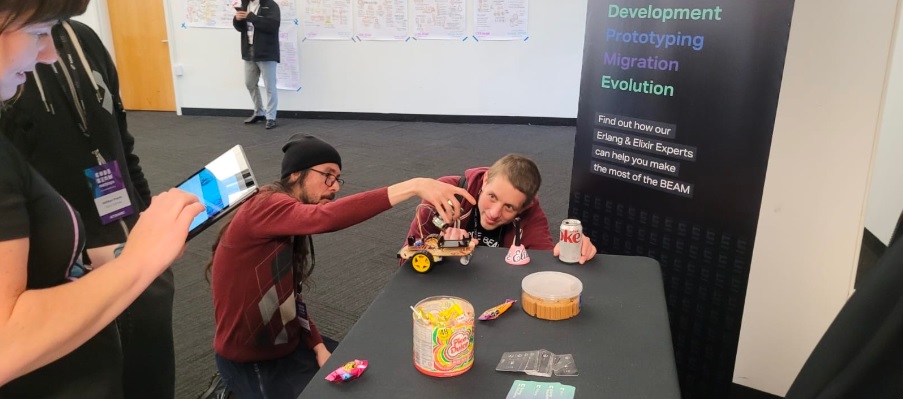
    During ElixirConf , we set a Scalextric racetrack at our sponsor booth where people meeting us were able to play around with the race cars. It’s a fun way to encourage people to come to the stand, but we felt that something was missing, there was no connection between the fun we had on the stand and the languages we love (Erlang and Elixir).

    So we thought it would be cool to assemble our own remote car using Elixir. We went ahead and got rid of the cables and the track, which were physical restrictions to the fun we envisioned.

    That’s how the idea was born.

    The initial implementation was for us to gain more knowledge about Nerves and IoT in general. Our approach was to assemble some RaspberryPi with a motor driver and see if we could control the car over WiFi.

    This is when we decided to start a very rough car prototype to see how easy it was to get the whole project running in Elixir.

    Requirements

    We wanted to ensure we only used Elixir / Erlang Ecosystem in our stack:

    • Erlang/OTP 25.1.2

    • Elixir 1.14.2

    You also need the Nerves bootstrap mix archive in order to create the project scaffold and provide deeper integration within mix.

    mix archive.install hex nerves_bootstrap

    Theory

    Let’s first recap some theory and concepts:

    The basic idea is for us to move a pair of wheels. In order to do that, we need a device that is capable of power and can control a couple of motors. We decided to use a L298n motor driver that is easily available in the local electronics stores.

    The L298n is a device that can power up to two motors and is able to control their speed by issuing PWM commands.

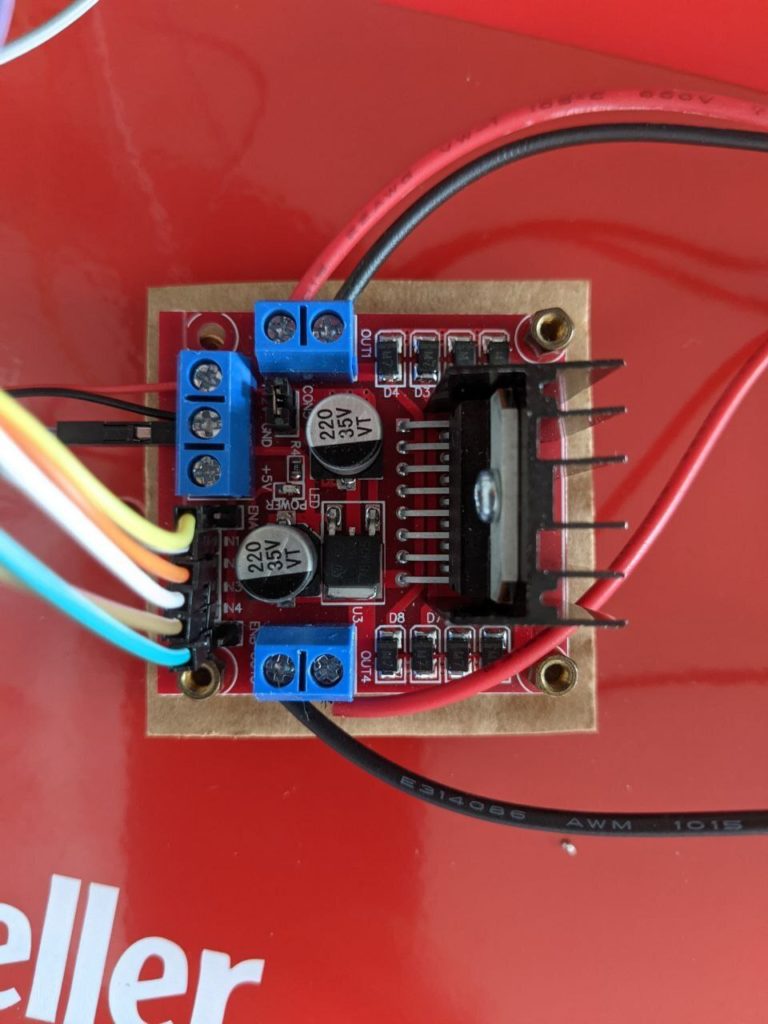
    L298N module pinout

    We powered the device using four AA rechargeable batteries that are connected via 12v and GND pins.

    We also needed to know that for moving the wheels, we had to write GPIO commands to IN1, IN2, IN3 and IN4, while controlling the speed via PWM over the pins ENA and ENB (motor A and B respectively).

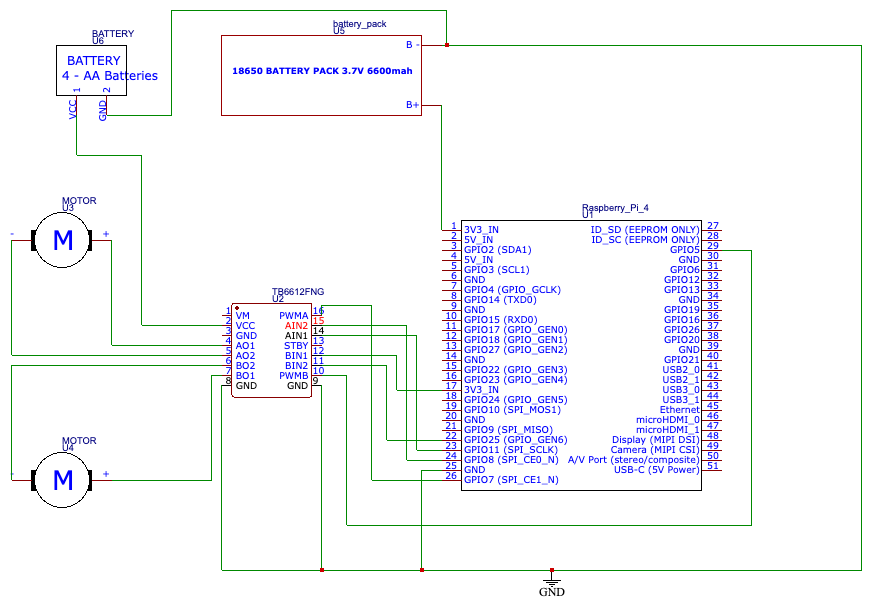
    At the end of the day, we had this circuit implemented:

    Starting the project

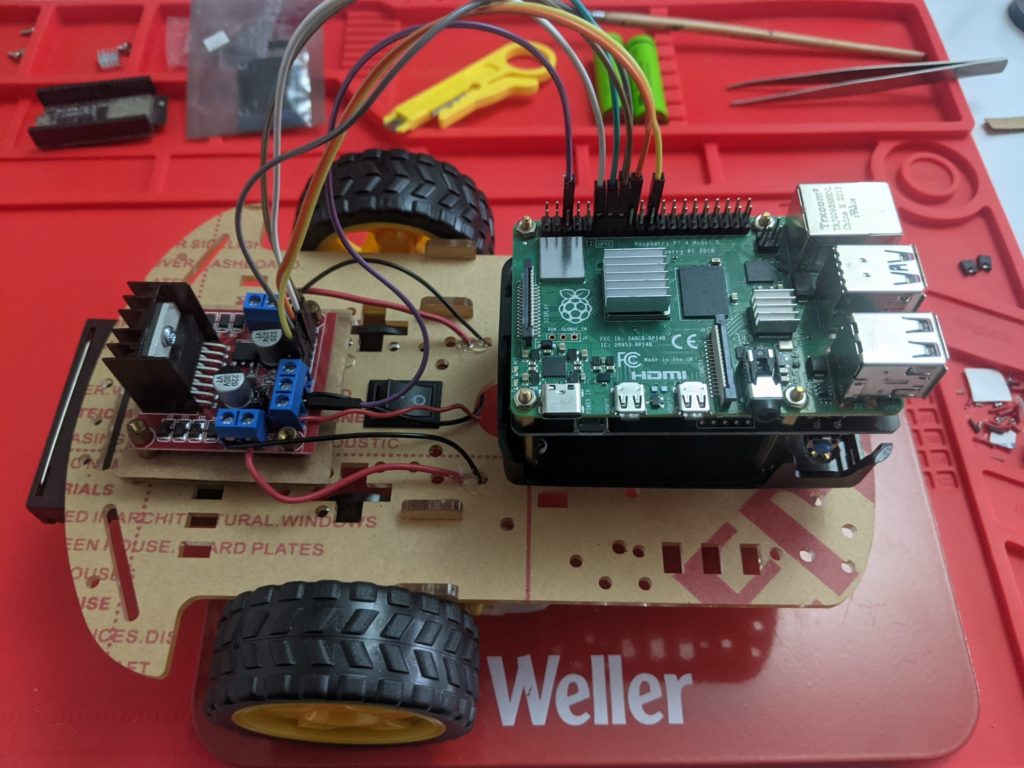
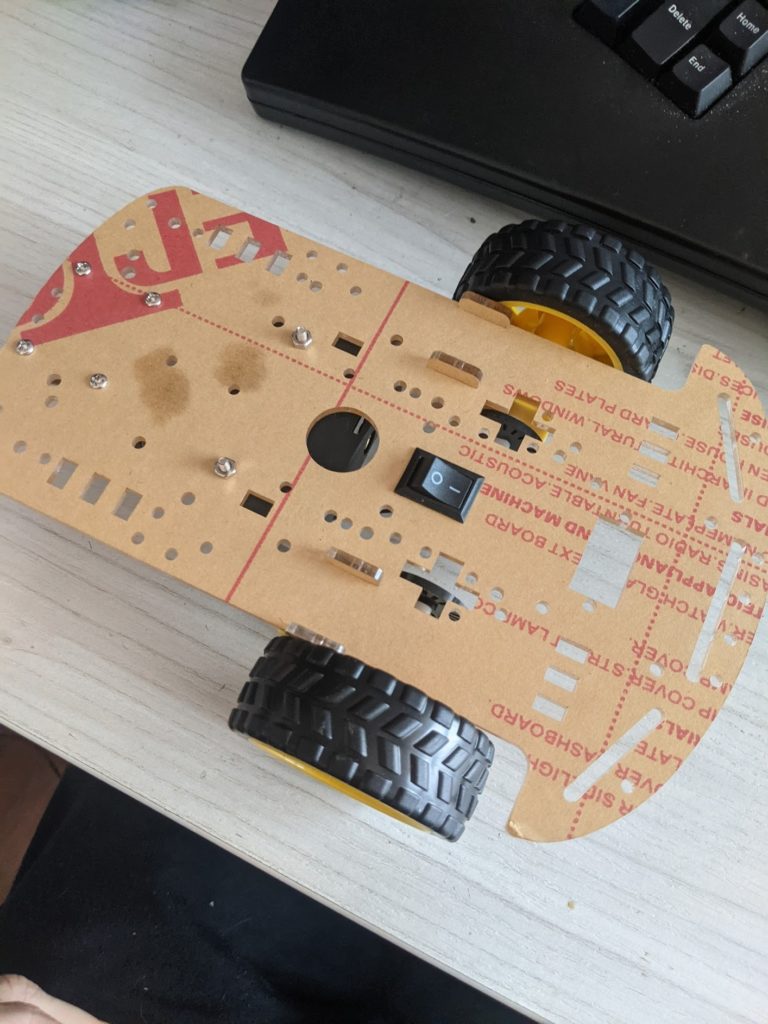
    We started with a blank project and chassis:

    First, we start with a blank Nerves project that will give us the scaffold we need:

    export MIX_TARGET=rpi4
    mix nerves.new jaguar
    

    Before we compiled the project, we added a couple of dependencies that we needed:

    # ...
    {:vintage_net, "~> 0.12", targets: @all_targets},
    {:vintage_net_wifi, "~> 0.11.1", targets: @all_targets},
    {:pigpiox, "~> 0.1", targets: @all_targets},
    # ...
    

    The dependencies above helped us with WiFi connectivity and GPIO / PWM commands.

    2.2 First steps

    Now that we had all dependencies in place we can proceed to compile the project:

    mix do deps.get, compile

    We now needed to focus on how to make the wheels move. At first, you might have to do some scaffolding to test your setup:

    The motors themselves don’t have any polarity, so there is no risk of magic smoke. But keep this in mind in case your wheels spin backwards.

    Now, let’s connect the other components and give it a try.

    Tune in

    After having a working setup, we need to connect to the outside world. We provided a very naive and basic way to connect to the back-end via TCP. But first, we need to make sure our device can connect to the internet at startup.

    Nerves has a third-party library that deals with networking setup and also provides WiFi configuration utilities. There are different ways to set this up but for simplicity, we are going to set the configuration statically in your config/target.exs file:

    config :vintage_net,
      config: [			
    {"wlan0", %{
           type: VintageNetWiFi,
            vintage_net_wifi: %{
    
    					
             networks: [
                %{
    
    					
                 key_mgmt: :wpa_psk,
                  ssid: "my_network_ssid",
                  psk: "a_passphrase_or_psk",
    } ]
    					
    },
    					
           ipv4: %{method: :dhcp}
          }					
    } ] 
    

    For more information about the different configuration options and setup choices, refer to the documentation.

    Once your WiFi connectivity is configured, we need to make sure that we can connect to the back-end via TCP. To do so, just create a new GenServer that connects via :gen_tcp at initialization, pretty much like this:

    ## GenServer callbacks
    @impl true
    def init(opts) do
      backend = Keyword.get(opts, :backend, "localhost") |> to_charlist()
      port = Keyword.get(opts, :port, 5000)
      state = %{socket: nil, backend: backend, port: port}
      {:ok, state, {:continue, :connect}}
    End
    
    @impl true
    def handle_continue(:connect, state) do
      Logger.info("connecting to #{inspect(state.backend)}")
      {:ok, socket} = :gen_tcp.connect(state.backend, state.port, keepalive: true)
      _ref = Port.monitor(socket)
      {:noreply, %{state | socket: socket}}
    end 
    #...
    

    Powering the device

    There is not much to this as we use a standard MakerHawk Raspberry Pi UPS that fits right down the Raspberry Pi. It is powered by two rechargeable 18650 Li-PO batteries. This hat also works as a charging device.

    Moving the wheels

    Moving the wheels is a straightforward process. We only need to take into consideration the PIN layout that we are using for communicating with the motor driver. In this case we are using the following layout:

    IN1 – GPIO 24 (A forward)

    IN2 – GPIO 23 (A backward)

    IN3 – GPIO 17 (B forward)

    IN4 – GPIO 22 (B backward)

    ENA – GPIO 25 (A speed)

    ENB – GPIO 27 (B speed)

    The PIN numbers correspond to the pinout layout for Raspberry Pi 4 model B.

    With the pins wired, we can now issue some commands to prepare the pins for output and set the initial motor speed:

    Enum.map([in1, in2, in3, in4], fn pin ->
      Pigpiox.GPIO.set_mode(pin, :output)
      Pigpiox.GPIO.write(pin, 0) # Stop
    end)
    speed = 250
    Enum.map([ena, enb], fn pin ->
      Pigpiox.GPIO.set_mode(pin, :output)
      Pigpiox.Pwm.gpio_pwm(pin, speed)
    end)
    

    After setup, we can change the speed of the motors on the fly:

    speed = 200
    :ok = Pigpiox.Pwm.gpio_pwm(ena, speed)
    :ok = Pigpiox.Pwm.gpio_pwm(enb, speed)
    

    We can also control the motors to go forwards/backwards:

    # Forwards
    _ = Enum.map([in2, in4], &Pigpiox.GPIO.write(&1, 0))
    _ = Enum.map([in1, in3], &Pigpiox.GPIO.write(&1, 1))
    # Backwards
    _ = Enum.map([in1, in3], &Pigpiox.GPIO.write(&1, 0))
    _ = Enum.map([in2, in4], &Pigpiox.GPIO.write(&1, 1))
    

    wire everything up! The idea is that we used the TCP socket we opened for listening for Erlang binary terms that when decoded, will get translated into steering instructions, that we can then translate to GPIO commands.

    With the base logic drafted, we burned the firmware into the SD card and power up the device:

    MIX_TARGET=rpi4 mix do deps.get, compile, firmware, burn

    Next steps

    Moving on to the next part of the setup. We would need a way for sending commands to the car over the internet.

    In the firmware, we have a simple interface for translating steering commands into GPIO commands. We can export those facilities over our TCP socket:

    		
    		@impl true
    def handle_info({:tcp, _, data}, state) do
    msg = data
        |> :erlang.iolist_to_binary()
        |> :erlang.binary_to_term()
      case msg do
        {:speed, speed} ->
          Vehicle.speed(speed)
        steering when steering in @valid_moves ->
    Vehicle.direction(steering)
      end
      {:noreply, state}
    End
    			

    Keep in mind that we are using a naive approach at communicating with the back-end. A more robust mechanism would be needed if you plan to drive the car in a highway.

    3.1 The back-end

    The back-end is fairly easy and is left as an exercise to the reader. Our current implementation consists of a LiveView car controller, that consists of a couple of buttons for the steering and a slider for the speed. On user input, the LiveView process will encode the information to send it to the connected car via TCP:

    # ...
    def handle_event("speed", %{"value" => speed}, socket) do
      vehicle = socket.assigns.vehicle
      speed = String.to_integer(speed)
      Vehicles.speed(vehicle.pid, speed)
      {:noreply, assign(socket, speed: speed)}
    end
    def handle_event("stop", _params, socket) do
      vehicle = socket.assigns.vehicle
      Vehicles.stop(vehicle.pid)
      {:noreply, assign(socket, stopped: true)}
    end
    def handle_event(direction, _params, socket) do
      vehicle = socket.assigns.vehicle
      case direction do
        "left" -> Vehicles.left(vehicle.pid)
        "right" -> Vehicles.right(vehicle.pid)
        "forward" -> Vehicles.forward(vehicle.pid)
    "backwards" -> Vehicles.backwards(vehicle.pid)
      end
      {:noreply, socket}
    end
    # …
    

    4 Sources and conclusions

    We are now finished! Hopefully everything is put together and, you should have something that reassembles this:

    va

    We had fun assembling the kit and working with Nerves. It was easier than we expected, and we found that Nerves is a very stable and solid frame- work for deploying Elixir applications in restrained environments without friction.

    Now that we finished our first proof of concept, we are going to see if this idea can be scaled and enhanced. Stay tuned for more!

    All the source code is available under MIT licence under GitHub:

    • Jaguar-1 source code

    • Nerves project

    • Erlang Solutions

    Need help making the most of Elixir?

    You’re in the right place. We’ve worked with the world’s biggest companies to provide transformative, mission critical solutions across a range of industries including Fintech, Health Care and Utilities providers. Learn more about our Elixir services here. Or if you’re a developer looking to take your skills to the next level check out our training page.

    The post Building a Remote Control Car from Scratch Using Elixir appeared first on Erlang Solutions .

    • Pl chevron_right

      Erlang Solutions: Building a Remote Control Car from Scratch Using Elixir

      news.movim.eu / PlanetJabber • 12 January 2023 • 8 minutes

    Introduction

    Elixir is undoubtedly one of the most comprehensive full stack languages available, offering battle-tested reliability and fault-tolerance on the backend. This is thanks to its origins in Erlang, the BEAM VM and OTP, powerful and agile frontend development thanks to LiveView and the ability to write to hardware with Nerves (not to mention the exciting developments happening in the machine learning space).

    Our Americas office created a project that takes full advantage of that fullstack capability- a remote control car that can be controlled from your phone. It has all the components from the car to the app, controlled and written in Elixir.

    Here’s how they did it.

    Background

    During ElixirConf , we set a Scalextric racetrack at our sponsor booth where people meeting us were able to play around with the race cars. It’s a fun way to encourage people to come to the stand, but we felt that something was missing, there was no connection between the fun we had on the stand and the languages we love (Erlang and Elixir).

    So we thought it would be cool to assemble our own remote car using Elixir. We went ahead and got rid of the cables and the track, which were physical restrictions to the fun we envisioned.

    That’s how the idea was born.

    The initial implementation was for us to gain more knowledge about Nerves and IoT in general. Our approach was to assemble some RaspberryPi with a motor driver and see if we could control the car over WiFi.

    This is when we decided to start a very rough car prototype to see how easy it was to get the whole project running in Elixir.

    Requirements

    We wanted to ensure we only used Elixir / Erlang Ecosystem in our stack:

    • Erlang/OTP 25.1.2

    • Elixir 1.14.2

    You also need the Nerves bootstrap mix archive in order to create the project scaffold and provide deeper integration within mix.

    mix archive.install hex nerves_bootstrap

    Theory

    Let’s first recap some theory and concepts:

    The basic idea is for us to move a pair of wheels. In order to do that, we need a device that is capable of power and can control a couple of motors. We decided to use a L298n motor driver that is easily available in the local electronics stores.

    The L298n is a device that can power up to two motors and is able to control their speed by issuing PWM commands.

    L298N module pinout

    We powered the device using four AA rechargeable batteries that are connected via 12v and GND pins.

    We also needed to know that for moving the wheels, we had to write GPIO commands to IN1, IN2, IN3 and IN4, while controlling the speed via PWM over the pins ENA and ENB (motor A and B respectively).

    At the end of the day, we had this circuit implemented:

    Starting the project

    We started with a blank project and chassis:

    First, we start with a blank Nerves project that will give us the scaffold we need:

    export MIX_TARGET=rpi4
    mix nerves.new jaguar
    

    Before we compiled the project, we added a couple of dependencies that we needed:

    # ...
    {:vintage_net, "~> 0.12", targets: @all_targets},
    {:vintage_net_wifi, "~> 0.11.1", targets: @all_targets},
    {:pigpiox, "~> 0.1", targets: @all_targets},
    # ...
    

    The dependencies above helped us with WiFi connectivity and GPIO / PWM commands.

    2.2 First steps

    Now that we had all dependencies in place we can proceed to compile the project:

    mix do deps.get, compile

    We now needed to focus on how to make the wheels move. At first, you might have to do some scaffolding to test your setup:

    The motors themselves don’t have any polarity, so there is no risk of magic smoke. But keep this in mind in case your wheels spin backwards.

    Now, let’s connect the other components and give it a try.

    Tune in

    After having a working setup, we need to connect to the outside world. We provided a very naive and basic way to connect to the back-end via TCP. But first, we need to make sure our device can connect to the internet at startup.

    Nerves has a third-party library that deals with networking setup and also provides WiFi configuration utilities. There are different ways to set this up but for simplicity, we are going to set the configuration statically in your config/target.exs file:

    config :vintage_net,
      config: [			
    {"wlan0", %{
           type: VintageNetWiFi,
            vintage_net_wifi: %{
    
    					
             networks: [
                %{
    
    					
                 key_mgmt: :wpa_psk,
                  ssid: "my_network_ssid",
                  psk: "a_passphrase_or_psk",
    } ]
    					
    },
    					
           ipv4: %{method: :dhcp}
          }					
    } ] 
    

    For more information about the different configuration options and setup choices, refer to the documentation.

    Once your WiFi connectivity is configured, we need to make sure that we can connect to the back-end via TCP. To do so, just create a new GenServer that connects via :gen_tcp at initialization, pretty much like this:

    ## GenServer callbacks
    @impl true
    def init(opts) do
      backend = Keyword.get(opts, :backend, "localhost") |> to_charlist()
      port = Keyword.get(opts, :port, 5000)
      state = %{socket: nil, backend: backend, port: port}
      {:ok, state, {:continue, :connect}}
    End
    
    @impl true
    def handle_continue(:connect, state) do
      Logger.info("connecting to #{inspect(state.backend)}")
      {:ok, socket} = :gen_tcp.connect(state.backend, state.port, keepalive: true)
      _ref = Port.monitor(socket)
      {:noreply, %{state | socket: socket}}
    end 
    #...
    

    Powering the device

    There is not much to this as we use a standard MakerHawk Raspberry Pi UPS that fits right down the Raspberry Pi. It is powered by two rechargeable 18650 Li-PO batteries. This hat also works as a charging device.

    Moving the wheels

    Moving the wheels is a straightforward process. We only need to take into consideration the PIN layout that we are using for communicating with the motor driver. In this case we are using the following layout:

    IN1 – GPIO 24 (A forward)

    IN2 – GPIO 23 (A backward)

    IN3 – GPIO 17 (B forward)

    IN4 – GPIO 22 (B backward)

    ENA – GPIO 25 (A speed)

    ENB – GPIO 27 (B speed)

    The PIN numbers correspond to the pinout layout for Raspberry Pi 4 model B.

    With the pins wired, we can now issue some commands to prepare the pins for output and set the initial motor speed:

    Enum.map([in1, in2, in3, in4], fn pin ->
      Pigpiox.GPIO.set_mode(pin, :output)
      Pigpiox.GPIO.write(pin, 0) # Stop
    end)
    speed = 250
    Enum.map([ena, enb], fn pin ->
      Pigpiox.GPIO.set_mode(pin, :output)
      Pigpiox.Pwm.gpio_pwm(pin, speed)
    end)
    

    After setup, we can change the speed of the motors on the fly:

    speed = 200
    :ok = Pigpiox.Pwm.gpio_pwm(ena, speed)
    :ok = Pigpiox.Pwm.gpio_pwm(enb, speed)
    

    We can also control the motors to go forwards/backwards:

    # Forwards
    _ = Enum.map([in2, in4], &Pigpiox.GPIO.write(&1, 0))
    _ = Enum.map([in1, in3], &Pigpiox.GPIO.write(&1, 1))
    # Backwards
    _ = Enum.map([in1, in3], &Pigpiox.GPIO.write(&1, 0))
    _ = Enum.map([in2, in4], &Pigpiox.GPIO.write(&1, 1))
    

    wire everything up! The idea is that we used the TCP socket we opened for listening for Erlang binary terms that when decoded, will get translated into steering instructions, that we can then translate to GPIO commands.

    With the base logic drafted, we burned the firmware into the SD card and power up the device:

    MIX_TARGET=rpi4 mix do deps.get, compile, firmware, burn

    Next steps

    Moving on to the next part of the setup. We would need a way for sending commands to the car over the internet.

    In the firmware, we have a simple interface for translating steering commands into GPIO commands. We can export those facilities over our TCP socket:

    		
    		@impl true
    def handle_info({:tcp, _, data}, state) do
    msg = data
        |> :erlang.iolist_to_binary()
        |> :erlang.binary_to_term()
      case msg do
        {:speed, speed} ->
          Vehicle.speed(speed)
        steering when steering in @valid_moves ->
    Vehicle.direction(steering)
      end
      {:noreply, state}
    End
    			

    Keep in mind that we are using a naive approach at communicating with the back-end. A more robust mechanism would be needed if you plan to drive the car in a highway.

    3.1 The back-end

    The back-end is fairly easy and is left as an exercise to the reader. Our current implementation consists of a LiveView car controller, that consists of a couple of buttons for the steering and a slider for the speed. On user input, the LiveView process will encode the information to send it to the connected car via TCP:

    # ...
    def handle_event("speed", %{"value" => speed}, socket) do
      vehicle = socket.assigns.vehicle
      speed = String.to_integer(speed)
      Vehicles.speed(vehicle.pid, speed)
      {:noreply, assign(socket, speed: speed)}
    end
    def handle_event("stop", _params, socket) do
      vehicle = socket.assigns.vehicle
      Vehicles.stop(vehicle.pid)
      {:noreply, assign(socket, stopped: true)}
    end
    def handle_event(direction, _params, socket) do
      vehicle = socket.assigns.vehicle
      case direction do
        "left" -> Vehicles.left(vehicle.pid)
        "right" -> Vehicles.right(vehicle.pid)
        "forward" -> Vehicles.forward(vehicle.pid)
    "backwards" -> Vehicles.backwards(vehicle.pid)
      end
      {:noreply, socket}
    end
    # …
    

    4 Sources and conclusions

    We are now finished! Hopefully everything is put together and, you should have something that reassembles this:

    va

    We had fun assembling the kit and working with Nerves. It was easier than we expected, and we found that Nerves is a very stable and solid frame- work for deploying Elixir applications in restrained environments without friction.

    Now that we finished our first proof of concept, we are going to see if this idea can be scaled and enhanced. Stay tuned for more!

    All the source code is available under MIT licence under GitHub:

    • Jaguar-1 source code

    • Nerves project

    • Erlang Solutions

    Need help making the most of Elixir?

    You’re in the right place. We’ve worked with the world’s biggest companies to provide transformative, mission critical solutions across a range of industries including Fintech, Health Care and Utilities providers. Learn more about our Elixir services here. Or if you’re a developer looking to take your skills to the next level check out our training page.

    The post Building a Remote Control Car from Scratch Using Elixir appeared first on Erlang Solutions .

    • Pl chevron_right

      Erlang Solutions: Building a Remote Control Car from Scratch Using Elixir

      news.movim.eu / PlanetJabber • 12 January 2023 • 8 minutes

    Introduction

    Elixir is undoubtedly one of the most comprehensive full stack languages available, offering battle-tested reliability and fault-tolerance on the backend. This is thanks to its origins in Erlang, the BEAM VM and OTP, powerful and agile frontend development thanks to LiveView and the ability to write to hardware with Nerves (not to mention the exciting developments happening in the machine learning space).

    Our Americas office created a project that takes full advantage of that fullstack capability- a remote control car that can be controlled from your phone. It has all the components from the car to the app, controlled and written in Elixir.

    Here’s how they did it.

    Background

    During ElixirConf , we set a Scalextric racetrack at our sponsor booth where people meeting us were able to play around with the race cars. It’s a fun way to encourage people to come to the stand, but we felt that something was missing, there was no connection between the fun we had on the stand and the languages we love (Erlang and Elixir).

    So we thought it would be cool to assemble our own remote car using Elixir. We went ahead and got rid of the cables and the track, which were physical restrictions to the fun we envisioned.

    That’s how the idea was born.

    The initial implementation was for us to gain more knowledge about Nerves and IoT in general. Our approach was to assemble some RaspberryPi with a motor driver and see if we could control the car over WiFi.

    This is when we decided to start a very rough car prototype to see how easy it was to get the whole project running in Elixir.

    Requirements

    We wanted to ensure we only used Elixir / Erlang Ecosystem in our stack:

    • Erlang/OTP 25.1.2

    • Elixir 1.14.2

    You also need the Nerves bootstrap mix archive in order to create the project scaffold and provide deeper integration within mix.

    mix archive.install hex nerves_bootstrap

    Theory

    Let’s first recap some theory and concepts:

    The basic idea is for us to move a pair of wheels. In order to do that, we need a device that is capable of power and can control a couple of motors. We decided to use a L298n motor driver that is easily available in the local electronics stores.

    The L298n is a device that can power up to two motors and is able to control their speed by issuing PWM commands.

    L298N module pinout

    We powered the device using four AA rechargeable batteries that are connected via 12v and GND pins.

    We also needed to know that for moving the wheels, we had to write GPIO commands to IN1, IN2, IN3 and IN4, while controlling the speed via PWM over the pins ENA and ENB (motor A and B respectively).

    At the end of the day, we had this circuit implemented:

    Starting the project

    We started with a blank project and chassis:

    First, we start with a blank Nerves project that will give us the scaffold we need:

    export MIX_TARGET=rpi4
    mix nerves.new jaguar
    

    Before we compiled the project, we added a couple of dependencies that we needed:

    # ...
    {:vintage_net, "~> 0.12", targets: @all_targets},
    {:vintage_net_wifi, "~> 0.11.1", targets: @all_targets},
    {:pigpiox, "~> 0.1", targets: @all_targets},
    # ...
    

    The dependencies above helped us with WiFi connectivity and GPIO / PWM commands.

    2.2 First steps

    Now that we had all dependencies in place we can proceed to compile the project:

    mix do deps.get, compile

    We now needed to focus on how to make the wheels move. At first, you might have to do some scaffolding to test your setup:

    The motors themselves don’t have any polarity, so there is no risk of magic smoke. But keep this in mind in case your wheels spin backwards.

    Now, let’s connect the other components and give it a try.

    Tune in

    After having a working setup, we need to connect to the outside world. We provided a very naive and basic way to connect to the back-end via TCP. But first, we need to make sure our device can connect to the internet at startup.

    Nerves has a third-party library that deals with networking setup and also provides WiFi configuration utilities. There are different ways to set this up but for simplicity, we are going to set the configuration statically in your config/target.exs file:

    config :vintage_net,
      config: [			
    {"wlan0", %{
           type: VintageNetWiFi,
            vintage_net_wifi: %{
    
    					
             networks: [
                %{
    
    					
                 key_mgmt: :wpa_psk,
                  ssid: "my_network_ssid",
                  psk: "a_passphrase_or_psk",
    } ]
    					
    },
    					
           ipv4: %{method: :dhcp}
          }					
    } ] 
    

    For more information about the different configuration options and setup choices, refer to the documentation.

    Once your WiFi connectivity is configured, we need to make sure that we can connect to the back-end via TCP. To do so, just create a new GenServer that connects via :gen_tcp at initialization, pretty much like this:

    ## GenServer callbacks
    @impl true
    def init(opts) do
      backend = Keyword.get(opts, :backend, "localhost") |> to_charlist()
      port = Keyword.get(opts, :port, 5000)
      state = %{socket: nil, backend: backend, port: port}
      {:ok, state, {:continue, :connect}}
    End
    
    @impl true
    def handle_continue(:connect, state) do
      Logger.info("connecting to #{inspect(state.backend)}")
      {:ok, socket} = :gen_tcp.connect(state.backend, state.port, keepalive: true)
      _ref = Port.monitor(socket)
      {:noreply, %{state | socket: socket}}
    end 
    #...
    

    Powering the device

    There is not much to this as we use a standard MakerHawk Raspberry Pi UPS that fits right down the Raspberry Pi. It is powered by two rechargeable 18650 Li-PO batteries. This hat also works as a charging device.

    Moving the wheels

    Moving the wheels is a straightforward process. We only need to take into consideration the PIN layout that we are using for communicating with the motor driver. In this case we are using the following layout:

    IN1 – GPIO 24 (A forward)

    IN2 – GPIO 23 (A backward)

    IN3 – GPIO 17 (B forward)

    IN4 – GPIO 22 (B backward)

    ENA – GPIO 25 (A speed)

    ENB – GPIO 27 (B speed)

    The PIN numbers correspond to the pinout layout for Raspberry Pi 4 model B.

    With the pins wired, we can now issue some commands to prepare the pins for output and set the initial motor speed:

    Enum.map([in1, in2, in3, in4], fn pin ->
      Pigpiox.GPIO.set_mode(pin, :output)
      Pigpiox.GPIO.write(pin, 0) # Stop
    end)
    speed = 250
    Enum.map([ena, enb], fn pin ->
      Pigpiox.GPIO.set_mode(pin, :output)
      Pigpiox.Pwm.gpio_pwm(pin, speed)
    end)
    

    After setup, we can change the speed of the motors on the fly:

    speed = 200
    :ok = Pigpiox.Pwm.gpio_pwm(ena, speed)
    :ok = Pigpiox.Pwm.gpio_pwm(enb, speed)
    

    We can also control the motors to go forwards/backwards:

    # Forwards
    _ = Enum.map([in2, in4], &Pigpiox.GPIO.write(&1, 0))
    _ = Enum.map([in1, in3], &Pigpiox.GPIO.write(&1, 1))
    # Backwards
    _ = Enum.map([in1, in3], &Pigpiox.GPIO.write(&1, 0))
    _ = Enum.map([in2, in4], &Pigpiox.GPIO.write(&1, 1))
    

    wire everything up! The idea is that we used the TCP socket we opened for listening for Erlang binary terms that when decoded, will get translated into steering instructions, that we can then translate to GPIO commands.

    With the base logic drafted, we burned the firmware into the SD card and power up the device:

    MIX_TARGET=rpi4 mix do deps.get, compile, firmware, burn

    Next steps

    Moving on to the next part of the setup. We would need a way for sending commands to the car over the internet.

    In the firmware, we have a simple interface for translating steering commands into GPIO commands. We can export those facilities over our TCP socket:

    		
    		@impl true
    def handle_info({:tcp, _, data}, state) do
    msg = data
        |> :erlang.iolist_to_binary()
        |> :erlang.binary_to_term()
      case msg do
        {:speed, speed} ->
          Vehicle.speed(speed)
        steering when steering in @valid_moves ->
    Vehicle.direction(steering)
      end
      {:noreply, state}
    End
    			

    Keep in mind that we are using a naive approach at communicating with the back-end. A more robust mechanism would be needed if you plan to drive the car in a highway.

    3.1 The back-end

    The back-end is fairly easy and is left as an exercise to the reader. Our current implementation consists of a LiveView car controller, that consists of a couple of buttons for the steering and a slider for the speed. On user input, the LiveView process will encode the information to send it to the connected car via TCP:

    # ...
    def handle_event("speed", %{"value" => speed}, socket) do
      vehicle = socket.assigns.vehicle
      speed = String.to_integer(speed)
      Vehicles.speed(vehicle.pid, speed)
      {:noreply, assign(socket, speed: speed)}
    end
    def handle_event("stop", _params, socket) do
      vehicle = socket.assigns.vehicle
      Vehicles.stop(vehicle.pid)
      {:noreply, assign(socket, stopped: true)}
    end
    def handle_event(direction, _params, socket) do
      vehicle = socket.assigns.vehicle
      case direction do
        "left" -> Vehicles.left(vehicle.pid)
        "right" -> Vehicles.right(vehicle.pid)
        "forward" -> Vehicles.forward(vehicle.pid)
    "backwards" -> Vehicles.backwards(vehicle.pid)
      end
      {:noreply, socket}
    end
    # …
    

    4 Sources and conclusions

    We are now finished! Hopefully everything is put together and, you should have something that reassembles this:

    va

    We had fun assembling the kit and working with Nerves. It was easier than we expected, and we found that Nerves is a very stable and solid frame- work for deploying Elixir applications in restrained environments without friction.

    Now that we finished our first proof of concept, we are going to see if this idea can be scaled and enhanced. Stay tuned for more!

    All the source code is available under MIT licence under GitHub:

    • Jaguar-1 source code

    • Nerves project

    • Erlang Solutions

    Need help making the most of Elixir?

    You’re in the right place. We’ve worked with the world’s biggest companies to provide transformative, mission critical solutions across a range of industries including Fintech, Health Care and Utilities providers. Learn more about our Elixir services here. Or if you’re a developer looking to take your skills to the next level check out our training page.

    The post Building a Remote Control Car from Scratch Using Elixir appeared first on Erlang Solutions .