• Pl chevron_right

      Erlang Solutions: You’ve been curious about LiveView, but you haven’t gotten into it

      news.movim.eu / PlanetJabber • 6 April 2023 • 21 minutes

    As a backend developer, I’ve spent most of my programming career away from frontend development. Whether it’s React/Elm for the web or Swift/Kotlin for mobile, these are fields of knowledge that fall outside of what I usually work with.

    Nonetheless, I always wanted to have a tool at my disposal for building rich frontends. While the web seemed like the platform with the lowest bar of entry for this, the size of the Javascript ecosystem had become so vast that familiarizing oneself with it was no small task.

    This is why I got very excited when Chris McCord first showed LiveView to the world. Building interactive frontends, with no Javascript required? This sounded like it was made for all of us Elixir backend developers that were “frontend curious”.

    However, if you haven’t already jumped into it, you might be hesitant to start. After all: it’s often not just about learning LiveView as if you were writing a greenfield project, but about how you would add LiveView into that Phoenix app that you’re already working on.

    Therefore, throughout this guide, I’ll presume that you already have an existing project that you wish to integrate LiveView into. If you have the luxury of a clean slate, then other resources (such as the Programming Phoenix LiveView book, by Bruce A. Tate and Sophie DeBenedetto ) may be of more use.

    I hope that this article may serve you well as a starting point!

    Will it work for my use case?

    You might have some worries about whether LiveView is a technology that you can introduce to your application. After all: no team likes to adopt a technology that they later figure out does not suit their use case.

    There are some properties of LiveView which are inherent to the technology, and therefore must be considered:

    Offline mode

    The biggest question is whether you need an offline mode for your application. My guess is that you probably do not need it , but if you do, LiveView is not the technology for you. The reason for this is that LiveView is rendered on the backend , necessitating communication with it.

    Latency

    The second biggest question: do you expect the latency from your clients to the server to be high , and would it being high be a serious detriment to your application?

    As Chris McCord put it in his announcement blog post on the Dockyard blog :

    “Certain use cases and experiences demand zero-latency, as well as offline capabilities. This is where Javascript frameworks like React, Ember, etc., shine.”

    Almost every interaction with a LiveView interface will send a request to the server; while requests will have highly optimized payloads, if you expect the average round trip from client to server to be too many milliseconds, then the user experience will suffer. LiveView ships with tools for testing your application with increased latency, but if you already know that there’s a certain latency maximum that your clients must not but very likely would exceed, then LiveView may not be suitable.

    If these are not of concern to your use case, then let’s get going!

    What does it take for me to start?

    Phoenix setup

    First of all, you’ll want to have a recent version of Phoenix, and your code up-to-date. Following are upgrade guides for older projects:

    LiveView setup

    The next step is to install LiveView into your existing project. The LiveView documentation has a great section on the subject: Installing LiveView into an existing project .

    The guide is rather straight-forward, so I will not reiterate its contents here. The only comment I’ll add is that the section at the very end about adding a topbar is (as the documentation points out) optional. It should be said, however, that this is added by default in new LiveView projects, so if you want to have a setup that’s as close to a freshly generated project, you should include this.

    At this point, you should have everything ready for introducing your own LiveView code!

    Quick LiveView overview

    Before we get to the actual coding, let’s get at a quick overview of the life cycle of a LiveView page. Here’s a high-level overview:
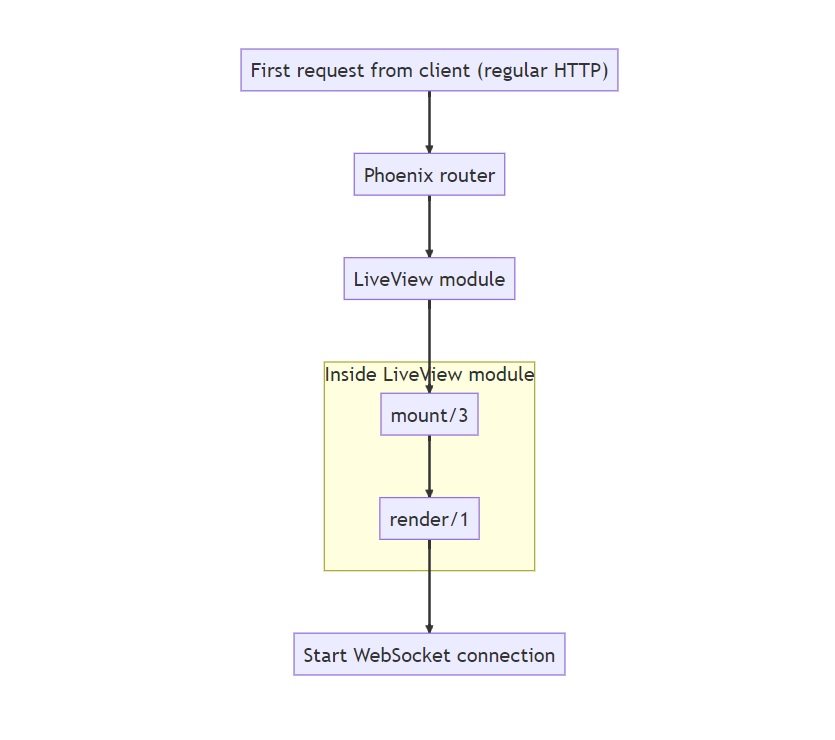
    The first request made to a LiveView route will be a plain HTTP request. The router will invoke a LiveView module, which calls the mount/3 function and then the render/1 function. This will render a static page (SEO-friendly out-of-the-box, by the way!), with the required Javascript for LiveView to work. The page then opens a WebSocket connection between the client and the server.

    After the WebSocket connection has been established, we get into the LiveView life cycle:
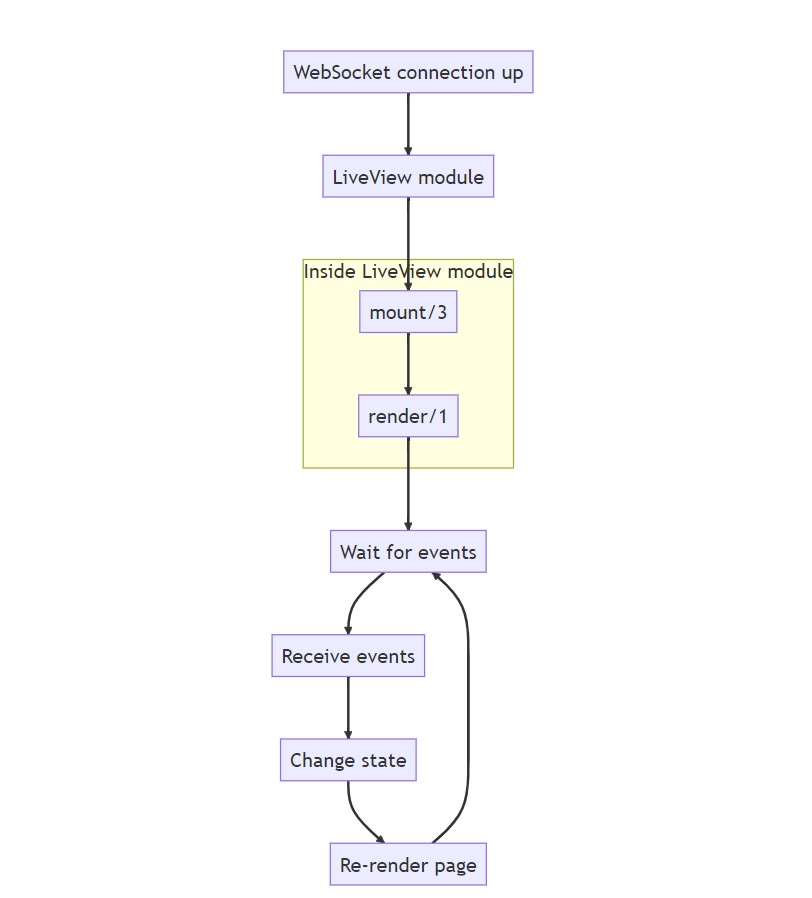
    Note that mount/3 and render/1 will be called again, this time over the WebSocket connection. While this probably will not be something you need to worry about when writing your first LiveView pages, it might be of relevance to know that this is the case ( discussion about this can be read here ). If you have a very expensive function call to make, and you only want to do it once, consider using the connected?/1 function.

    After render/1 has been called a second time, we get into the LiveView loop: wait for events, send the events over the wire, change the state on the server, then send back the minimal required data for updating the page on the client.

    Let’s now see how we’ll need to change your code to get to this LiveView flow.

    Making things live

    Now you might be asking:

    “OK, so the basics have been set up. What are the bare minimum things to get a page to be live?”

    You’ll need to do the following things:

    1. Convert an existing route to a live one
    2. Convert the controller module into a live module
    3. Modify the templates
    4. Introduce liveness

    Let’s go over them, one by one:

    Bringing life to the dead

    Here’s a question I once had, that you might be wondering:

    If I’ve got a regular (“dead”) Phoenix route, can I just add something live to a portion of the page, on the existing “dead” route?

    Considering how LiveView works, I’d like to transform the question into two new (slightly different) questions:

    1. Can one preserve the current routes and controllers, having them execute live code?
    2. Can one express the live interactions in the dead controllers?

    The answer to the first question: yes, but generally you won’t . You won’t, because of the answer to the second question: no , you’ll need separate live modules to express the live interactions.

    This leads to an important point:

    If you want some part of a page to be live, then your whole page has to be live.

    Technically , you can have the route be something else than live (e.g. a get route), and you would then use Phoenix.LiveView.Controller.live_render/3 in a “dead” controller function to render a LiveView module. This does still mean, however, that the page (the logic and templates) will be defined by the live module. You’re not “adding something live to a portion of the dead page”, but rather delegating to a live module from a dead route; you’ll still have to migrate the logic and templates to the live module.

    Therefore, your live code will be in LiveView modules (instead of your current controller modules ), invoked by live routes. As a sidenote: while it’s not covered by this article, you’ll eventually group live routes with live_session/3 , enabling redirects between routes without full page reloads.

    Introducing a live route

    Many tutorials and videos about LiveView use the example of programming a continuously updating rendering of a thermostat. Let’s therefore presume that you’ve got a home automation application, and up until now you had to go to /thermostats and refresh the page to get the latest data.

    The router.ex might look something like this:

    defmodule HomeAutomationWeb.Router do
      use HomeAutomationWeb, :router
    
      pipeline :browser do
        # ...
      end
    
      pipeline :logged_in do
        # ...
      end
    
      scope "/", HomeAutomationWeb do
        pipe_through [:browser, :logged_in]
    
        # ...
    
        resources "/thermostats", ThermostatController
        post "/thermostats/reboot", ThermostatController, :reboot
      end
    end
    

    This is a rather simple router (with some lines removed for brevity), but you can probably figure out how this compares to your code. We’re using a call to Phoenix.Router.resources/2 here to cover a standard set of CRUD actions; your set of actions could be different.

    Let’s introduce the following route after the post-route:

    live "/live/thermostats", ThermostatLive
    

    The ThermostatLive will be the module to which we’ll be migrating logic from ThermostatController.

    Creating a live module to migrate to

    Creating a skeleton

    Let’s start by creating a directory for LiveView modules, then create an empty thermostat_live.ex in that directory.

    $ mkdir lib/home_automation_web/live
    $ touch lib/home_automation_web/live/thermostat_live.ex
    

    It might seem a bit strange to create a dedicated directory for the live modules, considering that the dead parts of your application already have controller/template/view directories. This convention, however, allows one to make use of the following feature from the Phoenix.LiveView.render/1 callback (slight changes by me, for readability):

    If you don’t define [render/1 in your LiveView module], LiveView will attempt to render a template in the same directory as your LiveView. For example, if you have a LiveView named MyApp.MyCustomView inside lib/my_app/live_views/my_custom_view.ex, Phoenix will look for a template at lib/my_app/live_views/my_custom_view.html.heex.

    This means that it’s common for LiveView projects to have a live directory with file pairs, such as foobar.ex and foobar.html.heex, i.e. module and corresponding template. Whether you inline your template in the render/1 function or put it in a dedicated file is up to you.

    Open the lib/home_automation_web/live/thermostat_live.ex file, and add the following skeleton of the ThermostatLive module:

    defmodule HomeAutomationWeb.ThermostatLive do
      use HomeAutomationWeb, :live_view
    
      def mount(_params, _session, socket) do
        {:ok, socket}
      end
    
      def render(assigns) do
        ~H"""
        <div id="thermostats">
          <p>Thermostats</p>
        </div>
        """
      end
    end
    

    There are two mandatory callbacks in a LiveView module: mount/3, and render/1. As mentioned earlier, you can leave out render/1 if you have a template file with the right file name. You can also leave out the mount/3, but that would mean that you neither want to set any state, nor do any work on mount, which is unlikely.

    Migrating mount logic

    Let’s now look at our imagined HomeAutomationWeb.ThermostatController, to see what we’ll be transferring over to ThermostatLive:

    defmodule HomeAutomationWeb.ThermostatController do
      use HomeAutomationWeb, :controller
    
      alias HomeAutomation.Thermostat
    
      def index(conn, _params) do
        thermostats = Thermostat.all_for_user(conn.assigns.current_user)
    
        render(conn, :index, thermostats: thermostats)
      end
    
      # ...
    
      def reboot(conn, %{"id" => id}) do
        {:ok, thermostat} =
          id
          |> Thermostat.get!()
          |> Thermostat.reboot()
    
        conn
        |> put_flash(:info, "Thermostat '#{thermostat.room_name}' rebooted.")
        |> redirect(to: Routes.thermostat_path(conn, :index))
      end
    end
    

    We’ll be porting a subset of the functions that are present in the controller module: index/2 and reboot/2. This is mostly to have two somewhat different controller actions to work with.

    Let’s first focus on the index/2 function. We could imagine that Thermostat.all_for_user/1 makes a database call of some kind, possibly with Ecto. conn.assigns.current_user would be added to the assigns by the logged_in Plug in the pipeline in the router.

    Let’s naively move over the ThermostatController.index/2 logic to the LiveView module, and take it from there:

    defmodule HomeAutomationWeb.ThermostatLive do
      use HomeAutomationWeb, :live_view
    
      alias HomeAutomation.Thermostat
    
      def mount(_params, _session, socket) do
        thermostats = Thermostat.all_for_user(socket.assigns.current_user)
    
        {:ok, assign(socket, %{thermostats: thermostats})}
      end
    
      def render(assigns) do
        ~H"""
        <div id="thermostats">
          <p>Thermostats</p>
        </div>
        """
      end
    end
    

    Firstly, we’re inserting the index/2 logic into the mount/3 function of ThermostatLive, meaning that the data will be called for on page load.

    Secondly, notice that we changed the argument to Thermostat.all_for_user/1 from conn.assigns.current_user to socket.assigns.current_user. This is just a change of variable name, of course, but it signifies a change in the underlying data structure: you’re not working with a Plug.Conn struct, but rather with a Phoenix.LiveView.Socket.

    So far we’ve written some sample template code inside the render/1 function definition, and we haven’t seen the actual templates that would render the thermostats, so let’s get to those.

    Creating live templates

    Let’s presume that you have a rather simple index page, listing all of your thermostats.

    <h1>Listing Thermostats</h1>
    
    <%= for thermostat <- @thermostats do %>
      <div class="thermostat">
        <div class="row">
          <div class="column">
            <ul>
              <li>Room name: <%= thermostat.room_name %></li>
              <li>Temperature: <%= thermostat.temperature %></li>
            </ul>
          </div>
    
          <div class="column">
            Actions: <%= link("Show", to: Routes.thermostat_path(@conn, :show, thermostat)) %>
            <%= link("Edit", to: Routes.thermostat_path(@conn, :edit, thermostat)) %>
            <%= link("Delete",
              to: Routes.thermostat_path(@conn, :delete, thermostat),
              method: :delete,
              data: [confirm: "Are you sure?"]
            ) %>
          </div>
    
          <div class="column">
            <%= form_for %{}, Routes.thermostat_path(@conn, :reboot), fn f -> %>
              <%= hidden_input(f, :id, value: thermostat.id) %>
              <%= submit("Reboot", class: "rounded-full") %>
            <% end %>
          </div>
        </div>
      </div>
    <% end %>
    
    <%= link("New Thermostat", to: Routes.thermostat_path(@conn, :new)) %>
    

    Each listed thermostat has the standard resource links of Show/Edit/Delete, with a New-link at the very end of the page. The only thing that goes beyond the usual CRUD actions is the form_for, defining a Reboot-button. The Reboot-button will initiate a request to the POST /thermostats/reboot route.

    As previously mentioned, we can either move this template code into the ThermostatLive.render/1 function, or we can create a template file named lib/home_automation_web/live/thermostat_live.html.heex. To get used to the new ways of LiveView, let’s put the code into the render/1 function. You can always extract it later (but remember to delete the render/1 function, if you do!).

    The first step would be to simply copy paste everything, with the small change that you need to replace every instance of @conn with @socket. Here’s what the ThermostatLive will look like:

    defmodule HomeAutomationWeb.ThermostatLive do
      use HomeAutomationWeb, :live_view
    
      alias HomeAutomation.Thermostat
    
      def mount(_params, _session, socket) do
        thermostats = Thermostat.all_for_user(socket.assigns.current_user)
    
        {:ok, assign(socket, %{thermostats: thermostats})}
      end
    
      def render(assigns) do
        ~H"""
        <h1>Listing Thermostats</h1>
    
        <%= for thermostat <- @thermostats do %>
          <div class="thermostat">
            <div class="row">
              <div class="column">
                <ul>
                  <li>Room name: <%= thermostat.room_name %></li>
                  <li>Temperature: <%= thermostat.temperature %></li>
                </ul>
              </div>
    
              <div class="column">
                Actions: <%= link("Show", to: Routes.thermostat_path(@socket, :show, thermostat)) %>
                <%= link("Edit", to: Routes.thermostat_path(@socket, :edit, thermostat)) %>
                <%= link("Delete",
                  to: Routes.thermostat_path(@socket, :delete, thermostat),
                  method: :delete,
                  data: [confirm: "Are you sure?"]
                ) %>
              </div>
    
              <div class="column">
                <%= form_for %{}, Routes.thermostat_path(@socket, :reboot), fn f -> %>
                  <%= hidden_input(f, :id, value: thermostat.id) %>
                  <%= submit("Reboot", class: "rounded-full") %>
                <% end %>
              </div>
            </div>
          </div>
        <% end %>
    
        <%= link("New Thermostat", to: Routes.thermostat_path(@socket, :new)) %>
        """
      end
    end
    

    While this makes the page render, both the links and the form are doing the same “dead” navigation as before, leading to full-page reloads, not to mention that we currently get out from the live page.

    To make the page more live, let’s focus on making the clicking of the Reboot-button result in a LiveView event, instead of a regular POST with subsequent redirect.

    Changing the button to something live

    The Reboot-button is a good target to turn live, as it should just fire an asynchronous event, without redirecting anywhere. Let’s have a look at how the button is currently defined:

    <%= form_for %{}, Routes.thermostat_path(@socket, :reboot), fn f -> %>
      <%= hidden_input(f, :id, value: thermostat.id) %>
      <%= submit("Reboot", class: "rounded-full") %>
    <% end %>
    

    The reason why the “dead” template used a form_for with a submit is two-fold. Firstly , since the action of rebooting the thermostat is not a navigation action, using an anchor tag (<a>) styled to look like a button would not be appropriate: using a form with a submit button is better, since it indicates that an action will be performed, and the action is clearly defined by the form’s method and action attributes. Secondly , a form allows you to include a CSRF token , which is automatically injected into the resulting <form> with form_for.

    Let’s look at what the live version will look like:

    <%= link("Reboot",
      to: "#",
      phx_click: "reboot",
      phx_value_id: thermostat.id,
      data: [confirm: "Are you sure?"]
    ) %>
    

    Let’s break this down a bit:

    A note about <form>

    First thing to note: this is no longer a <form>!

    Above I mentioned CSRF protection being a reason for using the <form>, but the Channel (i.e. the WebSocket connection between server and client) is already protected with a CSRF token, so we can send LiveView events without worrying about this.

    The detail above about navigation technically still applies, but in LiveView one would (generally) use a link with to: “#” for most things functioning like a button.

    As a minor note: you’ll still be using forms in LiveView for data input, although you’ll be using the <.form> component , instead of calling form_for .

    The phx_click event

    The second thing to note is that is the phx_click attribute, and it’s value “reboot”. The key is indicating what event should be fired when interacting with the generated <a> tag. The various possible event bindings can be found here:

    https://hexdocs.pm/phoenix_live_view/bindings.html

    If you want to have a reference for what events you can work with in LiveView, the link above is a good one to bookmark!

    Clarifying a potentially confusing detail: the events listed in the above linked documentation use hyphens (-) as separators in their names. link uses underscores (_), but apart from this, the event names are the same.

    The “reboot” string specifies the “name” of the event that is sent to the server. We’ll see the usage of this string in a second.

    The value attribute

    Finally, let’s talk about the phx_value_id attribute. phx_value_id is special, in that part of the attribute name is user defined. The phx_value_-part of the attribute name indicates to LiveView that the attribute is an “event value”, and what follows after phx_value_ (in our case: id) will be the key name in the resulting “event data map” on the server side. The value of the attribute will become the value in the map.

    This means that this…:

    phx_value_id: "thermostat_13" ,

    …will be received as the following on the server:

    %{id: "thermostat_13"}

    Further explanation can be found in the documentation:

    https://hexdocs.pm/phoenix_live_view/bindings.html#click-events

    Adding the corresponding event to the LiveView module

    Now that we’ve changed the Reboot-button in the template, we can get to the final step: amending the ThermostatLive module to react to the “reboot” event. We need to add a handle_event function to the module, and we’ll use the logic that we saw earlier in ThermostatController.reboot/2:

    defmodule HomeAutomationWeb.ThermostatLive do
      use HomeAutomationWeb, :live_view
    
      alias HomeAutomation.Thermostat
    
      def mount(_params, _session, socket) do
        # ...
      end
    
      def handle_event("reboot", %{"id" => id}, socket) do
        {:ok, thermostat} =
          id
          |> Thermostat.get!()
          |> Thermostat.reboot()
    
        {:noreply,
          put_flash(
            socket,
            :info,
            "Thermostat '#{thermostat.room_name}' rebooted."
          )}
      end
    
      def render(assigns) do
        # ...
      end
    end
    

    This handle_event function will react to the “reboot” event. The first argument to the function is the event name, the second is any passed data (through phx-value-*), and finally the socket.

    A quick note about the :noreply: presume that you’ll be using {:noreply, socket}, as the alternative ({:reply, map, socket}) is rarely useful. Just don’t worry about this, for now.

    That’s it!

    If you’ve been following this guide, trying to adapt it to your application, then you should have something like the following:

    1. A live route.
    2. A live module, where you’ve ported some of the logic from the controller module.
    3. A template that’s been adapted to be rendered by a live module.
    4. An element on the page that, when interacted with, causes an event to fire, with no need for a page refresh.

    At this stage, one would probably want to address the other CRUD actions, at the very least having their navigation point to the live route, e.g. creating a new thermostat should not result in a redirect to the dead route. Even better would be to have the CRUD actions all be changed to be fully live, requiring no page reloads. However, this is unfortunately outside of the scope of this guide.

    I hope that this guide has helped you to take your first steps toward working with LiveView!

    Further reading

    Here’s some closing advice that you might find useful, if you want to continue on your own.

    Exploring generators

    A very educative thing to do is comparing what code Phoenix generates for “dead” pages vs. live pages.

    Following are the commands for first generating a “dead” CRUD page setup for a context (Devices) and entity (Thermostat), and then one generates the same context and entity, but in a live fashion. The resulting git commits illustrate how the same intent is expressed in the two styles.

    $ mix phx.new home_automation --live
    $ cd home_automation
    $ git init .
    $ git add .
    $ git commit -m "Initial commit"
    $ mix phx.gen.html Devices Thermostat thermostats room_name:string temperature:integer
    $ git add .
    $ git commit -m "Added Devices context with Thermostat entity"
    $ git show
    $ mix phx.gen.live Devices Thermostat thermostats room_name:string temperature:integer
    $ git add .
    $ git commit -m "Added Live version of Devices with Thermostat"
    $ git show
    

    Note that when you get to the phx.gen.live step, you’ll have to answer Y to a couple of questions, as you’ll be overwriting some code. Also, you’ll generate a superfluous Ecto migration, which you can ignore.

    Study these generated commits, the resulting files, and the difference between the generated approaches, as it helps a lot with understanding how the transition from dead to live is done.

    Broadcasting events

    You might want your live module to react to specific events in your application. In the case of the thermostat application it could be the change of temperature on any of the thermostats, or the reboot status getting updated asynchronously. In the case of a LiveView chat application, it would be receiving a new message from someone in the conversation.

    A very commonly used method for generating and listening to events is making use of Phoenix.PubSub . Not only is Phoenix.PubSub a robust solution for broadcasting events, it gets pulled in as a dependency to Phoenix, so you should already have the hex installed.

    There are numerous guides out there for how to make use of Phoenix.PubSub, but a good place to start is probably watching how Chris McCord uses LiveView and Phoenix.PubSub to create a Twitter clone, in about 15 minutes (the part with Phoenix.PubSub is about half-way through the video).

    HTTP verbs

    Regarding HTTP verbs, coming from the world of dead routes, you might be wondering:

    I’ve got various GET/POST/PUT/etc. routes that serve different purposes. When building live modules, do all of the routes (with their different HTTP verbs) just get replaced with live?

    Yes, mostly. Generally your live parts of the application will handle their communication over the WebSocket connection, sending various events. This means that any kind of meaning you wish to communicate through the various HTTP verbs will instead be communicated through various events instead.

    With that said, you may still have parts of your application that will still be accessed with regular HTTP requests, which would be a reason to keep these routes around. The will not, however, be called from your live components.

    Credits

    Last year, Stone Filipczak wrote an excellent guide on the SmartLogic blog , on how to quickly introduce LiveView to an existing phoenix app. It was difficult to not have overlap with that guide, so my intention has been to complement it. Either way, I encourage you to check it out!

    The post You’ve been curious about LiveView, but you haven’t gotten into it appeared first on Erlang Solutions .

    • Pl chevron_right

      Erlang Solutions: You’ve been curious about LiveView, but you haven’t gotten into it

      news.movim.eu / PlanetJabber • 6 April 2023 • 21 minutes

    As a backend developer, I’ve spent most of my programming career away from frontend development. Whether it’s React/Elm for the web or Swift/Kotlin for mobile, these are fields of knowledge that fall outside of what I usually work with.

    Nonetheless, I always wanted to have a tool at my disposal for building rich frontends. While the web seemed like the platform with the lowest bar of entry for this, the size of the Javascript ecosystem had become so vast that familiarizing oneself with it was no small task.

    This is why I got very excited when Chris McCord first showed LiveView to the world. Building interactive frontends, with no Javascript required? This sounded like it was made for all of us Elixir backend developers that were “frontend curious”.

    However, if you haven’t already jumped into it, you might be hesitant to start. After all: it’s often not just about learning LiveView as if you were writing a greenfield project, but about how you would add LiveView into that Phoenix app that you’re already working on.

    Therefore, throughout this guide, I’ll presume that you already have an existing project that you wish to integrate LiveView into. If you have the luxury of a clean slate, then other resources (such as the Programming Phoenix LiveView book, by Bruce A. Tate and Sophie DeBenedetto ) may be of more use.

    I hope that this article may serve you well as a starting point!

    Will it work for my use case?

    You might have some worries about whether LiveView is a technology that you can introduce to your application. After all: no team likes to adopt a technology that they later figure out does not suit their use case.

    There are some properties of LiveView which are inherent to the technology, and therefore must be considered:

    Offline mode

    The biggest question is whether you need an offline mode for your application. My guess is that you probably do not need it , but if you do, LiveView is not the technology for you. The reason for this is that LiveView is rendered on the backend , necessitating communication with it.

    Latency

    The second biggest question: do you expect the latency from your clients to the server to be high , and would it being high be a serious detriment to your application?

    As Chris McCord put it in his announcement blog post on the Dockyard blog :

    “Certain use cases and experiences demand zero-latency, as well as offline capabilities. This is where Javascript frameworks like React, Ember, etc., shine.”

    Almost every interaction with a LiveView interface will send a request to the server; while requests will have highly optimized payloads, if you expect the average round trip from client to server to be too many milliseconds, then the user experience will suffer. LiveView ships with tools for testing your application with increased latency, but if you already know that there’s a certain latency maximum that your clients must not but very likely would exceed, then LiveView may not be suitable.

    If these are not of concern to your use case, then let’s get going!

    What does it take for me to start?

    Phoenix setup

    First of all, you’ll want to have a recent version of Phoenix, and your code up-to-date. Following are upgrade guides for older projects:

    LiveView setup

    The next step is to install LiveView into your existing project. The LiveView documentation has a great section on the subject: Installing LiveView into an existing project .

    The guide is rather straight-forward, so I will not reiterate its contents here. The only comment I’ll add is that the section at the very end about adding a topbar is (as the documentation points out) optional. It should be said, however, that this is added by default in new LiveView projects, so if you want to have a setup that’s as close to a freshly generated project, you should include this.

    At this point, you should have everything ready for introducing your own LiveView code!

    Quick LiveView overview

    Before we get to the actual coding, let’s get at a quick overview of the life cycle of a LiveView page. Here’s a high-level overview:

    The first request made to a LiveView route will be a plain HTTP request. The router will invoke a LiveView module, which calls the mount/3 function and then the render/1 function. This will render a static page (SEO-friendly out-of-the-box, by the way!), with the required Javascript for LiveView to work. The page then opens a WebSocket connection between the client and the server.

    After the WebSocket connection has been established, we get into the LiveView life cycle:

    Note that mount/3 and render/1 will be called again, this time over the WebSocket connection. While this probably will not be something you need to worry about when writing your first LiveView pages, it might be of relevance to know that this is the case ( discussion about this can be read here ). If you have a very expensive function call to make, and you only want to do it once, consider using the connected?/1 function.

    After render/1 has been called a second time, we get into the LiveView loop: wait for events, send the events over the wire, change the state on the server, then send back the minimal required data for updating the page on the client.

    Let’s now see how we’ll need to change your code to get to this LiveView flow.

    Making things live

    Now you might be asking:

    “OK, so the basics have been set up. What are the bare minimum things to get a page to be live?”

    You’ll need to do the following things:

    1. Convert an existing route to a live one
    2. Convert the controller module into a live module
    3. Modify the templates
    4. Introduce liveness

    Let’s go over them, one by one:

    Bringing life to the dead

    Here’s a question I once had, that you might be wondering:

    If I’ve got a regular (“dead”) Phoenix route, can I just add something live to a portion of the page, on the existing “dead” route?

    Considering how LiveView works, I’d like to transform the question into two new (slightly different) questions:

    1. Can one preserve the current routes and controllers, having them execute live code?
    2. Can one express the live interactions in the dead controllers?

    The answer to the first question: yes, but generally you won’t . You won’t, because of the answer to the second question: no , you’ll need separate live modules to express the live interactions.

    This leads to an important point:

    If you want some part of a page to be live, then your whole page has to be live.

    Technically , you can have the route be something else than live (e.g. a get route), and you would then use Phoenix.LiveView.Controller.live_render/3 in a “dead” controller function to render a LiveView module. This does still mean, however, that the page (the logic and templates) will be defined by the live module. You’re not “adding something live to a portion of the dead page”, but rather delegating to a live module from a dead route; you’ll still have to migrate the logic and templates to the live module.

    Therefore, your live code will be in LiveView modules (instead of your current controller modules ), invoked by live routes. As a sidenote: while it’s not covered by this article, you’ll eventually group live routes with live_session/3 , enabling redirects between routes without full page reloads.

    Introducing a live route

    Many tutorials and videos about LiveView use the example of programming a continuously updating rendering of a thermostat. Let’s therefore presume that you’ve got a home automation application, and up until now you had to go to /thermostats and refresh the page to get the latest data.

    The router.ex might look something like this:

    defmodule HomeAutomationWeb.Router do
      use HomeAutomationWeb, :router
    
      pipeline :browser do
        # ...
      end
    
      pipeline :logged_in do
        # ...
      end
    
      scope "/", HomeAutomationWeb do
        pipe_through [:browser, :logged_in]
    
        # ...
    
        resources "/thermostats", ThermostatController
        post "/thermostats/reboot", ThermostatController, :reboot
      end
    end
    

    This is a rather simple router (with some lines removed for brevity), but you can probably figure out how this compares to your code. We’re using a call to Phoenix.Router.resources/2 here to cover a standard set of CRUD actions; your set of actions could be different.

    Let’s introduce the following route after the post-route:

    live "/live/thermostats", ThermostatLive
    

    The ThermostatLive will be the module to which we’ll be migrating logic from ThermostatController.

    Creating a live module to migrate to

    Creating a skeleton

    Let’s start by creating a directory for LiveView modules, then create an empty thermostat_live.ex in that directory.

    $ mkdir lib/home_automation_web/live
    $ touch lib/home_automation_web/live/thermostat_live.ex
    

    It might seem a bit strange to create a dedicated directory for the live modules, considering that the dead parts of your application already have controller/template/view directories. This convention, however, allows one to make use of the following feature from the Phoenix.LiveView.render/1 callback (slight changes by me, for readability):

    If you don’t define [render/1 in your LiveView module], LiveView will attempt to render a template in the same directory as your LiveView. For example, if you have a LiveView named MyApp.MyCustomView inside lib/my_app/live_views/my_custom_view.ex, Phoenix will look for a template at lib/my_app/live_views/my_custom_view.html.heex.

    This means that it’s common for LiveView projects to have a live directory with file pairs, such as foobar.ex and foobar.html.heex, i.e. module and corresponding template. Whether you inline your template in the render/1 function or put it in a dedicated file is up to you.

    Open the lib/home_automation_web/live/thermostat_live.ex file, and add the following skeleton of the ThermostatLive module:

    defmodule HomeAutomationWeb.ThermostatLive do
      use HomeAutomationWeb, :live_view
    
      def mount(_params, _session, socket) do
        {:ok, socket}
      end
    
      def render(assigns) do
        ~H"""
        <div id="thermostats">
          <p>Thermostats</p>
        </div>
        """
      end
    end
    

    There are two mandatory callbacks in a LiveView module: mount/3, and render/1. As mentioned earlier, you can leave out render/1 if you have a template file with the right file name. You can also leave out the mount/3, but that would mean that you neither want to set any state, nor do any work on mount, which is unlikely.

    Migrating mount logic

    Let’s now look at our imagined HomeAutomationWeb.ThermostatController, to see what we’ll be transferring over to ThermostatLive:

    defmodule HomeAutomationWeb.ThermostatController do
      use HomeAutomationWeb, :controller
    
      alias HomeAutomation.Thermostat
    
      def index(conn, _params) do
        thermostats = Thermostat.all_for_user(conn.assigns.current_user)
    
        render(conn, :index, thermostats: thermostats)
      end
    
      # ...
    
      def reboot(conn, %{"id" => id}) do
        {:ok, thermostat} =
          id
          |> Thermostat.get!()
          |> Thermostat.reboot()
    
        conn
        |> put_flash(:info, "Thermostat '#{thermostat.room_name}' rebooted.")
        |> redirect(to: Routes.thermostat_path(conn, :index))
      end
    end
    

    We’ll be porting a subset of the functions that are present in the controller module: index/2 and reboot/2. This is mostly to have two somewhat different controller actions to work with.

    Let’s first focus on the index/2 function. We could imagine that Thermostat.all_for_user/1 makes a database call of some kind, possibly with Ecto. conn.assigns.current_user would be added to the assigns by the logged_in Plug in the pipeline in the router.

    Let’s naively move over the ThermostatController.index/2 logic to the LiveView module, and take it from there:

    defmodule HomeAutomationWeb.ThermostatLive do
      use HomeAutomationWeb, :live_view
    
      alias HomeAutomation.Thermostat
    
      def mount(_params, _session, socket) do
        thermostats = Thermostat.all_for_user(socket.assigns.current_user)
    
        {:ok, assign(socket, %{thermostats: thermostats})}
      end
    
      def render(assigns) do
        ~H"""
        <div id="thermostats">
          <p>Thermostats</p>
        </div>
        """
      end
    end
    

    Firstly, we’re inserting the index/2 logic into the mount/3 function of ThermostatLive, meaning that the data will be called for on page load.

    Secondly, notice that we changed the argument to Thermostat.all_for_user/1 from conn.assigns.current_user to socket.assigns.current_user. This is just a change of variable name, of course, but it signifies a change in the underlying data structure: you’re not working with a Plug.Conn struct, but rather with a Phoenix.LiveView.Socket.

    So far we’ve written some sample template code inside the render/1 function definition, and we haven’t seen the actual templates that would render the thermostats, so let’s get to those.

    Creating live templates

    Let’s presume that you have a rather simple index page, listing all of your thermostats.

    <h1>Listing Thermostats</h1>
    
    <%= for thermostat <- @thermostats do %>
      <div class="thermostat">
        <div class="row">
          <div class="column">
            <ul>
              <li>Room name: <%= thermostat.room_name %></li>
              <li>Temperature: <%= thermostat.temperature %></li>
            </ul>
          </div>
    
          <div class="column">
            Actions: <%= link("Show", to: Routes.thermostat_path(@conn, :show, thermostat)) %>
            <%= link("Edit", to: Routes.thermostat_path(@conn, :edit, thermostat)) %>
            <%= link("Delete",
              to: Routes.thermostat_path(@conn, :delete, thermostat),
              method: :delete,
              data: [confirm: "Are you sure?"]
            ) %>
          </div>
    
          <div class="column">
            <%= form_for %{}, Routes.thermostat_path(@conn, :reboot), fn f -> %>
              <%= hidden_input(f, :id, value: thermostat.id) %>
              <%= submit("Reboot", class: "rounded-full") %>
            <% end %>
          </div>
        </div>
      </div>
    <% end %>
    
    <%= link("New Thermostat", to: Routes.thermostat_path(@conn, :new)) %>
    

    Each listed thermostat has the standard resource links of Show/Edit/Delete, with a New-link at the very end of the page. The only thing that goes beyond the usual CRUD actions is the form_for, defining a Reboot-button. The Reboot-button will initiate a request to the POST /thermostats/reboot route.

    As previously mentioned, we can either move this template code into the ThermostatLive.render/1 function, or we can create a template file named lib/home_automation_web/live/thermostat_live.html.heex. To get used to the new ways of LiveView, let’s put the code into the render/1 function. You can always extract it later (but remember to delete the render/1 function, if you do!).

    The first step would be to simply copy paste everything, with the small change that you need to replace every instance of @conn with @socket. Here’s what the ThermostatLive will look like:

    defmodule HomeAutomationWeb.ThermostatLive do
      use HomeAutomationWeb, :live_view
    
      alias HomeAutomation.Thermostat
    
      def mount(_params, _session, socket) do
        thermostats = Thermostat.all_for_user(socket.assigns.current_user)
    
        {:ok, assign(socket, %{thermostats: thermostats})}
      end
    
      def render(assigns) do
        ~H"""
        <h1>Listing Thermostats</h1>
    
        <%= for thermostat <- @thermostats do %>
          <div class="thermostat">
            <div class="row">
              <div class="column">
                <ul>
                  <li>Room name: <%= thermostat.room_name %></li>
                  <li>Temperature: <%= thermostat.temperature %></li>
                </ul>
              </div>
    
              <div class="column">
                Actions: <%= link("Show", to: Routes.thermostat_path(@socket, :show, thermostat)) %>
                <%= link("Edit", to: Routes.thermostat_path(@socket, :edit, thermostat)) %>
                <%= link("Delete",
                  to: Routes.thermostat_path(@socket, :delete, thermostat),
                  method: :delete,
                  data: [confirm: "Are you sure?"]
                ) %>
              </div>
    
              <div class="column">
                <%= form_for %{}, Routes.thermostat_path(@socket, :reboot), fn f -> %>
                  <%= hidden_input(f, :id, value: thermostat.id) %>
                  <%= submit("Reboot", class: "rounded-full") %>
                <% end %>
              </div>
            </div>
          </div>
        <% end %>
    
        <%= link("New Thermostat", to: Routes.thermostat_path(@socket, :new)) %>
        """
      end
    end
    

    While this makes the page render, both the links and the form are doing the same “dead” navigation as before, leading to full-page reloads, not to mention that we currently get out from the live page.

    To make the page more live, let’s focus on making the clicking of the Reboot-button result in a LiveView event, instead of a regular POST with subsequent redirect.

    Changing the button to something live

    The Reboot-button is a good target to turn live, as it should just fire an asynchronous event, without redirecting anywhere. Let’s have a look at how the button is currently defined:

    <%= form_for %{}, Routes.thermostat_path(@socket, :reboot), fn f -> %>
      <%= hidden_input(f, :id, value: thermostat.id) %>
      <%= submit("Reboot", class: "rounded-full") %>
    <% end %>
    

    The reason why the “dead” template used a form_for with a submit is two-fold. Firstly , since the action of rebooting the thermostat is not a navigation action, using an anchor tag (<a>) styled to look like a button would not be appropriate: using a form with a submit button is better, since it indicates that an action will be performed, and the action is clearly defined by the form’s method and action attributes. Secondly , a form allows you to include a CSRF token , which is automatically injected into the resulting <form> with form_for.

    Let’s look at what the live version will look like:

    <%= link("Reboot",
      to: "#",
      phx_click: "reboot",
      phx_value_id: thermostat.id,
      data: [confirm: "Are you sure?"]
    ) %>
    

    Let’s break this down a bit:

    A note about <form>

    First thing to note: this is no longer a <form>!

    Above I mentioned CSRF protection being a reason for using the <form>, but the Channel (i.e. the WebSocket connection between server and client) is already protected with a CSRF token, so we can send LiveView events without worrying about this.

    The detail above about navigation technically still applies, but in LiveView one would (generally) use a link with to: “#” for most things functioning like a button.

    As a minor note: you’ll still be using forms in LiveView for data input, although you’ll be using the <.form> component , instead of calling form_for .

    The phx_click event

    The second thing to note is that is the phx_click attribute, and it’s value “reboot”. The key is indicating what event should be fired when interacting with the generated <a> tag. The various possible event bindings can be found here:

    https://hexdocs.pm/phoenix_live_view/bindings.html

    If you want to have a reference for what events you can work with in LiveView, the link above is a good one to bookmark!

    Clarifying a potentially confusing detail: the events listed in the above linked documentation use hyphens (-) as separators in their names. link uses underscores (_), but apart from this, the event names are the same.

    The “reboot” string specifies the “name” of the event that is sent to the server. We’ll see the usage of this string in a second.

    The value attribute

    Finally, let’s talk about the phx_value_id attribute. phx_value_id is special, in that part of the attribute name is user defined. The phx_value_-part of the attribute name indicates to LiveView that the attribute is an “event value”, and what follows after phx_value_ (in our case: id) will be the key name in the resulting “event data map” on the server side. The value of the attribute will become the value in the map.

    This means that this…:

    phx_value_id: "thermostat_13" ,

    …will be received as the following on the server:

    %{id: "thermostat_13"}

    Further explanation can be found in the documentation:

    https://hexdocs.pm/phoenix_live_view/bindings.html#click-events

    Adding the corresponding event to the LiveView module

    Now that we’ve changed the Reboot-button in the template, we can get to the final step: amending the ThermostatLive module to react to the “reboot” event. We need to add a handle_event function to the module, and we’ll use the logic that we saw earlier in ThermostatController.reboot/2:

    defmodule HomeAutomationWeb.ThermostatLive do
      use HomeAutomationWeb, :live_view
    
      alias HomeAutomation.Thermostat
    
      def mount(_params, _session, socket) do
        # ...
      end
    
      def handle_event("reboot", %{"id" => id}, socket) do
        {:ok, thermostat} =
          id
          |> Thermostat.get!()
          |> Thermostat.reboot()
    
        {:noreply,
          put_flash(
            socket,
            :info,
            "Thermostat '#{thermostat.room_name}' rebooted."
          )}
      end
    
      def render(assigns) do
        # ...
      end
    end
    

    This handle_event function will react to the “reboot” event. The first argument to the function is the event name, the second is any passed data (through phx-value-*), and finally the socket.

    A quick note about the :noreply: presume that you’ll be using {:noreply, socket}, as the alternative ({:reply, map, socket}) is rarely useful. Just don’t worry about this, for now.

    That’s it!

    If you’ve been following this guide, trying to adapt it to your application, then you should have something like the following:

    1. A live route.
    2. A live module, where you’ve ported some of the logic from the controller module.
    3. A template that’s been adapted to be rendered by a live module.
    4. An element on the page that, when interacted with, causes an event to fire, with no need for a page refresh.

    At this stage, one would probably want to address the other CRUD actions, at the very least having their navigation point to the live route, e.g. creating a new thermostat should not result in a redirect to the dead route. Even better would be to have the CRUD actions all be changed to be fully live, requiring no page reloads. However, this is unfortunately outside of the scope of this guide.

    I hope that this guide has helped you to take your first steps toward working with LiveView!

    Further reading

    Here’s some closing advice that you might find useful, if you want to continue on your own.

    Exploring generators

    A very educative thing to do is comparing what code Phoenix generates for “dead” pages vs. live pages.

    Following are the commands for first generating a “dead” CRUD page setup for a context (Devices) and entity (Thermostat), and then one generates the same context and entity, but in a live fashion. The resulting git commits illustrate how the same intent is expressed in the two styles.

    $ mix phx.new home_automation --live
    $ cd home_automation
    $ git init .
    $ git add .
    $ git commit -m "Initial commit"
    $ mix phx.gen.html Devices Thermostat thermostats room_name:string temperature:integer
    $ git add .
    $ git commit -m "Added Devices context with Thermostat entity"
    $ git show
    $ mix phx.gen.live Devices Thermostat thermostats room_name:string temperature:integer
    $ git add .
    $ git commit -m "Added Live version of Devices with Thermostat"
    $ git show
    

    Note that when you get to the phx.gen.live step, you’ll have to answer Y to a couple of questions, as you’ll be overwriting some code. Also, you’ll generate a superfluous Ecto migration, which you can ignore.

    Study these generated commits, the resulting files, and the difference between the generated approaches, as it helps a lot with understanding how the transition from dead to live is done.

    Broadcasting events

    You might want your live module to react to specific events in your application. In the case of the thermostat application it could be the change of temperature on any of the thermostats, or the reboot status getting updated asynchronously. In the case of a LiveView chat application, it would be receiving a new message from someone in the conversation.

    A very commonly used method for generating and listening to events is making use of Phoenix.PubSub . Not only is Phoenix.PubSub a robust solution for broadcasting events, it gets pulled in as a dependency to Phoenix, so you should already have the hex installed.

    There are numerous guides out there for how to make use of Phoenix.PubSub, but a good place to start is probably watching how Chris McCord uses LiveView and Phoenix.PubSub to create a Twitter clone, in about 15 minutes (the part with Phoenix.PubSub is about half-way through the video).

    HTTP verbs

    Regarding HTTP verbs, coming from the world of dead routes, you might be wondering:

    I’ve got various GET/POST/PUT/etc. routes that serve different purposes. When building live modules, do all of the routes (with their different HTTP verbs) just get replaced with live?

    Yes, mostly. Generally your live parts of the application will handle their communication over the WebSocket connection, sending various events. This means that any kind of meaning you wish to communicate through the various HTTP verbs will instead be communicated through various events instead.

    With that said, you may still have parts of your application that will still be accessed with regular HTTP requests, which would be a reason to keep these routes around. The will not, however, be called from your live components.

    Credits

    Last year, Stone Filipczak wrote an excellent guide on the SmartLogic blog , on how to quickly introduce LiveView to an existing phoenix app. It was difficult to not have overlap with that guide, so my intention has been to complement it. Either way, I encourage you to check it out!

    The post You’ve been curious about LiveView, but you haven’t gotten into it appeared first on Erlang Solutions .

    • Pl chevron_right

      Erlang Solutions: You’ve been curious about LiveView, but you haven’t gotten into it

      news.movim.eu / PlanetJabber • 6 April 2023 • 21 minutes

    As a backend developer, I’ve spent most of my programming career away from frontend development. Whether it’s React/Elm for the web or Swift/Kotlin for mobile, these are fields of knowledge that fall outside of what I usually work with.

    Nonetheless, I always wanted to have a tool at my disposal for building rich frontends. While the web seemed like the platform with the lowest bar of entry for this, the size of the Javascript ecosystem had become so vast that familiarizing oneself with it was no small task.

    This is why I got very excited when Chris McCord first showed LiveView to the world. Building interactive frontends, with no Javascript required? This sounded like it was made for all of us Elixir backend developers that were “frontend curious”.

    However, if you haven’t already jumped into it, you might be hesitant to start. After all: it’s often not just about learning LiveView as if you were writing a greenfield project, but about how you would add LiveView into that Phoenix app that you’re already working on.

    Therefore, throughout this guide, I’ll presume that you already have an existing project that you wish to integrate LiveView into. If you have the luxury of a clean slate, then other resources (such as the Programming Phoenix LiveView book, by Bruce A. Tate and Sophie DeBenedetto ) may be of more use.

    I hope that this article may serve you well as a starting point!

    Will it work for my use case?

    You might have some worries about whether LiveView is a technology that you can introduce to your application. After all: no team likes to adopt a technology that they later figure out does not suit their use case.

    There are some properties of LiveView which are inherent to the technology, and therefore must be considered:

    Offline mode

    The biggest question is whether you need an offline mode for your application. My guess is that you probably do not need it , but if you do, LiveView is not the technology for you. The reason for this is that LiveView is rendered on the backend , necessitating communication with it.

    Latency

    The second biggest question: do you expect the latency from your clients to the server to be high , and would it being high be a serious detriment to your application?

    As Chris McCord put it in his announcement blog post on the Dockyard blog :

    “Certain use cases and experiences demand zero-latency, as well as offline capabilities. This is where Javascript frameworks like React, Ember, etc., shine.”

    Almost every interaction with a LiveView interface will send a request to the server; while requests will have highly optimized payloads, if you expect the average round trip from client to server to be too many milliseconds, then the user experience will suffer. LiveView ships with tools for testing your application with increased latency, but if you already know that there’s a certain latency maximum that your clients must not but very likely would exceed, then LiveView may not be suitable.

    If these are not of concern to your use case, then let’s get going!

    What does it take for me to start?

    Phoenix setup

    First of all, you’ll want to have a recent version of Phoenix, and your code up-to-date. Following are upgrade guides for older projects:

    LiveView setup

    The next step is to install LiveView into your existing project. The LiveView documentation has a great section on the subject: Installing LiveView into an existing project .

    The guide is rather straight-forward, so I will not reiterate its contents here. The only comment I’ll add is that the section at the very end about adding a topbar is (as the documentation points out) optional. It should be said, however, that this is added by default in new LiveView projects, so if you want to have a setup that’s as close to a freshly generated project, you should include this.

    At this point, you should have everything ready for introducing your own LiveView code!

    Quick LiveView overview

    Before we get to the actual coding, let’s get at a quick overview of the life cycle of a LiveView page. Here’s a high-level overview:

    The first request made to a LiveView route will be a plain HTTP request. The router will invoke a LiveView module, which calls the mount/3 function and then the render/1 function. This will render a static page (SEO-friendly out-of-the-box, by the way!), with the required Javascript for LiveView to work. The page then opens a WebSocket connection between the client and the server.

    After the WebSocket connection has been established, we get into the LiveView life cycle:

    Note that mount/3 and render/1 will be called again, this time over the WebSocket connection. While this probably will not be something you need to worry about when writing your first LiveView pages, it might be of relevance to know that this is the case ( discussion about this can be read here ). If you have a very expensive function call to make, and you only want to do it once, consider using the connected?/1 function.

    After render/1 has been called a second time, we get into the LiveView loop: wait for events, send the events over the wire, change the state on the server, then send back the minimal required data for updating the page on the client.

    Let’s now see how we’ll need to change your code to get to this LiveView flow.

    Making things live

    Now you might be asking:

    “OK, so the basics have been set up. What are the bare minimum things to get a page to be live?”

    You’ll need to do the following things:

    1. Convert an existing route to a live one
    2. Convert the controller module into a live module
    3. Modify the templates
    4. Introduce liveness

    Let’s go over them, one by one:

    Bringing life to the dead

    Here’s a question I once had, that you might be wondering:

    If I’ve got a regular (“dead”) Phoenix route, can I just add something live to a portion of the page, on the existing “dead” route?

    Considering how LiveView works, I’d like to transform the question into two new (slightly different) questions:

    1. Can one preserve the current routes and controllers, having them execute live code?
    2. Can one express the live interactions in the dead controllers?

    The answer to the first question: yes, but generally you won’t . You won’t, because of the answer to the second question: no , you’ll need separate live modules to express the live interactions.

    This leads to an important point:

    If you want some part of a page to be live, then your whole page has to be live.

    Technically , you can have the route be something else than live (e.g. a get route), and you would then use Phoenix.LiveView.Controller.live_render/3 in a “dead” controller function to render a LiveView module. This does still mean, however, that the page (the logic and templates) will be defined by the live module. You’re not “adding something live to a portion of the dead page”, but rather delegating to a live module from a dead route; you’ll still have to migrate the logic and templates to the live module.

    Therefore, your live code will be in LiveView modules (instead of your current controller modules ), invoked by live routes. As a sidenote: while it’s not covered by this article, you’ll eventually group live routes with live_session/3 , enabling redirects between routes without full page reloads.

    Introducing a live route

    Many tutorials and videos about LiveView use the example of programming a continuously updating rendering of a thermostat. Let’s therefore presume that you’ve got a home automation application, and up until now you had to go to /thermostats and refresh the page to get the latest data.

    The router.ex might look something like this:

    defmodule HomeAutomationWeb.Router do
      use HomeAutomationWeb, :router
    
      pipeline :browser do
        # ...
      end
    
      pipeline :logged_in do
        # ...
      end
    
      scope "/", HomeAutomationWeb do
        pipe_through [:browser, :logged_in]
    
        # ...
    
        resources "/thermostats", ThermostatController
        post "/thermostats/reboot", ThermostatController, :reboot
      end
    end
    

    This is a rather simple router (with some lines removed for brevity), but you can probably figure out how this compares to your code. We’re using a call to Phoenix.Router.resources/2 here to cover a standard set of CRUD actions; your set of actions could be different.

    Let’s introduce the following route after the post-route:

    live "/live/thermostats", ThermostatLive
    

    The ThermostatLive will be the module to which we’ll be migrating logic from ThermostatController.

    Creating a live module to migrate to

    Creating a skeleton

    Let’s start by creating a directory for LiveView modules, then create an empty thermostat_live.ex in that directory.

    $ mkdir lib/home_automation_web/live
    $ touch lib/home_automation_web/live/thermostat_live.ex
    

    It might seem a bit strange to create a dedicated directory for the live modules, considering that the dead parts of your application already have controller/template/view directories. This convention, however, allows one to make use of the following feature from the Phoenix.LiveView.render/1 callback (slight changes by me, for readability):

    If you don’t define [render/1 in your LiveView module], LiveView will attempt to render a template in the same directory as your LiveView. For example, if you have a LiveView named MyApp.MyCustomView inside lib/my_app/live_views/my_custom_view.ex, Phoenix will look for a template at lib/my_app/live_views/my_custom_view.html.heex.

    This means that it’s common for LiveView projects to have a live directory with file pairs, such as foobar.ex and foobar.html.heex, i.e. module and corresponding template. Whether you inline your template in the render/1 function or put it in a dedicated file is up to you.

    Open the lib/home_automation_web/live/thermostat_live.ex file, and add the following skeleton of the ThermostatLive module:

    defmodule HomeAutomationWeb.ThermostatLive do
      use HomeAutomationWeb, :live_view
    
      def mount(_params, _session, socket) do
        {:ok, socket}
      end
    
      def render(assigns) do
        ~H"""
        <div id="thermostats">
          <p>Thermostats</p>
        </div>
        """
      end
    end
    

    There are two mandatory callbacks in a LiveView module: mount/3, and render/1. As mentioned earlier, you can leave out render/1 if you have a template file with the right file name. You can also leave out the mount/3, but that would mean that you neither want to set any state, nor do any work on mount, which is unlikely.

    Migrating mount logic

    Let’s now look at our imagined HomeAutomationWeb.ThermostatController, to see what we’ll be transferring over to ThermostatLive:

    defmodule HomeAutomationWeb.ThermostatController do
      use HomeAutomationWeb, :controller
    
      alias HomeAutomation.Thermostat
    
      def index(conn, _params) do
        thermostats = Thermostat.all_for_user(conn.assigns.current_user)
    
        render(conn, :index, thermostats: thermostats)
      end
    
      # ...
    
      def reboot(conn, %{"id" => id}) do
        {:ok, thermostat} =
          id
          |> Thermostat.get!()
          |> Thermostat.reboot()
    
        conn
        |> put_flash(:info, "Thermostat '#{thermostat.room_name}' rebooted.")
        |> redirect(to: Routes.thermostat_path(conn, :index))
      end
    end
    

    We’ll be porting a subset of the functions that are present in the controller module: index/2 and reboot/2. This is mostly to have two somewhat different controller actions to work with.

    Let’s first focus on the index/2 function. We could imagine that Thermostat.all_for_user/1 makes a database call of some kind, possibly with Ecto. conn.assigns.current_user would be added to the assigns by the logged_in Plug in the pipeline in the router.

    Let’s naively move over the ThermostatController.index/2 logic to the LiveView module, and take it from there:

    defmodule HomeAutomationWeb.ThermostatLive do
      use HomeAutomationWeb, :live_view
    
      alias HomeAutomation.Thermostat
    
      def mount(_params, _session, socket) do
        thermostats = Thermostat.all_for_user(socket.assigns.current_user)
    
        {:ok, assign(socket, %{thermostats: thermostats})}
      end
    
      def render(assigns) do
        ~H"""
        <div id="thermostats">
          <p>Thermostats</p>
        </div>
        """
      end
    end
    

    Firstly, we’re inserting the index/2 logic into the mount/3 function of ThermostatLive, meaning that the data will be called for on page load.

    Secondly, notice that we changed the argument to Thermostat.all_for_user/1 from conn.assigns.current_user to socket.assigns.current_user. This is just a change of variable name, of course, but it signifies a change in the underlying data structure: you’re not working with a Plug.Conn struct, but rather with a Phoenix.LiveView.Socket.

    So far we’ve written some sample template code inside the render/1 function definition, and we haven’t seen the actual templates that would render the thermostats, so let’s get to those.

    Creating live templates

    Let’s presume that you have a rather simple index page, listing all of your thermostats.

    <h1>Listing Thermostats</h1>
    
    <%= for thermostat <- @thermostats do %>
      <div class="thermostat">
        <div class="row">
          <div class="column">
            <ul>
              <li>Room name: <%= thermostat.room_name %></li>
              <li>Temperature: <%= thermostat.temperature %></li>
            </ul>
          </div>
    
          <div class="column">
            Actions: <%= link("Show", to: Routes.thermostat_path(@conn, :show, thermostat)) %>
            <%= link("Edit", to: Routes.thermostat_path(@conn, :edit, thermostat)) %>
            <%= link("Delete",
              to: Routes.thermostat_path(@conn, :delete, thermostat),
              method: :delete,
              data: [confirm: "Are you sure?"]
            ) %>
          </div>
    
          <div class="column">
            <%= form_for %{}, Routes.thermostat_path(@conn, :reboot), fn f -> %>
              <%= hidden_input(f, :id, value: thermostat.id) %>
              <%= submit("Reboot", class: "rounded-full") %>
            <% end %>
          </div>
        </div>
      </div>
    <% end %>
    
    <%= link("New Thermostat", to: Routes.thermostat_path(@conn, :new)) %>
    

    Each listed thermostat has the standard resource links of Show/Edit/Delete, with a New-link at the very end of the page. The only thing that goes beyond the usual CRUD actions is the form_for, defining a Reboot-button. The Reboot-button will initiate a request to the POST /thermostats/reboot route.

    As previously mentioned, we can either move this template code into the ThermostatLive.render/1 function, or we can create a template file named lib/home_automation_web/live/thermostat_live.html.heex. To get used to the new ways of LiveView, let’s put the code into the render/1 function. You can always extract it later (but remember to delete the render/1 function, if you do!).

    The first step would be to simply copy paste everything, with the small change that you need to replace every instance of @conn with @socket. Here’s what the ThermostatLive will look like:

    defmodule HomeAutomationWeb.ThermostatLive do
      use HomeAutomationWeb, :live_view
    
      alias HomeAutomation.Thermostat
    
      def mount(_params, _session, socket) do
        thermostats = Thermostat.all_for_user(socket.assigns.current_user)
    
        {:ok, assign(socket, %{thermostats: thermostats})}
      end
    
      def render(assigns) do
        ~H"""
        <h1>Listing Thermostats</h1>
    
        <%= for thermostat <- @thermostats do %>
          <div class="thermostat">
            <div class="row">
              <div class="column">
                <ul>
                  <li>Room name: <%= thermostat.room_name %></li>
                  <li>Temperature: <%= thermostat.temperature %></li>
                </ul>
              </div>
    
              <div class="column">
                Actions: <%= link("Show", to: Routes.thermostat_path(@socket, :show, thermostat)) %>
                <%= link("Edit", to: Routes.thermostat_path(@socket, :edit, thermostat)) %>
                <%= link("Delete",
                  to: Routes.thermostat_path(@socket, :delete, thermostat),
                  method: :delete,
                  data: [confirm: "Are you sure?"]
                ) %>
              </div>
    
              <div class="column">
                <%= form_for %{}, Routes.thermostat_path(@socket, :reboot), fn f -> %>
                  <%= hidden_input(f, :id, value: thermostat.id) %>
                  <%= submit("Reboot", class: "rounded-full") %>
                <% end %>
              </div>
            </div>
          </div>
        <% end %>
    
        <%= link("New Thermostat", to: Routes.thermostat_path(@socket, :new)) %>
        """
      end
    end
    

    While this makes the page render, both the links and the form are doing the same “dead” navigation as before, leading to full-page reloads, not to mention that we currently get out from the live page.

    To make the page more live, let’s focus on making the clicking of the Reboot-button result in a LiveView event, instead of a regular POST with subsequent redirect.

    Changing the button to something live

    The Reboot-button is a good target to turn live, as it should just fire an asynchronous event, without redirecting anywhere. Let’s have a look at how the button is currently defined:

    <%= form_for %{}, Routes.thermostat_path(@socket, :reboot), fn f -> %>
      <%= hidden_input(f, :id, value: thermostat.id) %>
      <%= submit("Reboot", class: "rounded-full") %>
    <% end %>
    

    The reason why the “dead” template used a form_for with a submit is two-fold. Firstly , since the action of rebooting the thermostat is not a navigation action, using an anchor tag (<a>) styled to look like a button would not be appropriate: using a form with a submit button is better, since it indicates that an action will be performed, and the action is clearly defined by the form’s method and action attributes. Secondly , a form allows you to include a CSRF token , which is automatically injected into the resulting <form> with form_for.

    Let’s look at what the live version will look like:

    <%= link("Reboot",
      to: "#",
      phx_click: "reboot",
      phx_value_id: thermostat.id,
      data: [confirm: "Are you sure?"]
    ) %>
    

    Let’s break this down a bit:

    A note about <form>

    First thing to note: this is no longer a <form>!

    Above I mentioned CSRF protection being a reason for using the <form>, but the Channel (i.e. the WebSocket connection between server and client) is already protected with a CSRF token, so we can send LiveView events without worrying about this.

    The detail above about navigation technically still applies, but in LiveView one would (generally) use a link with to: “#” for most things functioning like a button.

    As a minor note: you’ll still be using forms in LiveView for data input, although you’ll be using the <.form> component , instead of calling form_for .

    The phx_click event

    The second thing to note is that is the phx_click attribute, and it’s value “reboot”. The key is indicating what event should be fired when interacting with the generated <a> tag. The various possible event bindings can be found here:

    https://hexdocs.pm/phoenix_live_view/bindings.html

    If you want to have a reference for what events you can work with in LiveView, the link above is a good one to bookmark!

    Clarifying a potentially confusing detail: the events listed in the above linked documentation use hyphens (-) as separators in their names. link uses underscores (_), but apart from this, the event names are the same.

    The “reboot” string specifies the “name” of the event that is sent to the server. We’ll see the usage of this string in a second.

    The value attribute

    Finally, let’s talk about the phx_value_id attribute. phx_value_id is special, in that part of the attribute name is user defined. The phx_value_-part of the attribute name indicates to LiveView that the attribute is an “event value”, and what follows after phx_value_ (in our case: id) will be the key name in the resulting “event data map” on the server side. The value of the attribute will become the value in the map.

    This means that this…:

    phx_value_id: "thermostat_13" ,

    …will be received as the following on the server:

    %{id: "thermostat_13"}

    Further explanation can be found in the documentation:

    https://hexdocs.pm/phoenix_live_view/bindings.html#click-events

    Adding the corresponding event to the LiveView module

    Now that we’ve changed the Reboot-button in the template, we can get to the final step: amending the ThermostatLive module to react to the “reboot” event. We need to add a handle_event function to the module, and we’ll use the logic that we saw earlier in ThermostatController.reboot/2:

    defmodule HomeAutomationWeb.ThermostatLive do
      use HomeAutomationWeb, :live_view
    
      alias HomeAutomation.Thermostat
    
      def mount(_params, _session, socket) do
        # ...
      end
    
      def handle_event("reboot", %{"id" => id}, socket) do
        {:ok, thermostat} =
          id
          |> Thermostat.get!()
          |> Thermostat.reboot()
    
        {:noreply,
          put_flash(
            socket,
            :info,
            "Thermostat '#{thermostat.room_name}' rebooted."
          )}
      end
    
      def render(assigns) do
        # ...
      end
    end
    

    This handle_event function will react to the “reboot” event. The first argument to the function is the event name, the second is any passed data (through phx-value-*), and finally the socket.

    A quick note about the :noreply: presume that you’ll be using {:noreply, socket}, as the alternative ({:reply, map, socket}) is rarely useful. Just don’t worry about this, for now.

    That’s it!

    If you’ve been following this guide, trying to adapt it to your application, then you should have something like the following:

    1. A live route.
    2. A live module, where you’ve ported some of the logic from the controller module.
    3. A template that’s been adapted to be rendered by a live module.
    4. An element on the page that, when interacted with, causes an event to fire, with no need for a page refresh.

    At this stage, one would probably want to address the other CRUD actions, at the very least having their navigation point to the live route, e.g. creating a new thermostat should not result in a redirect to the dead route. Even better would be to have the CRUD actions all be changed to be fully live, requiring no page reloads. However, this is unfortunately outside of the scope of this guide.

    I hope that this guide has helped you to take your first steps toward working with LiveView!

    Further reading

    Here’s some closing advice that you might find useful, if you want to continue on your own.

    Exploring generators

    A very educative thing to do is comparing what code Phoenix generates for “dead” pages vs. live pages.

    Following are the commands for first generating a “dead” CRUD page setup for a context (Devices) and entity (Thermostat), and then one generates the same context and entity, but in a live fashion. The resulting git commits illustrate how the same intent is expressed in the two styles.

    $ mix phx.new home_automation --live
    $ cd home_automation
    $ git init .
    $ git add .
    $ git commit -m "Initial commit"
    $ mix phx.gen.html Devices Thermostat thermostats room_name:string temperature:integer
    $ git add .
    $ git commit -m "Added Devices context with Thermostat entity"
    $ git show
    $ mix phx.gen.live Devices Thermostat thermostats room_name:string temperature:integer
    $ git add .
    $ git commit -m "Added Live version of Devices with Thermostat"
    $ git show
    

    Note that when you get to the phx.gen.live step, you’ll have to answer Y to a couple of questions, as you’ll be overwriting some code. Also, you’ll generate a superfluous Ecto migration, which you can ignore.

    Study these generated commits, the resulting files, and the difference between the generated approaches, as it helps a lot with understanding how the transition from dead to live is done.

    Broadcasting events

    You might want your live module to react to specific events in your application. In the case of the thermostat application it could be the change of temperature on any of the thermostats, or the reboot status getting updated asynchronously. In the case of a LiveView chat application, it would be receiving a new message from someone in the conversation.

    A very commonly used method for generating and listening to events is making use of Phoenix.PubSub . Not only is Phoenix.PubSub a robust solution for broadcasting events, it gets pulled in as a dependency to Phoenix, so you should already have the hex installed.

    There are numerous guides out there for how to make use of Phoenix.PubSub, but a good place to start is probably watching how Chris McCord uses LiveView and Phoenix.PubSub to create a Twitter clone, in about 15 minutes (the part with Phoenix.PubSub is about half-way through the video).

    HTTP verbs

    Regarding HTTP verbs, coming from the world of dead routes, you might be wondering:

    I’ve got various GET/POST/PUT/etc. routes that serve different purposes. When building live modules, do all of the routes (with their different HTTP verbs) just get replaced with live?

    Yes, mostly. Generally your live parts of the application will handle their communication over the WebSocket connection, sending various events. This means that any kind of meaning you wish to communicate through the various HTTP verbs will instead be communicated through various events instead.

    With that said, you may still have parts of your application that will still be accessed with regular HTTP requests, which would be a reason to keep these routes around. The will not, however, be called from your live components.

    Credits

    Last year, Stone Filipczak wrote an excellent guide on the SmartLogic blog , on how to quickly introduce LiveView to an existing phoenix app. It was difficult to not have overlap with that guide, so my intention has been to complement it. Either way, I encourage you to check it out!

    The post You’ve been curious about LiveView, but you haven’t gotten into it appeared first on Erlang Solutions .

    • Pl chevron_right

      Erlang Solutions: Captura de datos con Postgres y Elixir

      news.movim.eu / PlanetJabber • 5 April 2023 • 20 minutes

    La captura de datos es el proceso de identificar y capturar cambios de datos en la base de datos.

    Con captura de datos, los cambios en los datos pueden ser rastreados casi en tiempo real, y esa información puede ser utilizada para apoyar una variedad de casos de uso, incluyendo auditoría, replicación y sincronización.

    Un buen ejemplo de un caso de uso para captura de datos es considerar una aplicación que inserta un registro en la base de datos y envía un evento a una cola de mensajes después de que se ha insertado el registro (escribir dos veces).

    Imagina que estás trabajando en una aplicación de comercio electrónico y después de que se crea y se inserta un pedido en la base de datos, se envía un evento OrderCreated a una cola de mensajes. Los consumidores del evento podrían hacer cosas como crear órdenes de recolección para el almacén, programar transportes para la entrega y enviar un correo electrónico de confirmación del pedido al cliente.

    Pero ¿qué sucede si la aplicación se bloquea después de que se ha insertado el pedido en la base de datos pero antes de lograr enviar el evento a la cola de mensajes? Esto es posible debido al hecho de que no se puede insertar atómicamente el registro Y enviar el mensaje en la misma transacción, por lo que si la aplicación se bloquea después de insertar el registro en la base de datos pero antes de enviar el evento a la cola, se pierde el evento.

    Por supuesto, existen soluciones alternativas para evitar esto: una solución simple es “almacenar” el evento en una tabla de almacenamiento temporal en la misma transacción en la que se escribe el registro, y luego depender de un proceso captura de datos para capturar el cambio en la tabla de almacenamiento y enviar el evento a la cola de mensajes. La transacción es atómica y el proceso de captura de datos puede asegurar que el evento se entregue al menos una vez.

    Para capturar cambios, la captura de datos típicamente utiliza uno de dos métodos: basado en registro o basado en disparadores.

    La captura de datos basado en registro implica leer los registros de transacciones de la base de datos para identificar los cambios de datos, que es el método que utilizaremos aquí al utilizar la replicación lógica de Postgres.

    Replicación de Postgres

    Hay dos modos de replicación en Postgres:

    1. Replicación física: cada cambio del primario se transmite a las réplicas a través del WAL (Write Ahead Log). Esta replicación se realiza byte por byte con direcciones de bloque exactas.
    1. Replicación lógica: en la replicación lógica, el suscriptor recibe cada cambio de transacción individual (es decir, declaraciones INSERT, UPDATE o DELETE) en la base de datos.

    El WAL todavía se transmite, pero codifica las operaciones lógicas para que puedan ser decodificadas por el suscriptor sin tener que conocer los detalles internos de Postgres.

    Una de las grandes ventajas de la replicación lógica es que se puede utilizar para replicar sólo tablas o filas específicas, lo que significa que se tiene un control completo sobre lo que se está replicando.

    Para habilitar la replicación lógica, el wal_level debe ser configurado:

    -- determines how much information is written to the wal. 
    -- Each 'level' inherits the level below it; 'logical' is the highest level
    
    ALTER SYSTEM SET wal_level=logical;
    
    -- simultaneously running WAL sender processes
    ALTER SYSTEM SET max_wal_senders='10';
    
    -- simultaneously defined replication slots
    ALTER SYSTEM SET max_replication_slots='10';
    

    Los cambios requieren un reinicio de la instancia de Postgres.

    Después de reiniciar el sistema, el wal_level se puede verificar con:

    SHOW wal_level;
     wal_level 
    -----------
     logical
    (1 row)
    

    Para suscribirse a los cambios se debe crear una publicación . Una publicación es un grupo de tablas en las que nos gustaría recibir cambios de datos.

    Vamos a crear una tabla simple y definir una publicación para ella:

    CREATE TABLE articles (id serial PRIMARY KEY, title text, description text, body text);
    CREATE PUBLICATION articles_pub FOR TABLE articles;
    

    Para indicar a Postgres que retenga segmentos de WAL, debemos crear un slot de replicación.

    El slot de replicación representa un flujo de cambios desde una o más publicaciones y se utiliza para prevenir la pérdida de datos en caso de una falla del servidor, ya que son a prueba de fallos.

    Protocolo de Replicación

    Para tener una idea del protocolo y los mensajes que se envían, podemos usar pg_recvlogical para iniciar un suscriptor de replicación:

    # Start and use the publication defined above
    # output is written to stdout
    pg_recvlogical --start \
      --host='localhost' \
      --port='5432' \
      --username='postgres' \
      --dbname='postgres' \
      --option=publication_names='articles_pub' \
      --option=proto_version=1 \
      --create-slot \
      --if-not-exists \
      --slot=articles_slot \
      --plugin=pgoutput \
      --file=-
    

    Insertar un registro:

    INSERT INTO articles (title, description, body)
        VALUES ('Postgres replication', 'Using logical replication', 'Foo bar baz');
    

    Cada linea en la salida corresponde a un mensaje de replicación recibido a través de suscripción:

    B(egin) - Begin transaction 
    R(elation) - Table, schema, columns and their types
    I(insert) - Data being inserted
    C(ommit) - Commit transaction
    
    ___________________________________
    
    B
    
    Rarticlesdidtitledescriptionbody
    It35tPostgres replicationtUsing logical replicationtFoo bar baz
    C
    

    Si insertamos múltiples registros en una transacción deberíamos tener dos I entre B y C:

    BEGIN;
    INSERT INTO articles (title, description, body) VALUES ('First', 'desc', 'Foo');
    
    INSERT INTO articles (title, description, body) VALUES ('Second', 'desc', 'Bar');
    COMMIT;
    

    Y la salida:

    C
    B
    
    It37tFirsttdesctFoo
    It38tSecondtdesctBar
    CCopied to clipboard!
    

    La información de la relación, es decir, la tabla, no se transmitió porque ya se recibió la relación al insertar el primer registro.

    Postgres solo envía la relación la primera vez que se encuentra durante la sesión. Se espera que el suscriptor almacene en caché una relación previamente enviada.

    Ahora que tenemos una idea de cómo funciona la replicación lógica, ¡implementémosla en Elixir!

    Implementando la conexión de replicación

    Cree un nuevo proyecto de Elixir:

    mix new cdc
    

    Añadiremos las siguientes dependencias a mix.exs:

    defp deps do
      {:postgrex, "~> 0.16.4"},
      # decode/encode replication messages
      {:postgrex_pgoutput, "~> 0.1.0"}
    end
    

    Postgrex admite la replicación a través del proceso Postgrex.ReplicationConnection.

    defmodule CDC.Replication do
      use Postgrex.ReplicationConnection
      require Logger
    
      defstruct [
        :publications,
        :slot,
        :state
      ]
    
      def start_link(opts) do
        conn_opts = [auto_reconnect: true]
        publications = opts[:publications] || raise ArgumentError, message: "`:publications` is required"
        slot = opts[:slot] || raise ArgumentError, message: "`:slot` is required"
    
        Postgrex.ReplicationConnection.start_link(
          __MODULE__,
          {slot, publications},
          conn_opts ++ opts
        )
      end
    
      @impl true
      def init({slot, pubs}) do
        {:ok, %__MODULE__{slot: slot, publications: pubs}}
      end
    
      
      @impl true
      def handle_connect(%__MODULE__{slot: slot} = state) do
        query = "CREATE_REPLICATION_SLOT #{slot} TEMPORARY LOGICAL pgoutput NOEXPORT_SNAPSHOT"
    
        Logger.debug("[create slot] query=#{query}")
    
        {:query, query, %{state | state: :create_slot}}
      end
    
      @impl true
      def handle_result([%Postgrex.Result{} | _], %__MODULE__{state: :create_slot, publications: pubs, slot: slot} = state) do
        opts = [proto_version: 1, publication_names: pubs]
    
        query = "START_REPLICATION SLOT #{slot} LOGICAL 0/0 #{escape_options(opts)}"
    
        Logger.debug("[start streaming] query=#{query}")
    
        {:stream, query, [], %{state | state: :streaming}}
      end
    
      @impl true
      def handle_data(msg, state) do
        Logger.debug("Received msg=#{inspect(msg, limit: :infinity, pretty: true)}")
        {:noreply, [], state}
      end
    
      defp escape_options([]),
        do: ""
    
      defp escape_options(opts) do
        parts =
          Enum.map_intersperse(opts, ", ", fn {k, v} -> [Atom.to_string(k), ?\s, escape_string(v)] end)
    
        [?\s, ?(, parts, ?)]
      end
    
      defp escape_string(value) do
        [?', :binary.replace(to_string(value), "'", "''", [:global]), ?']
      end
    end
    

    El código esta disponible en GitHub

    Probemos:

    opts = [
      slot: "articles_slot_elixir",
      publications: ["articles_pub"],
      host: "localhost",
      database: "postgres",
      username: "postgres",
      password: "postgres",
      port: 5432,
    ]
    
    CDC.Replication.start_link(opts)
    

    Cuando iniciamos el proceso, ocurre lo siguiente:

    1. Una vez que estamos conectados a Postgres, se llama al callback handle_connect/1, se crea un slot de replicación lógica temporal.
    2. Se llama a handle_result/2 con el resultado de la consulta en el paso 1. Si el slot se creó correctamente, comenzamos a transmitir desde el slot y entramos en el modo de transmisión. La posición solicitada ‘0/0’ significa que Postgres elige la posición.
    3. Cualquier mensaje de replicación enviado desde Postgres se recibe en el callback handle_data/2.

    Mensajes de replicación

    Hay dos tipos de mensajes que un suscriptor recibe:

    1. primary_keep_alive: un mensaje de comprobación, si reply == 1 se espera que el suscriptor responda al mensaje con un standby_status_update para evitar una desconexión por tiempo de espera.

    El standby_status_update contiene el LSN actual que el suscriptor ha procesado.

    Postgres utiliza este mensaje para determinar qué segmentos de WAL se pueden eliminar de forma segura.

    1. xlog_data: contiene los mensajes de datos para cada paso en una transacción.Dado que no estamos respondiendo a los mensajes primary_keep_alive, el proceso se desconecta y se reinicia.

    Arreglemos esto decodificando los mensajes y comenzando a responder con mensajes standby_status_update.

    
    defmodule CDC.Replication do
      use Postgrex.ReplicationConnection
    
      require Postgrex.PgOutput.Messages
      alias Postgrex.PgOutput.{Messages, Lsn}
    
      require Logger
    
      defstruct [
        :publications,
        :slot,
        :state
      ]
    
      def start_link(opts) do
        conn_opts = [auto_reconnect: true]
        publications = opts[:publications] || raise ArgumentError, message: "`:publications` is required"
        slot = opts[:slot] || raise ArgumentError, message: "`:slot` is required"
    
        Postgrex.ReplicationConnection.start_link(
          __MODULE__,
          {slot, publications},
          conn_opts ++ opts
        )
      end
    
      @impl true
      def init({slot, pubs}) do
        {:ok, %__MODULE__{slot: slot, publications: pubs}}
      end
    
      @impl true
      def handle_connect(%__MODULE__{slot: slot} = state) do
        query = "CREATE_REPLICATION_SLOT #{slot} TEMPORARY LOGICAL pgoutput NOEXPORT_SNAPSHOT"
    
        Logger.debug("[create slot] query=#{query}")
    
        {:query, query, %{state | state: :create_slot}}
      end
    
      @impl true
      def handle_result(
            [%Postgrex.Result{} | _],
            %__MODULE__{state: :create_slot, publications: pubs, slot: slot} = state
          ) do
        opts = [proto_version: 1, publication_names: pubs]
    
        query = "START_REPLICATION SLOT #{slot} LOGICAL 0/0 #{escape_options(opts)}"
    
        Logger.debug("[start streaming] query=#{query}")
    
        {:stream, query, [], %{state | state: :streaming}}
      end
    
      @impl true
      def handle_data(msg, state) do
        return_msgs =
          msg
          |> Messages.decode()
          |> handle_msg()
    
        {:noreply, return_msgs, state}
      end
    
      #
      defp handle_msg(Messages.msg_primary_keep_alive(server_wal: lsn, reply: 1)) do
        Logger.debug("msg_primary_keep_alive message reply=true")
        <<lsn::64>> = Lsn.encode(lsn)
    
        [standby_status_update(lsn)]
      end
    
      defp handle_msg(Messages.msg_primary_keep_alive(reply: 0)), do: []
    
      defp handle_msg(Messages.msg_xlog_data(data: data)) do
        Logger.debug("xlog_data message: #{inspect(data, pretty: true)}")
        []
      end
    
      defp standby_status_update(lsn) do
        [
          wal_recv: lsn + 1,
          wal_flush: lsn + 1,
          wal_apply: lsn + 1,
          system_clock: Messages.now(),
          reply: 0
        ]
        |> Messages.msg_standby_status_update()
        |> Messages.encode()
      end
    
      
    defp escape_options([]),
        do: ""
    
      defp escape_options(opts) do
        parts =
          Enum.map_intersperse(opts, ", ", fn {k, v} -> [Atom.to_string(k), ?\s, escape_string(v)] end)
    
        [?\s, ?(, parts, ?)]
      end
    
      defp escape_string(value) do
        [?', :binary.replace(to_string(value), "'", "''", [:global]), ?']
      end
    end
    

    handle_data/2 decodifica el mensaje y lo pasa a handle_msg/1. Si es un primary_keep_alive , respondemos con un standby_status_update.

    El LSN denota una posición de byte en el WAL.

    El suscriptor responde con el LSN que ha manejado actualmente, como no estamos haciendo seguimiento de los mensajes que recibimos, simplemente confirmamos con el LSN enviado desde el servidor.

    A continuación, manejaremos los mensajes xlog_data, la idea aquí es que capturaremos cada operación en una estructura de transacción.

    Capturando transacciones

    El módulo CDC.Protocol manejará los mensajes xlog_data y rastreará el estado de la transacción

    defmodule CDC.Protocol do
      import Postgrex.PgOutput.Messages
      require Logger
    
      alias CDC.Tx
      alias Postgrex.PgOutput.Lsn
    
      
    @type t :: %__MODULE__{
              tx: Tx.t(),
              relations: map()
            }
    
      defstruct [
        :tx,
        relations: %{}
      ]
    
      @spec new() :: t()
      def new do
        %__MODULE__{}
      end
    
      def handle_message(msg, state) when is_binary(msg) do
        msg
        |> decode()
        |> handle_message(state)
      end
    
      def handle_message(msg_primary_keep_alive(reply: 0), state), do: {[], nil, state}
      def handle_message(msg_primary_keep_alive(server_wal: lsn, reply: 1), state) do
        Logger.debug("msg_primary_keep_alive message reply=true")
        <<lsn::64>> = Lsn.encode(lsn)
    
        {[standby_status_update(lsn)], nil, state}
      end
    
      def handle_message(msg, %__MODULE__{tx: nil, relations: relations} = state) do
        tx =
          [relations: relations, decode: true]
          |> Tx.new()
          |> Tx.build(msg)
    
        {[], nil, %{state | tx: tx}}
      end
    
      def handle_message(msg, %__MODULE__{tx: tx} = state) do
        case Tx.build(tx, msg) do
          %Tx{state: :commit, relations: relations} ->
            tx = Tx.finalize(tx)
            relations = Map.merge(state.relations, relations)
            {[], tx, %{state | tx: nil, relations: relations}}
    
          tx ->
            {[], nil, %{state | tx: tx}}
        end
      end
    
      defp standby_status_update(lsn) do
        [
          wal_recv: lsn + 1,
          wal_flush: lsn + 1,
          wal_apply: lsn + 1,
          system_clock: now(),
          reply: 0
        ]
        |> msg_standby_status_update()
        |> encode()
      end
    end
    

    CDC.Tx maneja mensajes recibidos dentro de la transacción, begin, relation, insert/update/delete y commit.

    defmodule CDC.Tx do
      import Postgrex.PgOutput.Messages
      alias Postgrex.PgOutput.Lsn
    
      alias __MODULE__.Operation
    
      @type t :: %__MODULE__{
              operations: [Operation.t()],
              relations: map(),
              timestamp: term(),
              xid: pos_integer(),
              state: :begin | :commit,
              lsn: Lsn.t(),
              end_lsn: Lsn.t()
            }
    
      defstruct [
        :timestamp,
        :xid,
        :lsn,
        :end_lsn,
        relations: %{},
        operations: [],
        state: :begin,
        decode: true
      ]
    
      def new(opts \\ []) do
        struct(__MODULE__, opts)
      end
    
      def finalize(%__MODULE__{state: :commit, operations: ops} = tx) do
        %{tx | operations: Enum.reverse(ops)}
      end
    
      def finalize(%__MODULE__{} = tx), do: tx
    
      @spec build(t(), tuple()) :: t()
      def build(tx, msg_xlog_data(data: data)) do
        build(tx, data)
      end
    
      def build(tx, msg_begin(lsn: lsn, timestamp: ts, xid: xid)) do
        %{tx | lsn: lsn, timestamp: ts, xid: xid, state: :begin}
      end
    
      def build(%__MODULE__{state: :begin, relations: relations} = tx, msg_relation(id: id) = rel) do
        %{tx | relations: Map.put(relations, id, rel)}
      end
    
      def build(%__MODULE__{state: :begin, lsn: tx_lsn} = tx, msg_commit(lsn: lsn, end_lsn: end_lsn))
          when tx_lsn == lsn do
        %{tx | state: :commit, end_lsn: end_lsn}
      end
    
      def build(%__MODULE__{state: :begin} = builder, msg_insert(relation_id: id) = msg),
        do: build_op(builder, id, msg)
    
      def build(%__MODULE__{state: :begin} = builder, msg_update(relation_id: id) = msg),
        do: build_op(builder, id, msg)
    
      def build(%__MODULE__{state: :begin} = builder, msg_delete(relation_id: id) = msg),
        do: build_op(builder, id, msg)
    
      # skip unknown messages
      def build(%__MODULE__{} = tx, _msg), do: tx
    
      defp build_op(%__MODULE__{state: :begin, relations: rels, decode: decode} = tx, id, msg) do
        rel = Map.fetch!(rels, id)
        op = Operation.from_msg(msg, rel, decode)
    
        %{tx | operations: [op | tx.operations]}
      end
    end
    

    CDC.Tx.Operation maneja los mensajes INSERT/UPDATE/DELETE y decodifica los datos combinándolos con la relación

    defmodule CDC.Tx.Operation do
      @moduledoc "Describes a change (INSERT, UPDATE, DELETE) within a transaction."
    
      import Postgrex.PgOutput.Messages
      alias Postgrex.PgOutput.Type, as: PgType
    
      @type t :: %__MODULE__{}
      defstruct [
        :type,
        :schema,
        :namespace,
        :table,
        :record,
        :old_record,
        :timestamp
      ]
    
      @spec from_msg(tuple(), tuple(), decode :: boolean()) :: t()
      def from_msg(
            msg_insert(data: data),
            msg_relation(columns: columns, namespace: ns, name: name),
            decode?
          ) do
        %__MODULE__{
          type: :insert,
          namespace: ns,
          schema: into_schema(columns),
          table: name,
          record: cast(data, columns, decode?),
          old_record: %{}
        }
      end
    
      def from_msg(
            msg_update(change_data: data, old_data: old_data),
            msg_relation(columns: columns, namespace: ns, name: name),
            decode?
          ) do
        %__MODULE__{
          type: :update,
          namespace: ns,
          table: name,
          schema: into_schema(columns),
          record: cast(data, columns, decode?),
          old_record: cast(columns, old_data, decode?)
        }
      end
    
      def from_msg(
            msg_delete(old_data: data),
            msg_relation(columns: columns, namespace: ns, name: name),
            decode?
          ) do
        %__MODULE__{
          type: :delete,
          namespace: ns,
          schema: into_schema(columns),
          table: name,
          record: %{},
          old_record: cast(data, columns, decode?)
        }
      end
    
      defp into_schema(columns) do
        for c <- columns do
          c
          |> column()
          |> Enum.into(%{})
        end
      end
    
      defp cast(data, columns, decode?) do
        Enum.zip_reduce([data, columns], %{}, fn [text, typeinfo], acc ->
          key = column(typeinfo, :name)
    
          value =
            if decode? do
              t =
                typeinfo
                |> column(:type)
                |> PgType.type_info()
    
              PgType.decode(text, t)
            else
              text
            end
    
          Map.put(acc, key, value)
        end)
      end
    end
    

    Como antes, el mensaje primary_keep_alive con reply == 1 envía un standby_status_update. Cuando recibimos un mensaje xlog_data, creamos un nuevo %Tx{} que usamos para “construir” la transacción hasta que recibimos un msg_commit que marca el final de la transacción.

    Cualquier mensaje de inserción, actualización o eliminación crea una CDC.Tx.Operation en la transacción, cada operación contiene un relation_id que se utiliza para buscar la relación desde tx.relations.

    La operación junto con la relación nos permite decodificar los datos. La información de columna y tipo se recupera de la relación y se utiliza para decodificar los valores en términos de Elixir.

    Una vez que estamos en un estado de commit, fusionamos Tx.relations con Protocol.relations, ya que un mensaje de relación sólo se transmitirá la primera vez que se encuentre una tabla durante la sesión de conexión, Protocol.relations contiene todos los msg_relation que se nos han enviado durante la sesión.

    El módulo CDC.Replication ahora se ve así:

    defmodule CDC.Replication do
      use Postgrex.ReplicationConnection
    
      alias CDC.Protocol
    
      require Logger
    
      defstruct [
        :publications,
        :protocol,
        :slot,
        :state
      ]
    
      def start_link(opts) do
        conn_opts = [auto_reconnect: true]
        publications = opts[:publications] || raise ArgumentError, message: "`:publications` is required"
        slot = opts[:slot] || raise ArgumentError, message: "`:slot` is required"
    
        Postgrex.ReplicationConnection.start_link(
          __MODULE__,
          {slot, publications},
          conn_opts ++ opts
        )
      end
    
      @impl true
      def init({slot, pubs}) do
        {:ok,
         %__MODULE__{
           slot: slot,
           publications: pubs,
           protocol: Protocol.new()
         }}
      end
    
      @impl true
      def handle_connect(%__MODULE__{slot: slot} = state) do
        query = "CREATE_REPLICATION_SLOT #{slot} TEMPORARY LOGICAL pgoutput NOEXPORT_SNAPSHOT"
    
        Logger.debug("[create slot] query=#{query}")
    
        {:query, query, %{state | state: :create_slot}}
      end
    
      @impl true
      def handle_result(
            [%Postgrex.Result{} | _],
            %__MODULE__{state: :create_slot, publications: pubs, slot: slot} = state
          ) do
        opts = [proto_version: 1, publication_names: pubs]
    
        query = "START_REPLICATION SLOT #{slot} LOGICAL 0/0 #{escape_options(opts)}"
    
        Logger.debug("[start streaming] query=#{query}")
    
        {:stream, query, [], %{state | state: :streaming}}
      end
    
      @impl true
      def handle_data(msg, state) do
        {return_msgs, tx, protocol} = Protocol.handle_message(msg, state.protocol)
    
        if not is_nil(tx) do
          Logger.debug("Tx: #{inspect(tx, pretty: true)}")
        end
    
        {:noreply, return_msgs, %{state | protocol: protocol}}
      end
    
      
    defp escape_options([]),
        do: ""
    
      defp escape_options(opts) do
        parts =
          Enum.map_intersperse(opts, ", ", fn {k, v} -> [Atom.to_string(k), ?\s, escape_string(v)] end)
    
        [?\s, ?(, parts, ?)]
      end
    
      defp escape_string(value) do
        [?', :binary.replace(to_string(value), "'", "''", [:global]), ?']
      end
    end
    

    handle_data/2 llama a Protocol.handle_message/1 que devuelve una tupla con tres elementos {messages_to_send :: [binary()], complete_transaction :: CDC.Tx.t() | nil, CDC.Protocolo.t()}

    Por ahora solo inspeccionamos la transacción cuando se emite desde Protocol.handle_message/3, probémoslo:

    Interactive Elixir (1.14.0) - press Ctrl+C to exit (type h() ENTER for help)
    opts = [
      slot: "articles_slot_elixir",
      publications: ["articles_pub"],
      host: "localhost",
      database: "postgres",
      username: "postgres",
      password: "postgres",
      port: 5432,
    ]
    
    {:ok, _} = CDC.Replication.start_link(opts)
    {:ok, pid} = Postgrex.start_link(opts)
    
    insert_query = """
    INSERT INTO articles (title, description, body) 
    VALUES ('Postgres replication', 'Using logical replication', 'with Elixir!')
    """
    
    _ = Postgrex.query!(pid, insert_query, [])
      
    14:03:48.020 [debug] Tx: %CDC.Tx{
      timestamp: ~U[2022-10-31 13:03:48Z],
      xid: 494,
      lsn: {0, 22981920},
      end_lsn: nil,
      relations: %{
        16386 => {:msg_relation, 16386, "public", "articles", :default,
         [
           {:column, [:key], "id", :int4, -1},
           {:column, [], "title", :text, -1},
           {:column, [], "description", :text, -1},
           {:column, [], "body", :text, -1}
         ]}
      },
      operations: [
        %CDC.Tx.Operation{
          type: :insert,
          schema: [
            %{flags: [:key], modifier: -1, name: "id", type: :int4},
            %{flags: [], modifier: -1, name: "title", type: :text},
            %{flags: [], modifier: -1, name: "description", type: :text},
            %{flags: [], modifier: -1, name: "body", type: :text}
          ],
          namespace: "public",
          table: "articles",
          record: %{
            "body" => "with Elixir!",
            "description" => "Using logical replication",
            "id" => 6,
            "title" => "Postgres replication"
          },
          old_record: %{},
          timestamp: nil
        }
      ],
      state: :begin,
      decode: true
    }
    

    Cada cambio en la transacción se almacena en Tx.operations, operation.record es la fila decodificada como un mapa.

    Finalmente, implementemos una forma de suscribirnos a los cambios de CDC.Replication:

    defmodule CDC.Replication do
      use Postgrex.ReplicationConnection
    
      alias CDC.Protocol
    
      require Logger
    
      defstruct [
        :publications,
        :protocol,
        :slot,
        :state,
        subscribers: %{}
      ]
    
      def start_link(opts) do
        conn_opts = [auto_reconnect: true]
        publications = opts[:publications] || raise ArgumentError, message: "`:publications` is required"
        slot = opts[:slot] || raise ArgumentError, message: "`:slot` is required"
    
        Postgrex.ReplicationConnection.start_link(
          __MODULE__,
          {slot, publications},
          conn_opts ++ opts
        )
      end
    
      def subscribe(pid, opts \\ []) do
        Postgrex.ReplicationConnection.call(pid, :subscribe, Keyword.get(opts, :timeout, 5_000))
      end
    
      def unsubscribe(pid, ref, opts \\ []) do
        Postgrex.ReplicationConnection.call(
          pid,
          {:unsubscribe, ref},
          Keyword.get(opts, :timeout, 5_000)
        )
      end
    
      @impl true
      def init({slot, pubs}) do
        {:ok,
         %__MODULE__{
           slot: slot,
           publications: pubs,
           protocol: Protocol.new()
         }}
      end
    
      @impl true
      def handle_connect(%__MODULE__{slot: slot} = state) do
        query = "CREATE_REPLICATION_SLOT #{slot} TEMPORARY LOGICAL pgoutput NOEXPORT_SNAPSHOT"
    
        Logger.debug("[create slot] query=#{query}")
    
        {:query, query, %{state | state: :create_slot}}
      end
    
      @impl true
      def handle_result(
            [%Postgrex.Result{} | _],
            %__MODULE__{state: :create_slot, publications: pubs, slot: slot} = state
          ) do
        opts = [proto_version: 1, publication_names: pubs]
    
        query = "START_REPLICATION SLOT #{slot} LOGICAL 0/0 #{escape_options(opts)}"
    
        Logger.debug("[start streaming] query=#{query}")
    
        {:stream, query, [], %{state | state: :streaming}}
      end
    
      @impl true
      def handle_data(msg, state) do
        {return_msgs, tx, protocol} = Protocol.handle_message(msg, state.protocol)
    
        if not is_nil(tx) do
          notify(tx, state.subscribers)
        end
    
        {:noreply, return_msgs, %{state | protocol: protocol}}
      end
    
      # Replies must be sent using `reply/2`
      # https://hexdocs.pm/postgrex/Postgrex.ReplicationConnection.html#reply/2
      @impl true
      def handle_call(:subscribe, {pid, _} = from, state) do
        ref = Process.monitor(pid)
    
        state = put_in(state.subscribers[ref], pid)
    
        Postgrex.ReplicationConnection.reply(from, {:ok, ref})
    
        {:noreply, state}
      end
    
      def handle_call({:unsubscribe, ref}, from, state) do
        {reply, new_state} =
          case state.subscribers do
            %{^ref => _pid} ->
              Process.demonitor(ref, [:flush])
    
              {_, state} = pop_in(state.subscribers[ref])
              {:ok, state}
    
            _ ->
              {:error, state}
          end
    
        from && Postgrex.ReplicationConnection.reply(from, reply)
    
        {:noreply, new_state}
      end
    
      @impl true
      def handle_info({:DOWN, ref, :process, _, _}, state) do
        handle_call({:unsubscribe, ref}, nil, state)
      end
    
      defp notify(tx, subscribers) do
        for {ref, pid} <- subscribers do
          send(pid, {:notification, self(), ref, tx})
        end
    
        :ok
      end
    
      defp escape_options([]),
        do: ""
    
      defp escape_options(opts) do
        parts =
          Enum.map_intersperse(opts, ", ", fn {k, v} -> [Atom.to_string(k), ?\s, escape_string(v)] end)
    
        [?\s, ?(, parts, ?)]
      end
    
      defp escape_string(value) do
        [?', :binary.replace(to_string(value), "'", "''", [:global]), ?']
      end
    end


    Y lo podemos usar así:

    opts = [
      slot: "articles_slot",
      publications: ["articles_pub"],
      host: "localhost",
      database: "postgres",
      username: "postgres",
      password: "postgres",
      port: 5432,
    ]
    
    {:ok, pid} = CDC.Replication.start_link(opts)
    {:ok, pg_pid} = Postgrex.start_link(opts)
    {:ok, ref} = CDC.Replication.subscribe(pid)
    
    insert_query = """
    INSERT INTO articles (title, description, body) 
    VALUES ('Postgres replication', 'Using logical replication', 'with Elixir!')
    """
    
    _ = Postgrex.query!(pg_pid, insert_query, [])
    flush()
    
    {:notification, #PID<0.266.0>, #Reference<0.2499916608.3416784901.94813>,
     %CDC.Tx{
       timestamp: ~U[2022-10-31 13:26:35Z],
       xid: 495,
       lsn: {0, 22983536},
       end_lsn: nil,
       relations: %{
         16386 => {:msg_relation, 16386, "public", "articles", :default,
          [
            {:column, [:key], "id", :int4, -1},
            {:column, [], "title", :text, -1},
            {:column, [], "description", :text, -1},
            {:column, [], "body", :text, -1}
          ]}
       },
       operations: [
         %CDC.Tx.Operation{
           type: :insert,
           schema: [
             %{flags: [:key], modifier: -1, name: "id", type: :int4},
             %{flags: [], modifier: -1, name: "title", type: :text},
             %{flags: [], modifier: -1, name: "description", type: :text},
             %{flags: [], modifier: -1, name: "body", type: :text}
           ],
           namespace: "public",
           table: "articles",
           record: %{
             "body" => "with Elixir!",
             "description" => "Using logical replication",
             "id" => 7,
             "title" => "Postgres replication"
           },
           old_record: %{},
           timestamp: nil
         }
       ],
       state: :begin,
       decode: true
     }}
    

    Conclusión

    Si está buscando una manera de capturar cambios de su base de datos con cambios mínimos en su configuración existente, definitivamente vale la pena considerar Cambiar la captura de datos. Con Elixir y postgrex hemos implementado un mini Debezium en ~400 LOC. La fuente completa está disponible aquí .

    Si necesita ayuda con la implementación de Elixir, nuestro equipo de expertos líder en el mundo siempre está aquí para ayudarlo. Contáctenos hoy para saber cómo podemos ayudarlo.

    The post Captura de datos con Postgres y Elixir appeared first on Erlang Solutions .

    • Pl chevron_right

      Erlang Solutions: Captura de datos con Postgres y Elixir

      news.movim.eu / PlanetJabber • 5 April 2023 • 20 minutes

    La captura de datos es el proceso de identificar y capturar cambios de datos en la base de datos.

    Con captura de datos, los cambios en los datos pueden ser rastreados casi en tiempo real, y esa información puede ser utilizada para apoyar una variedad de casos de uso, incluyendo auditoría, replicación y sincronización.

    Un buen ejemplo de un caso de uso para captura de datos es considerar una aplicación que inserta un registro en la base de datos y envía un evento a una cola de mensajes después de que se ha insertado el registro (escribir dos veces).

    Imagina que estás trabajando en una aplicación de comercio electrónico y después de que se crea y se inserta un pedido en la base de datos, se envía un evento OrderCreated a una cola de mensajes. Los consumidores del evento podrían hacer cosas como crear órdenes de recolección para el almacén, programar transportes para la entrega y enviar un correo electrónico de confirmación del pedido al cliente.

    Pero ¿qué sucede si la aplicación se bloquea después de que se ha insertado el pedido en la base de datos pero antes de lograr enviar el evento a la cola de mensajes? Esto es posible debido al hecho de que no se puede insertar atómicamente el registro Y enviar el mensaje en la misma transacción, por lo que si la aplicación se bloquea después de insertar el registro en la base de datos pero antes de enviar el evento a la cola, se pierde el evento.

    Por supuesto, existen soluciones alternativas para evitar esto: una solución simple es “almacenar” el evento en una tabla de almacenamiento temporal en la misma transacción en la que se escribe el registro, y luego depender de un proceso captura de datos para capturar el cambio en la tabla de almacenamiento y enviar el evento a la cola de mensajes. La transacción es atómica y el proceso de captura de datos puede asegurar que el evento se entregue al menos una vez.

    Para capturar cambios, la captura de datos típicamente utiliza uno de dos métodos: basado en registro o basado en disparadores.

    La captura de datos basado en registro implica leer los registros de transacciones de la base de datos para identificar los cambios de datos, que es el método que utilizaremos aquí al utilizar la replicación lógica de Postgres.

    Replicación de Postgres

    Hay dos modos de replicación en Postgres:

    1. Replicación física: cada cambio del primario se transmite a las réplicas a través del WAL (Write Ahead Log). Esta replicación se realiza byte por byte con direcciones de bloque exactas.
    1. Replicación lógica: en la replicación lógica, el suscriptor recibe cada cambio de transacción individual (es decir, declaraciones INSERT, UPDATE o DELETE) en la base de datos.

    El WAL todavía se transmite, pero codifica las operaciones lógicas para que puedan ser decodificadas por el suscriptor sin tener que conocer los detalles internos de Postgres.

    Una de las grandes ventajas de la replicación lógica es que se puede utilizar para replicar sólo tablas o filas específicas, lo que significa que se tiene un control completo sobre lo que se está replicando.

    Para habilitar la replicación lógica, el wal_level debe ser configurado:

    -- determines how much information is written to the wal. 
    -- Each 'level' inherits the level below it; 'logical' is the highest level
    
    ALTER SYSTEM SET wal_level=logical;
    
    -- simultaneously running WAL sender processes
    ALTER SYSTEM SET max_wal_senders='10';
    
    -- simultaneously defined replication slots
    ALTER SYSTEM SET max_replication_slots='10';
    

    Los cambios requieren un reinicio de la instancia de Postgres.

    Después de reiniciar el sistema, el wal_level se puede verificar con:

    SHOW wal_level;
     wal_level 
    -----------
     logical
    (1 row)
    

    Para suscribirse a los cambios se debe crear una publicación . Una publicación es un grupo de tablas en las que nos gustaría recibir cambios de datos.

    Vamos a crear una tabla simple y definir una publicación para ella:

    CREATE TABLE articles (id serial PRIMARY KEY, title text, description text, body text);
    CREATE PUBLICATION articles_pub FOR TABLE articles;
    

    Para indicar a Postgres que retenga segmentos de WAL, debemos crear un slot de replicación.

    El slot de replicación representa un flujo de cambios desde una o más publicaciones y se utiliza para prevenir la pérdida de datos en caso de una falla del servidor, ya que son a prueba de fallos.

    Protocolo de Replicación

    Para tener una idea del protocolo y los mensajes que se envían, podemos usar pg_recvlogical para iniciar un suscriptor de replicación:

    # Start and use the publication defined above
    # output is written to stdout
    pg_recvlogical --start \
      --host='localhost' \
      --port='5432' \
      --username='postgres' \
      --dbname='postgres' \
      --option=publication_names='articles_pub' \
      --option=proto_version=1 \
      --create-slot \
      --if-not-exists \
      --slot=articles_slot \
      --plugin=pgoutput \
      --file=-
    

    Insertar un registro:

    INSERT INTO articles (title, description, body)
        VALUES ('Postgres replication', 'Using logical replication', 'Foo bar baz');
    

    Cada linea en la salida corresponde a un mensaje de replicación recibido a través de suscripción:

    B(egin) - Begin transaction 
    R(elation) - Table, schema, columns and their types
    I(insert) - Data being inserted
    C(ommit) - Commit transaction
    
    ___________________________________
    
    B
    
    Rarticlesdidtitledescriptionbody
    It35tPostgres replicationtUsing logical replicationtFoo bar baz
    C
    

    Si insertamos múltiples registros en una transacción deberíamos tener dos I entre B y C:

    BEGIN;
    INSERT INTO articles (title, description, body) VALUES ('First', 'desc', 'Foo');
    
    INSERT INTO articles (title, description, body) VALUES ('Second', 'desc', 'Bar');
    COMMIT;
    

    Y la salida:

    C
    B
    
    It37tFirsttdesctFoo
    It38tSecondtdesctBar
    CCopied to clipboard!
    

    La información de la relación, es decir, la tabla, no se transmitió porque ya se recibió la relación al insertar el primer registro.

    Postgres solo envía la relación la primera vez que se encuentra durante la sesión. Se espera que el suscriptor almacene en caché una relación previamente enviada.

    Ahora que tenemos una idea de cómo funciona la replicación lógica, ¡implementémosla en Elixir!

    Implementando la conexión de replicación

    Cree un nuevo proyecto de Elixir:

    mix new cdc
    

    Añadiremos las siguientes dependencias a mix.exs:

    defp deps do
      {:postgrex, "~> 0.16.4"},
      # decode/encode replication messages
      {:postgrex_pgoutput, "~> 0.1.0"}
    end
    

    Postgrex admite la replicación a través del proceso Postgrex.ReplicationConnection.

    defmodule CDC.Replication do
      use Postgrex.ReplicationConnection
      require Logger
    
      defstruct [
        :publications,
        :slot,
        :state
      ]
    
      def start_link(opts) do
        conn_opts = [auto_reconnect: true]
        publications = opts[:publications] || raise ArgumentError, message: "`:publications` is required"
        slot = opts[:slot] || raise ArgumentError, message: "`:slot` is required"
    
        Postgrex.ReplicationConnection.start_link(
          __MODULE__,
          {slot, publications},
          conn_opts ++ opts
        )
      end
    
      @impl true
      def init({slot, pubs}) do
        {:ok, %__MODULE__{slot: slot, publications: pubs}}
      end
    
      
      @impl true
      def handle_connect(%__MODULE__{slot: slot} = state) do
        query = "CREATE_REPLICATION_SLOT #{slot} TEMPORARY LOGICAL pgoutput NOEXPORT_SNAPSHOT"
    
        Logger.debug("[create slot] query=#{query}")
    
        {:query, query, %{state | state: :create_slot}}
      end
    
      @impl true
      def handle_result([%Postgrex.Result{} | _], %__MODULE__{state: :create_slot, publications: pubs, slot: slot} = state) do
        opts = [proto_version: 1, publication_names: pubs]
    
        query = "START_REPLICATION SLOT #{slot} LOGICAL 0/0 #{escape_options(opts)}"
    
        Logger.debug("[start streaming] query=#{query}")
    
        {:stream, query, [], %{state | state: :streaming}}
      end
    
      @impl true
      def handle_data(msg, state) do
        Logger.debug("Received msg=#{inspect(msg, limit: :infinity, pretty: true)}")
        {:noreply, [], state}
      end
    
      defp escape_options([]),
        do: ""
    
      defp escape_options(opts) do
        parts =
          Enum.map_intersperse(opts, ", ", fn {k, v} -> [Atom.to_string(k), ?\s, escape_string(v)] end)
    
        [?\s, ?(, parts, ?)]
      end
    
      defp escape_string(value) do
        [?', :binary.replace(to_string(value), "'", "''", [:global]), ?']
      end
    end
    

    El código esta disponible en GitHub

    Probemos:

    opts = [
      slot: "articles_slot_elixir",
      publications: ["articles_pub"],
      host: "localhost",
      database: "postgres",
      username: "postgres",
      password: "postgres",
      port: 5432,
    ]
    
    CDC.Replication.start_link(opts)
    

    Cuando iniciamos el proceso, ocurre lo siguiente:

    1. Una vez que estamos conectados a Postgres, se llama al callback handle_connect/1, se crea un slot de replicación lógica temporal.
    2. Se llama a handle_result/2 con el resultado de la consulta en el paso 1. Si el slot se creó correctamente, comenzamos a transmitir desde el slot y entramos en el modo de transmisión. La posición solicitada ‘0/0’ significa que Postgres elige la posición.
    3. Cualquier mensaje de replicación enviado desde Postgres se recibe en el callback handle_data/2.

    Mensajes de replicación

    Hay dos tipos de mensajes que un suscriptor recibe:

    1. primary_keep_alive: un mensaje de comprobación, si reply == 1 se espera que el suscriptor responda al mensaje con un standby_status_update para evitar una desconexión por tiempo de espera.

    El standby_status_update contiene el LSN actual que el suscriptor ha procesado.

    Postgres utiliza este mensaje para determinar qué segmentos de WAL se pueden eliminar de forma segura.

    1. xlog_data: contiene los mensajes de datos para cada paso en una transacción.Dado que no estamos respondiendo a los mensajes primary_keep_alive, el proceso se desconecta y se reinicia.

    Arreglemos esto decodificando los mensajes y comenzando a responder con mensajes standby_status_update.

    
    defmodule CDC.Replication do
      use Postgrex.ReplicationConnection
    
      require Postgrex.PgOutput.Messages
      alias Postgrex.PgOutput.{Messages, Lsn}
    
      require Logger
    
      defstruct [
        :publications,
        :slot,
        :state
      ]
    
      def start_link(opts) do
        conn_opts = [auto_reconnect: true]
        publications = opts[:publications] || raise ArgumentError, message: "`:publications` is required"
        slot = opts[:slot] || raise ArgumentError, message: "`:slot` is required"
    
        Postgrex.ReplicationConnection.start_link(
          __MODULE__,
          {slot, publications},
          conn_opts ++ opts
        )
      end
    
      @impl true
      def init({slot, pubs}) do
        {:ok, %__MODULE__{slot: slot, publications: pubs}}
      end
    
      @impl true
      def handle_connect(%__MODULE__{slot: slot} = state) do
        query = "CREATE_REPLICATION_SLOT #{slot} TEMPORARY LOGICAL pgoutput NOEXPORT_SNAPSHOT"
    
        Logger.debug("[create slot] query=#{query}")
    
        {:query, query, %{state | state: :create_slot}}
      end
    
      @impl true
      def handle_result(
            [%Postgrex.Result{} | _],
            %__MODULE__{state: :create_slot, publications: pubs, slot: slot} = state
          ) do
        opts = [proto_version: 1, publication_names: pubs]
    
        query = "START_REPLICATION SLOT #{slot} LOGICAL 0/0 #{escape_options(opts)}"
    
        Logger.debug("[start streaming] query=#{query}")
    
        {:stream, query, [], %{state | state: :streaming}}
      end
    
      @impl true
      def handle_data(msg, state) do
        return_msgs =
          msg
          |> Messages.decode()
          |> handle_msg()
    
        {:noreply, return_msgs, state}
      end
    
      #
      defp handle_msg(Messages.msg_primary_keep_alive(server_wal: lsn, reply: 1)) do
        Logger.debug("msg_primary_keep_alive message reply=true")
        <<lsn::64>> = Lsn.encode(lsn)
    
        [standby_status_update(lsn)]
      end
    
      defp handle_msg(Messages.msg_primary_keep_alive(reply: 0)), do: []
    
      defp handle_msg(Messages.msg_xlog_data(data: data)) do
        Logger.debug("xlog_data message: #{inspect(data, pretty: true)}")
        []
      end
    
      defp standby_status_update(lsn) do
        [
          wal_recv: lsn + 1,
          wal_flush: lsn + 1,
          wal_apply: lsn + 1,
          system_clock: Messages.now(),
          reply: 0
        ]
        |> Messages.msg_standby_status_update()
        |> Messages.encode()
      end
    
      
    defp escape_options([]),
        do: ""
    
      defp escape_options(opts) do
        parts =
          Enum.map_intersperse(opts, ", ", fn {k, v} -> [Atom.to_string(k), ?\s, escape_string(v)] end)
    
        [?\s, ?(, parts, ?)]
      end
    
      defp escape_string(value) do
        [?', :binary.replace(to_string(value), "'", "''", [:global]), ?']
      end
    end
    

    handle_data/2 decodifica el mensaje y lo pasa a handle_msg/1. Si es un primary_keep_alive , respondemos con un standby_status_update.

    El LSN denota una posición de byte en el WAL.

    El suscriptor responde con el LSN que ha manejado actualmente, como no estamos haciendo seguimiento de los mensajes que recibimos, simplemente confirmamos con el LSN enviado desde el servidor.

    A continuación, manejaremos los mensajes xlog_data, la idea aquí es que capturaremos cada operación en una estructura de transacción.

    Capturando transacciones

    El módulo CDC.Protocol manejará los mensajes xlog_data y rastreará el estado de la transacción

    defmodule CDC.Protocol do
      import Postgrex.PgOutput.Messages
      require Logger
    
      alias CDC.Tx
      alias Postgrex.PgOutput.Lsn
    
      
    @type t :: %__MODULE__{
              tx: Tx.t(),
              relations: map()
            }
    
      defstruct [
        :tx,
        relations: %{}
      ]
    
      @spec new() :: t()
      def new do
        %__MODULE__{}
      end
    
      def handle_message(msg, state) when is_binary(msg) do
        msg
        |> decode()
        |> handle_message(state)
      end
    
      def handle_message(msg_primary_keep_alive(reply: 0), state), do: {[], nil, state}
      def handle_message(msg_primary_keep_alive(server_wal: lsn, reply: 1), state) do
        Logger.debug("msg_primary_keep_alive message reply=true")
        <<lsn::64>> = Lsn.encode(lsn)
    
        {[standby_status_update(lsn)], nil, state}
      end
    
      def handle_message(msg, %__MODULE__{tx: nil, relations: relations} = state) do
        tx =
          [relations: relations, decode: true]
          |> Tx.new()
          |> Tx.build(msg)
    
        {[], nil, %{state | tx: tx}}
      end
    
      def handle_message(msg, %__MODULE__{tx: tx} = state) do
        case Tx.build(tx, msg) do
          %Tx{state: :commit, relations: relations} ->
            tx = Tx.finalize(tx)
            relations = Map.merge(state.relations, relations)
            {[], tx, %{state | tx: nil, relations: relations}}
    
          tx ->
            {[], nil, %{state | tx: tx}}
        end
      end
    
      defp standby_status_update(lsn) do
        [
          wal_recv: lsn + 1,
          wal_flush: lsn + 1,
          wal_apply: lsn + 1,
          system_clock: now(),
          reply: 0
        ]
        |> msg_standby_status_update()
        |> encode()
      end
    end
    

    CDC.Tx maneja mensajes recibidos dentro de la transacción, begin, relation, insert/update/delete y commit.

    defmodule CDC.Tx do
      import Postgrex.PgOutput.Messages
      alias Postgrex.PgOutput.Lsn
    
      alias __MODULE__.Operation
    
      @type t :: %__MODULE__{
              operations: [Operation.t()],
              relations: map(),
              timestamp: term(),
              xid: pos_integer(),
              state: :begin | :commit,
              lsn: Lsn.t(),
              end_lsn: Lsn.t()
            }
    
      defstruct [
        :timestamp,
        :xid,
        :lsn,
        :end_lsn,
        relations: %{},
        operations: [],
        state: :begin,
        decode: true
      ]
    
      def new(opts \\ []) do
        struct(__MODULE__, opts)
      end
    
      def finalize(%__MODULE__{state: :commit, operations: ops} = tx) do
        %{tx | operations: Enum.reverse(ops)}
      end
    
      def finalize(%__MODULE__{} = tx), do: tx
    
      @spec build(t(), tuple()) :: t()
      def build(tx, msg_xlog_data(data: data)) do
        build(tx, data)
      end
    
      def build(tx, msg_begin(lsn: lsn, timestamp: ts, xid: xid)) do
        %{tx | lsn: lsn, timestamp: ts, xid: xid, state: :begin}
      end
    
      def build(%__MODULE__{state: :begin, relations: relations} = tx, msg_relation(id: id) = rel) do
        %{tx | relations: Map.put(relations, id, rel)}
      end
    
      def build(%__MODULE__{state: :begin, lsn: tx_lsn} = tx, msg_commit(lsn: lsn, end_lsn: end_lsn))
          when tx_lsn == lsn do
        %{tx | state: :commit, end_lsn: end_lsn}
      end
    
      def build(%__MODULE__{state: :begin} = builder, msg_insert(relation_id: id) = msg),
        do: build_op(builder, id, msg)
    
      def build(%__MODULE__{state: :begin} = builder, msg_update(relation_id: id) = msg),
        do: build_op(builder, id, msg)
    
      def build(%__MODULE__{state: :begin} = builder, msg_delete(relation_id: id) = msg),
        do: build_op(builder, id, msg)
    
      # skip unknown messages
      def build(%__MODULE__{} = tx, _msg), do: tx
    
      defp build_op(%__MODULE__{state: :begin, relations: rels, decode: decode} = tx, id, msg) do
        rel = Map.fetch!(rels, id)
        op = Operation.from_msg(msg, rel, decode)
    
        %{tx | operations: [op | tx.operations]}
      end
    end
    

    CDC.Tx.Operation maneja los mensajes INSERT/UPDATE/DELETE y decodifica los datos combinándolos con la relación

    defmodule CDC.Tx.Operation do
      @moduledoc "Describes a change (INSERT, UPDATE, DELETE) within a transaction."
    
      import Postgrex.PgOutput.Messages
      alias Postgrex.PgOutput.Type, as: PgType
    
      @type t :: %__MODULE__{}
      defstruct [
        :type,
        :schema,
        :namespace,
        :table,
        :record,
        :old_record,
        :timestamp
      ]
    
      @spec from_msg(tuple(), tuple(), decode :: boolean()) :: t()
      def from_msg(
            msg_insert(data: data),
            msg_relation(columns: columns, namespace: ns, name: name),
            decode?
          ) do
        %__MODULE__{
          type: :insert,
          namespace: ns,
          schema: into_schema(columns),
          table: name,
          record: cast(data, columns, decode?),
          old_record: %{}
        }
      end
    
      def from_msg(
            msg_update(change_data: data, old_data: old_data),
            msg_relation(columns: columns, namespace: ns, name: name),
            decode?
          ) do
        %__MODULE__{
          type: :update,
          namespace: ns,
          table: name,
          schema: into_schema(columns),
          record: cast(data, columns, decode?),
          old_record: cast(columns, old_data, decode?)
        }
      end
    
      def from_msg(
            msg_delete(old_data: data),
            msg_relation(columns: columns, namespace: ns, name: name),
            decode?
          ) do
        %__MODULE__{
          type: :delete,
          namespace: ns,
          schema: into_schema(columns),
          table: name,
          record: %{},
          old_record: cast(data, columns, decode?)
        }
      end
    
      defp into_schema(columns) do
        for c <- columns do
          c
          |> column()
          |> Enum.into(%{})
        end
      end
    
      defp cast(data, columns, decode?) do
        Enum.zip_reduce([data, columns], %{}, fn [text, typeinfo], acc ->
          key = column(typeinfo, :name)
    
          value =
            if decode? do
              t =
                typeinfo
                |> column(:type)
                |> PgType.type_info()
    
              PgType.decode(text, t)
            else
              text
            end
    
          Map.put(acc, key, value)
        end)
      end
    end
    

    Como antes, el mensaje primary_keep_alive con reply == 1 envía un standby_status_update. Cuando recibimos un mensaje xlog_data, creamos un nuevo %Tx{} que usamos para “construir” la transacción hasta que recibimos un msg_commit que marca el final de la transacción.

    Cualquier mensaje de inserción, actualización o eliminación crea una CDC.Tx.Operation en la transacción, cada operación contiene un relation_id que se utiliza para buscar la relación desde tx.relations.

    La operación junto con la relación nos permite decodificar los datos. La información de columna y tipo se recupera de la relación y se utiliza para decodificar los valores en términos de Elixir.

    Una vez que estamos en un estado de commit, fusionamos Tx.relations con Protocol.relations, ya que un mensaje de relación sólo se transmitirá la primera vez que se encuentre una tabla durante la sesión de conexión, Protocol.relations contiene todos los msg_relation que se nos han enviado durante la sesión.

    El módulo CDC.Replication ahora se ve así:

    defmodule CDC.Replication do
      use Postgrex.ReplicationConnection
    
      alias CDC.Protocol
    
      require Logger
    
      defstruct [
        :publications,
        :protocol,
        :slot,
        :state
      ]
    
      def start_link(opts) do
        conn_opts = [auto_reconnect: true]
        publications = opts[:publications] || raise ArgumentError, message: "`:publications` is required"
        slot = opts[:slot] || raise ArgumentError, message: "`:slot` is required"
    
        Postgrex.ReplicationConnection.start_link(
          __MODULE__,
          {slot, publications},
          conn_opts ++ opts
        )
      end
    
      @impl true
      def init({slot, pubs}) do
        {:ok,
         %__MODULE__{
           slot: slot,
           publications: pubs,
           protocol: Protocol.new()
         }}
      end
    
      @impl true
      def handle_connect(%__MODULE__{slot: slot} = state) do
        query = "CREATE_REPLICATION_SLOT #{slot} TEMPORARY LOGICAL pgoutput NOEXPORT_SNAPSHOT"
    
        Logger.debug("[create slot] query=#{query}")
    
        {:query, query, %{state | state: :create_slot}}
      end
    
      @impl true
      def handle_result(
            [%Postgrex.Result{} | _],
            %__MODULE__{state: :create_slot, publications: pubs, slot: slot} = state
          ) do
        opts = [proto_version: 1, publication_names: pubs]
    
        query = "START_REPLICATION SLOT #{slot} LOGICAL 0/0 #{escape_options(opts)}"
    
        Logger.debug("[start streaming] query=#{query}")
    
        {:stream, query, [], %{state | state: :streaming}}
      end
    
      @impl true
      def handle_data(msg, state) do
        {return_msgs, tx, protocol} = Protocol.handle_message(msg, state.protocol)
    
        if not is_nil(tx) do
          Logger.debug("Tx: #{inspect(tx, pretty: true)}")
        end
    
        {:noreply, return_msgs, %{state | protocol: protocol}}
      end
    
      
    defp escape_options([]),
        do: ""
    
      defp escape_options(opts) do
        parts =
          Enum.map_intersperse(opts, ", ", fn {k, v} -> [Atom.to_string(k), ?\s, escape_string(v)] end)
    
        [?\s, ?(, parts, ?)]
      end
    
      defp escape_string(value) do
        [?', :binary.replace(to_string(value), "'", "''", [:global]), ?']
      end
    end
    

    handle_data/2 llama a Protocol.handle_message/1 que devuelve una tupla con tres elementos {messages_to_send :: [binary()], complete_transaction :: CDC.Tx.t() | nil, CDC.Protocolo.t()}

    Por ahora solo inspeccionamos la transacción cuando se emite desde Protocol.handle_message/3, probémoslo:

    Interactive Elixir (1.14.0) - press Ctrl+C to exit (type h() ENTER for help)
    opts = [
      slot: "articles_slot_elixir",
      publications: ["articles_pub"],
      host: "localhost",
      database: "postgres",
      username: "postgres",
      password: "postgres",
      port: 5432,
    ]
    
    {:ok, _} = CDC.Replication.start_link(opts)
    {:ok, pid} = Postgrex.start_link(opts)
    
    insert_query = """
    INSERT INTO articles (title, description, body) 
    VALUES ('Postgres replication', 'Using logical replication', 'with Elixir!')
    """
    
    _ = Postgrex.query!(pid, insert_query, [])
      
    14:03:48.020 [debug] Tx: %CDC.Tx{
      timestamp: ~U[2022-10-31 13:03:48Z],
      xid: 494,
      lsn: {0, 22981920},
      end_lsn: nil,
      relations: %{
        16386 => {:msg_relation, 16386, "public", "articles", :default,
         [
           {:column, [:key], "id", :int4, -1},
           {:column, [], "title", :text, -1},
           {:column, [], "description", :text, -1},
           {:column, [], "body", :text, -1}
         ]}
      },
      operations: [
        %CDC.Tx.Operation{
          type: :insert,
          schema: [
            %{flags: [:key], modifier: -1, name: "id", type: :int4},
            %{flags: [], modifier: -1, name: "title", type: :text},
            %{flags: [], modifier: -1, name: "description", type: :text},
            %{flags: [], modifier: -1, name: "body", type: :text}
          ],
          namespace: "public",
          table: "articles",
          record: %{
            "body" => "with Elixir!",
            "description" => "Using logical replication",
            "id" => 6,
            "title" => "Postgres replication"
          },
          old_record: %{},
          timestamp: nil
        }
      ],
      state: :begin,
      decode: true
    }
    

    Cada cambio en la transacción se almacena en Tx.operations, operation.record es la fila decodificada como un mapa.

    Finalmente, implementemos una forma de suscribirnos a los cambios de CDC.Replication:

    defmodule CDC.Replication do
      use Postgrex.ReplicationConnection
    
      alias CDC.Protocol
    
      require Logger
    
      defstruct [
        :publications,
        :protocol,
        :slot,
        :state,
        subscribers: %{}
      ]
    
      def start_link(opts) do
        conn_opts = [auto_reconnect: true]
        publications = opts[:publications] || raise ArgumentError, message: "`:publications` is required"
        slot = opts[:slot] || raise ArgumentError, message: "`:slot` is required"
    
        Postgrex.ReplicationConnection.start_link(
          __MODULE__,
          {slot, publications},
          conn_opts ++ opts
        )
      end
    
      def subscribe(pid, opts \\ []) do
        Postgrex.ReplicationConnection.call(pid, :subscribe, Keyword.get(opts, :timeout, 5_000))
      end
    
      def unsubscribe(pid, ref, opts \\ []) do
        Postgrex.ReplicationConnection.call(
          pid,
          {:unsubscribe, ref},
          Keyword.get(opts, :timeout, 5_000)
        )
      end
    
      @impl true
      def init({slot, pubs}) do
        {:ok,
         %__MODULE__{
           slot: slot,
           publications: pubs,
           protocol: Protocol.new()
         }}
      end
    
      @impl true
      def handle_connect(%__MODULE__{slot: slot} = state) do
        query = "CREATE_REPLICATION_SLOT #{slot} TEMPORARY LOGICAL pgoutput NOEXPORT_SNAPSHOT"
    
        Logger.debug("[create slot] query=#{query}")
    
        {:query, query, %{state | state: :create_slot}}
      end
    
      @impl true
      def handle_result(
            [%Postgrex.Result{} | _],
            %__MODULE__{state: :create_slot, publications: pubs, slot: slot} = state
          ) do
        opts = [proto_version: 1, publication_names: pubs]
    
        query = "START_REPLICATION SLOT #{slot} LOGICAL 0/0 #{escape_options(opts)}"
    
        Logger.debug("[start streaming] query=#{query}")
    
        {:stream, query, [], %{state | state: :streaming}}
      end
    
      @impl true
      def handle_data(msg, state) do
        {return_msgs, tx, protocol} = Protocol.handle_message(msg, state.protocol)
    
        if not is_nil(tx) do
          notify(tx, state.subscribers)
        end
    
        {:noreply, return_msgs, %{state | protocol: protocol}}
      end
    
      # Replies must be sent using `reply/2`
      # https://hexdocs.pm/postgrex/Postgrex.ReplicationConnection.html#reply/2
      @impl true
      def handle_call(:subscribe, {pid, _} = from, state) do
        ref = Process.monitor(pid)
    
        state = put_in(state.subscribers[ref], pid)
    
        Postgrex.ReplicationConnection.reply(from, {:ok, ref})
    
        {:noreply, state}
      end
    
      def handle_call({:unsubscribe, ref}, from, state) do
        {reply, new_state} =
          case state.subscribers do
            %{^ref => _pid} ->
              Process.demonitor(ref, [:flush])
    
              {_, state} = pop_in(state.subscribers[ref])
              {:ok, state}
    
            _ ->
              {:error, state}
          end
    
        from && Postgrex.ReplicationConnection.reply(from, reply)
    
        {:noreply, new_state}
      end
    
      @impl true
      def handle_info({:DOWN, ref, :process, _, _}, state) do
        handle_call({:unsubscribe, ref}, nil, state)
      end
    
      defp notify(tx, subscribers) do
        for {ref, pid} <- subscribers do
          send(pid, {:notification, self(), ref, tx})
        end
    
        :ok
      end
    
      defp escape_options([]),
        do: ""
    
      defp escape_options(opts) do
        parts =
          Enum.map_intersperse(opts, ", ", fn {k, v} -> [Atom.to_string(k), ?\s, escape_string(v)] end)
    
        [?\s, ?(, parts, ?)]
      end
    
      defp escape_string(value) do
        [?', :binary.replace(to_string(value), "'", "''", [:global]), ?']
      end
    end


    Y lo podemos usar así:

    opts = [
      slot: "articles_slot",
      publications: ["articles_pub"],
      host: "localhost",
      database: "postgres",
      username: "postgres",
      password: "postgres",
      port: 5432,
    ]
    
    {:ok, pid} = CDC.Replication.start_link(opts)
    {:ok, pg_pid} = Postgrex.start_link(opts)
    {:ok, ref} = CDC.Replication.subscribe(pid)
    
    insert_query = """
    INSERT INTO articles (title, description, body) 
    VALUES ('Postgres replication', 'Using logical replication', 'with Elixir!')
    """
    
    _ = Postgrex.query!(pg_pid, insert_query, [])
    flush()
    
    {:notification, #PID<0.266.0>, #Reference<0.2499916608.3416784901.94813>,
     %CDC.Tx{
       timestamp: ~U[2022-10-31 13:26:35Z],
       xid: 495,
       lsn: {0, 22983536},
       end_lsn: nil,
       relations: %{
         16386 => {:msg_relation, 16386, "public", "articles", :default,
          [
            {:column, [:key], "id", :int4, -1},
            {:column, [], "title", :text, -1},
            {:column, [], "description", :text, -1},
            {:column, [], "body", :text, -1}
          ]}
       },
       operations: [
         %CDC.Tx.Operation{
           type: :insert,
           schema: [
             %{flags: [:key], modifier: -1, name: "id", type: :int4},
             %{flags: [], modifier: -1, name: "title", type: :text},
             %{flags: [], modifier: -1, name: "description", type: :text},
             %{flags: [], modifier: -1, name: "body", type: :text}
           ],
           namespace: "public",
           table: "articles",
           record: %{
             "body" => "with Elixir!",
             "description" => "Using logical replication",
             "id" => 7,
             "title" => "Postgres replication"
           },
           old_record: %{},
           timestamp: nil
         }
       ],
       state: :begin,
       decode: true
     }}
    

    Conclusión

    Si está buscando una manera de capturar cambios de su base de datos con cambios mínimos en su configuración existente, definitivamente vale la pena considerar Cambiar la captura de datos. Con Elixir y postgrex hemos implementado un mini Debezium en ~400 LOC. La fuente completa está disponible aquí .

    Si necesita ayuda con la implementación de Elixir, nuestro equipo de expertos líder en el mundo siempre está aquí para ayudarlo. Contáctenos hoy para saber cómo podemos ayudarlo.

    The post Captura de datos con Postgres y Elixir appeared first on Erlang Solutions .

    • Pl chevron_right

      Erlang Solutions: Captura de datos con Postgres y Elixir

      news.movim.eu / PlanetJabber • 5 April 2023 • 20 minutes

    La captura de datos es el proceso de identificar y capturar cambios de datos en la base de datos.

    Con captura de datos, los cambios en los datos pueden ser rastreados casi en tiempo real, y esa información puede ser utilizada para apoyar una variedad de casos de uso, incluyendo auditoría, replicación y sincronización.

    Un buen ejemplo de un caso de uso para captura de datos es considerar una aplicación que inserta un registro en la base de datos y envía un evento a una cola de mensajes después de que se ha insertado el registro (escribir dos veces).

    Imagina que estás trabajando en una aplicación de comercio electrónico y después de que se crea y se inserta un pedido en la base de datos, se envía un evento OrderCreated a una cola de mensajes. Los consumidores del evento podrían hacer cosas como crear órdenes de recolección para el almacén, programar transportes para la entrega y enviar un correo electrónico de confirmación del pedido al cliente.

    Pero ¿qué sucede si la aplicación se bloquea después de que se ha insertado el pedido en la base de datos pero antes de lograr enviar el evento a la cola de mensajes? Esto es posible debido al hecho de que no se puede insertar atómicamente el registro Y enviar el mensaje en la misma transacción, por lo que si la aplicación se bloquea después de insertar el registro en la base de datos pero antes de enviar el evento a la cola, se pierde el evento.

    Por supuesto, existen soluciones alternativas para evitar esto: una solución simple es “almacenar” el evento en una tabla de almacenamiento temporal en la misma transacción en la que se escribe el registro, y luego depender de un proceso captura de datos para capturar el cambio en la tabla de almacenamiento y enviar el evento a la cola de mensajes. La transacción es atómica y el proceso de captura de datos puede asegurar que el evento se entregue al menos una vez.

    Para capturar cambios, la captura de datos típicamente utiliza uno de dos métodos: basado en registro o basado en disparadores.

    La captura de datos basado en registro implica leer los registros de transacciones de la base de datos para identificar los cambios de datos, que es el método que utilizaremos aquí al utilizar la replicación lógica de Postgres.

    Replicación de Postgres

    Hay dos modos de replicación en Postgres:

    1. Replicación física: cada cambio del primario se transmite a las réplicas a través del WAL (Write Ahead Log). Esta replicación se realiza byte por byte con direcciones de bloque exactas.
    1. Replicación lógica: en la replicación lógica, el suscriptor recibe cada cambio de transacción individual (es decir, declaraciones INSERT, UPDATE o DELETE) en la base de datos.

    El WAL todavía se transmite, pero codifica las operaciones lógicas para que puedan ser decodificadas por el suscriptor sin tener que conocer los detalles internos de Postgres.

    Una de las grandes ventajas de la replicación lógica es que se puede utilizar para replicar sólo tablas o filas específicas, lo que significa que se tiene un control completo sobre lo que se está replicando.

    Para habilitar la replicación lógica, el wal_level debe ser configurado:

    -- determines how much information is written to the wal. 
    -- Each 'level' inherits the level below it; 'logical' is the highest level
    
    ALTER SYSTEM SET wal_level=logical;
    
    -- simultaneously running WAL sender processes
    ALTER SYSTEM SET max_wal_senders='10';
    
    -- simultaneously defined replication slots
    ALTER SYSTEM SET max_replication_slots='10';
    

    Los cambios requieren un reinicio de la instancia de Postgres.

    Después de reiniciar el sistema, el wal_level se puede verificar con:

    SHOW wal_level;
     wal_level 
    -----------
     logical
    (1 row)
    

    Para suscribirse a los cambios se debe crear una publicación . Una publicación es un grupo de tablas en las que nos gustaría recibir cambios de datos.

    Vamos a crear una tabla simple y definir una publicación para ella:

    CREATE TABLE articles (id serial PRIMARY KEY, title text, description text, body text);
    CREATE PUBLICATION articles_pub FOR TABLE articles;
    

    Para indicar a Postgres que retenga segmentos de WAL, debemos crear un slot de replicación.

    El slot de replicación representa un flujo de cambios desde una o más publicaciones y se utiliza para prevenir la pérdida de datos en caso de una falla del servidor, ya que son a prueba de fallos.

    Protocolo de Replicación

    Para tener una idea del protocolo y los mensajes que se envían, podemos usar pg_recvlogical para iniciar un suscriptor de replicación:

    # Start and use the publication defined above
    # output is written to stdout
    pg_recvlogical --start \
      --host='localhost' \
      --port='5432' \
      --username='postgres' \
      --dbname='postgres' \
      --option=publication_names='articles_pub' \
      --option=proto_version=1 \
      --create-slot \
      --if-not-exists \
      --slot=articles_slot \
      --plugin=pgoutput \
      --file=-
    

    Insertar un registro:

    INSERT INTO articles (title, description, body)
        VALUES ('Postgres replication', 'Using logical replication', 'Foo bar baz');
    

    Cada linea en la salida corresponde a un mensaje de replicación recibido a través de suscripción:

    B(egin) - Begin transaction 
    R(elation) - Table, schema, columns and their types
    I(insert) - Data being inserted
    C(ommit) - Commit transaction
    
    ___________________________________
    
    B
    
    Rarticlesdidtitledescriptionbody
    It35tPostgres replicationtUsing logical replicationtFoo bar baz
    C
    

    Si insertamos múltiples registros en una transacción deberíamos tener dos I entre B y C:

    BEGIN;
    INSERT INTO articles (title, description, body) VALUES ('First', 'desc', 'Foo');
    
    INSERT INTO articles (title, description, body) VALUES ('Second', 'desc', 'Bar');
    COMMIT;
    

    Y la salida:

    C
    B
    
    It37tFirsttdesctFoo
    It38tSecondtdesctBar
    CCopied to clipboard!
    

    La información de la relación, es decir, la tabla, no se transmitió porque ya se recibió la relación al insertar el primer registro.

    Postgres solo envía la relación la primera vez que se encuentra durante la sesión. Se espera que el suscriptor almacene en caché una relación previamente enviada.

    Ahora que tenemos una idea de cómo funciona la replicación lógica, ¡implementémosla en Elixir!

    Implementando la conexión de replicación

    Cree un nuevo proyecto de Elixir:

    mix new cdc
    

    Añadiremos las siguientes dependencias a mix.exs:

    defp deps do
      {:postgrex, "~> 0.16.4"},
      # decode/encode replication messages
      {:postgrex_pgoutput, "~> 0.1.0"}
    end
    

    Postgrex admite la replicación a través del proceso Postgrex.ReplicationConnection.

    defmodule CDC.Replication do
      use Postgrex.ReplicationConnection
      require Logger
    
      defstruct [
        :publications,
        :slot,
        :state
      ]
    
      def start_link(opts) do
        conn_opts = [auto_reconnect: true]
        publications = opts[:publications] || raise ArgumentError, message: "`:publications` is required"
        slot = opts[:slot] || raise ArgumentError, message: "`:slot` is required"
    
        Postgrex.ReplicationConnection.start_link(
          __MODULE__,
          {slot, publications},
          conn_opts ++ opts
        )
      end
    
      @impl true
      def init({slot, pubs}) do
        {:ok, %__MODULE__{slot: slot, publications: pubs}}
      end
    
      
      @impl true
      def handle_connect(%__MODULE__{slot: slot} = state) do
        query = "CREATE_REPLICATION_SLOT #{slot} TEMPORARY LOGICAL pgoutput NOEXPORT_SNAPSHOT"
    
        Logger.debug("[create slot] query=#{query}")
    
        {:query, query, %{state | state: :create_slot}}
      end
    
      @impl true
      def handle_result([%Postgrex.Result{} | _], %__MODULE__{state: :create_slot, publications: pubs, slot: slot} = state) do
        opts = [proto_version: 1, publication_names: pubs]
    
        query = "START_REPLICATION SLOT #{slot} LOGICAL 0/0 #{escape_options(opts)}"
    
        Logger.debug("[start streaming] query=#{query}")
    
        {:stream, query, [], %{state | state: :streaming}}
      end
    
      @impl true
      def handle_data(msg, state) do
        Logger.debug("Received msg=#{inspect(msg, limit: :infinity, pretty: true)}")
        {:noreply, [], state}
      end
    
      defp escape_options([]),
        do: ""
    
      defp escape_options(opts) do
        parts =
          Enum.map_intersperse(opts, ", ", fn {k, v} -> [Atom.to_string(k), ?\s, escape_string(v)] end)
    
        [?\s, ?(, parts, ?)]
      end
    
      defp escape_string(value) do
        [?', :binary.replace(to_string(value), "'", "''", [:global]), ?']
      end
    end
    

    El código esta disponible en GitHub

    Probemos:

    opts = [
      slot: "articles_slot_elixir",
      publications: ["articles_pub"],
      host: "localhost",
      database: "postgres",
      username: "postgres",
      password: "postgres",
      port: 5432,
    ]
    
    CDC.Replication.start_link(opts)
    

    Cuando iniciamos el proceso, ocurre lo siguiente:

    1. Una vez que estamos conectados a Postgres, se llama al callback handle_connect/1, se crea un slot de replicación lógica temporal.
    2. Se llama a handle_result/2 con el resultado de la consulta en el paso 1. Si el slot se creó correctamente, comenzamos a transmitir desde el slot y entramos en el modo de transmisión. La posición solicitada ‘0/0’ significa que Postgres elige la posición.
    3. Cualquier mensaje de replicación enviado desde Postgres se recibe en el callback handle_data/2.

    Mensajes de replicación

    Hay dos tipos de mensajes que un suscriptor recibe:

    1. primary_keep_alive: un mensaje de comprobación, si reply == 1 se espera que el suscriptor responda al mensaje con un standby_status_update para evitar una desconexión por tiempo de espera.

    El standby_status_update contiene el LSN actual que el suscriptor ha procesado.

    Postgres utiliza este mensaje para determinar qué segmentos de WAL se pueden eliminar de forma segura.

    1. xlog_data: contiene los mensajes de datos para cada paso en una transacción.Dado que no estamos respondiendo a los mensajes primary_keep_alive, el proceso se desconecta y se reinicia.

    Arreglemos esto decodificando los mensajes y comenzando a responder con mensajes standby_status_update.

    
    defmodule CDC.Replication do
      use Postgrex.ReplicationConnection
    
      require Postgrex.PgOutput.Messages
      alias Postgrex.PgOutput.{Messages, Lsn}
    
      require Logger
    
      defstruct [
        :publications,
        :slot,
        :state
      ]
    
      def start_link(opts) do
        conn_opts = [auto_reconnect: true]
        publications = opts[:publications] || raise ArgumentError, message: "`:publications` is required"
        slot = opts[:slot] || raise ArgumentError, message: "`:slot` is required"
    
        Postgrex.ReplicationConnection.start_link(
          __MODULE__,
          {slot, publications},
          conn_opts ++ opts
        )
      end
    
      @impl true
      def init({slot, pubs}) do
        {:ok, %__MODULE__{slot: slot, publications: pubs}}
      end
    
      @impl true
      def handle_connect(%__MODULE__{slot: slot} = state) do
        query = "CREATE_REPLICATION_SLOT #{slot} TEMPORARY LOGICAL pgoutput NOEXPORT_SNAPSHOT"
    
        Logger.debug("[create slot] query=#{query}")
    
        {:query, query, %{state | state: :create_slot}}
      end
    
      @impl true
      def handle_result(
            [%Postgrex.Result{} | _],
            %__MODULE__{state: :create_slot, publications: pubs, slot: slot} = state
          ) do
        opts = [proto_version: 1, publication_names: pubs]
    
        query = "START_REPLICATION SLOT #{slot} LOGICAL 0/0 #{escape_options(opts)}"
    
        Logger.debug("[start streaming] query=#{query}")
    
        {:stream, query, [], %{state | state: :streaming}}
      end
    
      @impl true
      def handle_data(msg, state) do
        return_msgs =
          msg
          |> Messages.decode()
          |> handle_msg()
    
        {:noreply, return_msgs, state}
      end
    
      #
      defp handle_msg(Messages.msg_primary_keep_alive(server_wal: lsn, reply: 1)) do
        Logger.debug("msg_primary_keep_alive message reply=true")
        <<lsn::64>> = Lsn.encode(lsn)
    
        [standby_status_update(lsn)]
      end
    
      defp handle_msg(Messages.msg_primary_keep_alive(reply: 0)), do: []
    
      defp handle_msg(Messages.msg_xlog_data(data: data)) do
        Logger.debug("xlog_data message: #{inspect(data, pretty: true)}")
        []
      end
    
      defp standby_status_update(lsn) do
        [
          wal_recv: lsn + 1,
          wal_flush: lsn + 1,
          wal_apply: lsn + 1,
          system_clock: Messages.now(),
          reply: 0
        ]
        |> Messages.msg_standby_status_update()
        |> Messages.encode()
      end
    
      
    defp escape_options([]),
        do: ""
    
      defp escape_options(opts) do
        parts =
          Enum.map_intersperse(opts, ", ", fn {k, v} -> [Atom.to_string(k), ?\s, escape_string(v)] end)
    
        [?\s, ?(, parts, ?)]
      end
    
      defp escape_string(value) do
        [?', :binary.replace(to_string(value), "'", "''", [:global]), ?']
      end
    end
    

    handle_data/2 decodifica el mensaje y lo pasa a handle_msg/1. Si es un primary_keep_alive , respondemos con un standby_status_update.

    El LSN denota una posición de byte en el WAL.

    El suscriptor responde con el LSN que ha manejado actualmente, como no estamos haciendo seguimiento de los mensajes que recibimos, simplemente confirmamos con el LSN enviado desde el servidor.

    A continuación, manejaremos los mensajes xlog_data, la idea aquí es que capturaremos cada operación en una estructura de transacción.

    Capturando transacciones

    El módulo CDC.Protocol manejará los mensajes xlog_data y rastreará el estado de la transacción

    defmodule CDC.Protocol do
      import Postgrex.PgOutput.Messages
      require Logger
    
      alias CDC.Tx
      alias Postgrex.PgOutput.Lsn
    
      
    @type t :: %__MODULE__{
              tx: Tx.t(),
              relations: map()
            }
    
      defstruct [
        :tx,
        relations: %{}
      ]
    
      @spec new() :: t()
      def new do
        %__MODULE__{}
      end
    
      def handle_message(msg, state) when is_binary(msg) do
        msg
        |> decode()
        |> handle_message(state)
      end
    
      def handle_message(msg_primary_keep_alive(reply: 0), state), do: {[], nil, state}
      def handle_message(msg_primary_keep_alive(server_wal: lsn, reply: 1), state) do
        Logger.debug("msg_primary_keep_alive message reply=true")
        <<lsn::64>> = Lsn.encode(lsn)
    
        {[standby_status_update(lsn)], nil, state}
      end
    
      def handle_message(msg, %__MODULE__{tx: nil, relations: relations} = state) do
        tx =
          [relations: relations, decode: true]
          |> Tx.new()
          |> Tx.build(msg)
    
        {[], nil, %{state | tx: tx}}
      end
    
      def handle_message(msg, %__MODULE__{tx: tx} = state) do
        case Tx.build(tx, msg) do
          %Tx{state: :commit, relations: relations} ->
            tx = Tx.finalize(tx)
            relations = Map.merge(state.relations, relations)
            {[], tx, %{state | tx: nil, relations: relations}}
    
          tx ->
            {[], nil, %{state | tx: tx}}
        end
      end
    
      defp standby_status_update(lsn) do
        [
          wal_recv: lsn + 1,
          wal_flush: lsn + 1,
          wal_apply: lsn + 1,
          system_clock: now(),
          reply: 0
        ]
        |> msg_standby_status_update()
        |> encode()
      end
    end
    

    CDC.Tx maneja mensajes recibidos dentro de la transacción, begin, relation, insert/update/delete y commit.

    defmodule CDC.Tx do
      import Postgrex.PgOutput.Messages
      alias Postgrex.PgOutput.Lsn
    
      alias __MODULE__.Operation
    
      @type t :: %__MODULE__{
              operations: [Operation.t()],
              relations: map(),
              timestamp: term(),
              xid: pos_integer(),
              state: :begin | :commit,
              lsn: Lsn.t(),
              end_lsn: Lsn.t()
            }
    
      defstruct [
        :timestamp,
        :xid,
        :lsn,
        :end_lsn,
        relations: %{},
        operations: [],
        state: :begin,
        decode: true
      ]
    
      def new(opts \\ []) do
        struct(__MODULE__, opts)
      end
    
      def finalize(%__MODULE__{state: :commit, operations: ops} = tx) do
        %{tx | operations: Enum.reverse(ops)}
      end
    
      def finalize(%__MODULE__{} = tx), do: tx
    
      @spec build(t(), tuple()) :: t()
      def build(tx, msg_xlog_data(data: data)) do
        build(tx, data)
      end
    
      def build(tx, msg_begin(lsn: lsn, timestamp: ts, xid: xid)) do
        %{tx | lsn: lsn, timestamp: ts, xid: xid, state: :begin}
      end
    
      def build(%__MODULE__{state: :begin, relations: relations} = tx, msg_relation(id: id) = rel) do
        %{tx | relations: Map.put(relations, id, rel)}
      end
    
      def build(%__MODULE__{state: :begin, lsn: tx_lsn} = tx, msg_commit(lsn: lsn, end_lsn: end_lsn))
          when tx_lsn == lsn do
        %{tx | state: :commit, end_lsn: end_lsn}
      end
    
      def build(%__MODULE__{state: :begin} = builder, msg_insert(relation_id: id) = msg),
        do: build_op(builder, id, msg)
    
      def build(%__MODULE__{state: :begin} = builder, msg_update(relation_id: id) = msg),
        do: build_op(builder, id, msg)
    
      def build(%__MODULE__{state: :begin} = builder, msg_delete(relation_id: id) = msg),
        do: build_op(builder, id, msg)
    
      # skip unknown messages
      def build(%__MODULE__{} = tx, _msg), do: tx
    
      defp build_op(%__MODULE__{state: :begin, relations: rels, decode: decode} = tx, id, msg) do
        rel = Map.fetch!(rels, id)
        op = Operation.from_msg(msg, rel, decode)
    
        %{tx | operations: [op | tx.operations]}
      end
    end
    

    CDC.Tx.Operation maneja los mensajes INSERT/UPDATE/DELETE y decodifica los datos combinándolos con la relación

    defmodule CDC.Tx.Operation do
      @moduledoc "Describes a change (INSERT, UPDATE, DELETE) within a transaction."
    
      import Postgrex.PgOutput.Messages
      alias Postgrex.PgOutput.Type, as: PgType
    
      @type t :: %__MODULE__{}
      defstruct [
        :type,
        :schema,
        :namespace,
        :table,
        :record,
        :old_record,
        :timestamp
      ]
    
      @spec from_msg(tuple(), tuple(), decode :: boolean()) :: t()
      def from_msg(
            msg_insert(data: data),
            msg_relation(columns: columns, namespace: ns, name: name),
            decode?
          ) do
        %__MODULE__{
          type: :insert,
          namespace: ns,
          schema: into_schema(columns),
          table: name,
          record: cast(data, columns, decode?),
          old_record: %{}
        }
      end
    
      def from_msg(
            msg_update(change_data: data, old_data: old_data),
            msg_relation(columns: columns, namespace: ns, name: name),
            decode?
          ) do
        %__MODULE__{
          type: :update,
          namespace: ns,
          table: name,
          schema: into_schema(columns),
          record: cast(data, columns, decode?),
          old_record: cast(columns, old_data, decode?)
        }
      end
    
      def from_msg(
            msg_delete(old_data: data),
            msg_relation(columns: columns, namespace: ns, name: name),
            decode?
          ) do
        %__MODULE__{
          type: :delete,
          namespace: ns,
          schema: into_schema(columns),
          table: name,
          record: %{},
          old_record: cast(data, columns, decode?)
        }
      end
    
      defp into_schema(columns) do
        for c <- columns do
          c
          |> column()
          |> Enum.into(%{})
        end
      end
    
      defp cast(data, columns, decode?) do
        Enum.zip_reduce([data, columns], %{}, fn [text, typeinfo], acc ->
          key = column(typeinfo, :name)
    
          value =
            if decode? do
              t =
                typeinfo
                |> column(:type)
                |> PgType.type_info()
    
              PgType.decode(text, t)
            else
              text
            end
    
          Map.put(acc, key, value)
        end)
      end
    end
    

    Como antes, el mensaje primary_keep_alive con reply == 1 envía un standby_status_update. Cuando recibimos un mensaje xlog_data, creamos un nuevo %Tx{} que usamos para “construir” la transacción hasta que recibimos un msg_commit que marca el final de la transacción.

    Cualquier mensaje de inserción, actualización o eliminación crea una CDC.Tx.Operation en la transacción, cada operación contiene un relation_id que se utiliza para buscar la relación desde tx.relations.

    La operación junto con la relación nos permite decodificar los datos. La información de columna y tipo se recupera de la relación y se utiliza para decodificar los valores en términos de Elixir.

    Una vez que estamos en un estado de commit, fusionamos Tx.relations con Protocol.relations, ya que un mensaje de relación sólo se transmitirá la primera vez que se encuentre una tabla durante la sesión de conexión, Protocol.relations contiene todos los msg_relation que se nos han enviado durante la sesión.

    El módulo CDC.Replication ahora se ve así:

    defmodule CDC.Replication do
      use Postgrex.ReplicationConnection
    
      alias CDC.Protocol
    
      require Logger
    
      defstruct [
        :publications,
        :protocol,
        :slot,
        :state
      ]
    
      def start_link(opts) do
        conn_opts = [auto_reconnect: true]
        publications = opts[:publications] || raise ArgumentError, message: "`:publications` is required"
        slot = opts[:slot] || raise ArgumentError, message: "`:slot` is required"
    
        Postgrex.ReplicationConnection.start_link(
          __MODULE__,
          {slot, publications},
          conn_opts ++ opts
        )
      end
    
      @impl true
      def init({slot, pubs}) do
        {:ok,
         %__MODULE__{
           slot: slot,
           publications: pubs,
           protocol: Protocol.new()
         }}
      end
    
      @impl true
      def handle_connect(%__MODULE__{slot: slot} = state) do
        query = "CREATE_REPLICATION_SLOT #{slot} TEMPORARY LOGICAL pgoutput NOEXPORT_SNAPSHOT"
    
        Logger.debug("[create slot] query=#{query}")
    
        {:query, query, %{state | state: :create_slot}}
      end
    
      @impl true
      def handle_result(
            [%Postgrex.Result{} | _],
            %__MODULE__{state: :create_slot, publications: pubs, slot: slot} = state
          ) do
        opts = [proto_version: 1, publication_names: pubs]
    
        query = "START_REPLICATION SLOT #{slot} LOGICAL 0/0 #{escape_options(opts)}"
    
        Logger.debug("[start streaming] query=#{query}")
    
        {:stream, query, [], %{state | state: :streaming}}
      end
    
      @impl true
      def handle_data(msg, state) do
        {return_msgs, tx, protocol} = Protocol.handle_message(msg, state.protocol)
    
        if not is_nil(tx) do
          Logger.debug("Tx: #{inspect(tx, pretty: true)}")
        end
    
        {:noreply, return_msgs, %{state | protocol: protocol}}
      end
    
      
    defp escape_options([]),
        do: ""
    
      defp escape_options(opts) do
        parts =
          Enum.map_intersperse(opts, ", ", fn {k, v} -> [Atom.to_string(k), ?\s, escape_string(v)] end)
    
        [?\s, ?(, parts, ?)]
      end
    
      defp escape_string(value) do
        [?', :binary.replace(to_string(value), "'", "''", [:global]), ?']
      end
    end
    

    handle_data/2 llama a Protocol.handle_message/1 que devuelve una tupla con tres elementos {messages_to_send :: [binary()], complete_transaction :: CDC.Tx.t() | nil, CDC.Protocolo.t()}

    Por ahora solo inspeccionamos la transacción cuando se emite desde Protocol.handle_message/3, probémoslo:

    Interactive Elixir (1.14.0) - press Ctrl+C to exit (type h() ENTER for help)
    opts = [
      slot: "articles_slot_elixir",
      publications: ["articles_pub"],
      host: "localhost",
      database: "postgres",
      username: "postgres",
      password: "postgres",
      port: 5432,
    ]
    
    {:ok, _} = CDC.Replication.start_link(opts)
    {:ok, pid} = Postgrex.start_link(opts)
    
    insert_query = """
    INSERT INTO articles (title, description, body) 
    VALUES ('Postgres replication', 'Using logical replication', 'with Elixir!')
    """
    
    _ = Postgrex.query!(pid, insert_query, [])
      
    14:03:48.020 [debug] Tx: %CDC.Tx{
      timestamp: ~U[2022-10-31 13:03:48Z],
      xid: 494,
      lsn: {0, 22981920},
      end_lsn: nil,
      relations: %{
        16386 => {:msg_relation, 16386, "public", "articles", :default,
         [
           {:column, [:key], "id", :int4, -1},
           {:column, [], "title", :text, -1},
           {:column, [], "description", :text, -1},
           {:column, [], "body", :text, -1}
         ]}
      },
      operations: [
        %CDC.Tx.Operation{
          type: :insert,
          schema: [
            %{flags: [:key], modifier: -1, name: "id", type: :int4},
            %{flags: [], modifier: -1, name: "title", type: :text},
            %{flags: [], modifier: -1, name: "description", type: :text},
            %{flags: [], modifier: -1, name: "body", type: :text}
          ],
          namespace: "public",
          table: "articles",
          record: %{
            "body" => "with Elixir!",
            "description" => "Using logical replication",
            "id" => 6,
            "title" => "Postgres replication"
          },
          old_record: %{},
          timestamp: nil
        }
      ],
      state: :begin,
      decode: true
    }
    

    Cada cambio en la transacción se almacena en Tx.operations, operation.record es la fila decodificada como un mapa.

    Finalmente, implementemos una forma de suscribirnos a los cambios de CDC.Replication:

    defmodule CDC.Replication do
      use Postgrex.ReplicationConnection
    
      alias CDC.Protocol
    
      require Logger
    
      defstruct [
        :publications,
        :protocol,
        :slot,
        :state,
        subscribers: %{}
      ]
    
      def start_link(opts) do
        conn_opts = [auto_reconnect: true]
        publications = opts[:publications] || raise ArgumentError, message: "`:publications` is required"
        slot = opts[:slot] || raise ArgumentError, message: "`:slot` is required"
    
        Postgrex.ReplicationConnection.start_link(
          __MODULE__,
          {slot, publications},
          conn_opts ++ opts
        )
      end
    
      def subscribe(pid, opts \\ []) do
        Postgrex.ReplicationConnection.call(pid, :subscribe, Keyword.get(opts, :timeout, 5_000))
      end
    
      def unsubscribe(pid, ref, opts \\ []) do
        Postgrex.ReplicationConnection.call(
          pid,
          {:unsubscribe, ref},
          Keyword.get(opts, :timeout, 5_000)
        )
      end
    
      @impl true
      def init({slot, pubs}) do
        {:ok,
         %__MODULE__{
           slot: slot,
           publications: pubs,
           protocol: Protocol.new()
         }}
      end
    
      @impl true
      def handle_connect(%__MODULE__{slot: slot} = state) do
        query = "CREATE_REPLICATION_SLOT #{slot} TEMPORARY LOGICAL pgoutput NOEXPORT_SNAPSHOT"
    
        Logger.debug("[create slot] query=#{query}")
    
        {:query, query, %{state | state: :create_slot}}
      end
    
      @impl true
      def handle_result(
            [%Postgrex.Result{} | _],
            %__MODULE__{state: :create_slot, publications: pubs, slot: slot} = state
          ) do
        opts = [proto_version: 1, publication_names: pubs]
    
        query = "START_REPLICATION SLOT #{slot} LOGICAL 0/0 #{escape_options(opts)}"
    
        Logger.debug("[start streaming] query=#{query}")
    
        {:stream, query, [], %{state | state: :streaming}}
      end
    
      @impl true
      def handle_data(msg, state) do
        {return_msgs, tx, protocol} = Protocol.handle_message(msg, state.protocol)
    
        if not is_nil(tx) do
          notify(tx, state.subscribers)
        end
    
        {:noreply, return_msgs, %{state | protocol: protocol}}
      end
    
      # Replies must be sent using `reply/2`
      # https://hexdocs.pm/postgrex/Postgrex.ReplicationConnection.html#reply/2
      @impl true
      def handle_call(:subscribe, {pid, _} = from, state) do
        ref = Process.monitor(pid)
    
        state = put_in(state.subscribers[ref], pid)
    
        Postgrex.ReplicationConnection.reply(from, {:ok, ref})
    
        {:noreply, state}
      end
    
      def handle_call({:unsubscribe, ref}, from, state) do
        {reply, new_state} =
          case state.subscribers do
            %{^ref => _pid} ->
              Process.demonitor(ref, [:flush])
    
              {_, state} = pop_in(state.subscribers[ref])
              {:ok, state}
    
            _ ->
              {:error, state}
          end
    
        from && Postgrex.ReplicationConnection.reply(from, reply)
    
        {:noreply, new_state}
      end
    
      @impl true
      def handle_info({:DOWN, ref, :process, _, _}, state) do
        handle_call({:unsubscribe, ref}, nil, state)
      end
    
      defp notify(tx, subscribers) do
        for {ref, pid} <- subscribers do
          send(pid, {:notification, self(), ref, tx})
        end
    
        :ok
      end
    
      defp escape_options([]),
        do: ""
    
      defp escape_options(opts) do
        parts =
          Enum.map_intersperse(opts, ", ", fn {k, v} -> [Atom.to_string(k), ?\s, escape_string(v)] end)
    
        [?\s, ?(, parts, ?)]
      end
    
      defp escape_string(value) do
        [?', :binary.replace(to_string(value), "'", "''", [:global]), ?']
      end
    end


    Y lo podemos usar así:

    opts = [
      slot: "articles_slot",
      publications: ["articles_pub"],
      host: "localhost",
      database: "postgres",
      username: "postgres",
      password: "postgres",
      port: 5432,
    ]
    
    {:ok, pid} = CDC.Replication.start_link(opts)
    {:ok, pg_pid} = Postgrex.start_link(opts)
    {:ok, ref} = CDC.Replication.subscribe(pid)
    
    insert_query = """
    INSERT INTO articles (title, description, body) 
    VALUES ('Postgres replication', 'Using logical replication', 'with Elixir!')
    """
    
    _ = Postgrex.query!(pg_pid, insert_query, [])
    flush()
    
    {:notification, #PID<0.266.0>, #Reference<0.2499916608.3416784901.94813>,
     %CDC.Tx{
       timestamp: ~U[2022-10-31 13:26:35Z],
       xid: 495,
       lsn: {0, 22983536},
       end_lsn: nil,
       relations: %{
         16386 => {:msg_relation, 16386, "public", "articles", :default,
          [
            {:column, [:key], "id", :int4, -1},
            {:column, [], "title", :text, -1},
            {:column, [], "description", :text, -1},
            {:column, [], "body", :text, -1}
          ]}
       },
       operations: [
         %CDC.Tx.Operation{
           type: :insert,
           schema: [
             %{flags: [:key], modifier: -1, name: "id", type: :int4},
             %{flags: [], modifier: -1, name: "title", type: :text},
             %{flags: [], modifier: -1, name: "description", type: :text},
             %{flags: [], modifier: -1, name: "body", type: :text}
           ],
           namespace: "public",
           table: "articles",
           record: %{
             "body" => "with Elixir!",
             "description" => "Using logical replication",
             "id" => 7,
             "title" => "Postgres replication"
           },
           old_record: %{},
           timestamp: nil
         }
       ],
       state: :begin,
       decode: true
     }}
    

    Conclusión

    Si está buscando una manera de capturar cambios de su base de datos con cambios mínimos en su configuración existente, definitivamente vale la pena considerar Cambiar la captura de datos. Con Elixir y postgrex hemos implementado un mini Debezium en ~400 LOC. La fuente completa está disponible aquí .

    Si necesita ayuda con la implementación de Elixir, nuestro equipo de expertos líder en el mundo siempre está aquí para ayudarlo. Contáctenos hoy para saber cómo podemos ayudarlo.

    The post Captura de datos con Postgres y Elixir appeared first on Erlang Solutions .

    • Pl chevron_right

      JMP: SMS Account Verification

      news.movim.eu / PlanetJabber • 19 February 2023 • 4 minutes

    Some apps and services (but not JMP!) require an SMS verification code in order to create a new account.  (Note that this is different from using SMS for authentication; which is a bad idea since SMS can be easily intercepted , are not encrypted in transit , and are vulnerable to simple swap scams , etc.; but has different incentives and issues.)  Why do they do this, and how can it affect you as a user?

    Tarpit

    In the fight against service abuse and SPAM, there are no sure-fire one-size-fits-all solutions.  Often preventing abusive accounts and spammers entirely is not possible, so targets turn to other strategies, such as tarpits .  This is anything that slows down the abusive activity, thus resulting in less of it.  This is the best way to think about most account-creation verification measures.  Receiving an SMS to a unique phone number is something that is not hard for most customers creating an account.  Even a customer who does not wish to give out their phone number or does not have a phone number can (in many countries, with enough money) get a new cell phone and cell phone number fairly quickly and use that to create the account.

    If a customer is expected to be able to pass this check easily, and an abuser is indistiguishable from a customer, then how can any SMS verification possibly help prevent abuse?  Well, if the abuser needs to create only one account, it cannot.  However, in many cases an abuser is trying to create tens of thousands of accounts.  Now imagine trying to buy ten thousand new cell phones at your local store every day.  It is not going to be easy.

    “VoIP Numbers”

    Now, JMP can easily get ten thousand new SMS-enabled numbers in a day.  So can almost any other carrier or reseller.  If there is no physical device that needs to be handed over (such as with VoIP , eSIM , and similar services), the natural tarpit is gone and all that is left is the prices and policies of the provider.  JMP has many times received requests to help with getting “10,000 numbers, only need them for one day”.  Of course, we do not serve such customers.  JMP is not here to facilitate abuse, but to help create a gateway to the phone network for human beings whose contacts are still only found there.  That doesn’t mean there are no resellers who will work with such a customer, however.

    So now the targets are in a pickle if they want to keep using this strategy.  If the abuser can get ten thousand SMS-enabled numbers a day, and if it doesn’t cost too much, then it won’t work as a tarpit at all!  So many of them have chosen a sort of scorched-earth policy.  They buy and create heuristics to guess if a phone number was “too easy” to get, blocking entire resellers, entire carriers, entire countries.  These rules change daily, are different for every target, and can be quite unpredictable.  This may help when it comes to foiling the abusers, but is bad if you are a customer who just wants to create an account.  Some targets, especially “big” ones, have made the decision to lose some customers (or make their lives much more difficult) in order to slow the abusers down.

    De-anonymization

    Many apps and services also make money by selling your viewing time to advertisers (e.g. ads interspersed in a social media feed, as pre-/mid-roll in a video, etc.) based on your demographics and behaviour.  To do this, they need to know who you are and what your habits are so they can target the ads you see for the advertisers’ benefit.  As a result, they have an incentive to associate your activity with just one identity, and to make it difficult for you to separate your behaviour in ways that reduce their ability to get a complete picture of who you are.  Some companies might choose to use SMS verification as one of the ways they try to ensure a given person can’t get more than one account, or for associating the account (via the provided phone number) with information they can acquire from other sources, such as where you are at any given time .

    Can I make a new account with JMP numbers?

    The honest answer is, we cannot say.  While JMP would never work with abusers, and has pricing and incentives set up to cater to long-term users rather than those looking for something “disposable”, communicating that to every app and service out there is a big job.  Many of our customers try to help us with this job by contacting the services they are also customers of; after all, a company is more likely to listen to their own customers than a cold-call from some other company. The Soprani.ca project has a wiki page where users keep track of what has worked for them, and what hasn’t, so everyone can remain informed of the current state (since a service may work today, but not tomorrow, then work again next week, it is important to track success over time).

    Many customers use JMP as their only phone number, often ported in from their previous carrier and already associated with many online accounts.  This often works very well, but everyone’s needs are different.  Especially those creating new personas which start with a JMP number find that creating new accounts at some services for the persona can be frustrating to impossible.  It is an active area of work for us and all other small, easy-access phone network resellers.

    • Pl chevron_right

      JMP: SMS Account Verification

      news.movim.eu / PlanetJabber • 19 February 2023 • 4 minutes

    Some apps and services (but not JMP!) require an SMS verification code in order to create a new account.  (Note that this is different from using SMS for authentication; which is a bad idea since SMS can be easily intercepted , are not encrypted in transit , and are vulnerable to simple swap scams , etc.; but has different incentives and issues.)  Why do they do this, and how can it affect you as a user?

    Tarpit

    In the fight against service abuse and SPAM, there are no sure-fire one-size-fits-all solutions.  Often preventing abusive accounts and spammers entirely is not possible, so targets turn to other strategies, such as tarpits .  This is anything that slows down the abusive activity, thus resulting in less of it.  This is the best way to think about most account-creation verification measures.  Receiving an SMS to a unique phone number is something that is not hard for most customers creating an account.  Even a customer who does not wish to give out their phone number or does not have a phone number can (in many countries, with enough money) get a new cell phone and cell phone number fairly quickly and use that to create the account.

    If a customer is expected to be able to pass this check easily, and an abuser is indistiguishable from a customer, then how can any SMS verification possibly help prevent abuse?  Well, if the abuser needs to create only one account, it cannot.  However, in many cases an abuser is trying to create tens of thousands of accounts.  Now imagine trying to buy ten thousand new cell phones at your local store every day.  It is not going to be easy.

    “VoIP Numbers”

    Now, JMP can easily get ten thousand new SMS-enabled numbers in a day.  So can almost any other carrier or reseller.  If there is no physical device that needs to be handed over (such as with VoIP , eSIM , and similar services), the natural tarpit is gone and all that is left is the prices and policies of the provider.  JMP has many times received requests to help with getting “10,000 numbers, only need them for one day”.  Of course, we do not serve such customers.  JMP is not here to facilitate abuse, but to help create a gateway to the phone network for human beings whose contacts are still only found there.  That doesn’t mean there are no resellers who will work with such a customer, however.

    So now the targets are in a pickle if they want to keep using this strategy.  If the abuser can get ten thousand SMS-enabled numbers a day, and if it doesn’t cost too much, then it won’t work as a tarpit at all!  So many of them have chosen a sort of scorched-earth policy.  They buy and create heuristics to guess if a phone number was “too easy” to get, blocking entire resellers, entire carriers, entire countries.  These rules change daily, are different for every target, and can be quite unpredictable.  This may help when it comes to foiling the abusers, but is bad if you are a customer who just wants to create an account.  Some targets, especially “big” ones, have made the decision to lose some customers (or make their lives much more difficult) in order to slow the abusers down.

    De-anonymization

    Many apps and services also make money by selling your viewing time to advertisers (e.g. ads interspersed in a social media feed, as pre-/mid-roll in a video, etc.) based on your demographics and behaviour.  To do this, they need to know who you are and what your habits are so they can target the ads you see for the advertisers’ benefit.  As a result, they have an incentive to associate your activity with just one identity, and to make it difficult for you to separate your behaviour in ways that reduce their ability to get a complete picture of who you are.  Some companies might choose to use SMS verification as one of the ways they try to ensure a given person can’t get more than one account, or for associating the account (via the provided phone number) with information they can acquire from other sources, such as where you are at any given time .

    Can I make a new account with JMP numbers?

    The honest answer is, we cannot say.  While JMP would never work with abusers, and has pricing and incentives set up to cater to long-term users rather than those looking for something “disposable”, communicating that to every app and service out there is a big job.  Many of our customers try to help us with this job by contacting the services they are also customers of; after all, a company is more likely to listen to their own customers than a cold-call from some other company. The Soprani.ca project has a wiki page where users keep track of what has worked for them, and what hasn’t, so everyone can remain informed of the current state (since a service may work today, but not tomorrow, then work again next week, it is important to track success over time).

    Many customers use JMP as their only phone number, often ported in from their previous carrier and already associated with many online accounts.  This often works very well, but everyone’s needs are different.  Especially those creating new personas which start with a JMP number find that creating new accounts at some services for the persona can be frustrating to impossible.  It is an active area of work for us and all other small, easy-access phone network resellers.

    • Pl chevron_right

      JMP: SMS Account Verification

      news.movim.eu / PlanetJabber • 19 February 2023 • 4 minutes

    Some apps and services (but not JMP!) require an SMS verification code in order to create a new account.  (Note that this is different from using SMS for authentication; which is a bad idea since SMS can be easily intercepted , are not encrypted in transit , and are vulnerable to simple swap scams , etc.; but has different incentives and issues.)  Why do they do this, and how can it affect you as a user?

    Tarpit

    In the fight against service abuse and SPAM, there are no sure-fire one-size-fits-all solutions.  Often preventing abusive accounts and spammers entirely is not possible, so targets turn to other strategies, such as tarpits .  This is anything that slows down the abusive activity, thus resulting in less of it.  This is the best way to think about most account-creation verification measures.  Receiving an SMS to a unique phone number is something that is not hard for most customers creating an account.  Even a customer who does not wish to give out their phone number or does not have a phone number can (in many countries, with enough money) get a new cell phone and cell phone number fairly quickly and use that to create the account.

    If a customer is expected to be able to pass this check easily, and an abuser is indistiguishable from a customer, then how can any SMS verification possibly help prevent abuse?  Well, if the abuser needs to create only one account, it cannot.  However, in many cases an abuser is trying to create tens of thousands of accounts.  Now imagine trying to buy ten thousand new cell phones at your local store every day.  It is not going to be easy.

    “VoIP Numbers”

    Now, JMP can easily get ten thousand new SMS-enabled numbers in a day.  So can almost any other carrier or reseller.  If there is no physical device that needs to be handed over (such as with VoIP , eSIM , and similar services), the natural tarpit is gone and all that is left is the prices and policies of the provider.  JMP has many times received requests to help with getting “10,000 numbers, only need them for one day”.  Of course, we do not serve such customers.  JMP is not here to facilitate abuse, but to help create a gateway to the phone network for human beings whose contacts are still only found there.  That doesn’t mean there are no resellers who will work with such a customer, however.

    So now the targets are in a pickle if they want to keep using this strategy.  If the abuser can get ten thousand SMS-enabled numbers a day, and if it doesn’t cost too much, then it won’t work as a tarpit at all!  So many of them have chosen a sort of scorched-earth policy.  They buy and create heuristics to guess if a phone number was “too easy” to get, blocking entire resellers, entire carriers, entire countries.  These rules change daily, are different for every target, and can be quite unpredictable.  This may help when it comes to foiling the abusers, but is bad if you are a customer who just wants to create an account.  Some targets, especially “big” ones, have made the decision to lose some customers (or make their lives much more difficult) in order to slow the abusers down.

    De-anonymization

    Many apps and services also make money by selling your viewing time to advertisers (e.g. ads interspersed in a social media feed, as pre-/mid-roll in a video, etc.) based on your demographics and behaviour.  To do this, they need to know who you are and what your habits are so they can target the ads you see for the advertisers’ benefit.  As a result, they have an incentive to associate your activity with just one identity, and to make it difficult for you to separate your behaviour in ways that reduce their ability to get a complete picture of who you are.  Some companies might choose to use SMS verification as one of the ways they try to ensure a given person can’t get more than one account, or for associating the account (via the provided phone number) with information they can acquire from other sources, such as where you are at any given time .

    Can I make a new account with JMP numbers?

    The honest answer is, we cannot say.  While JMP would never work with abusers, and has pricing and incentives set up to cater to long-term users rather than those looking for something “disposable”, communicating that to every app and service out there is a big job.  Many of our customers try to help us with this job by contacting the services they are also customers of; after all, a company is more likely to listen to their own customers than a cold-call from some other company. The Soprani.ca project has a wiki page where users keep track of what has worked for them, and what hasn’t, so everyone can remain informed of the current state (since a service may work today, but not tomorrow, then work again next week, it is important to track success over time).

    Many customers use JMP as their only phone number, often ported in from their previous carrier and already associated with many online accounts.  This often works very well, but everyone’s needs are different.  Especially those creating new personas which start with a JMP number find that creating new accounts at some services for the persona can be frustrating to impossible.  It is an active area of work for us and all other small, easy-access phone network resellers.