• Pl chevron_right

      Erlang Solutions: Implementing Phoenix LiveView: From Concept to Production

      news.movim.eu / PlanetJabber • 24 October 2024 • 6 minutes

    When I began working with Phoenix LiveView , the project evolved from a simple backend service into a powerful, UI-driven customer service tool. A basic Phoenix app for storing user data quickly became a core part of our client’s workflow.

    In this post, I’ll take you through a project that grew from its original purpose- from a service for storing and serving user data to a LiveView-powered application that is now a key tool in the client’s organisation for customer service.

    Why We Chose Phoenix LiveView

    Our initial goal was to migrate user data from an external, paid service to a new in-house solution, developed collaboratively by Erlang Solutions (ESL) and the client’s teams.

    With millions of users, we needed a simple way to verify migrated data without manually connecting to the container and querying the database every time.

    Since the in-house service was a Phoenix application that uses Ecto and Postgres, adding LiveView was the most natural fit.

    Implementing Phoenix LiveView: Data Migration and UI Development

    After we had established the goal, the next step was to create a database service to store and serve user information to other services, as well as to migrate all existing user data from an external service to the new one.

    We chose Phoenix with Ecto and Postgres, as the old database was already connected to a Phoenix application , and the client’s team was well-versed in Elixir and BEAM .

    Data Migration Strategy

    The ESL and client teams’ strategy began by slowly copying user data from the old service to the new database whenever users logged in. For certain users (e.g., developers), we logged them in and pulled user information only from the new system. We defined a new login session struct (Elixir struct), which we used for pattern matching to determine whether to use the old or new system. The old system was treated as a fallback and the source of truth for user data.
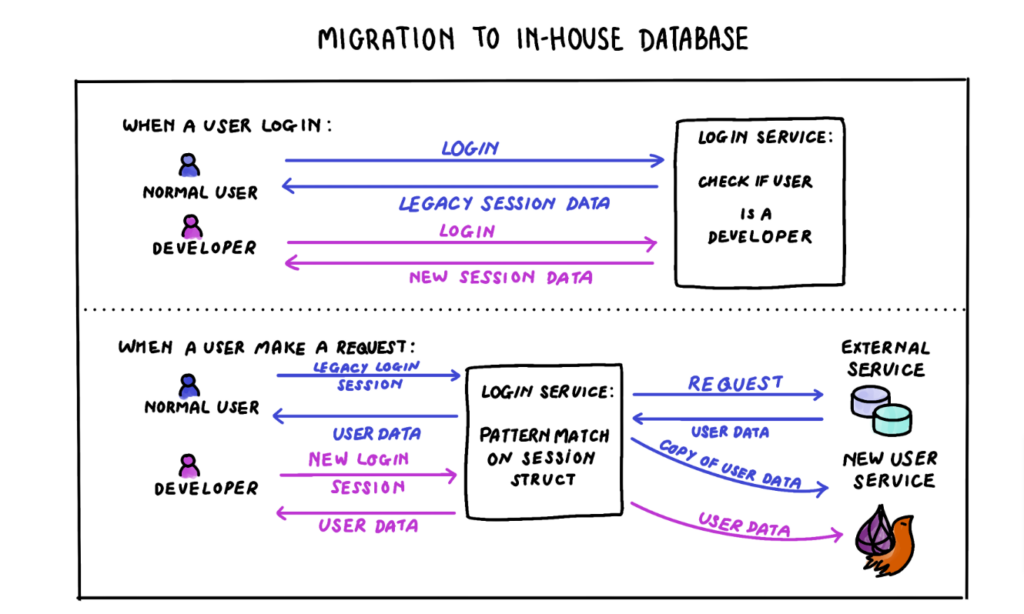
    Phoenix LiveView Migration to in-house database

    With this strategy, we could develop and test the new database system in parallel with the old one in production, without affecting regular users, and ensured that everything worked as expected.

    At the end, we performed a data dump for all users, configuring the service to use the new system as the main source of truth. Since we had tested with a small number of users beforehand, the transition was smooth, and users had no idea anything had changed from their end. Response times were cut in half compared to the previous solution!

    The Evolution of LiveView Application

    The addition of LiveView to the application was first thought of when the ESL team together with the client team wanted to check the test migration data. The team wanted to be able to cross reference immediately if the user data has been inserted or updated as intended in our new service. It was complicated and cumbersome at first as we had to connect to the application remotely and do a manual query or call an internal function from a remote Elixir shell.

    Phoenix LiveVie: Evolution of LiveView Application

    Initially, LiveView was developed solely for the team. We started with a simple table listing users, then added search functionality for IDs or emails, followed by pagination as the test data grew. With the simple UI using LiveView in place, we started with the data migration process and the UI helped tremendously when we went to verify if the data got migrated correctly, and how many users we have successfully migrated.

    Adoption and Expansion of the LiveView Tool

    As we demonstrated the UI to stakeholders, it quickly became the go-to tool for customer service, with new features continuously added based on feedback. The development team received many requests from customer service and other managers in the client’s organisation. We fulfilled these requests with features such as searching users by a combination of fields, helping change users’ email addresses, and checking user activity (e.g., when a user’s email was changed or if users suspected they had been hacked).

    Later, we connected the LiveView application to sync and display data from another internal service, which contained information about users’ access to the client’s product. The customer service team was able to get a more complete view of the user and could use the same tool to grant or sync user access without switching to other systems.

    The best aspect of using Phoenix LiveView is that the development team also owned the UI. We determined the data structure, knew what needed to be there, and designed the LiveView page ourselves. This removed the need to rely on another team, and we could reflect changes swiftly in the web views without having to coordinate with external teams.

    Challenges and Feedback of Implementing Phonenix LiveView

    There were some glitches along the way, and when we asked for feedback from the customer service team, we found several UX aspects that could be improved. For example, data didn’t always update immediately, or buttons occasionally failed to work properly. However, these issues also indicated that the Phoenix LiveView application was used heavily by the team, emphasising the need for improvements to support better workflows.

    While our LiveView implementation worked well, it wasn’t without imperfections. Most of our development team lacked extensive web development experience, so there were several aspects we either overlooked or didn’t fully consider. Some team members had limited knowledge of web technologies like Tailwind and CSS/HTML, which helped guide us, but we realised that for a more polished user experience (UX) and smoother interface, basic HTML/CSS skills alone wouldn’t be sufficient to create an optimal LiveView application.

    Another challenge was infrastructure. Since our service was read-heavy, we used AWS RDS reader instances to maximise performance, but this led to occasional replication delays. These delays could cause mismatches when customer service updated data and LiveView reloaded the page before the updates had replicated to the reader instances. We had to carefully consider when it was appropriate to use the reader instances and adjust our approach accordingly.

    Team Dynamics and Collaboration

    Mob programming way of working was also one of the factors that led to the success of this project.  Our team consists of members with different expertise. By working together, we can discuss and share our experiences while programming together, instead of having to explain later in code review or knowledge sharing what each of us has implemented and why. For example, we guided a member who had more experience in Erlang/OTP through creating a form with Liveview, which needed more experience in Ecto and Phoenix. That member could then explain and guide others with OTP-related implementation in our services.

    Mob programming helped our team focus on one large task at a time. This collaborative approach ensured a consistent codebase with unified conventions, leading to efficient feature implementation.

    Conclusion

    What began as a simple backend project with Phoenix and Ecto evolved into a key tool for customer service, driven by the power of Phoenix LiveView. The Admin page, initially unplanned, became an integral part of the client’s workflow, proving the vast potential of LiveView and Elixir.

    Though we encountered challenges, LiveView’s real-time interactivity, seamless integration, and developer control over both the backend and UI were invaluable. We believe we’ve only scratched the surface of what developers can achieve with LiveView.

    Want to learn more about LiveView? Check out this article . If you’re exploring Phoenix LiveView for your project, feel free to reach out —we’d love to share our experience and help you unlock its full potential.

    The post Implementing Phoenix LiveView: From Concept to Production appeared first on Erlang Solutions .

    • Pl chevron_right

      Erlang Solutions: Implementing Phoenix LiveView: From Concept to Production

      news.movim.eu / PlanetJabber • 24 October 2024 • 6 minutes

    When I began working with Phoenix LiveView , the project evolved from a simple backend service into a powerful, UI-driven customer service tool. A basic Phoenix app for storing user data quickly became a core part of our client’s workflow.

    In this post, I’ll take you through a project that grew from its original purpose- from a service for storing and serving user data to a LiveView-powered application that is now a key tool in the client’s organisation for customer service.

    Why We Chose Phoenix LiveView

    Our initial goal was to migrate user data from an external, paid service to a new in-house solution, developed collaboratively by Erlang Solutions (ESL) and the client’s teams.

    With millions of users, we needed a simple way to verify migrated data without manually connecting to the container and querying the database every time.

    Since the in-house service was a Phoenix application that uses Ecto and Postgres, adding LiveView was the most natural fit.

    Implementing Phoenix LiveView: Data Migration and UI Development

    After we had established the goal, the next step was to create a database service to store and serve user information to other services, as well as to migrate all existing user data from an external service to the new one.

    We chose Phoenix with Ecto and Postgres, as the old database was already connected to a Phoenix application , and the client’s team was well-versed in Elixir and BEAM .

    Data Migration Strategy

    The ESL and client teams’ strategy began by slowly copying user data from the old service to the new database whenever users logged in. For certain users (e.g., developers), we logged them in and pulled user information only from the new system. We defined a new login session struct (Elixir struct), which we used for pattern matching to determine whether to use the old or new system. The old system was treated as a fallback and the source of truth for user data.

    Phoenix LiveView Migration to in-house database

    With this strategy, we could develop and test the new database system in parallel with the old one in production, without affecting regular users, and ensured that everything worked as expected.

    At the end, we performed a data dump for all users, configuring the service to use the new system as the main source of truth. Since we had tested with a small number of users beforehand, the transition was smooth, and users had no idea anything had changed from their end. Response times were cut in half compared to the previous solution!

    The Evolution of LiveView Application

    The addition of LiveView to the application was first thought of when the ESL team together with the client team wanted to check the test migration data. The team wanted to be able to cross reference immediately if the user data has been inserted or updated as intended in our new service. It was complicated and cumbersome at first as we had to connect to the application remotely and do a manual query or call an internal function from a remote Elixir shell.

    Phoenix LiveVie: Evolution of LiveView Application

    Initially, LiveView was developed solely for the team. We started with a simple table listing users, then added search functionality for IDs or emails, followed by pagination as the test data grew. With the simple UI using LiveView in place, we started with the data migration process and the UI helped tremendously when we went to verify if the data got migrated correctly, and how many users we have successfully migrated.

    Adoption and Expansion of the LiveView Tool

    As we demonstrated the UI to stakeholders, it quickly became the go-to tool for customer service, with new features continuously added based on feedback. The development team received many requests from customer service and other managers in the client’s organisation. We fulfilled these requests with features such as searching users by a combination of fields, helping change users’ email addresses, and checking user activity (e.g., when a user’s email was changed or if users suspected they had been hacked).

    Later, we connected the LiveView application to sync and display data from another internal service, which contained information about users’ access to the client’s product. The customer service team was able to get a more complete view of the user and could use the same tool to grant or sync user access without switching to other systems.

    The best aspect of using Phoenix LiveView is that the development team also owned the UI. We determined the data structure, knew what needed to be there, and designed the LiveView page ourselves. This removed the need to rely on another team, and we could reflect changes swiftly in the web views without having to coordinate with external teams.

    Challenges and Feedback of Implementing Phonenix LiveView

    There were some glitches along the way, and when we asked for feedback from the customer service team, we found several UX aspects that could be improved. For example, data didn’t always update immediately, or buttons occasionally failed to work properly. However, these issues also indicated that the Phoenix LiveView application was used heavily by the team, emphasising the need for improvements to support better workflows.

    While our LiveView implementation worked well, it wasn’t without imperfections. Most of our development team lacked extensive web development experience, so there were several aspects we either overlooked or didn’t fully consider. Some team members had limited knowledge of web technologies like Tailwind and CSS/HTML, which helped guide us, but we realised that for a more polished user experience (UX) and smoother interface, basic HTML/CSS skills alone wouldn’t be sufficient to create an optimal LiveView application.

    Another challenge was infrastructure. Since our service was read-heavy, we used AWS RDS reader instances to maximise performance, but this led to occasional replication delays. These delays could cause mismatches when customer service updated data and LiveView reloaded the page before the updates had replicated to the reader instances. We had to carefully consider when it was appropriate to use the reader instances and adjust our approach accordingly.

    Team Dynamics and Collaboration

    Mob programming way of working was also one of the factors that led to the success of this project.  Our team consists of members with different expertise. By working together, we can discuss and share our experiences while programming together, instead of having to explain later in code review or knowledge sharing what each of us has implemented and why. For example, we guided a member who had more experience in Erlang/OTP through creating a form with Liveview, which needed more experience in Ecto and Phoenix. That member could then explain and guide others with OTP-related implementation in our services.

    Mob programming helped our team focus on one large task at a time. This collaborative approach ensured a consistent codebase with unified conventions, leading to efficient feature implementation.

    Conclusion

    What began as a simple backend project with Phoenix and Ecto evolved into a key tool for customer service, driven by the power of Phoenix LiveView. The Admin page, initially unplanned, became an integral part of the client’s workflow, proving the vast potential of LiveView and Elixir.

    Though we encountered challenges, LiveView’s real-time interactivity, seamless integration, and developer control over both the backend and UI were invaluable. We believe we’ve only scratched the surface of what developers can achieve with LiveView.

    Want to learn more about LiveView? Check out this article . If you’re exploring Phoenix LiveView for your project, feel free to reach out —we’d love to share our experience and help you unlock its full potential.

    The post Implementing Phoenix LiveView: From Concept to Production appeared first on Erlang Solutions .
    • Pl chevron_right

      Erlang Solutions: Implementing Phoenix LiveView: From Concept to Production

      news.movim.eu / PlanetJabber • 24 October 2024 • 6 minutes

    When I began working with Phoenix LiveView , the project evolved from a simple backend service into a powerful, UI-driven customer service tool. A basic Phoenix app for storing user data quickly became a core part of our client’s workflow.

    In this post, I’ll take you through a project that grew from its original purpose- from a service for storing and serving user data to a LiveView-powered application that is now a key tool in the client’s organisation for customer service.

    Why We Chose Phoenix LiveView

    Our initial goal was to migrate user data from an external, paid service to a new in-house solution, developed collaboratively by Erlang Solutions (ESL) and the client’s teams.

    With millions of users, we needed a simple way to verify migrated data without manually connecting to the container and querying the database every time.

    Since the in-house service was a Phoenix application that uses Ecto and Postgres, adding LiveView was the most natural fit.

    Implementing Phoenix LiveView: Data Migration and UI Development

    After we had established the goal, the next step was to create a database service to store and serve user information to other services, as well as to migrate all existing user data from an external service to the new one.

    We chose Phoenix with Ecto and Postgres, as the old database was already connected to a Phoenix application , and the client’s team was well-versed in Elixir and BEAM .

    Data Migration Strategy

    The ESL and client teams’ strategy began by slowly copying user data from the old service to the new database whenever users logged in. For certain users (e.g., developers), we logged them in and pulled user information only from the new system. We defined a new login session struct (Elixir struct), which we used for pattern matching to determine whether to use the old or new system. The old system was treated as a fallback and the source of truth for user data.

    Phoenix LiveView Migration to in-house database

    With this strategy, we could develop and test the new database system in parallel with the old one in production, without affecting regular users, and ensured that everything worked as expected.

    At the end, we performed a data dump for all users, configuring the service to use the new system as the main source of truth. Since we had tested with a small number of users beforehand, the transition was smooth, and users had no idea anything had changed from their end. Response times were cut in half compared to the previous solution!

    The Evolution of LiveView Application

    The addition of LiveView to the application was first thought of when the ESL team together with the client team wanted to check the test migration data. The team wanted to be able to cross reference immediately if the user data has been inserted or updated as intended in our new service. It was complicated and cumbersome at first as we had to connect to the application remotely and do a manual query or call an internal function from a remote Elixir shell.

    Phoenix LiveVie: Evolution of LiveView Application

    Initially, LiveView was developed solely for the team. We started with a simple table listing users, then added search functionality for IDs or emails, followed by pagination as the test data grew. With the simple UI using LiveView in place, we started with the data migration process and the UI helped tremendously when we went to verify if the data got migrated correctly, and how many users we have successfully migrated.

    Adoption and Expansion of the LiveView Tool

    As we demonstrated the UI to stakeholders, it quickly became the go-to tool for customer service, with new features continuously added based on feedback. The development team received many requests from customer service and other managers in the client’s organisation. We fulfilled these requests with features such as searching users by a combination of fields, helping change users’ email addresses, and checking user activity (e.g., when a user’s email was changed or if users suspected they had been hacked).

    Later, we connected the LiveView application to sync and display data from another internal service, which contained information about users’ access to the client’s product. The customer service team was able to get a more complete view of the user and could use the same tool to grant or sync user access without switching to other systems.

    The best aspect of using Phoenix LiveView is that the development team also owned the UI. We determined the data structure, knew what needed to be there, and designed the LiveView page ourselves. This removed the need to rely on another team, and we could reflect changes swiftly in the web views without having to coordinate with external teams.

    Challenges and Feedback of Implementing Phonenix LiveView

    There were some glitches along the way, and when we asked for feedback from the customer service team, we found several UX aspects that could be improved. For example, data didn’t always update immediately, or buttons occasionally failed to work properly. However, these issues also indicated that the Phoenix LiveView application was used heavily by the team, emphasising the need for improvements to support better workflows.

    While our LiveView implementation worked well, it wasn’t without imperfections. Most of our development team lacked extensive web development experience, so there were several aspects we either overlooked or didn’t fully consider. Some team members had limited knowledge of web technologies like Tailwind and CSS/HTML, which helped guide us, but we realised that for a more polished user experience (UX) and smoother interface, basic HTML/CSS skills alone wouldn’t be sufficient to create an optimal LiveView application.

    Another challenge was infrastructure. Since our service was read-heavy, we used AWS RDS reader instances to maximise performance, but this led to occasional replication delays. These delays could cause mismatches when customer service updated data and LiveView reloaded the page before the updates had replicated to the reader instances. We had to carefully consider when it was appropriate to use the reader instances and adjust our approach accordingly.

    Team Dynamics and Collaboration

    Mob programming way of working was also one of the factors that led to the success of this project.  Our team consists of members with different expertise. By working together, we can discuss and share our experiences while programming together, instead of having to explain later in code review or knowledge sharing what each of us has implemented and why. For example, we guided a member who had more experience in Erlang/OTP through creating a form with Liveview, which needed more experience in Ecto and Phoenix. That member could then explain and guide others with OTP-related implementation in our services.

    Mob programming helped our team focus on one large task at a time. This collaborative approach ensured a consistent codebase with unified conventions, leading to efficient feature implementation.

    Conclusion

    What began as a simple backend project with Phoenix and Ecto evolved into a key tool for customer service, driven by the power of Phoenix LiveView. The Admin page, initially unplanned, became an integral part of the client’s workflow, proving the vast potential of LiveView and Elixir.

    Though we encountered challenges, LiveView’s real-time interactivity, seamless integration, and developer control over both the backend and UI were invaluable. We believe we’ve only scratched the surface of what developers can achieve with LiveView.

    Want to learn more about LiveView? Check out this article . If you’re exploring Phoenix LiveView for your project, feel free to reach out —we’d love to share our experience and help you unlock its full potential.

    The post Implementing Phoenix LiveView: From Concept to Production appeared first on Erlang Solutions .

    • Pl chevron_right

      ProcessOne: ProcessOne Unveils New Website

      news.movim.eu / PlanetJabber • 22 October 2024 • 1 minute

    We’re excited to announce the relaunch of our website, designed to better showcase our expertise in large-scale messaging solutions, highlighting our full spectrum of supported protocols—from XMPP to MQTT and Matrix. This reflects our core strength: delivering reliable messaging at scale.

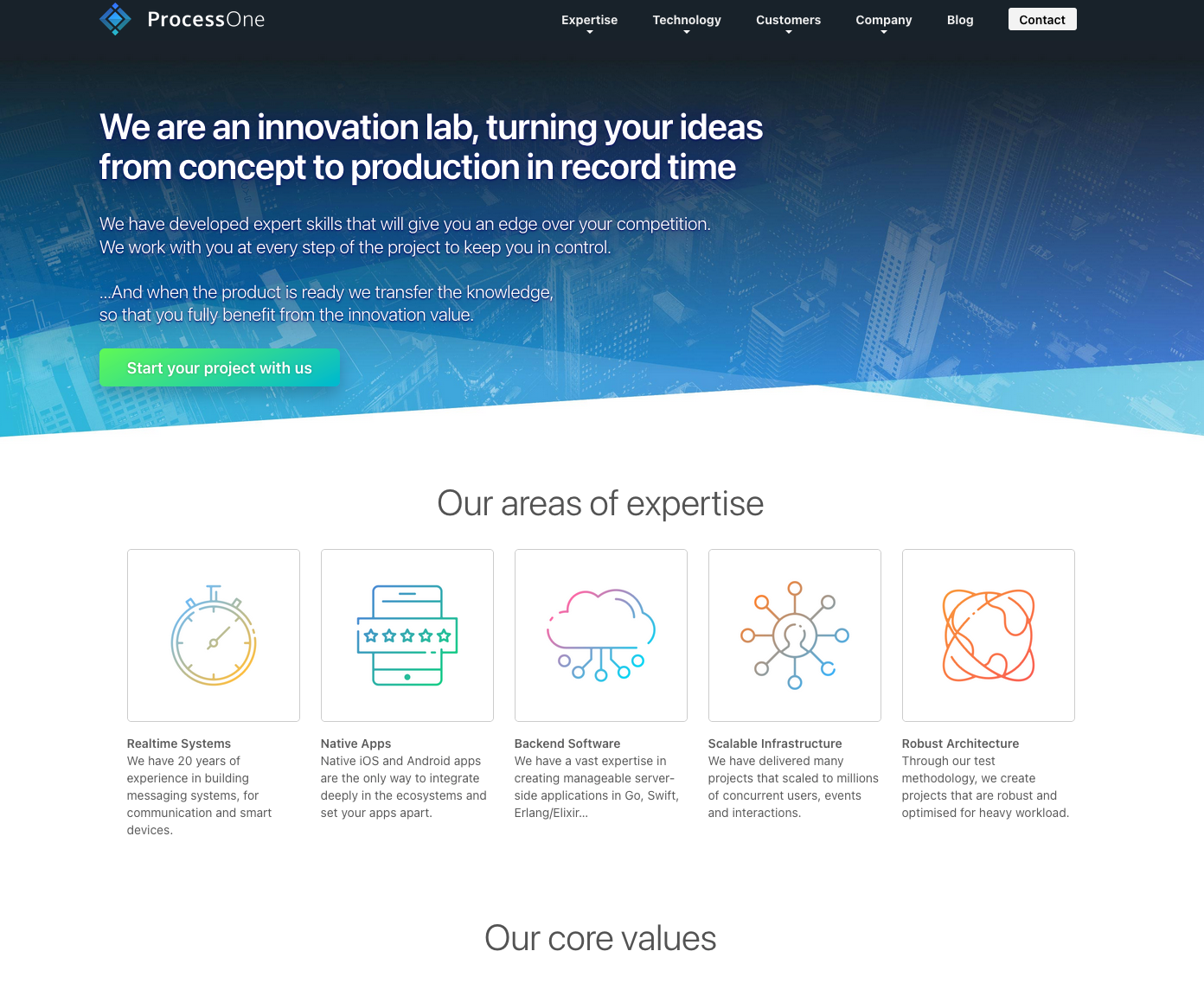
    The last major redesign was back in October 2017, so this update was long overdue. As we say farewell to the old design, here’s a screenshot of the previous version to commemorate the journey so far.

    alt

    In addition to refreshing the layout and structure, we’ve made a significant change under the hood by migrating from WordPress to Ghost. After using Ghost for my personal blog and being thoroughly impressed, we knew it was the right choice for ProcessOne. The new platform offers not only long-term maintainability but also a much more streamlined, enjoyable day-to-day experience, thanks to its faster and more efficient authoring tools.

    All of our previous blog content has been successfully migrated, and we’re now in a great position to deliver more frequent updates on topics such as messaging, XMPP, ejabberd, MQTT, and Matrix. Stay tuned for exciting new posts!

    We’d love to hear your feedback and suggestions on what topics you’d like us to cover next. To join the conversation, simply create an account on our site and share your thoughts.

    • Pl chevron_right

      ProcessOne: ProcessOne Unveils New Website

      news.movim.eu / PlanetJabber • 22 October 2024 • 1 minute

    We’re excited to announce the relaunch of our website, designed to better showcase our expertise in large-scale messaging solutions, highlighting our full spectrum of supported protocols—from XMPP to MQTT and Matrix. This reflects our core strength: delivering reliable messaging at scale.

    The last major redesign was back in October 2017, so this update was long overdue. As we say farewell to the old design, here’s a screenshot of the previous version to commemorate the journey so far.

    alt

    In addition to refreshing the layout and structure, we’ve made a significant change under the hood by migrating from WordPress to Ghost. After using Ghost for my personal blog and being thoroughly impressed, we knew it was the right choice for ProcessOne. The new platform offers not only long-term maintainability but also a much more streamlined, enjoyable day-to-day experience, thanks to its faster and more efficient authoring tools.

    All of our previous blog content has been successfully migrated, and we’re now in a great position to deliver more frequent updates on topics such as messaging, XMPP, ejabberd, MQTT, and Matrix. Stay tuned for exciting new posts!

    We’d love to hear your feedback and suggestions on what topics you’d like us to cover next. To join the conversation, simply create an account on our site and share your thoughts.

    • Pl chevron_right

      ProcessOne: ProcessOne Unveils New Website

      news.movim.eu / PlanetJabber • 22 October 2024 • 1 minute

    We’re excited to announce the relaunch of our website, designed to better showcase our expertise in large-scale messaging solutions, highlighting our full spectrum of supported protocols—from XMPP to MQTT and Matrix. This reflects our core strength: delivering reliable messaging at scale.

    The last major redesign was back in October 2017, so this update was long overdue. As we say farewell to the old design, here’s a screenshot of the previous version to commemorate the journey so far.

    alt

    In addition to refreshing the layout and structure, we’ve made a significant change under the hood by migrating from WordPress to Ghost. After using Ghost for my personal blog and being thoroughly impressed, we knew it was the right choice for ProcessOne. The new platform offers not only long-term maintainability but also a much more streamlined, enjoyable day-to-day experience, thanks to its faster and more efficient authoring tools.

    All of our previous blog content has been successfully migrated, and we’re now in a great position to deliver more frequent updates on topics such as messaging, XMPP, ejabberd, MQTT, and Matrix. Stay tuned for exciting new posts!

    We’d love to hear your feedback and suggestions on what topics you’d like us to cover next. To join the conversation, simply create an account on our site and share your thoughts.

    • Pl chevron_right

      Erlang Solutions: Client Case Studies with Erlang Solutions

      news.movim.eu / PlanetJabber • 17 October 2024 • 2 minutes

    At Erlang Solutions, we’ve worked with diverse clients, solving business challenges and delivering impactful results. We would like to share just some of our top client case studies in this latest post with you.

    Get a glimpse into how our leading technologies—Erlang, Elixir, MongooseIM, and more—combined with our expert team, have transformed the outcomes for major industry players.

    Transforming streaming with zero downtime for TV4

    Our first client case study is our partnership with TV4 . The leading Nordic broadcaster needed to address major challenges in the competitive streaming industry. With global giants like Netflix and Disney Plus on the rise, TV4 needed to unify user data from multiple platforms into a seamless streaming experience for millions of subscribers.

    Using Elixir, we ensured a smooth migration and helped TV4 reduce infrastructure costs and improve efficiency.

    TV4 Erlang Solutions client case study

    Check out the full TV4 case study .

    Financial services with secure messaging solutions with Teleware

    Erlang Solutions partnered with Teleware to enhance their Reapp with secure instant messaging (IM) capabilities for a major UK financial services group. As TeleWare aimed to meet strict regulatory requirements while improving user experience, they needed a robust, scalable solution that could seamlessly integrate into their existing infrastructure.

    We utilised MongooseIM ’s out-of-the-box functionality, and Teleware quickly integrated group chat features that allowed secure collaboration while meeting the Financial Conduct Authority (FCA) compliance standards.

    Teleware Erlang Solutions

    Take a look at the full Teleware case study .

    Gaming experiences with enhanced scalability and performance for FACEIT

    FACEIT , the leading independent competitive gaming platform with over 25 million users, had some scalability and performance challenges. As its user base grew, FACEIT needed to upgrade their systems to handle hundreds of thousands of players seamlessly.

    By upgrading to the latest version of MongooseIM and Erlang , we delivered a solution that managed large user lists and improved overall system efficiency.

    FACEIT Erlang Solutions client case study

    Explore the full FACEIT case study .

    Rapid growth with scalable systems for BET Software

    In another one of our client case studies, we worked with BET Software , a leading betting software provider in South Africa, to address the challenges posed by rapid growth and increasing user demand. As the main technology provider for Hollywoodbets, BET Software needed a more resilient and scalable system to support peak betting periods.

    By utilising Elixir to support and transition to a distributed data architecture, we helped BET Software eliminate bottlenecks and ensure seamless service- even during the busiest betting events.

    BET Software Erlang Solutions client case study

    Read the BET Software case study in full.

    Innovation and competitive edge with International Registries Inc.

    The final client case study of this series is with International Registries Inc. (IRI) . They are global leaders in maritime and corporate registry services, who were looking to enhance its technological infrastructure and strengthen their competitive advantage.

    Erlang Solutions helped IRI by using Elixir to reduce costs, improve system maintainability, and decommission servers.

    International Registries Inc Erlang Solutions

    Discover the complete IRI case study.

    Real results from client case studies

    Our client case study examples show how we help companies like TV4, FACEIT, TeleWare, BET Software, and International Registries Inc. solve tough tech challenges and excel in competitive markets. Whether it’s boosting performance, securing communications, or scaling for growth, our solutions unlock new possibilities.

    You can explore more Erlang Solutions case studies here .

    If you’d like to chat with the Erlang Solutions team about what we can do for you, feel free to drop us a message .

    The post Client Case Studies with Erlang Solutions appeared first on Erlang Solutions .
    • Pl chevron_right

      Erlang Solutions: Client Case Studies with Erlang Solutions

      news.movim.eu / PlanetJabber • 17 October 2024 • 2 minutes

    At Erlang Solutions, we’ve worked with diverse clients, solving business challenges and delivering impactful results. We would like to share just some of our top client case studies in this latest post with you.

    Get a glimpse into how our leading technologies—Erlang, Elixir, MongooseIM, and more—combined with our expert team, have transformed the outcomes for major industry players.

    Transforming streaming with zero downtime for TV4

    Our first client case study is our partnership with TV4 . The leading Nordic broadcaster needed to address major challenges in the competitive streaming industry. With global giants like Netflix and Disney Plus on the rise, TV4 needed to unify user data from multiple platforms into a seamless streaming experience for millions of subscribers.

    Using Elixir, we ensured a smooth migration and helped TV4 reduce infrastructure costs and improve efficiency.

    TV4 Erlang Solutions client case study

    Check out the full TV4 case study .

    Financial services with secure messaging solutions with Teleware

    Erlang Solutions partnered with Teleware to enhance their Reapp with secure instant messaging (IM) capabilities for a major UK financial services group. As TeleWare aimed to meet strict regulatory requirements while improving user experience, they needed a robust, scalable solution that could seamlessly integrate into their existing infrastructure.

    We utilised MongooseIM ’s out-of-the-box functionality, and Teleware quickly integrated group chat features that allowed secure collaboration while meeting the Financial Conduct Authority (FCA) compliance standards.

    Teleware Erlang Solutions

    Take a look at the full Teleware case study .

    Gaming experiences with enhanced scalability and performance for FACEIT

    FACEIT , the leading independent competitive gaming platform with over 25 million users, had some scalability and performance challenges. As its user base grew, FACEIT needed to upgrade their systems to handle hundreds of thousands of players seamlessly.

    By upgrading to the latest version of MongooseIM and Erlang , we delivered a solution that managed large user lists and improved overall system efficiency.

    FACEIT Erlang Solutions client case study

    Explore the full FACEIT case study .

    Rapid growth with scalable systems for BET Software

    In another one of our client case studies, we worked with BET Software , a leading betting software provider in South Africa, to address the challenges posed by rapid growth and increasing user demand. As the main technology provider for Hollywoodbets, BET Software needed a more resilient and scalable system to support peak betting periods.

    By utilising Elixir to support and transition to a distributed data architecture, we helped BET Software eliminate bottlenecks and ensure seamless service- even during the busiest betting events.

    BET Software Erlang Solutions client case study

    Read the BET Software case study in full.

    Innovation and competitive edge with International Registries Inc.

    The final client case study of this series is with International Registries Inc. (IRI) . They are global leaders in maritime and corporate registry services, who were looking to enhance its technological infrastructure and strengthen their competitive advantage.

    Erlang Solutions helped IRI by using Elixir to reduce costs, improve system maintainability, and decommission servers.

    International Registries Inc Erlang Solutions

    Discover the complete IRI case study.

    Real results from client case studies

    Our client case study examples show how we help companies like TV4, FACEIT, TeleWare, BET Software, and International Registries Inc. solve tough tech challenges and excel in competitive markets. Whether it’s boosting performance, securing communications, or scaling for growth, our solutions unlock new possibilities.

    You can explore more Erlang Solutions case studies here .

    If you’d like to chat with the Erlang Solutions team about what we can do for you, feel free to drop us a message .

    The post Client Case Studies with Erlang Solutions appeared first on Erlang Solutions .

    • Pl chevron_right

      Erlang Solutions: Client Case Studies with Erlang Solutions

      news.movim.eu / PlanetJabber • 17 October 2024 • 2 minutes

    At Erlang Solutions, we’ve worked with diverse clients, solving business challenges and delivering impactful results. We would like to share just some of our top client case studies in this latest post with you.

    Get a glimpse into how our leading technologies—Erlang, Elixir, MongooseIM, and more—combined with our expert team, have transformed the outcomes for major industry players.

    Transforming streaming with zero downtime for TV4

    Our first client case study is our partnership with TV4 . The leading Nordic broadcaster needed to address major challenges in the competitive streaming industry. With global giants like Netflix and Disney Plus on the rise, TV4 needed to unify user data from multiple platforms into a seamless streaming experience for millions of subscribers.

    Using Elixir, we ensured a smooth migration and helped TV4 reduce infrastructure costs and improve efficiency.

    TV4 Erlang Solutions client case study

    Check out the full TV4 case study .

    Financial services with secure messaging solutions with Teleware

    Erlang Solutions partnered with Teleware to enhance their Reapp with secure instant messaging (IM) capabilities for a major UK financial services group. As TeleWare aimed to meet strict regulatory requirements while improving user experience, they needed a robust, scalable solution that could seamlessly integrate into their existing infrastructure.

    We utilised MongooseIM ’s out-of-the-box functionality, and Teleware quickly integrated group chat features that allowed secure collaboration while meeting the Financial Conduct Authority (FCA) compliance standards.

    Teleware Erlang Solutions

    Take a look at the full Teleware case study .

    Gaming experiences with enhanced scalability and performance for FACEIT

    FACEIT , the leading independent competitive gaming platform with over 25 million users, had some scalability and performance challenges. As its user base grew, FACEIT needed to upgrade their systems to handle hundreds of thousands of players seamlessly.

    By upgrading to the latest version of MongooseIM and Erlang , we delivered a solution that managed large user lists and improved overall system efficiency.

    FACEIT Erlang Solutions client case study

    Explore the full FACEIT case study .

    Rapid growth with scalable systems for BET Software

    In another one of our client case studies, we worked with BET Software , a leading betting software provider in South Africa, to address the challenges posed by rapid growth and increasing user demand. As the main technology provider for Hollywoodbets, BET Software needed a more resilient and scalable system to support peak betting periods.

    By utilising Elixir to support and transition to a distributed data architecture, we helped BET Software eliminate bottlenecks and ensure seamless service- even during the busiest betting events.

    BET Software Erlang Solutions client case study

    Read the BET Software case study in full.

    Innovation and competitive edge with International Registries Inc.

    The final client case study of this series is with International Registries Inc. (IRI) . They are global leaders in maritime and corporate registry services, who were looking to enhance its technological infrastructure and strengthen their competitive advantage.

    Erlang Solutions helped IRI by using Elixir to reduce costs, improve system maintainability, and decommission servers.

    International Registries Inc Erlang Solutions

    Discover the complete IRI case study.

    Real results from client case studies

    Our client case study examples show how we help companies like TV4, FACEIT, TeleWare, BET Software, and International Registries Inc. solve tough tech challenges and excel in competitive markets. Whether it’s boosting performance, securing communications, or scaling for growth, our solutions unlock new possibilities.

    You can explore more Erlang Solutions case studies here .

    If you’d like to chat with the Erlang Solutions team about what we can do for you, feel free to drop us a message .

    The post Client Case Studies with Erlang Solutions appeared first on Erlang Solutions .