• Pl chevron_right

      Gajim: Gajim 2.1.1

      news.movim.eu / PlanetJabber • 17 April 2025 • 1 minute

    This release brings layout improvements to Gajim’s Start Chat dialog, an improved message search, and includes fixes for some issues with Message Displayed Synchronization. Thank you for all your contributions!

    What’s New

    Gajim 2.1 comes with a new ‘Activity feed’ which displays events around group chat invitations, contact requests, and updates. This will be the central feed for all kinds of activities in the future (e.g. reactions, replies, mentions, message reminders).
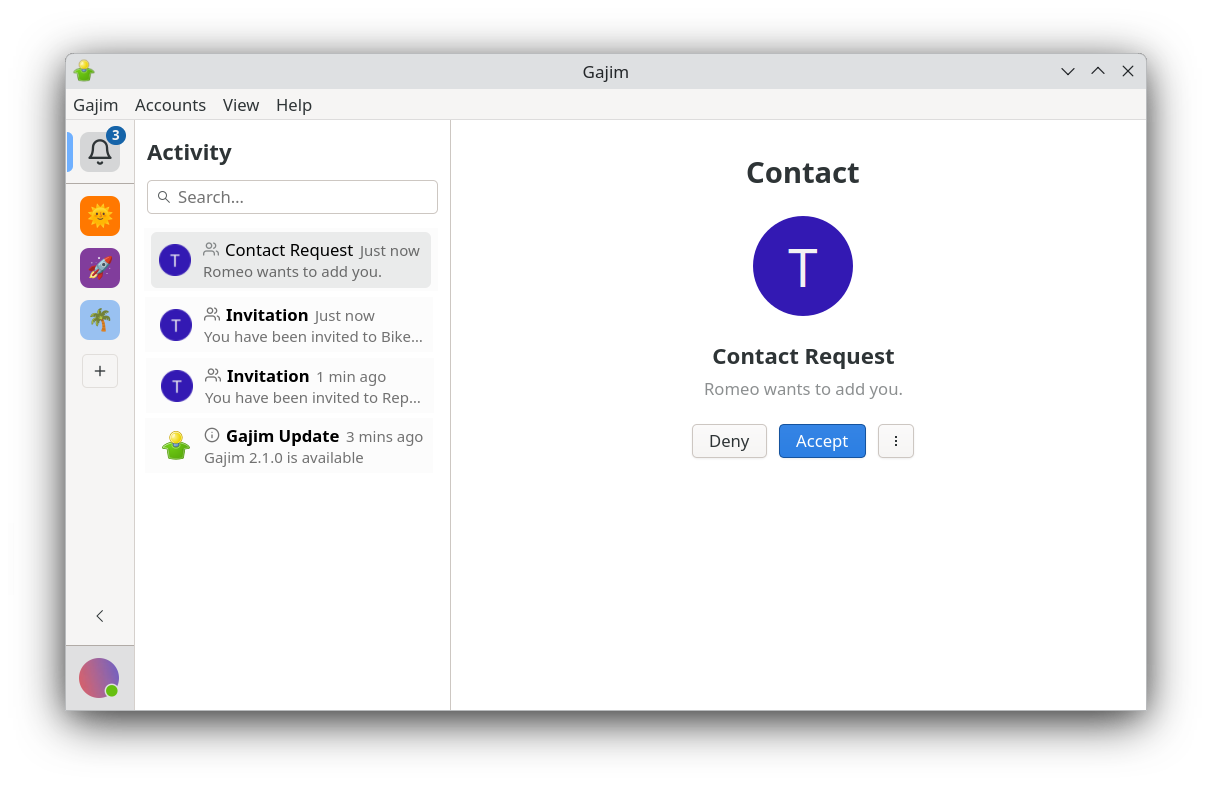
    Activity feed in Gajim 2.1

    Activity feed in Gajim 2.1

    Gajim 2.1.1 brings layout improvements for its Start Chat dialog, which now renders more compact and shows more information. This release also improves message search by displaying the last correction of a message and by not showing moderated messages. Last but not least, some issues with XEP-0490: Message Displayed Synchronization have been fixed.

    A note for Windows users: At the time of writing, there are some issues with emoji rendering on Windows. That’s why there is no release of Gajim 2.1 for Windows yet. This issue should soon be resolved and we will post an update once Gajim 2.1 is released on Windows.

    More Changes

    • Group chats now show voice request errors, if they happen
    • Setting your status for multiple accounts though the account sidebar now works properly

    And much more! Have a look at the changelog for a complete list.

    Gajim

    As always, don’t hesitate to contact us at gajim@conference.gajim.org or open an issue on our Gitlab .

    Support Gajim

    Gajim is free software developed by volunteers.
    If you like to support Gajim, please consider making a donation.

    Donate via Liberapay:

    liberapay-donate.svg

    • Pl chevron_right

      Gajim: Gajim 2.1.1

      news.movim.eu / PlanetJabber • 17 April 2025 • 1 minute

    This release brings layout improvements to Gajim’s Start Chat dialog, an improved message search, and includes fixes for some issues with Message Displayed Synchronization. Thank you for all your contributions!

    What’s New

    Gajim 2.1 comes with a new ‘Activity feed’ which displays events around group chat invitations, contact requests, and updates. This will be the central feed for all kinds of activities in the future (e.g. reactions, replies, mentions, message reminders).

    Activity feed in Gajim 2.1

    Activity feed in Gajim 2.1

    Gajim 2.1.1 brings layout improvements for its Start Chat dialog, which now renders more compact and shows more information. This release also improves message search by displaying the last correction of a message and by not showing moderated messages. Last but not least, some issues with XEP-0490: Message Displayed Synchronization have been fixed.

    A note for Windows users: At the time of writing, there are some issues with emoji rendering on Windows. That’s why there is no release of Gajim 2.1 for Windows yet. This issue should soon be resolved and we will post an update once Gajim 2.1 is released on Windows.

    More Changes

    • Group chats now show voice request errors, if they happen
    • Setting your status for multiple accounts though the account sidebar now works properly

    And much more! Have a look at the changelog for a complete list.

    Gajim

    As always, don’t hesitate to contact us at gajim@conference.gajim.org or open an issue on our Gitlab .

    Support Gajim

    Gajim is free software developed by volunteers.
    If you like to support Gajim, please consider making a donation.

    Donate via Liberapay:
    liberapay-donate.svg

    • Pl chevron_right

      Gajim: Gajim 2.1.1

      news.movim.eu / PlanetJabber • 17 April 2025 • 1 minute

    This release brings layout improvements to Gajim’s Start Chat dialog, an improved message search, and includes fixes for some issues with Message Displayed Synchronization. Thank you for all your contributions!

    What’s New

    Gajim 2.1 comes with a new ‘Activity feed’ which displays events around group chat invitations, contact requests, and updates. This will be the central feed for all kinds of activities in the future (e.g. reactions, replies, mentions, message reminders).

    Activity feed in Gajim 2.1

    Activity feed in Gajim 2.1

    Gajim 2.1.1 brings layout improvements for its Start Chat dialog, which now renders more compact and shows more information. This release also improves message search by displaying the last correction of a message and by not showing moderated messages. Last but not least, some issues with XEP-0490: Message Displayed Synchronization have been fixed.

    A note for Windows users: At the time of writing, there are some issues with emoji rendering on Windows. That’s why there is no release of Gajim 2.1 for Windows yet. This issue should soon be resolved and we will post an update once Gajim 2.1 is released on Windows.

    More Changes

    • Group chats now show voice request errors, if they happen
    • Setting your status for multiple accounts though the account sidebar now works properly

    And much more! Have a look at the changelog for a complete list.

    Gajim

    As always, don’t hesitate to contact us at gajim@conference.gajim.org or open an issue on our Gitlab .

    Support Gajim

    Gajim is free software developed by volunteers.
    If you like to support Gajim, please consider making a donation.

    Donate via Liberapay:

    liberapay-donate.svg

    • Pl chevron_right

      ProcessOne: ejabberd 25.04

      news.movim.eu / PlanetJabber • 16 April 2025 • 2 minutes

    ejabberd 25.04

    Just a few weeks after previous release, ejabberd 25.04 is published with an important security fix, several bug fixes and a new API command.

    Release Highlights:

    If you are upgrading from a previous version, there are no changes in SQL schemas, configuration, API commands or hooks.

    Other contents:

    Below is a detailed breakdown of the improvements and enhancements:

    mod_muc_occupantid: Fix handling multiple occupant-id

    Fixed issue with handling of user provided occupant-id in messages and presences sent to muc room. Server was replacing just first instance of occupant-id with its own version, leaving other ones untouched. That would mean that depending on order in which clients send occupant-id, they could see value provided by sender, and that could be used to spoof as different sender.

    New kick_users API command

    There is a new API command kick_users that disconnects all the client sessions in a given virtual host.

    Acknowledgments

    We would like to thank the contributions to the source code, documentation, and translation provided for this release by:

    And also to all the people contributing in the ejabberd chatroom, issue tracker...

    Improvements in ejabberd Business Edition

    For customers of the ejabberd Business Edition , in addition to all those improvements and bugfixes:

    • Bugfix on max_concurrent_connections for mod_gcm , mod_webhook and mod_webpush

    ChangeLog

    This is a more complete list of changes in this ejabberd release:

    Security fixes

    • mod_muc_occupantid : Fix handling multiple occupant-id

    Commands API

    • kick_users : New command to kick all logged users for a given host

    Bugfixes

    • Fix issue with sql schema auto upgrade when using sqlite database
    • Fix problem with container update, that could ignore previous data stored in mnesia database
    • Revert limit of allowed characters in shared roster group names, that will again allow using symbols like :
    • Binary installers and ejabberd container image: Updated to Erlang/OTP 27.3.2

    Full Changelog

    https://github.com/processone/ejabberd/compare/25.03...25.04

    ejabberd 25.04 download & feedback

    As usual, the release is tagged in the Git source code repository on GitHub .

    The source package and installers are available in ejabberd Downloads page. To check the *.asc signature files, see How to verify ProcessOne downloads integrity .

    For convenience, there are alternative download locations like the ejabberd DEB/RPM Packages Repository and the GitHub Release / Tags .

    The ecs container image is available in docker.io/ejabberd/ecs and ghcr.io/processone/ecs . The alternative ejabberd container image is available in ghcr.io/processone/ejabberd .

    If you consider that you&aposve found a bug, please search or fill a bug report on GitHub Issues .

    • Pl chevron_right

      ProcessOne: ejabberd 25.04

      news.movim.eu / PlanetJabber • 16 April 2025 • 2 minutes

    ejabberd 25.04

    Just a few weeks after previous release, ejabberd 25.04 is published with an important security fix, several bug fixes and a new API command.

    Release Highlights:

    If you are upgrading from a previous version, there are no changes in SQL schemas, configuration, API commands or hooks.

    Other contents:

    Below is a detailed breakdown of the improvements and enhancements:

    mod_muc_occupantid: Fix handling multiple occupant-id

    Fixed issue with handling of user provided occupant-id in messages and presences sent to muc room. Server was replacing just first instance of occupant-id with its own version, leaving other ones untouched. That would mean that depending on order in which clients send occupant-id, they could see value provided by sender, and that could be used to spoof as different sender.

    New kick_users API command

    There is a new API command kick_users that disconnects all the client sessions in a given virtual host.

    Acknowledgments

    We would like to thank the contributions to the source code, documentation, and translation provided for this release by:

    And also to all the people contributing in the ejabberd chatroom, issue tracker...

    Improvements in ejabberd Business Edition

    For customers of the ejabberd Business Edition , in addition to all those improvements and bugfixes:

    • Bugfix on max_concurrent_connections for mod_gcm , mod_webhook and mod_webpush

    ChangeLog

    This is a more complete list of changes in this ejabberd release:

    Security fixes

    • mod_muc_occupantid : Fix handling multiple occupant-id

    Commands API

    • kick_users : New command to kick all logged users for a given host

    Bugfixes

    • Fix issue with sql schema auto upgrade when using sqlite database
    • Fix problem with container update, that could ignore previous data stored in mnesia database
    • Revert limit of allowed characters in shared roster group names, that will again allow using symbols like :
    • Binary installers and ejabberd container image: Updated to Erlang/OTP 27.3.2

    Full Changelog

    https://github.com/processone/ejabberd/compare/25.03...25.04

    ejabberd 25.04 download & feedback

    As usual, the release is tagged in the Git source code repository on GitHub .

    The source package and installers are available in ejabberd Downloads page. To check the *.asc signature files, see How to verify ProcessOne downloads integrity .

    For convenience, there are alternative download locations like the ejabberd DEB/RPM Packages Repository and the GitHub Release / Tags .

    The ecs container image is available in docker.io/ejabberd/ecs and ghcr.io/processone/ecs . The alternative ejabberd container image is available in ghcr.io/processone/ejabberd .

    If you consider that you&aposve found a bug, please search or fill a bug report on GitHub Issues .

    • Pl chevron_right

      ProcessOne: ejabberd 25.04

      news.movim.eu / PlanetJabber • 16 April 2025 • 2 minutes

    ejabberd 25.04

    Just a few weeks after previous release, ejabberd 25.04 is published with an important security fix, several bug fixes and a new API command.

    Release Highlights:

    If you are upgrading from a previous version, there are no changes in SQL schemas, configuration, API commands or hooks.

    Other contents:

    Below is a detailed breakdown of the improvements and enhancements:

    mod_muc_occupantid: Fix handling multiple occupant-id

    Fixed issue with handling of user provided occupant-id in messages and presences sent to muc room. Server was replacing just first instance of occupant-id with its own version, leaving other ones untouched. That would mean that depending on order in which clients send occupant-id, they could see value provided by sender, and that could be used to spoof as different sender.

    New kick_users API command

    There is a new API command kick_users that disconnects all the client sessions in a given virtual host.

    Acknowledgments

    We would like to thank the contributions to the source code, documentation, and translation provided for this release by:

    And also to all the people contributing in the ejabberd chatroom, issue tracker...

    Improvements in ejabberd Business Edition

    For customers of the ejabberd Business Edition , in addition to all those improvements and bugfixes:

    • Bugfix on max_concurrent_connections for mod_gcm , mod_webhook and mod_webpush

    ChangeLog

    This is a more complete list of changes in this ejabberd release:

    Security fixes

    • mod_muc_occupantid : Fix handling multiple occupant-id

    Commands API

    • kick_users : New command to kick all logged users for a given host

    Bugfixes

    • Fix issue with sql schema auto upgrade when using sqlite database
    • Fix problem with container update, that could ignore previous data stored in mnesia database
    • Revert limit of allowed characters in shared roster group names, that will again allow using symbols like :
    • Binary installers and ejabberd container image: Updated to Erlang/OTP 27.3.2

    Full Changelog

    https://github.com/processone/ejabberd/compare/25.03...25.04

    ejabberd 25.04 download & feedback

    As usual, the release is tagged in the Git source code repository on GitHub .

    The source package and installers are available in ejabberd Downloads page. To check the *.asc signature files, see How to verify ProcessOne downloads integrity .

    For convenience, there are alternative download locations like the ejabberd DEB/RPM Packages Repository and the GitHub Release / Tags .

    The ecs container image is available in docker.io/ejabberd/ecs and ghcr.io/processone/ecs . The alternative ejabberd container image is available in ghcr.io/processone/ejabberd .

    If you consider that you&aposve found a bug, please search or fill a bug report on GitHub Issues .

    • Pl chevron_right

      ProcessOne: Hello from the other side: Matrix left-right arrow XMPP via ejabberd 25.03

      news.movim.eu / PlanetJabber • 15 April 2025 • 2 minutes

    Hello from the other side: Matrix ↔ XMPP via ejabberd 25.03


    With ejabberd 25.03 , the Matrix gateway ( mod_matrix_gw ) now supports not only one-to-one chats, but also joining Matrix rooms via XMPP. That’s right — your favorite XMPP client can now talk to Matrix users or hop into Matrix rooms just like regular MUCs. ✨

    In this guide, we’ll show a quick demo of:

    1. One-to-one chat between an XMPP and a Matrix user.
    2. Joining a Matrix room and chatting from your XMPP client.

    And the best part? You don’t need to install a Matrix client at all. Keep your favorite XMPP client near, welcome to the magic of federation & interoperability.


    🛠 Setup Summary

    We won’t repeat the full configuration steps here — they’re already covered in this earlier blogpost and the 25.03 release note .

    In short, you’ll need:

    • A properly configured ejabberd server with mod_matrix_gw
    • Block outgoing connections to lethe.matrix.org to avoid conflicts with their XMPP instance

    Here’s a minimal config snippet:

    listen:
      -
        port: 8448
        module: ejabberd_http
        tls: true
        request_handlers:
          "/_matrix": mod_matrix_gw
    
    modules:
      mod_matrix_gw:
        key_name: "xxxxxx"
        key: "xxxxxxxxxxxxxxxxxxxxxxxxxxxxxxxx"
        matrix_id_as_jid: true
    

    Wondering what is the Matrix signing key? Please refer to previous blog post: Matrix gateway setup with ejabberd

    Still not sure if your setup is correct? Try Matrix Federation Tester to check if everything is wired up properly.

    🧪 One-to-One Chat (XMPP ↔ Matrix)

    In your XMPP client (e.g. Psi), add a Matrix contact using this format:
    matrixUser%theirMatrixServer.tld@yourXMPPserver.tld

    In my case, that means:
    adrien-p1%matrix.org@matrix.mickael.m.in-app.io

    On the Matrix side (e.g. Element Web), your contact will get a request. Once accepted, you’re good to chat!

    ✅ Demo: XMPP user (Psi) chats with Matrix user (Element Web)

    🧪 Join a Matrix Room from your XMPP Client

    Alright, let’s join a public Matrix room now.

    From your XMPP client, you can join any Matrix public room using this format:
    #matrixRoom%theirMatrixServer.tld@yourXMPPserver.tld

    We’ll use the following room: #ejabberd-demo:matrix.org , so in my case, that means joining:
    #ejabberd-demo%matrix.org@matrix.mickael.m.in-app.io

    Once connected, you’ll be able to send and receive messages from any other participant, just like in a regular MUC. :)

    ✅ Demo: Join and chat in a Matrix room from XMPP

    🐞 Known Caveats

    There&aposs still a lot of work to do to make it seamless, here&aposs a short list of currently known caveats:

    • Room presence can be overwhelming in large rooms (thousands of Matrix users may appear "online").
    • No E2EE support between Matrix and XMPP — encryption must be disabled for now.
    • If the server restarts, 1-to-1 conversations must be restarted (re-added), as persistence is not implemented yet.
    • Only Matrix room protocol versions 9, 10, and 11 are supported.

    🧵 Wrapping Up

    With this, ejabberd makes another step into being a powerful bridge into the Matrix federation, for both private and public communication.

    It’s a great way to keep using your favorite XMPP tools while staying connected to Matrix communities.

    Got feedback? Drop us a line in the comments or open a PR .

    Happy bridging! 🙌

    • Pl chevron_right

      ProcessOne: Hello from the other side: Matrix left-right arrow XMPP via ejabberd 25.03

      news.movim.eu / PlanetJabber • 15 April 2025 • 2 minutes

    Hello from the other side: Matrix ↔ XMPP via ejabberd 25.03


    With ejabberd 25.03 , the Matrix gateway ( mod_matrix_gw ) now supports not only one-to-one chats, but also joining Matrix rooms via XMPP. That’s right — your favorite XMPP client can now talk to Matrix users or hop into Matrix rooms just like regular MUCs. ✨

    In this guide, we’ll show a quick demo of:

    1. One-to-one chat between an XMPP and a Matrix user.
    2. Joining a Matrix room and chatting from your XMPP client.

    And the best part? You don’t need to install a Matrix client at all. Keep your favorite XMPP client near, welcome to the magic of federation & interoperability.


    🛠 Setup Summary

    We won’t repeat the full configuration steps here — they’re already covered in this earlier blogpost and the 25.03 release note .

    In short, you’ll need:

    • A properly configured ejabberd server with mod_matrix_gw
    • Block outgoing connections to lethe.matrix.org to avoid conflicts with their XMPP instance

    Here’s a minimal config snippet:

    listen:
      -
        port: 8448
        module: ejabberd_http
        tls: true
        request_handlers:
          "/_matrix": mod_matrix_gw
    
    modules:
      mod_matrix_gw:
        key_name: "xxxxxx"
        key: "xxxxxxxxxxxxxxxxxxxxxxxxxxxxxxxx"
        matrix_id_as_jid: true
    

    Wondering what is the Matrix signing key? Please refer to previous blog post: Matrix gateway setup with ejabberd

    Still not sure if your setup is correct? Try Matrix Federation Tester to check if everything is wired up properly.

    🧪 One-to-One Chat (XMPP ↔ Matrix)

    In your XMPP client (e.g. Psi), add a Matrix contact using this format:
    matrixUser%theirMatrixServer.tld@yourXMPPserver.tld

    In my case, that means:
    adrien-p1%matrix.org@matrix.mickael.m.in-app.io

    On the Matrix side (e.g. Element Web), your contact will get a request. Once accepted, you’re good to chat!

    ✅ Demo: XMPP user (Psi) chats with Matrix user (Element Web)

    🧪 Join a Matrix Room from your XMPP Client

    Alright, let’s join a public Matrix room now.

    From your XMPP client, you can join any Matrix public room using this format:
    #matrixRoom%theirMatrixServer.tld@yourXMPPserver.tld

    We’ll use the following room: #ejabberd-demo:matrix.org , so in my case, that means joining:
    #ejabberd-demo%matrix.org@matrix.mickael.m.in-app.io

    Once connected, you’ll be able to send and receive messages from any other participant, just like in a regular MUC. :)

    ✅ Demo: Join and chat in a Matrix room from XMPP

    🐞 Known Caveats

    There&aposs still a lot of work to do to make it seamless, here&aposs a short list of currently known caveats:

    • Room presence can be overwhelming in large rooms (thousands of Matrix users may appear "online").
    • No E2EE support between Matrix and XMPP — encryption must be disabled for now.
    • If the server restarts, 1-to-1 conversations must be restarted (re-added), as persistence is not implemented yet.
    • Only Matrix room protocol versions 9, 10, and 11 are supported.

    🧵 Wrapping Up

    With this, ejabberd makes another step into being a powerful bridge into the Matrix federation, for both private and public communication.

    It’s a great way to keep using your favorite XMPP tools while staying connected to Matrix communities.

    Got feedback? Drop us a line in the comments or open a PR .

    Happy bridging! 🙌

    • Pl chevron_right

      ProcessOne: Hello from the other side: Matrix left-right arrow XMPP via ejabberd 25.03

      news.movim.eu / PlanetJabber • 15 April 2025 • 2 minutes

    Hello from the other side: Matrix ↔ XMPP via ejabberd 25.03


    With ejabberd 25.03 , the Matrix gateway ( mod_matrix_gw ) now supports not only one-to-one chats, but also joining Matrix rooms via XMPP. That’s right — your favorite XMPP client can now talk to Matrix users or hop into Matrix rooms just like regular MUCs. ✨

    In this guide, we’ll show a quick demo of:

    1. One-to-one chat between an XMPP and a Matrix user.
    2. Joining a Matrix room and chatting from your XMPP client.

    And the best part? You don’t need to install a Matrix client at all. Keep your favorite XMPP client near, welcome to the magic of federation & interoperability.


    🛠 Setup Summary

    We won’t repeat the full configuration steps here — they’re already covered in this earlier blogpost and the 25.03 release note .

    In short, you’ll need:

    • A properly configured ejabberd server with mod_matrix_gw
    • Block outgoing connections to lethe.matrix.org to avoid conflicts with their XMPP instance

    Here’s a minimal config snippet:

    listen:
      -
        port: 8448
        module: ejabberd_http
        tls: true
        request_handlers:
          "/_matrix": mod_matrix_gw
    
    modules:
      mod_matrix_gw:
        key_name: "xxxxxx"
        key: "xxxxxxxxxxxxxxxxxxxxxxxxxxxxxxxx"
        matrix_id_as_jid: true
    

    Wondering what is the Matrix signing key? Please refer to previous blog post: Matrix gateway setup with ejabberd

    Still not sure if your setup is correct? Try Matrix Federation Tester to check if everything is wired up properly.

    🧪 One-to-One Chat (XMPP ↔ Matrix)

    In your XMPP client (e.g. Psi), add a Matrix contact using this format:
    matrixUser%theirMatrixServer.tld@yourXMPPserver.tld

    In my case, that means:
    adrien-p1%matrix.org@matrix.mickael.m.in-app.io

    On the Matrix side (e.g. Element Web), your contact will get a request. Once accepted, you’re good to chat!

    ✅ Demo: XMPP user (Psi) chats with Matrix user (Element Web)

    🧪 Join a Matrix Room from your XMPP Client

    Alright, let’s join a public Matrix room now.

    From your XMPP client, you can join any Matrix public room using this format:
    #matrixRoom%theirMatrixServer.tld@yourXMPPserver.tld

    We’ll use the following room: #ejabberd-demo:matrix.org , so in my case, that means joining:
    #ejabberd-demo%matrix.org@matrix.mickael.m.in-app.io

    Once connected, you’ll be able to send and receive messages from any other participant, just like in a regular MUC. :)

    ✅ Demo: Join and chat in a Matrix room from XMPP

    🐞 Known Caveats

    There&aposs still a lot of work to do to make it seamless, here&aposs a short list of currently known caveats:

    • Room presence can be overwhelming in large rooms (thousands of Matrix users may appear "online").
    • No E2EE support between Matrix and XMPP — encryption must be disabled for now.
    • If the server restarts, 1-to-1 conversations must be restarted (re-added), as persistence is not implemented yet.
    • Only Matrix room protocol versions 9, 10, and 11 are supported.

    🧵 Wrapping Up

    With this, ejabberd makes another step into being a powerful bridge into the Matrix federation, for both private and public communication.

    It’s a great way to keep using your favorite XMPP tools while staying connected to Matrix communities.

    Got feedback? Drop us a line in the comments or open a PR .

    Happy bridging! 🙌