


-
 chevron_right
edhelas • pubsub.movim.eu / Movim • 22 April 2025
Movim is officially dropping support for MySQL ⚠️
It is too difficult to maintain compatibility with all the quirks and specificity of this database MySQL was already broken for a while (migrations not running, broken queries).
Don't worry we are still fully compatible with PostgreSQL (that is the recommended one) and MariaDB. You can find those two databases in all the major distributions
This will greatly simplify and streamline the development of the project
#movim #migration #postgresql #mariadb #mysql #database
-
-
Movim Blog
The official Movim blog https://movim.eu/
article 121 posts • people 989 subscribers
assignment_ind Only publishers can publish -
Public subscriptions
-
Thorsten Fröhlich
-
Steven
-
coopr8
-
metalshadow1909
-
kenu_demon
-
Thorsten Fröhlich
-
Steven
-
coopr8
-
metalshadow1909
-
kenu_demon
-
Thorsten Fröhlich
-
Steven
-
coopr8
-
metalshadow1909
-
kenu_demon
-
chevron_right
Good news everyone, Movim 0.30 Encke is there
edhelas • pubsub.movim.eu / Movim • 4 April 2025 • 4 minutes
- One to allow declaring an SFU server in a Muji Call
- One to allow chatrooms to have permanent call rooms to join
-
chevron_right
Good news everyone, Movim 0.30 Encke is there
edhelas • pubsub.movim.eu / Movim • 4 April 2025 • 4 minutes
- One to allow declaring an SFU server in a Muji Call
- One to allow chatrooms to have permanent call rooms to join
-
chevron_right
Good news everyone, Movim 0.30 Encke is there
edhelas • pubsub.movim.eu / Movim • 4 April 2025 • 4 minutes
- One to allow declaring an SFU server in a Muji Call
- One to allow chatrooms to have permanent call rooms to join
-
chevron_right
edhelas • pubsub.movim.eu / Movim • 27 March 2025 edit
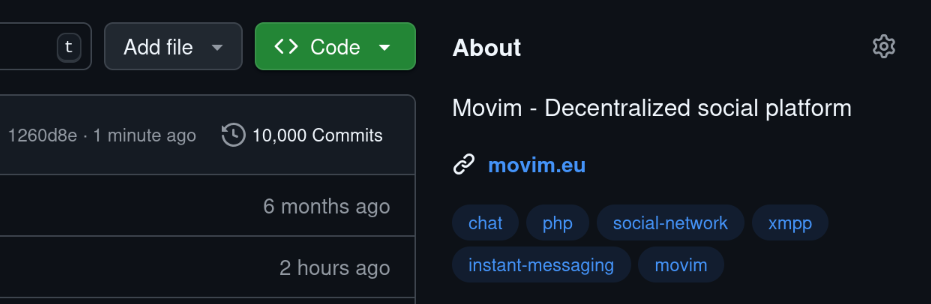
Today Movim just reached 10K commits
 , and this year we will celebrate the 15th anniversary of the project

The upcoming 0.30 will also be a huge milestone with plenty of exciting features, stay tuned #milestone #release #birthday #anniversary #xmpp #movim
-
chevron_right
edhelas • pubsub.movim.eu / Movim • 27 March 2025 edit
Today Movim just reached 10K commits
, and this year we will celebrate the 15th anniversary of the project
The upcoming 0.30 will also be a huge milestone with plenty of exciting features, stay tuned #milestone #release #birthday #anniversary #xmpp #movim
-
chevron_right
edhelas • pubsub.movim.eu / Movim • 27 March 2025 edit
Today Movim just reached 10K commits
, and this year we will celebrate the 15th anniversary of the project
The upcoming 0.30 will also be a huge milestone with plenty of exciting features, stay tuned #milestone #release #birthday #anniversary #xmpp #movim
-
chevron_right
Movim 0.29.2 is here

edhelas • pubsub.movim.eu / Movim • 17 February 2025 edit • 1 minute
-
chevron_right
Movim 0.29.2 is here
edhelas • pubsub.movim.eu / Movim • 17 February 2025 edit • 1 minute
 MySQL was already broken for a while (migrations not running, broken queries).

Only a few months after the previous version here comes Movim 0.30, codename Encke ☄️
This release is actually way bigger than you might think! Indeed, during half a year a lot of work was poured into the part II of the Movim Live project that has been the biggest evolution in Movim for many years. This side project was finally merged and stabilized in the main branch and we are proud to unveil it to you 🤩.
Movim Live, Part II
Funded by NLNet, the Movim Live project's aim is to bring a modern and complete stack of video-call features to Movim and to create a strong alternative to the other proprietary and centralized platforms.

The Part I goal was to modernize the existing one-to-call call stack. Part II was to bring multi-participant calls, and we did it!
How was it done?
Movim is now implementing XEP-0272: Multiparty Jingle (Muji) combined with XEP-0482: Call Invites. The first XMPP extension, called Muji, allows a user to join a temporary chatroom and initiate an audio or video call with any of the participants inside it. The second one allows this user to be invited or invite contacts to join this "Muji Chatroom".
Another client is already implementing those two XEPs, Dino, and it's actually the first time that we have two clients on totally different stacks (one is a desktop client, the other one a web application) that can do multi-participant calls on a standard protocol.
How can I create a group call in Movim?
The flow is quite close to a one-to-one call, except that you start the call in one of your group chats.
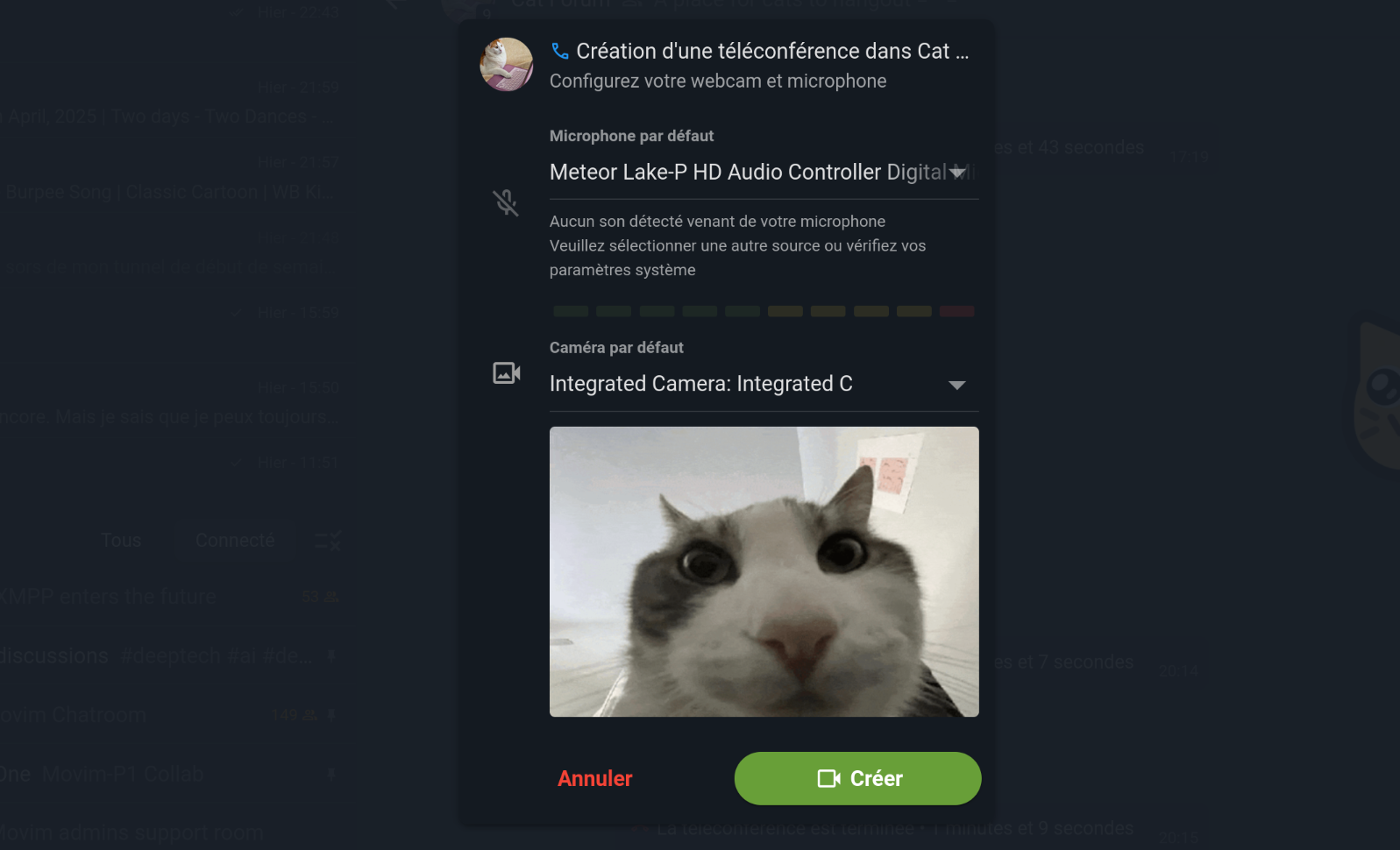
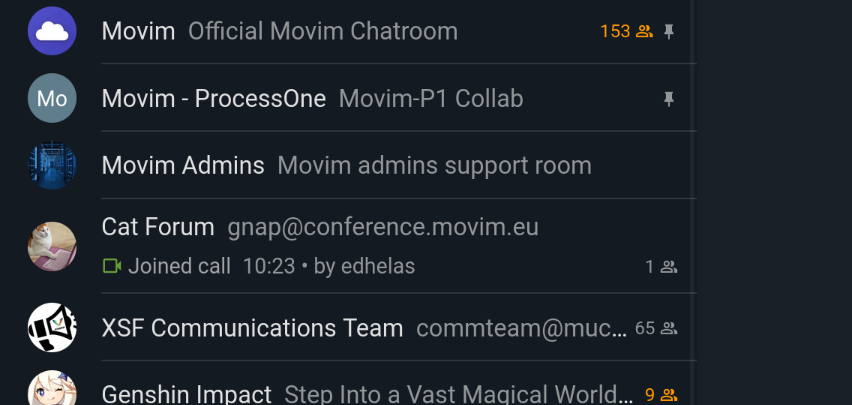
The group call will then appear in your chatroom list, similar to what you can find on Discord. The other participants will then get an invitation and will be able to join the group call once their camera and microphone are set up correctly.
What can I do in a group call?
Once you're in, Movim offers a couple of nice features to enjoy the call.
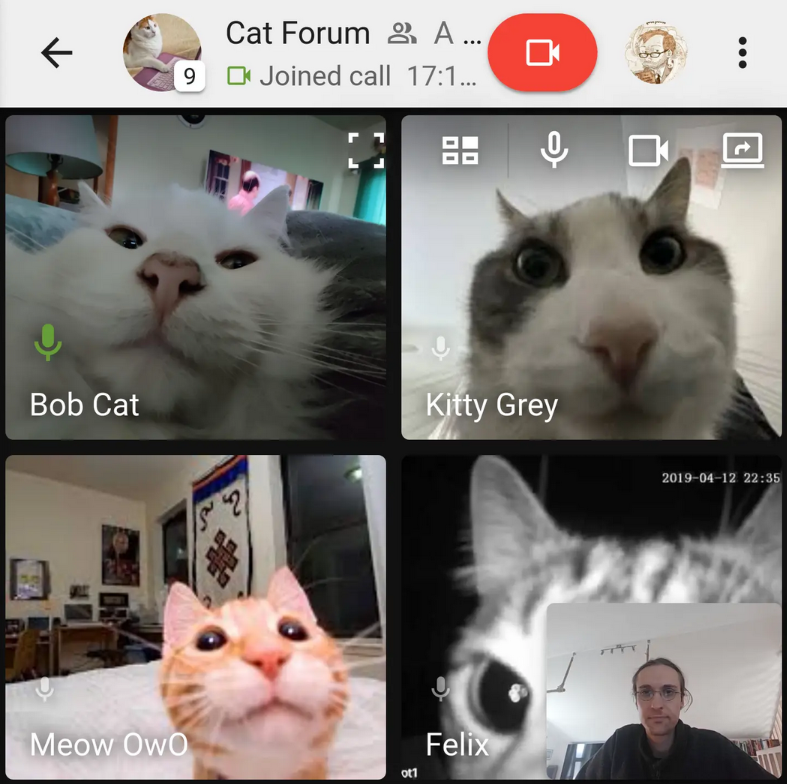
You can toggle between the grid view and the "active-speaker" view (where the actively speaking person is put in front). When using the grid view, the speaking person's microphone is slightly bigger and blinking in green.
The existing screen-sharing feature has also been ported to group calls, allowing you to share your screen with the others. More work will be done on the part to allow you to stream your screen and webcam simultaneously and use Movim as a nice stream-gaming platform or live-conference tool in the future ✨.
A lot of work was also spent on ensuring a proper integration of the call in the user interface and the user flows. When you're in the chatroom, the group call is integrated into the chat view, and when you leave the discussion, it moves automatically in the corner. You can also put the group call in full screen at any time.
And as always, you can toggle your webcam and microphone off any time.
Movim Live, Part III
So what's next? In the upcoming and last part Movim is actively working with the ProcessOne team on a new set of XMPP extensions to bring massively scalable group calls in XMPP.

The current Muji flow is to initiate a one-to-one call with each of the Muji call participants, as you can see it doesn't scale that much. An SFU, or Selective Forwarding Unit allows you to call a specialized server, send your video and audio streams and receive the other participants streams in return.
This should require standardizing two new XEPs:
The current flow is an "invite-based" one; this means that once everyone leaves the group call, it is automatically destroyed. We would like to allow chatroom admins to create one or several "call rooms," name them, and allow their users to join and leave the calls at their convenience. This will bring a more modern experience and bring many new ways of interacting with audio and video calls in XMPP.
Hopefully this Part III should be delivered in the upcoming months; stay tuned!
What else?
The 0.30 is also bringing some other exciting features 🤩.
The reactions are now displayed in the detailed message view.
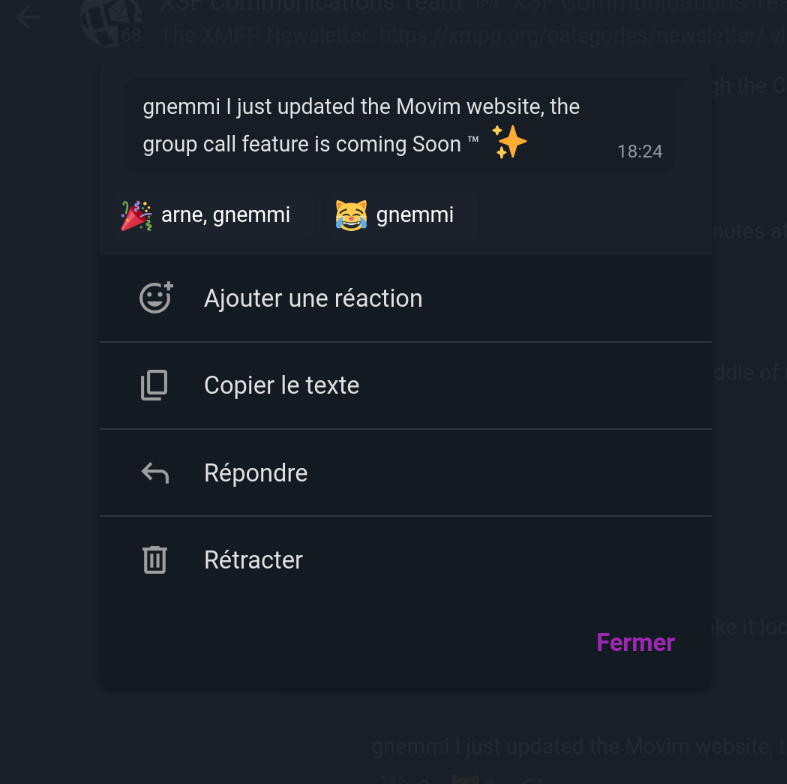
Some parts of the UI were modernized and simplified, such as the emoji picker view or the navigation bars.
Movim is now supporting Unicode 15.1 with plenty of new emojis to use 🥳.
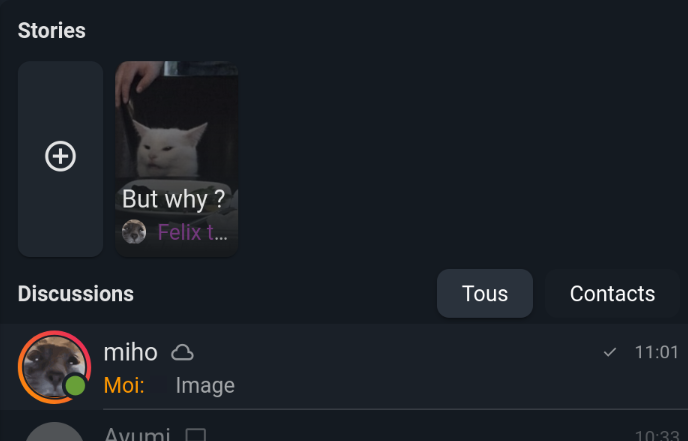
When one of your contacts is publishing a new Story his avatar will change, allowing you to easily open it.
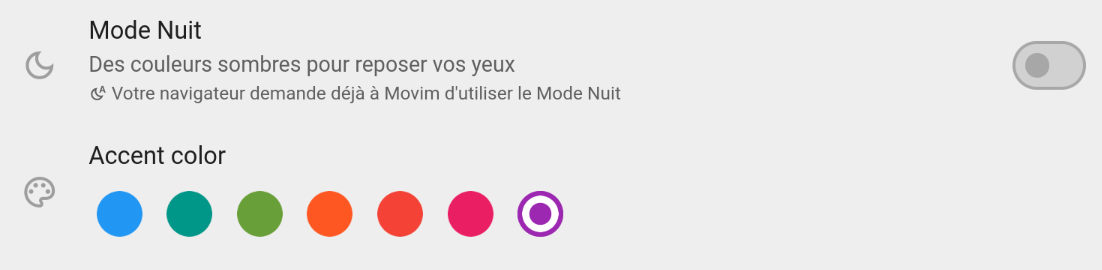
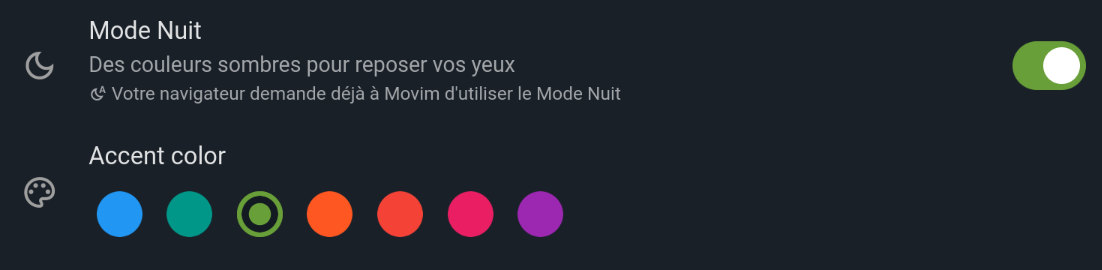
The Movim UI, and especially color management, was also deeply refactorized and simplified. The Light and Dark modes are better looking and an exciting Accent Color feature is now allowing you to customize your Movim even more 🎨.
See you soon!
So that's all folks ✨.
We hope that you'll really enjoy all those new features. If you're a server admin we invite you to add your server to join.movim.eu and join the federation.
We would also be really pleased if you share Movim around, invite your friends to join, and talk about it. Movim can be a really nice open-source, federated and standard alternative now. Let's grow the community ☺️!
Thanks again to all the contributors, translators, and other bug finders that allowed this exciting version to be launched 💕.
See you next time 😘.
Only a few months after the previous version here comes Movim 0.30, codename Encke ☄️
This release is actually way bigger than you might think! Indeed, during half a year a lot of work was poured into the part II of the Movim Live project that has been the biggest evolution in Movim for many years. This side project was finally merged and stabilized in the main branch and we are proud to unveil it to you 🤩.
Movim Live, Part II
Funded by NLNet, the Movim Live project's aim is to bring a modern and complete stack of video-call features to Movim and to create a strong alternative to the other proprietary and centralized platforms.
The Part I goal was to modernize the existing one-to-call call stack. Part II was to bring multi-participant calls, and we did it!
How was it done?
Movim is now implementing XEP-0272: Multiparty Jingle (Muji) combined with XEP-0482: Call Invites. The first XMPP extension, called Muji, allows a user to join a temporary chatroom and initiate an audio or video call with any of the participants inside it. The second one allows this user to be invited or invite contacts to join this "Muji Chatroom".
Another client is already implementing those two XEPs, Dino, and it's actually the first time that we have two clients on totally different stacks (one is a desktop client, the other one a web application) that can do multi-participant calls on a standard protocol.
How can I create a group call in Movim?
The flow is quite close to a one-to-one call, except that you start the call in one of your group chats.
The group call will then appear in your chatroom list, similar to what you can find on Discord. The other participants will then get an invitation and will be able to join the group call once their camera and microphone are set up correctly.
What can I do in a group call?
Once you're in, Movim offers a couple of nice features to enjoy the call.
You can toggle between the grid view and the "active-speaker" view (where the actively speaking person is put in front). When using the grid view, the speaking person's microphone is slightly bigger and blinking in green.
The existing screen-sharing feature has also been ported to group calls, allowing you to share your screen with the others. More work will be done on the part to allow you to stream your screen and webcam simultaneously and use Movim as a nice stream-gaming platform or live-conference tool in the future ✨.
A lot of work was also spent on ensuring a proper integration of the call in the user interface and the user flows. When you're in the chatroom, the group call is integrated into the chat view, and when you leave the discussion, it moves automatically in the corner. You can also put the group call in full screen at any time.
And as always, you can toggle your webcam and microphone off any time.
Movim Live, Part III
So what's next? In the upcoming and last part Movim is actively working with the ProcessOne team on a new set of XMPP extensions to bring massively scalable group calls in XMPP.
The current Muji flow is to initiate a one-to-one call with each of the Muji call participants, as you can see it doesn't scale that much. An SFU, or Selective Forwarding Unit allows you to call a specialized server, send your video and audio streams and receive the other participants streams in return.
This should require standardizing two new XEPs:
The current flow is an "invite-based" one; this means that once everyone leaves the group call, it is automatically destroyed. We would like to allow chatroom admins to create one or several "call rooms," name them, and allow their users to join and leave the calls at their convenience. This will bring a more modern experience and bring many new ways of interacting with audio and video calls in XMPP.
Hopefully this Part III should be delivered in the upcoming months; stay tuned!
What else?
The 0.30 is also bringing some other exciting features 🤩.
The reactions are now displayed in the detailed message view.
Some parts of the UI were modernized and simplified, such as the emoji picker view or the navigation bars.
Movim is now supporting Unicode 15.1 with plenty of new emojis to use 🥳.
When one of your contacts is publishing a new Story his avatar will change, allowing you to easily open it.
The Movim UI, and especially color management, was also deeply refactorized and simplified. The Light and Dark modes are better looking and an exciting Accent Color feature is now allowing you to customize your Movim even more 🎨.
See you soon!
So that's all folks ✨.
We hope that you'll really enjoy all those new features. If you're a server admin we invite you to add your server to join.movim.eu and join the federation.
We would also be really pleased if you share Movim around, invite your friends to join, and talk about it. Movim can be a really nice open-source, federated and standard alternative now. Let's grow the community ☺️!
Thanks again to all the contributors, translators, and other bug finders that allowed this exciting version to be launched 💕.
See you next time 😘.
Only a few months after the previous version here comes Movim 0.30, codename Encke ☄️
This release is actually way bigger than you might think! Indeed, during half a year a lot of work was poured into the part II of the Movim Live project that has been the biggest evolution in Movim for many years. This side project was finally merged and stabilized in the main branch and we are proud to unveil it to you 🤩.
Movim Live, Part II
Funded by NLNet, the Movim Live project's aim is to bring a modern and complete stack of video-call features to Movim and to create a strong alternative to the other proprietary and centralized platforms.
The Part I goal was to modernize the existing one-to-call call stack. Part II was to bring multi-participant calls, and we did it!
How was it done?
Movim is now implementing XEP-0272: Multiparty Jingle (Muji) combined with XEP-0482: Call Invites. The first XMPP extension, called Muji, allows a user to join a temporary chatroom and initiate an audio or video call with any of the participants inside it. The second one allows this user to be invited or invite contacts to join this "Muji Chatroom".
Another client is already implementing those two XEPs, Dino, and it's actually the first time that we have two clients on totally different stacks (one is a desktop client, the other one a web application) that can do multi-participant calls on a standard protocol.
How can I create a group call in Movim?
The flow is quite close to a one-to-one call, except that you start the call in one of your group chats.
The group call will then appear in your chatroom list, similar to what you can find on Discord. The other participants will then get an invitation and will be able to join the group call once their camera and microphone are set up correctly.
What can I do in a group call?
Once you're in, Movim offers a couple of nice features to enjoy the call.
You can toggle between the grid view and the "active-speaker" view (where the actively speaking person is put in front). When using the grid view, the speaking person's microphone is slightly bigger and blinking in green.
The existing screen-sharing feature has also been ported to group calls, allowing you to share your screen with the others. More work will be done on the part to allow you to stream your screen and webcam simultaneously and use Movim as a nice stream-gaming platform or live-conference tool in the future ✨.
A lot of work was also spent on ensuring a proper integration of the call in the user interface and the user flows. When you're in the chatroom, the group call is integrated into the chat view, and when you leave the discussion, it moves automatically in the corner. You can also put the group call in full screen at any time.
And as always, you can toggle your webcam and microphone off any time.
Movim Live, Part III
So what's next? In the upcoming and last part Movim is actively working with the ProcessOne team on a new set of XMPP extensions to bring massively scalable group calls in XMPP.
The current Muji flow is to initiate a one-to-one call with each of the Muji call participants, as you can see it doesn't scale that much. An SFU, or Selective Forwarding Unit allows you to call a specialized server, send your video and audio streams and receive the other participants streams in return.
This should require standardizing two new XEPs:
The current flow is an "invite-based" one; this means that once everyone leaves the group call, it is automatically destroyed. We would like to allow chatroom admins to create one or several "call rooms," name them, and allow their users to join and leave the calls at their convenience. This will bring a more modern experience and bring many new ways of interacting with audio and video calls in XMPP.
Hopefully this Part III should be delivered in the upcoming months; stay tuned!
What else?
The 0.30 is also bringing some other exciting features 🤩.
The reactions are now displayed in the detailed message view.
Some parts of the UI were modernized and simplified, such as the emoji picker view or the navigation bars.
Movim is now supporting Unicode 15.1 with plenty of new emojis to use 🥳.
When one of your contacts is publishing a new Story his avatar will change, allowing you to easily open it.
The Movim UI, and especially color management, was also deeply refactorized and simplified. The Light and Dark modes are better looking and an exciting Accent Color feature is now allowing you to customize your Movim even more 🎨.
See you soon!
So that's all folks ✨.
We hope that you'll really enjoy all those new features. If you're a server admin we invite you to add your server to join.movim.eu and join the federation.
We would also be really pleased if you share Movim around, invite your friends to join, and talk about it. Movim can be a really nice open-source, federated and standard alternative now. Let's grow the community ☺️!
Thanks again to all the contributors, translators, and other bug finders that allowed this exciting version to be launched 💕.
See you next time 😘.
 , and this year we will celebrate the 15th anniversary of the project


In this #release you'll find some important fixes and improvements; let's have a look. 😉
Set minimum PHP version to PHP 8.2
This change was initially planned for the next major version but some dependency issues forced me to raise the minimum PHP version required by #Movim to 8.2. PHP 8.1 was already in EOL anyway.
Fixes and improvements in file upload
The file upload code was slightly refactored. It fixes a crash when the filename was too long (the filename is then shortened and a hash is added at the end).
When uploading a file from Movim their name is also prefixed with post_, chat_ and story_ regarding from which part of the UI they are sent. This feature was requested many times by the admins to allow them to organize and expire them properly (for example after 24h for Stories files, unlimited for Post files).
Fixes Pubsub ordering
ejabberd and Prosody don't return the requested #Pubsub items the same way, most recent first for ejabberd and earliest first for Prosody. The XMPP protocol doesn't specify any default order so Movim is now automatically checking the order based on the articles publication time.
Reconcile the nullable state in some tables
It seems that a small change in the internal Movim database library (Eloquent) changed the behavior of some migrations along the way, this version reconcile those differences (some SQL columns were not nullable as they should).
Update fabiang/sasl to fix Update of the SASL SCRAM Downgrade protection XEP #17
Movim is now integrating the upgrade of the XEP-0474: SASL SCRAM Downgrade Protection XEP and the proper integration of the RFC 5802. This solved the connection issue on some #XMPP servers and fixed a risk of attack in the #SASL stack.
What's next?
Hopefully the next version will be a 0.30 and will integrate some pretty big changes, especially on the video-conferencing part. Stay tuned!
That's all folks ✨
In this #release you'll find some important fixes and improvements; let's have a look. 😉
Set minimum PHP version to PHP 8.2
This change was initially planned for the next major version but some dependency issues forced me to raise the minimum PHP version required by #Movim to 8.2. PHP 8.1 was already in EOL anyway.
Fixes and improvements in file upload
The file upload code was slightly refactored. It fixes a crash when the filename was too long (the filename is then shortened and a hash is added at the end).
When uploading a file from Movim their name is also prefixed with post_, chat_ and story_ regarding from which part of the UI they are sent. This feature was requested many times by the admins to allow them to organize and expire them properly (for example after 24h for Stories files, unlimited for Post files).
Fixes Pubsub ordering
ejabberd and Prosody don't return the requested #Pubsub items the same way, most recent first for ejabberd and earliest first for Prosody. The XMPP protocol doesn't specify any default order so Movim is now automatically checking the order based on the articles publication time.
Reconcile the nullable state in some tables
It seems that a small change in the internal Movim database library (Eloquent) changed the behavior of some migrations along the way, this version reconcile those differences (some SQL columns were not nullable as they should).
Update fabiang/sasl to fix Update of the SASL SCRAM Downgrade protection XEP #17
Movim is now integrating the upgrade of the XEP-0474: SASL SCRAM Downgrade Protection XEP and the proper integration of the RFC 5802. This solved the connection issue on some #XMPP servers and fixed a risk of attack in the #SASL stack.
What's next?
Hopefully the next version will be a 0.30 and will integrate some pretty big changes, especially on the video-conferencing part. Stay tuned!
That's all folks ✨