• chevron_right

      Movim 0.29 Rankin, time to share your Story! sparkles

      Timothée Jaussoin • pubsub.movim.eu / Movim • 1 January 2025 edit • 2 minutes

    New year, new #release ! This time with plenty of new exciting features, let's have a look at them. 😊

    Stories

    The past few years several chat platforms tried to blur the line between their chat and social features.

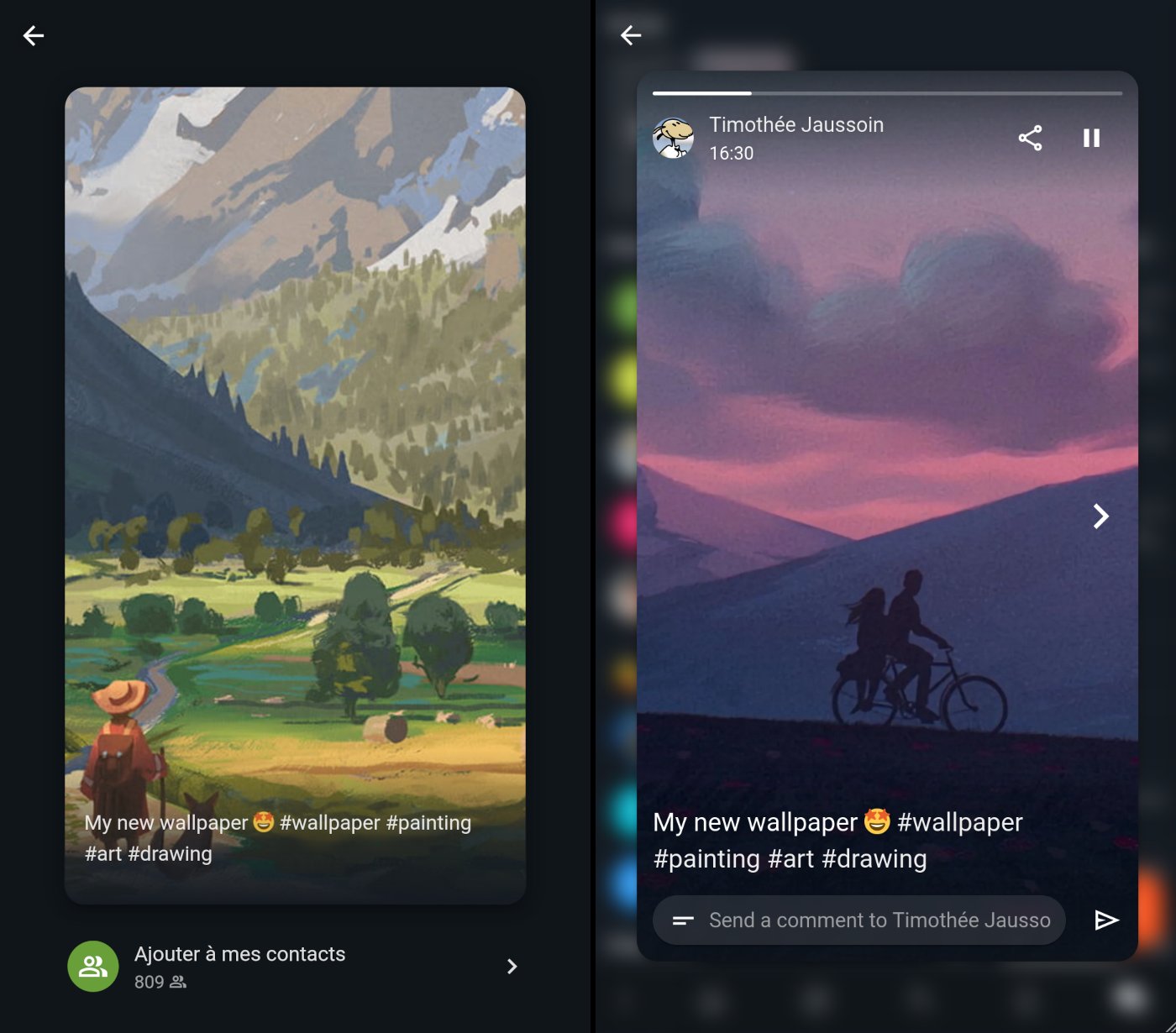
    Stories are a very nice way to share content with your contacts and allow them to react easily by chat.

    Stories screenshot

    Movim 0.29 is the first XMPP client that implements Stories. A specific XMPP extension, XEP-0501: Pubsub Stories, was created to standardize and allow perfect compatibility with other clients on the network. XMPP is once more showing its capability to be a perfect protocol to build this kind of feature and deploy it easily across a large network of compatible clients.

    While writing this article some other XMPP clients are already planning to implement the feature.

    You'll be able to create a new Story by taking a picture directly with your camera or select one from your gallery, edit it, add a small text and publish it to your contacts. Your story will then be available for 24 hours, and your contacts will be able to comment on it by sending you a chat message.

    In the upcoming versions more features will be progressively added to complete those ones. If you are looking for a feature in particular feel free to drop a comment or a message in the support room. 😌

    Briefs

    This version is also introducing Briefs, a simpler way to publish content on your profile or in your Communities.

    Until now you were invited to write posts having a title and a content. Briefs allows you to directly publish a short text to your contacts like on Mastodon, Twitter or Bluesky. If you feel the need to express yourself in a more "bloggy" way you can always switch back to the complete experience.

    A Brief

    Some refactoring was done in the database and user interface to better integrate Briefs in the feeds.

    But also...

    An important refactoring was done regarding how the internal dates and times were handled. Now each connected user is sending its own timezone on login and all the times are generated dynamically using those timezones; this solves some weird calculated hours during the switch between daylight saving times.

    Lots of fixes were done in how the chat discussions are handled and cached. This is fixing a few erratic behaviors in how chat discussions were ordered and their related notifications displayed.

    And as always some database, user interface and JavaScript fixes.

    Some news from the Movim Live project

    The Phase 2 of the Movim Live project is finally getting in shape. Movim is now able to start and join a multiparticipant call and get their cameras and microphones. This required some important refactorings in how the calls and media streams were handled internaly, you can follow the dedicated branch there Pull Request: Multiparty Jingle.

    This second important phase should be finished in a few months and a dedicated version (maybe a 0.30 ?) will be published then.

    In the meantime lets enjoy all the new exciting features.

    Happy New Year to all the #Movim and #XMPP users 🎉

    That's all folks!

    #stories #briefs #story #brief

    • chevron_right

      Movim 0.29 Rankin, time to share your Story! sparkles

      Timothée Jaussoin • pubsub.movim.eu / Movim • 1 January 2025 edit • 2 minutes

    New year, new #release ! This time with plenty of new exciting features, let's have a look at them. 😊

    Stories

    The past few years several chat platforms tried to blur the line between their chat and social features.

    Stories are a very nice way to share content with your contacts and allow them to react easily by chat.

    Stories screenshot

    Movim 0.29 is the first XMPP client that implements Stories. A specific XMPP extension, XEP-0501: Pubsub Stories, was created to standardize and allow perfect compatibility with other clients on the network. XMPP is once more showing its capability to be a perfect protocol to build this kind of feature and deploy it easily across a large network of compatible clients.

    While writing this article some other XMPP clients are already planning to implement the feature.

    You'll be able to create a new Story by taking a picture directly with your camera or select one from your gallery, edit it, add a small text and publish it to your contacts. Your story will then be available for 24 hours, and your contacts will be able to comment on it by sending you a chat message.

    In the upcoming versions more features will be progressively added to complete those ones. If you are looking for a feature in particular feel free to drop a comment or a message in the support room. 😌

    Briefs

    This version is also introducing Briefs, a simpler way to publish content on your profile or in your Communities.

    Until now you were invited to write posts having a title and a content. Briefs allows you to directly publish a short text to your contacts like on Mastodon, Twitter or Bluesky. If you feel the need to express yourself in a more "bloggy" way you can always switch back to the complete experience.

    A Brief

    Some refactoring was done in the database and user interface to better integrate Briefs in the feeds.

    But also...

    An important refactoring was done regarding how the internal dates and times were handled. Now each connected user is sending its own timezone on login and all the times are generated dynamically using those timezones; this solves some weird calculated hours during the switch between daylight saving times.

    Lots of fixes were done in how the chat discussions are handled and cached. This is fixing a few erratic behaviors in how chat discussions were ordered and their related notifications displayed.

    And as always some database, user interface and JavaScript fixes.

    Some news from the Movim Live project

    The Phase 2 of the Movim Live project is finally getting in shape. Movim is now able to start and join a multiparticipant call and get their cameras and microphones. This required some important refactorings in how the calls and media streams were handled internaly, you can follow the dedicated branch there Pull Request: Multiparty Jingle.

    This second important phase should be finished in a few months and a dedicated version (maybe a 0.30 ?) will be published then.

    In the meantime lets enjoy all the new exciting features.

    Happy New Year to all the #Movim and #XMPP users 🎉

    That's all folks!

    #stories #briefs #story #brief

    • chevron_right

      Movim 0.29 Rankin, time to share your Story! sparkles

      Timothée Jaussoin • pubsub.movim.eu / Movim • 1 January 2025 edit • 2 minutes

    New year, new #release ! This time with plenty of new exciting features, let's have a look at them. 😊

    Stories

    The past few years several chat platforms tried to blur the line between their chat and social features.

    Stories are a very nice way to share content with your contacts and allow them to react easily by chat.

    Stories screenshot

    Movim 0.29 is the first XMPP client that implements Stories. A specific XMPP extension, XEP-0501: Pubsub Stories, was created to standardize and allow perfect compatibility with other clients on the network. XMPP is once more showing its capability to be a perfect protocol to build this kind of feature and deploy it easily across a large network of compatible clients.

    While writing this article some other XMPP clients are already planning to implement the feature.

    You'll be able to create a new Story by taking a picture directly with your camera or select one from your gallery, edit it, add a small text and publish it to your contacts. Your story will then be available for 24 hours, and your contacts will be able to comment on it by sending you a chat message.

    In the upcoming versions more features will be progressively added to complete those ones. If you are looking for a feature in particular feel free to drop a comment or a message in the support room. 😌

    Briefs

    This version is also introducing Briefs, a simpler way to publish content on your profile or in your Communities.

    Until now you were invited to write posts having a title and a content. Briefs allows you to directly publish a short text to your contacts like on Mastodon, Twitter or Bluesky. If you feel the need to express yourself in a more "bloggy" way you can always switch back to the complete experience.

    A Brief

    Some refactoring was done in the database and user interface to better integrate Briefs in the feeds.

    But also...

    An important refactoring was done regarding how the internal dates and times were handled. Now each connected user is sending its own timezone on login and all the times are generated dynamically using those timezones; this solves some weird calculated hours during the switch between daylight saving times.

    Lots of fixes were done in how the chat discussions are handled and cached. This is fixing a few erratic behaviors in how chat discussions were ordered and their related notifications displayed.

    And as always some database, user interface and JavaScript fixes.

    Some news from the Movim Live project

    The Phase 2 of the Movim Live project is finally getting in shape. Movim is now able to start and join a multiparticipant call and get their cameras and microphones. This required some important refactorings in how the calls and media streams were handled internaly, you can follow the dedicated branch there Pull Request: Multiparty Jingle.

    This second important phase should be finished in a few months and a dedicated version (maybe a 0.30 ?) will be published then.

    In the meantime lets enjoy all the new exciting features.

    Happy New Year to all the #Movim and #XMPP users 🎉

    That's all folks!

    #stories #briefs #story #brief

    • chevron_right

      Everyone was Matt, a post-mortem

      Timothée Jaussoin • pubsub.movim.eu / Movim • 9 October 2024 edit • 3 minutes

    tldr; On the night between the 2nd and 3th of October 2024 a corruption of the mov.im instance HTTP cache allowed several users to be connected as another person. Only one account was affected.

    This issue only affected the mov.im instance and doesn't apply to the Movim project itself.

    The nxing location issue

    On the 2nd of October evening a new #nginx #configuration was pushed on the mov.im virtualhost. This configuration is using fastcgi_cache to #cache some URLs and lighten up the load put on the PHP side and therefore Movim.

    The existing configuration looked like this:

    server {
        server_name mov.im;
    
        location /picture {
            set $no_cache 0;
            try_files $uri $uri/ /index.php$is_args$args;
        }
    
        location / {
            set $no_cache 1;
            if (!-e $request_filename) {
                rewrite ^/(.*) /index.php?query=$1 last;
            }
        }
    
        location ~ \.php$ {
            include snippets/fastcgi-php.conf;
    
            add_header X-Cache $upstream_cache_status;
            fastcgi_cache nginx_cache;
            fastcgi_cache_valid 200 301 302 1h;
            fastcgi_cache_bypass $no_cache;
            fastcgi_no_cache $no_cache;
        }
    }
    

    The fastcgi_cache module is by default enabled for all the .php files called, is disabled for all the URLs except for the /picture ones. The reverse logic is what made things a bit confusing there.

    The configuration change added a new section:

        location = / {
            # Introduced configuration
        }
    

    This new section was applied only to the root https://mov.im/ requests but didn't contained the $no_cache parameter line.

    The second confusion came with how nginx is handling their locations blocks. The DigitalOcean - nginx location directive examples explains it quite clearly.

    Some locations blocks definitions are used or passed to the next matching one:

    3. NGINX location block for a directory The following location block will match any request starting with /images/ but continue with searching for more specific block for the requested URI. Therefore the location block will be selected if NGINX does not find any more specific match.

    And some others don't:

    2. NGINX location matching exact URL NGINX always tries to match most specific prefix location at first. Therefore, the equal sign in the following location block forces an exact match with the path requested and then stops searching for any more matches.

    The new introduced block (location = /) behave like the second definition. nginx basically used it and stopped there, applying cache to it without jumping to the "default" one location /.

    The consequences

    One of the mov.im users, lets call it Matt (name was changed) had a quite intensive activity on the instance, he basically created a little script to login and logout each 2-3 minutes to check a few parameters. This was not the cause of the issue but this activity raised the chances that he was the first one to hit the / URL when reconnecting.

    The PHP script processed the XMPP authentication successfully and set à cookie to Matt to let him enjoy Movim.

    The new nginx faulty configuration cached this call.

    The following hours many new users that tried to authenticate reached this URL and nginx directly returned the cached version... containing the cookie created especially for Matt.

    And then suddenly lots of persons were Matt.

    Fixing the issue

    Early in the morning, waking up, I was notified personally and on the support chatroom that some users were connected as other users.

    The mov.im instance was disconnected as well as the nginx configuration.

    I contacted Matt personally explaining the issue and asking him to change his password and started an investigation. A few small but not directly related issues and improvement concerning the session management were fixed.

    The actual one was found by searching the nginx cache for cookie content and I quickly figured out that the new nginx configuration was the cause of that.

    Aftermatt/aftermath

    The configuration is for now reversed to the old one and the nginx cache is disabled, I'll try to find a cleaner way to re-enable it to prevent such issue to pop again in the future.

    Only Matt (the first one to hit the cache) was affected by this issue so normally no other account were affected by the issue. If you logged during that night on mov.im I'd still recommend to change your password just in case.

    That's all folks, and sorry for the mess.

    edhelas

    #security #issue

    • chevron_right

      Everyone was Matt, a post-mortem

      Timothée Jaussoin • pubsub.movim.eu / Movim • 9 October 2024 edit • 3 minutes

    tldr; On the night between the 2nd and 3th of October 2024 a corruption of the mov.im instance HTTP cache allowed several users to be connected as another person. Only one account was affected.

    This issue only affected the mov.im instance and doesn't apply to the Movim project itself.

    The nxing location issue

    On the 2nd of October evening a new #nginx #configuration was pushed on the mov.im virtualhost. This configuration is using fastcgi_cache to #cache some URLs and lighten up the load put on the PHP side and therefore Movim.

    The existing configuration looked like this:

    server {
        server_name mov.im;
    
        location /picture {
            set $no_cache 0;
            try_files $uri $uri/ /index.php$is_args$args;
        }
    
        location / {
            set $no_cache 1;
            if (!-e $request_filename) {
                rewrite ^/(.*) /index.php?query=$1 last;
            }
        }
    
        location ~ \.php$ {
            include snippets/fastcgi-php.conf;
    
            add_header X-Cache $upstream_cache_status;
            fastcgi_cache nginx_cache;
            fastcgi_cache_valid 200 301 302 1h;
            fastcgi_cache_bypass $no_cache;
            fastcgi_no_cache $no_cache;
        }
    }
    

    The fastcgi_cache module is by default enabled for all the .php files called, is disabled for all the URLs except for the /picture ones. The reverse logic is what made things a bit confusing there.

    The configuration change added a new section:

        location = / {
            # Introduced configuration
        }
    

    This new section was applied only to the root https://mov.im/ requests but didn't contained the $no_cache parameter line.

    The second confusion came with how nginx is handling their locations blocks. The DigitalOcean - nginx location directive examples explains it quite clearly.

    Some locations blocks definitions are used or passed to the next matching one:

    3. NGINX location block for a directory The following location block will match any request starting with /images/ but continue with searching for more specific block for the requested URI. Therefore the location block will be selected if NGINX does not find any more specific match.

    And some others don't:

    2. NGINX location matching exact URL NGINX always tries to match most specific prefix location at first. Therefore, the equal sign in the following location block forces an exact match with the path requested and then stops searching for any more matches.

    The new introduced block (location = /) behave like the second definition. nginx basically used it and stopped there, applying cache to it without jumping to the "default" one location /.

    The consequences

    One of the mov.im users, lets call it Matt (name was changed) had a quite intensive activity on the instance, he basically created a little script to login and logout each 2-3 minutes to check a few parameters. This was not the cause of the issue but this activity raised the chances that he was the first one to hit the / URL when reconnecting.

    The PHP script processed the XMPP authentication successfully and set à cookie to Matt to let him enjoy Movim.

    The new nginx faulty configuration cached this call.

    The following hours many new users that tried to authenticate reached this URL and nginx directly returned the cached version... containing the cookie created especially for Matt.

    And then suddenly lots of persons were Matt.

    Fixing the issue

    Early in the morning, waking up, I was notified personally and on the support chatroom that some users were connected as other users.

    The mov.im instance was disconnected as well as the nginx configuration.

    I contacted Matt personally explaining the issue and asking him to change his password and started an investigation. A few small but not directly related issues and improvement concerning the session management were fixed.

    The actual one was found by searching the nginx cache for cookie content and I quickly figured out that the new nginx configuration was the cause of that.

    Aftermatt/aftermath

    The configuration is for now reversed to the old one and the nginx cache is disabled, I'll try to find a cleaner way to re-enable it to prevent such issue to pop again in the future.

    Only Matt (the first one to hit the cache) was affected by this issue so normally no other account were affected by the issue. If you logged during that night on mov.im I'd still recommend to change your password just in case.

    That's all folks, and sorry for the mess.

    edhelas

    #security #issue

    • chevron_right

      Everyone was Matt, a post-mortem

      Timothée Jaussoin • pubsub.movim.eu / Movim • 9 October 2024 edit • 3 minutes

    tldr; On the night between the 2nd and 3th of October 2024 a corruption of the mov.im instance HTTP cache allowed several users to be connected as another person. Only one account was affected.

    This issue only affected the mov.im instance and doesn't apply to the Movim project itself.

    The nxing location issue

    On the 2nd of October evening a new #nginx #configuration was pushed on the mov.im virtualhost. This configuration is using fastcgi_cache to #cache some URLs and lighten up the load put on the PHP side and therefore Movim.

    The existing configuration looked like this:

    server {
        server_name mov.im;
    
        location /picture {
            set $no_cache 0;
            try_files $uri $uri/ /index.php$is_args$args;
        }
    
        location / {
            set $no_cache 1;
            if (!-e $request_filename) {
                rewrite ^/(.*) /index.php?query=$1 last;
            }
        }
    
        location ~ \.php$ {
            include snippets/fastcgi-php.conf;
    
            add_header X-Cache $upstream_cache_status;
            fastcgi_cache nginx_cache;
            fastcgi_cache_valid 200 301 302 1h;
            fastcgi_cache_bypass $no_cache;
            fastcgi_no_cache $no_cache;
        }
    }
    

    The fastcgi_cache module is by default enabled for all the .php files called, is disabled for all the URLs except for the /picture ones. The reverse logic is what made things a bit confusing there.

    The configuration change added a new section:

        location = / {
            # Introduced configuration
        }
    

    This new section was applied only to the root https://mov.im/ requests but didn't contained the $no_cache parameter line.

    The second confusion came with how nginx is handling their locations blocks. The DigitalOcean - nginx location directive examples explains it quite clearly.

    Some locations blocks definitions are used or passed to the next matching one:

    3. NGINX location block for a directory The following location block will match any request starting with /images/ but continue with searching for more specific block for the requested URI. Therefore the location block will be selected if NGINX does not find any more specific match.

    And some others don't:

    2. NGINX location matching exact URL NGINX always tries to match most specific prefix location at first. Therefore, the equal sign in the following location block forces an exact match with the path requested and then stops searching for any more matches.

    The new introduced block (location = /) behave like the second definition. nginx basically used it and stopped there, applying cache to it without jumping to the "default" one location /.

    The consequences

    One of the mov.im users, lets call it Matt (name was changed) had a quite intensive activity on the instance, he basically created a little script to login and logout each 2-3 minutes to check a few parameters. This was not the cause of the issue but this activity raised the chances that he was the first one to hit the / URL when reconnecting.

    The PHP script processed the XMPP authentication successfully and set à cookie to Matt to let him enjoy Movim.

    The new nginx faulty configuration cached this call.

    The following hours many new users that tried to authenticate reached this URL and nginx directly returned the cached version... containing the cookie created especially for Matt.

    And then suddenly lots of persons were Matt.

    Fixing the issue

    Early in the morning, waking up, I was notified personally and on the support chatroom that some users were connected as other users.

    The mov.im instance was disconnected as well as the nginx configuration.

    I contacted Matt personally explaining the issue and asking him to change his password and started an investigation. A few small but not directly related issues and improvement concerning the session management were fixed.

    The actual one was found by searching the nginx cache for cookie content and I quickly figured out that the new nginx configuration was the cause of that.

    Aftermatt/aftermath

    The configuration is for now reversed to the old one and the nginx cache is disabled, I'll try to find a cleaner way to re-enable it to prevent such issue to pop again in the future.

    Only Matt (the first one to hit the cache) was affected by this issue so normally no other account were affected by the issue. If you logged during that night on mov.im I'd still recommend to change your password just in case.

    That's all folks, and sorry for the mess.

    edhelas

    #security #issue