• Pl chevron_right

      Erlang Solutions: Everything you need to know about Phoenix Framework 1.7

      news.movim.eu / PlanetJabber • 13 October 2022 • 7 minutes

    It is an exciting time for the Elixir community. As you may have seen at ElixirConf or ElixirConf EU, we are celebrating the 10th anniversary of Elixir . Despite now being 10 years old, there is no slowdown in the number of exciting new features, frameworks, and improvements being made to the language.

    One of the most exciting developments for Elixir is undoubtedly Phoenix . It is a project that is growing in both features and uses cases at an incredible pace. Phoenix 1.5 included some huge changes including the addition of LiveView to the framework, the creation of LiveDashboard, and the new version of PubSub (2.0.).

    Next Phoenix 1.6 introduced even more exciting features, most notably the HEEx engine, the authentication and mailer generators, better integration with LiveView, and the removal of node and webpack, which was replaced with a more simplified esbuild tool.

    For many of us, each new Phoenix framework release brings back the feeling of being a kid on Christmas, we wait with eager anticipation for Chris McCord to announce the new toys we have to play with for the upcoming year, but with these new toys also comes a challenge for those who want to keep their skills and their systems up-to-date. The migration nightmare. We will revisit that at the end of this post.

    Roadmap

    Since Phoenix 1.5 it is a noticeable trend to move into LiveView, as we progress, LiveView can replace more and more JavaScript code, allowing the Elixir developer to get better control of the HTML generation. In the latest release, this trend is continued with the following new features:

    • Verified Routes. This gives us the ability to define paths using a sigil that checks compilation time compared to defined routes.
    • Tailwind. In addition to answering our prayers concerning JavaScript and HTML, this new version also helps manage CSS.
    • Component-based generators. These features offer us a new and better way to write components.
    • Authentication generation code using LiveView. This lets us generate the code for the authentication code but using LiveView instead of the normal controllers, views, and templates.

    We will go deeper into each of these features, but you can already see a trend, right? We are moving more and more to LiveView in the same way we are removing the need to manage things like HTML, JavaScript, and CSS.

    First, let’s look more at LiveView specifically, for release 0.18, Chris McCord announced these improvements:

    • Declarative assigns/slots – which let us define information about attributes and slots which are included inside of the components.
    • HTML Formatter – which performs the format (mix format) for HEEx code even if it’s included inside of the sigil ~H.
    • Accessibility building blocks.

    Now let’s look at each of these elements in deeper detail.

    Verified Routes

    The story is that Jason Stiebs (from the Phoenix team) has been requesting a better, less verbose way, to use the routes for the last 8 years. The 12th time he requested it Chris McCord agreed to this feedback and José Valim had a fantastic way to make that happen.

    The basic idea is that if we have this:

    This is generating the route which we could use in this way:

    This is very verbose, but it could be even worse if we have a definition of the routes nested like this one:

    And it is just as verbose when we use LiveView:

    To avoid this, the Verified Routes provides us a shortcut using the path:

    As you can see, using the sigil “~p” we can define the path where we want to go and it’s completely equivalent to using the previous Routes helper function.

    The main advantage of this feature is that it allows us to write the path concisely and still check if that route is valid or not in the same way we would use the Route Helper function.

    Tailwind

    To understand this change let’s look at what Adam Wathan (creator of Tailwind) said about CSS and the use of CSS:
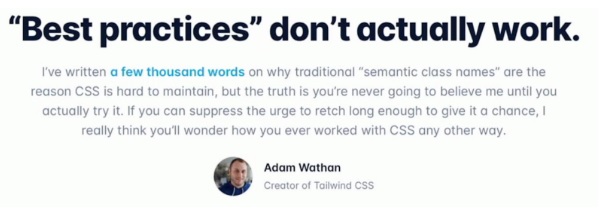
    The use of CSS in a traditional way, that is using “semantic class names”, is hard to maintain and that’s why he created Tailwind. Tailwind is based on the specification of how the element should be shown. There can be different elements that are semantically the same, for example, two “Accept” buttons where we want one to appear big and the other a bit narrower. Under this paradigm, we’d be forced to use the class “accept-button” in addition to the classes which are modifying this case and which do not allow them to be reused.

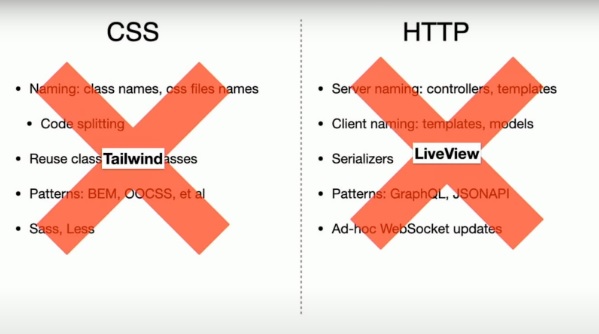
    The other approach is to implement small modifications to how we present the buttons. In this way, we can define a lot in HTML and get rid of the CSS.

    The main idea, as I said previously, is to replace as much CSS as possible in the same way as LiveView replaced a lot of JavaScript:
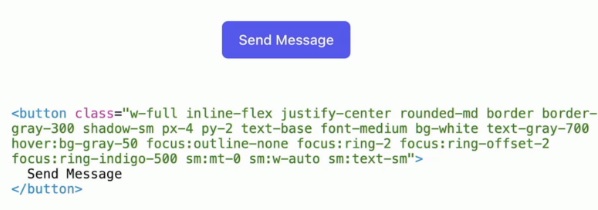
    For example, using Tailwind with HTML and getting rid of CSS, we could build a button like this one with the code shown in the image below:
    It could be argued that it’s complex, but it’s indeed perfect from the point of view of LiveView and components because these classes can be encapsulated inside of the component and we can use it in this way:
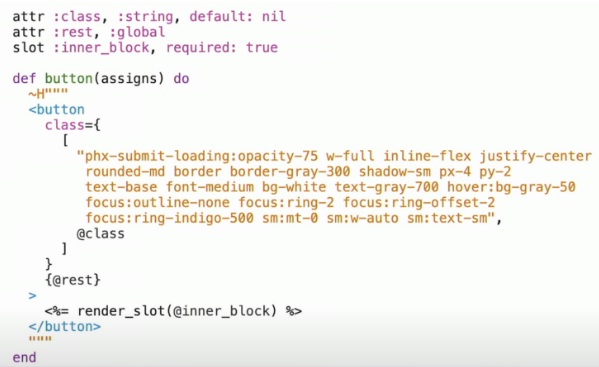
    And finally, in the template:

    Easy, right?

    Authentication generation code using LiveView

    Big thank you to Berenice Medel on the Phoenix team, she had the great idea to have the generation of the authentication templates work with LiveView.

    Declarative Assigns / Slots

    Before going into this section, Chris McCord gave a big thank you to Marius Saraiva and Connor Lay. They are the people in charge of all of the improvements regarding declarative assigns, slots, and HEEx.
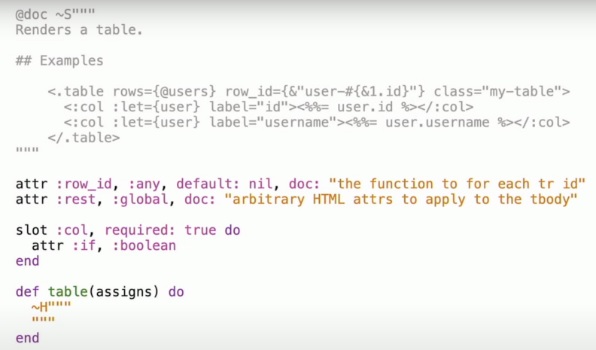
    The idea behind slots and attrs is to provide us with a way to define attributes and sub-elements inside of a defined component. The example above, it’s defining a component with the name “table”. It’s defining the attributes “row_id” and “rest”, as you can see in the documentation, the attributes for the table are “rows”, “row_id”, and “class”. That means we can find “row_id”, then “rest” will feature a map with all of the remaining attributes.

    As we said, the slot is a way to indicate we are going to use a sub-element “col” inside of the “table”. In the example, you can see two elements “col” inside of “table”. The “col” element has only defined one attribute “if” which is a boolean.

    HTML Formatter

    A big thank you to Felipe Renan who worked on the implementation of this for HEEx to be included in Phoenix. Now, it’s possible to have a “mix format” fixing the format of the code written inside of the templates, even inside of the ~H sigil.

    Accessibility building blocks

    Phoenix 1.7 includes some primitives for helping to create more accessible websites. One of them is “focus_wrap”:
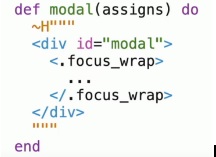
    This helps define the areas where you want to shift focus between multiple elements inside of a defined area instead of a whole website.

    This works in combination with functions in the JS module which configure the focus like a stack. When you go into the modal it pushes the focus area that we use and when the modal is closed, we pop out from that area of the stack and stay with the previous one.

    More improvements in the Roadmap

    One of the improvements for LiveView is Storybook. Storybook is a visual UI creator which lets us define the components we want to be included in our websites and then generate the code to be implemented for it. Christian Blavier did great work starting this in his repository but he’s now off and the Phoenix team is going to be moving it forward and evolving it.

    Streaming data for optimized handling of collections data is another priority in the roadmap. The work for this has already started, fingers are crossed that it might be announced for the next release.

    During recent conferences, another speaker raised a concern about the messaging incompatibility between LiveView and LiveComponent, luckily, this is on the roadmap to be fixed shortly.

    And is that all?

    With all the developments in Phoenix, it would be easy to talk about at much greater length and in much greater detail. The pace of the Phoenix team’s progress is impressive and exciting.

    As it continues to grow it is easy to imagine a future where we only need to write HEEx code inside of Elixir to get full control of generated HTML, CSS, and JavaScript for the browser. It’s exciting to imagine and will be sure to further grow the use and adoption of Elixir as a full-stack technology.

    Read to adopt Elixir? Or need help with your implementation? Or contact us about our training options.

    The post Everything you need to know about Phoenix Framework 1.7 appeared first on Erlang Solutions .

    • Pl chevron_right

      Erlang Solutions: Everything you need to know about Phoenix Framework 1.7

      news.movim.eu / PlanetJabber • 13 October 2022 • 7 minutes

    It is an exciting time for the Elixir community. As you may have seen at ElixirConf or ElixirConf EU, we are celebrating the 10th anniversary of Elixir . Despite now being 10 years old, there is no slowdown in the number of exciting new features, frameworks, and improvements being made to the language.

    One of the most exciting developments for Elixir is undoubtedly Phoenix . It is a project that is growing in both features and uses cases at an incredible pace. Phoenix 1.5 included some huge changes including the addition of LiveView to the framework, the creation of LiveDashboard, and the new version of PubSub (2.0.).

    Next Phoenix 1.6 introduced even more exciting features, most notably the HEEx engine, the authentication and mailer generators, better integration with LiveView, and the removal of node and webpack, which was replaced with a more simplified esbuild tool.

    For many of us, each new Phoenix framework release brings back the feeling of being a kid on Christmas, we wait with eager anticipation for Chris McCord to announce the new toys we have to play with for the upcoming year, but with these new toys also comes a challenge for those who want to keep their skills and their systems up-to-date. The migration nightmare. We will revisit that at the end of this post.

    Roadmap

    Since Phoenix 1.5 it is a noticeable trend to move into LiveView, as we progress, LiveView can replace more and more JavaScript code, allowing the Elixir developer to get better control of the HTML generation. In the latest release, this trend is continued with the following new features:

    • Verified Routes. This gives us the ability to define paths using a sigil that checks compilation time compared to defined routes.
    • Tailwind. In addition to answering our prayers concerning JavaScript and HTML, this new version also helps manage CSS.
    • Component-based generators. These features offer us a new and better way to write components.
    • Authentication generation code using LiveView. This lets us generate the code for the authentication code but using LiveView instead of the normal controllers, views, and templates.

    We will go deeper into each of these features, but you can already see a trend, right? We are moving more and more to LiveView in the same way we are removing the need to manage things like HTML, JavaScript, and CSS.

    First, let’s look more at LiveView specifically, for release 0.18, Chris McCord announced these improvements:

    • Declarative assigns/slots – which let us define information about attributes and slots which are included inside of the components.
    • HTML Formatter – which performs the format (mix format) for HEEx code even if it’s included inside of the sigil ~H.
    • Accessibility building blocks.

    Now let’s look at each of these elements in deeper detail.

    Verified Routes

    The story is that Jason Stiebs (from the Phoenix team) has been requesting a better, less verbose way, to use the routes for the last 8 years. The 12th time he requested it Chris McCord agreed to this feedback and José Valim had a fantastic way to make that happen.

    The basic idea is that if we have this:

    This is generating the route which we could use in this way:

    This is very verbose, but it could be even worse if we have a definition of the routes nested like this one:

    And it is just as verbose when we use LiveView:

    To avoid this, the Verified Routes provides us a shortcut using the path:

    As you can see, using the sigil “~p” we can define the path where we want to go and it’s completely equivalent to using the previous Routes helper function.

    The main advantage of this feature is that it allows us to write the path concisely and still check if that route is valid or not in the same way we would use the Route Helper function.

    Tailwind

    To understand this change let’s look at what Adam Wathan (creator of Tailwind) said about CSS and the use of CSS:

    The use of CSS in a traditional way, that is using “semantic class names”, is hard to maintain and that’s why he created Tailwind. Tailwind is based on the specification of how the element should be shown. There can be different elements that are semantically the same, for example, two “Accept” buttons where we want one to appear big and the other a bit narrower. Under this paradigm, we’d be forced to use the class “accept-button” in addition to the classes which are modifying this case and which do not allow them to be reused.

    The other approach is to implement small modifications to how we present the buttons. In this way, we can define a lot in HTML and get rid of the CSS.

    The main idea, as I said previously, is to replace as much CSS as possible in the same way as LiveView replaced a lot of JavaScript:

    For example, using Tailwind with HTML and getting rid of CSS, we could build a button like this one with the code shown in the image below:

    It could be argued that it’s complex, but it’s indeed perfect from the point of view of LiveView and components because these classes can be encapsulated inside of the component and we can use it in this way:

    And finally, in the template:

    Easy, right?

    Authentication generation code using LiveView

    Big thank you to Berenice Medel on the Phoenix team, she had the great idea to have the generation of the authentication templates work with LiveView.

    Declarative Assigns / Slots

    Before going into this section, Chris McCord gave a big thank you to Marius Saraiva and Connor Lay. They are the people in charge of all of the improvements regarding declarative assigns, slots, and HEEx.

    The idea behind slots and attrs is to provide us with a way to define attributes and sub-elements inside of a defined component. The example above, it’s defining a component with the name “table”. It’s defining the attributes “row_id” and “rest”, as you can see in the documentation, the attributes for the table are “rows”, “row_id”, and “class”. That means we can find “row_id”, then “rest” will feature a map with all of the remaining attributes.

    As we said, the slot is a way to indicate we are going to use a sub-element “col” inside of the “table”. In the example, you can see two elements “col” inside of “table”. The “col” element has only defined one attribute “if” which is a boolean.

    HTML Formatter

    A big thank you to Felipe Renan who worked on the implementation of this for HEEx to be included in Phoenix. Now, it’s possible to have a “mix format” fixing the format of the code written inside of the templates, even inside of the ~H sigil.

    Accessibility building blocks

    Phoenix 1.7 includes some primitives for helping to create more accessible websites. One of them is “focus_wrap”:

    This helps define the areas where you want to shift focus between multiple elements inside of a defined area instead of a whole website.

    This works in combination with functions in the JS module which configure the focus like a stack. When you go into the modal it pushes the focus area that we use and when the modal is closed, we pop out from that area of the stack and stay with the previous one.

    More improvements in the Roadmap

    One of the improvements for LiveView is Storybook. Storybook is a visual UI creator which lets us define the components we want to be included in our websites and then generate the code to be implemented for it. Christian Blavier did great work starting this in his repository but he’s now off and the Phoenix team is going to be moving it forward and evolving it.

    Streaming data for optimized handling of collections data is another priority in the roadmap. The work for this has already started, fingers are crossed that it might be announced for the next release.

    During recent conferences, another speaker raised a concern about the messaging incompatibility between LiveView and LiveComponent, luckily, this is on the roadmap to be fixed shortly.

    And is that all?

    With all the developments in Phoenix, it would be easy to talk about at much greater length and in much greater detail. The pace of the Phoenix team’s progress is impressive and exciting.

    As it continues to grow it is easy to imagine a future where we only need to write HEEx code inside of Elixir to get full control of generated HTML, CSS, and JavaScript for the browser. It’s exciting to imagine and will be sure to further grow the use and adoption of Elixir as a full-stack technology.

    Read to adopt Elixir? Or need help with your implementation? Or contact us about our training options.

    The post Everything you need to know about Phoenix Framework 1.7 appeared first on Erlang Solutions .

    • Pl chevron_right

      Erlang Solutions: Everything you need to know about Phoenix Framework 1.7

      news.movim.eu / PlanetJabber • 13 October 2022 • 7 minutes

    It is an exciting time for the Elixir community. As you may have seen at ElixirConf or ElixirConf EU, we are celebrating the 10th anniversary of Elixir . Despite now being 10 years old, there is no slowdown in the number of exciting new features, frameworks, and improvements being made to the language.

    One of the most exciting developments for Elixir is undoubtedly Phoenix . It is a project that is growing in both features and uses cases at an incredible pace. Phoenix 1.5 included some huge changes including the addition of LiveView to the framework, the creation of LiveDashboard, and the new version of PubSub (2.0.).

    Next Phoenix 1.6 introduced even more exciting features, most notably the HEEx engine, the authentication and mailer generators, better integration with LiveView, and the removal of node and webpack, which was replaced with a more simplified esbuild tool.

    For many of us, each new Phoenix framework release brings back the feeling of being a kid on Christmas, we wait with eager anticipation for Chris McCord to announce the new toys we have to play with for the upcoming year, but with these new toys also comes a challenge for those who want to keep their skills and their systems up-to-date. The migration nightmare. We will revisit that at the end of this post.

    Roadmap

    Since Phoenix 1.5 it is a noticeable trend to move into LiveView, as we progress, LiveView can replace more and more JavaScript code, allowing the Elixir developer to get better control of the HTML generation. In the latest release, this trend is continued with the following new features:

    • Verified Routes. This gives us the ability to define paths using a sigil that checks compilation time compared to defined routes.
    • Tailwind. In addition to answering our prayers concerning JavaScript and HTML, this new version also helps manage CSS.
    • Component-based generators. These features offer us a new and better way to write components.
    • Authentication generation code using LiveView. This lets us generate the code for the authentication code but using LiveView instead of the normal controllers, views, and templates.

    We will go deeper into each of these features, but you can already see a trend, right? We are moving more and more to LiveView in the same way we are removing the need to manage things like HTML, JavaScript, and CSS.

    First, let’s look more at LiveView specifically, for release 0.18, Chris McCord announced these improvements:

    • Declarative assigns/slots – which let us define information about attributes and slots which are included inside of the components.
    • HTML Formatter – which performs the format (mix format) for HEEx code even if it’s included inside of the sigil ~H.
    • Accessibility building blocks.

    Now let’s look at each of these elements in deeper detail.

    Verified Routes

    The story is that Jason Stiebs (from the Phoenix team) has been requesting a better, less verbose way, to use the routes for the last 8 years. The 12th time he requested it Chris McCord agreed to this feedback and José Valim had a fantastic way to make that happen.

    The basic idea is that if we have this:

    This is generating the route which we could use in this way:

    This is very verbose, but it could be even worse if we have a definition of the routes nested like this one:

    And it is just as verbose when we use LiveView:

    To avoid this, the Verified Routes provides us a shortcut using the path:

    As you can see, using the sigil “~p” we can define the path where we want to go and it’s completely equivalent to using the previous Routes helper function.

    The main advantage of this feature is that it allows us to write the path concisely and still check if that route is valid or not in the same way we would use the Route Helper function.

    Tailwind

    To understand this change let’s look at what Adam Wathan (creator of Tailwind) said about CSS and the use of CSS:

    The use of CSS in a traditional way, that is using “semantic class names”, is hard to maintain and that’s why he created Tailwind. Tailwind is based on the specification of how the element should be shown. There can be different elements that are semantically the same, for example, two “Accept” buttons where we want one to appear big and the other a bit narrower. Under this paradigm, we’d be forced to use the class “accept-button” in addition to the classes which are modifying this case and which do not allow them to be reused.

    The other approach is to implement small modifications to how we present the buttons. In this way, we can define a lot in HTML and get rid of the CSS.

    The main idea, as I said previously, is to replace as much CSS as possible in the same way as LiveView replaced a lot of JavaScript:

    For example, using Tailwind with HTML and getting rid of CSS, we could build a button like this one with the code shown in the image below:

    It could be argued that it’s complex, but it’s indeed perfect from the point of view of LiveView and components because these classes can be encapsulated inside of the component and we can use it in this way:

    And finally, in the template:

    Easy, right?

    Authentication generation code using LiveView

    Big thank you to Berenice Medel on the Phoenix team, she had the great idea to have the generation of the authentication templates work with LiveView.

    Declarative Assigns / Slots

    Before going into this section, Chris McCord gave a big thank you to Marius Saraiva and Connor Lay. They are the people in charge of all of the improvements regarding declarative assigns, slots, and HEEx.

    The idea behind slots and attrs is to provide us with a way to define attributes and sub-elements inside of a defined component. The example above, it’s defining a component with the name “table”. It’s defining the attributes “row_id” and “rest”, as you can see in the documentation, the attributes for the table are “rows”, “row_id”, and “class”. That means we can find “row_id”, then “rest” will feature a map with all of the remaining attributes.

    As we said, the slot is a way to indicate we are going to use a sub-element “col” inside of the “table”. In the example, you can see two elements “col” inside of “table”. The “col” element has only defined one attribute “if” which is a boolean.

    HTML Formatter

    A big thank you to Felipe Renan who worked on the implementation of this for HEEx to be included in Phoenix. Now, it’s possible to have a “mix format” fixing the format of the code written inside of the templates, even inside of the ~H sigil.

    Accessibility building blocks

    Phoenix 1.7 includes some primitives for helping to create more accessible websites. One of them is “focus_wrap”:

    This helps define the areas where you want to shift focus between multiple elements inside of a defined area instead of a whole website.

    This works in combination with functions in the JS module which configure the focus like a stack. When you go into the modal it pushes the focus area that we use and when the modal is closed, we pop out from that area of the stack and stay with the previous one.

    More improvements in the Roadmap

    One of the improvements for LiveView is Storybook. Storybook is a visual UI creator which lets us define the components we want to be included in our websites and then generate the code to be implemented for it. Christian Blavier did great work starting this in his repository but he’s now off and the Phoenix team is going to be moving it forward and evolving it.

    Streaming data for optimized handling of collections data is another priority in the roadmap. The work for this has already started, fingers are crossed that it might be announced for the next release.

    During recent conferences, another speaker raised a concern about the messaging incompatibility between LiveView and LiveComponent, luckily, this is on the roadmap to be fixed shortly.

    And is that all?

    With all the developments in Phoenix, it would be easy to talk about at much greater length and in much greater detail. The pace of the Phoenix team’s progress is impressive and exciting.

    As it continues to grow it is easy to imagine a future where we only need to write HEEx code inside of Elixir to get full control of generated HTML, CSS, and JavaScript for the browser. It’s exciting to imagine and will be sure to further grow the use and adoption of Elixir as a full-stack technology.

    Read to adopt Elixir? Or need help with your implementation? Or contact us about our training options.

    The post Everything you need to know about Phoenix Framework 1.7 appeared first on Erlang Solutions .

    • Pl chevron_right

      Prosodical Thoughts: Mutation Testing in Prosody

      news.movim.eu / PlanetJabber • 13 October 2022 • 7 minutes

    This is a post about a new automated testing technique we have recently adopted to help us during our daily development work on Prosody. It’s probably most interesting to developers, but anyone technically-inclined should be able to follow along!

    If you’re unfamiliar with our project, it’s an open-source real-time messaging server, built around the XMPP protocol. It’s used by many organizations and self-hosting hobbyists, and also powers applications such as Snikket , JMP.chat and Jitsi Meet .

    Like most software projects, we routinely use automated testing tools to ensure Prosody is behaving correctly, even as we continue to work daily on fixes and improvements throughout the project.

    We use unit tests, which test the individual modules that Prosody is built from, via the busted testing tool for Lua. We also developed scansion , an automated XMPP client, for our integration tests that ensure Prosody as a whole is functioning as expected at the XMPP level.

    Recently we’ve been experimenting with a new testing technique.

    Introducing ‘mutation testing’

    Mutation testing is a way to test the tests. It is an automated process that introduces intentional errors (known as “mutations”) into the source code, and then runs the tests after each possible mutation, to make sure they identify the error and fail.

    Example mutations are things like changing true to false , or + to - . If the program was originally correct, then these changes should make it incorrect and the tests should fail. However, if the tests were not extensive enough, they might not notice the change and continue to report that the code is working correctly. That’s when there is work to do!

    Mutation testing is similar and related to other testing methods such as fault injection , which intentionally introduce errors into an application at runtime to ensure it handles them correctly. Mutation testing is specifically about errors introduced by modifying the application source code in certain ways. For this reason it is applicable to any code written in a given language, and does not need to be aware of any application-specific APIs or the runtime environment.

    One end result of a full mutation testing analysis is a “mutation score”, which is simply the percentage of mutated versions of the program (“mutants”) that the test suite failed to identify. Along with coverage (which counts the percentage of lines successfully executed during a test run), the mutation score provides a way to measure the quality of a test suite.

    Code coverage is not enough

    Measuring coverage alone does not suffice to assess the quality of a test suite. Take this example function:

    function max(a, b, c)
    	if a > b or a > c then
    		return a
    	elseif b > a or b > c then
    		return b
    	elseif c > a or c > b then
    		return c
    	end
    end
    

    This (not necessarily correct) function returns the largest of three input values. The lazy (fictional!) developer who wrote it was asked to ensure 100% test coverage for this function, here is the set of tests they produced:

    assert(max(10, 0, 0) == 10) -- test case 1, a is greater
    assert(max(0, 10, 0) == 10) -- test case 2, b is greater
    assert(max(0, 0, 10) == 10) -- test case 3, c is greater
    

    Like most tests, it executes the function with various input values and ensures it returns the expected result. In this case, the developer moves the maximum value ‘10’ between the three input parameters and successfully exercises every line of the function, achieving 100% code coverage. Mission accomplished!

    But wait… is this really a comprehensive test suite? How can we judge how extensively the behaviour of this function is actually being tested?

    Mutation testing

    Running this function through a mutation testing tool will highlight behaviour that the developer forgot to test. So that’s exactly what I did.

    The tool generated 5 mutants, and the tests failed to catch 4 of them. This means the test suite only has a mutation score of 20%. This is a very low score, and despite the 100% line and branch coverage of the tests, we now have a strong indication that they are inadequate.

    To fix this, we next have to analyze the mutants that our tests considered acceptable. Here is mutant number one:

    function max(a, b, c)
    	if false and a > b or a > c then
    		return a
    	elseif b > a or b > c then
    		return b
    	elseif c > a or c > b then
    		return c
    	end
    end
    

    See what it did? It changed the first if a > b to if false and a > b , effectively ensuring the condition a > b will never be checked. A condition was entirely disabled, yet the tests continued to pass?! There are two possible reasons for this: either this condition is not really needed for the program to work correctly, or we just don’t have any tests verifying that this condition is doing its job.

    Which test case should have tested this path? Obviously ‘test case 1’:

    assert(max(10, 0, 0) == 10)
    

    a is the greatest input here, and indeed the test confirms that the function returns it correctly. But according to our mutation testing, this is happening even without the a > b check, and that seems wrong - we would only want to return a if it is also greater than b . So let’s add a test for the case where a is greater than c but not greater than b :

    assert(max(10, 15, 0) == 15)
    

    What a surprise, our new test fails:

    Failure → spec/max_spec.lua @ 4
    max produces the expected results
    spec/max_spec.lua:1: Expected objects to be equal.
    Passed in:
    (number) 10
    Expected:
    (number) 15
    

    With this new test case added, the mutant we looked at will no longer be passed, and we’ve successfully improved our mutation score.

    Mutation testing helped us discover that our tests were not complete, despite having 100% coverage, and helped us identify which test cases we had forgotten to write. We can now go and fix our code to make the new test case pass, resulting in better tests and more confidence in the correctness of our code.

    Mutation testing limitations

    As a new tool in our toolbox, mutation testing has already helped us improve lots of our unit tests in ways we didn’t previously know they were lacking, and we’re focusing especially on improving our tests that currently have a low mutation score. But before you get too excited, you should be aware that although it is an amazing tool to have, it is not entirely perfect.

    Probably the biggest problem with mutation testing, as anyone who tries it will soon discover, is what are called ‘equivalent mutants’. These are mutated versions of the source code that still behave correctly. Unfortunately, identifying whether mutants are equivalent to the original code often requires manual inspection by a developer.

    Equivalent mutants are common where there are performance optimizations in the code but the code still works correctly without them. There are other cases too, such as when code only deals with whether a number is positive or negative (the mutation tool might change -1 to -2 and expect the tests to fail). There are also APIs where modifying parameters will not change the result. A common example of this in Prosody’s code is Lua’s string.sub() , where indices outside the boundaries of the input string do not affect the result ( string.sub("test", 1, 4) and string.sub("test", 1, 5) are equivalent because the string is only 4 characters long).

    The implementation

    Although mutation testing is something I first read about many years ago and it immediately interested me, there were no mutation testing tools available for Lua source code at the time. As this is the language I spend most of my time in while working on Prosody, I’ve never been able to properly use the technique.

    However, for our new authorization API in Prosody, I’m currently adding more new code and tests than usual and the new code is security-related. I want to be sure that everything I add is covered well by the accompanying tests, and that sparked again my interest in mutation testing to support this effort.

    Still no tool was available for Lua, so I set aside a couple of hours to determine whether producing such a thing would be feasible. Luckily I didn’t need to start from scratch - there is already a mature project for parsing and modifying Lua source code called ltokenp written by Luiz Henrique de Figueiredo. On top of this I needed to write a small filter script to actually define the mutations, and a helper script for the testing tool we use ( busted ) to actually inject the mutated source code during test runs.

    Combining this all together, I wrote a simple shell script to wrap the process of generating the mutants, running the tests, and keeping score. The result is a single-file script that I’ve committed to the Prosody repository, and we will probably link it up to our CI in the future.

    It’s still very young, and there are many improvements that could be made, but it is already proving very useful to us. If there is sufficient interest, maybe it will graduate into its own project some day!

    If you’re interested in learning more about mutation testing, check out these resources:

    • Pl chevron_right

      Prosodical Thoughts: Mutation Testing in Prosody

      news.movim.eu / PlanetJabber • 13 October 2022 • 7 minutes

    This is a post about a new automated testing technique we have recently adopted to help us during our daily development work on Prosody. It’s probably most interesting to developers, but anyone technically-inclined should be able to follow along!

    If you’re unfamiliar with our project, it’s an open-source real-time messaging server, built around the XMPP protocol. It’s used by many organizations and self-hosting hobbyists, and also powers applications such as Snikket , JMP.chat and Jitsi Meet .

    Like most software projects, we routinely use automated testing tools to ensure Prosody is behaving correctly, even as we continue to work daily on fixes and improvements throughout the project.

    We use unit tests, which test the individual modules that Prosody is built from, via the busted testing tool for Lua. We also developed scansion , an automated XMPP client, for our integration tests that ensure Prosody as a whole is functioning as expected at the XMPP level.

    Recently we’ve been experimenting with a new testing technique.

    Introducing ‘mutation testing’

    Mutation testing is a way to test the tests. It is an automated process that introduces intentional errors (known as “mutations”) into the source code, and then runs the tests after each possible mutation, to make sure they identify the error and fail.

    Example mutations are things like changing true to false , or + to - . If the program was originally correct, then these changes should make it incorrect and the tests should fail. However, if the tests were not extensive enough, they might not notice the change and continue to report that the code is working correctly. That’s when there is work to do!

    Mutation testing is similar and related to other testing methods such as fault injection , which intentionally introduce errors into an application at runtime to ensure it handles them correctly. Mutation testing is specifically about errors introduced by modifying the application source code in certain ways. For this reason it is applicable to any code written in a given language, and does not need to be aware of any application-specific APIs or the runtime environment.

    One end result of a full mutation testing analysis is a “mutation score”, which is simply the percentage of mutated versions of the program (“mutants”) that the test suite failed to identify. Along with coverage (which counts the percentage of lines successfully executed during a test run), the mutation score provides a way to measure the quality of a test suite.

    Code coverage is not enough

    Measuring coverage alone does not suffice to assess the quality of a test suite. Take this example function:

    function max(a, b, c)
    	if a > b or a > c then
    		return a
    	elseif b > a or b > c then
    		return b
    	elseif c > a or c > b then
    		return c
    	end
    end
    

    This (not necessarily correct) function returns the largest of three input values. The lazy (fictional!) developer who wrote it was asked to ensure 100% test coverage for this function, here is the set of tests they produced:

    assert(max(10, 0, 0) == 10) -- test case 1, a is greater
    assert(max(0, 10, 0) == 10) -- test case 2, b is greater
    assert(max(0, 0, 10) == 10) -- test case 3, c is greater
    

    Like most tests, it executes the function with various input values and ensures it returns the expected result. In this case, the developer moves the maximum value ‘10’ between the three input parameters and successfully exercises every line of the function, achieving 100% code coverage. Mission accomplished!

    But wait… is this really a comprehensive test suite? How can we judge how extensively the behaviour of this function is actually being tested?

    Mutation testing

    Running this function through a mutation testing tool will highlight behaviour that the developer forgot to test. So that’s exactly what I did.

    The tool generated 5 mutants, and the tests failed to catch 4 of them. This means the test suite only has a mutation score of 20%. This is a very low score, and despite the 100% line and branch coverage of the tests, we now have a strong indication that they are inadequate.

    To fix this, we next have to analyze the mutants that our tests considered acceptable. Here is mutant number one:

    function max(a, b, c)
    	if false and a > b or a > c then
    		return a
    	elseif b > a or b > c then
    		return b
    	elseif c > a or c > b then
    		return c
    	end
    end
    

    See what it did? It changed the first if a > b to if false and a > b , effectively ensuring the condition a > b will never be checked. A condition was entirely disabled, yet the tests continued to pass?! There are two possible reasons for this: either this condition is not really needed for the program to work correctly, or we just don’t have any tests verifying that this condition is doing its job.

    Which test case should have tested this path? Obviously ‘test case 1’:

    assert(max(10, 0, 0) == 10)
    

    a is the greatest input here, and indeed the test confirms that the function returns it correctly. But according to our mutation testing, this is happening even without the a > b check, and that seems wrong - we would only want to return a if it is also greater than b . So let’s add a test for the case where a is greater than c but not greater than b :

    assert(max(10, 15, 0) == 15)
    

    What a surprise, our new test fails:

    Failure → spec/max_spec.lua @ 4
    max produces the expected results
    spec/max_spec.lua:1: Expected objects to be equal.
    Passed in:
    (number) 10
    Expected:
    (number) 15
    

    With this new test case added, the mutant we looked at will no longer be passed, and we’ve successfully improved our mutation score.

    Mutation testing helped us discover that our tests were not complete, despite having 100% coverage, and helped us identify which test cases we had forgotten to write. We can now go and fix our code to make the new test case pass, resulting in better tests and more confidence in the correctness of our code.

    Mutation testing limitations

    As a new tool in our toolbox, mutation testing has already helped us improve lots of our unit tests in ways we didn’t previously know they were lacking, and we’re focusing especially on improving our tests that currently have a low mutation score. But before you get too excited, you should be aware that although it is an amazing tool to have, it is not entirely perfect.

    Probably the biggest problem with mutation testing, as anyone who tries it will soon discover, is what are called ‘equivalent mutants’. These are mutated versions of the source code that still behave correctly. Unfortunately, identifying whether mutants are equivalent to the original code often requires manual inspection by a developer.

    Equivalent mutants are common where there are performance optimizations in the code but the code still works correctly without them. There are other cases too, such as when code only deals with whether a number is positive or negative (the mutation tool might change -1 to -2 and expect the tests to fail). There are also APIs where modifying parameters will not change the result. A common example of this in Prosody’s code is Lua’s string.sub() , where indices outside the boundaries of the input string do not affect the result ( string.sub("test", 1, 4) and string.sub("test", 1, 5) are equivalent because the string is only 4 characters long).

    The implementation

    Although mutation testing is something I first read about many years ago and it immediately interested me, there were no mutation testing tools available for Lua source code at the time. As this is the language I spend most of my time in while working on Prosody, I’ve never been able to properly use the technique.

    However, for our new authorization API in Prosody, I’m currently adding more new code and tests than usual and the new code is security-related. I want to be sure that everything I add is covered well by the accompanying tests, and that sparked again my interest in mutation testing to support this effort.

    Still no tool was available for Lua, so I set aside a couple of hours to determine whether producing such a thing would be feasible. Luckily I didn’t need to start from scratch - there is already a mature project for parsing and modifying Lua source code called ltokenp written by Luiz Henrique de Figueiredo. On top of this I needed to write a small filter script to actually define the mutations, and a helper script for the testing tool we use ( busted ) to actually inject the mutated source code during test runs.

    Combining this all together, I wrote a simple shell script to wrap the process of generating the mutants, running the tests, and keeping score. The result is a single-file script that I’ve committed to the Prosody repository, and we will probably link it up to our CI in the future.

    It’s still very young, and there are many improvements that could be made, but it is already proving very useful to us. If there is sufficient interest, maybe it will graduate into its own project some day!

    If you’re interested in learning more about mutation testing, check out these resources:

    • Pl chevron_right

      Prosodical Thoughts: Mutation Testing in Prosody

      news.movim.eu / PlanetJabber • 13 October 2022 • 7 minutes

    This is a post about a new automated testing technique we have recently adopted to help us during our daily development work on Prosody. It’s probably most interesting to developers, but anyone technically-inclined should be able to follow along!

    If you’re unfamiliar with our project, it’s an open-source real-time messaging server, built around the XMPP protocol. It’s used by many organizations and self-hosting hobbyists, and also powers applications such as Snikket , JMP.chat and Jitsi Meet .

    Like most software projects, we routinely use automated testing tools to ensure Prosody is behaving correctly, even as we continue to work daily on fixes and improvements throughout the project.

    We use unit tests, which test the individual modules that Prosody is built from, via the busted testing tool for Lua. We also developed scansion , an automated XMPP client, for our integration tests that ensure Prosody as a whole is functioning as expected at the XMPP level.

    Recently we’ve been experimenting with a new testing technique.

    Introducing ‘mutation testing’

    Mutation testing is a way to test the tests. It is an automated process that introduces intentional errors (known as “mutations”) into the source code, and then runs the tests after each possible mutation, to make sure they identify the error and fail.

    Example mutations are things like changing true to false , or + to - . If the program was originally correct, then these changes should make it incorrect and the tests should fail. However, if the tests were not extensive enough, they might not notice the change and continue to report that the code is working correctly. That’s when there is work to do!

    Mutation testing is similar and related to other testing methods such as fault injection , which intentionally introduce errors into an application at runtime to ensure it handles them correctly. Mutation testing is specifically about errors introduced by modifying the application source code in certain ways. For this reason it is applicable to any code written in a given language, and does not need to be aware of any application-specific APIs or the runtime environment.

    One end result of a full mutation testing analysis is a “mutation score”, which is simply the percentage of mutated versions of the program (“mutants”) that the test suite failed to identify. Along with coverage (which counts the percentage of lines successfully executed during a test run), the mutation score provides a way to measure the quality of a test suite.

    Code coverage is not enough

    Measuring coverage alone does not suffice to assess the quality of a test suite. Take this example function:

    function max(a, b, c)
    	if a > b or a > c then
    		return a
    	elseif b > a or b > c then
    		return b
    	elseif c > a or c > b then
    		return c
    	end
    end
    

    This (not necessarily correct) function returns the largest of three input values. The lazy (fictional!) developer who wrote it was asked to ensure 100% test coverage for this function, here is the set of tests they produced:

    assert(max(10, 0, 0) == 10) -- test case 1, a is greater
    assert(max(0, 10, 0) == 10) -- test case 2, b is greater
    assert(max(0, 0, 10) == 10) -- test case 3, c is greater
    

    Like most tests, it executes the function with various input values and ensures it returns the expected result. In this case, the developer moves the maximum value ‘10’ between the three input parameters and successfully exercises every line of the function, achieving 100% code coverage. Mission accomplished!

    But wait… is this really a comprehensive test suite? How can we judge how extensively the behaviour of this function is actually being tested?

    Mutation testing

    Running this function through a mutation testing tool will highlight behaviour that the developer forgot to test. So that’s exactly what I did.

    The tool generated 5 mutants, and the tests failed to catch 4 of them. This means the test suite only has a mutation score of 20%. This is a very low score, and despite the 100% line and branch coverage of the tests, we now have a strong indication that they are inadequate.

    To fix this, we next have to analyze the mutants that our tests considered acceptable. Here is mutant number one:

    function max(a, b, c)
    	if false and a > b or a > c then
    		return a
    	elseif b > a or b > c then
    		return b
    	elseif c > a or c > b then
    		return c
    	end
    end
    

    See what it did? It changed the first if a > b to if false and a > b , effectively ensuring the condition a > b will never be checked. A condition was entirely disabled, yet the tests continued to pass?! There are two possible reasons for this: either this condition is not really needed for the program to work correctly, or we just don’t have any tests verifying that this condition is doing its job.

    Which test case should have tested this path? Obviously ‘test case 1’:

    assert(max(10, 0, 0) == 10)
    

    a is the greatest input here, and indeed the test confirms that the function returns it correctly. But according to our mutation testing, this is happening even without the a > b check, and that seems wrong - we would only want to return a if it is also greater than b . So let’s add a test for the case where a is greater than c but not greater than b :

    assert(max(10, 15, 0) == 15)
    

    What a surprise, our new test fails:

    Failure → spec/max_spec.lua @ 4
    max produces the expected results
    spec/max_spec.lua:1: Expected objects to be equal.
    Passed in:
    (number) 10
    Expected:
    (number) 15
    

    With this new test case added, the mutant we looked at will no longer be passed, and we’ve successfully improved our mutation score.

    Mutation testing helped us discover that our tests were not complete, despite having 100% coverage, and helped us identify which test cases we had forgotten to write. We can now go and fix our code to make the new test case pass, resulting in better tests and more confidence in the correctness of our code.

    Mutation testing limitations

    As a new tool in our toolbox, mutation testing has already helped us improve lots of our unit tests in ways we didn’t previously know they were lacking, and we’re focusing especially on improving our tests that currently have a low mutation score. But before you get too excited, you should be aware that although it is an amazing tool to have, it is not entirely perfect.

    Probably the biggest problem with mutation testing, as anyone who tries it will soon discover, is what are called ‘equivalent mutants’. These are mutated versions of the source code that still behave correctly. Unfortunately, identifying whether mutants are equivalent to the original code often requires manual inspection by a developer.

    Equivalent mutants are common where there are performance optimizations in the code but the code still works correctly without them. There are other cases too, such as when code only deals with whether a number is positive or negative (the mutation tool might change -1 to -2 and expect the tests to fail). There are also APIs where modifying parameters will not change the result. A common example of this in Prosody’s code is Lua’s string.sub() , where indices outside the boundaries of the input string do not affect the result ( string.sub("test", 1, 4) and string.sub("test", 1, 5) are equivalent because the string is only 4 characters long).

    The implementation

    Although mutation testing is something I first read about many years ago and it immediately interested me, there were no mutation testing tools available for Lua source code at the time. As this is the language I spend most of my time in while working on Prosody, I’ve never been able to properly use the technique.

    However, for our new authorization API in Prosody, I’m currently adding more new code and tests than usual and the new code is security-related. I want to be sure that everything I add is covered well by the accompanying tests, and that sparked again my interest in mutation testing to support this effort.

    Still no tool was available for Lua, so I set aside a couple of hours to determine whether producing such a thing would be feasible. Luckily I didn’t need to start from scratch - there is already a mature project for parsing and modifying Lua source code called ltokenp written by Luiz Henrique de Figueiredo. On top of this I needed to write a small filter script to actually define the mutations, and a helper script for the testing tool we use ( busted ) to actually inject the mutated source code during test runs.

    Combining this all together, I wrote a simple shell script to wrap the process of generating the mutants, running the tests, and keeping score. The result is a single-file script that I’ve committed to the Prosody repository, and we will probably link it up to our CI in the future.

    It’s still very young, and there are many improvements that could be made, but it is already proving very useful to us. If there is sufficient interest, maybe it will graduate into its own project some day!

    If you’re interested in learning more about mutation testing, check out these resources:

    • Pl chevron_right

      ProcessOne: Matrix protocol added to ejabberd

      news.movim.eu / PlanetJabber • 13 October 2022 • 2 minutes

    ejabberd is already the most versatile and scalable messaging server. In this post, we are giving a sneak peak at what is coming next.

    ejabberd just get new ace in it sleeve – you can now use ejabberd to talk with other Matrix servers, a protocol sometimes used for small corporate server messaging.

    Of course, you all know ejabberd supports the XMPP instant messaging protocol with hundreds of XMPP extensions, this is what it is famous for.

    The second major protocol in XMPP is MQTT. ejabberd support MQTT 5 with clustering, and is massively scalable. ejabberd can be used to implement Internet of Things projects, using either XMPP or MQTT and it also supports hybrid workflow, where you can mix humans and machines exchanging messages on the same platform.

    It also supports SIP, as you can connect to ejabberd with a SIP client, so that you can use a softphone directly with ejabberd for internal calls.

    So far, so good, ejabberd leading both in terms of performance and number of messaging protocol it supports.

    We always keep an eye on new messaging protocol. Recently, the Matrix protocol emerged as a new way to implement messaging for the small corporate servers.

    ejabberd adds support for Matrix protocol

    Or course, by design, the Matrix protocol cannot scale as well as XMPP or MQTT protocols. At the heart of Matrix protocol, you have a kind of merging algorithm that reminds a bit of Google Wave. It means that a conversation is conceptually represented as a sort document you constantly merge on the server. This is a consuming process that is happening on the server for each message received in all conversations. That’s why Matrix has the reputation to be so difficult to scale.

    Even if it is not as scalable as XMPP, we believe that we can make Matrix much more scalable than what it is now. That’s what we are doing right now.

    As a first step, we have been working on implementing a large subset of the Matrix protocol as a bridge in ejabberd.

    It means that an ejabberd server will be able to act as a Matrix server in the Matrix ecosystem. XMPP users will be able to exchange messages with Matrix users, transparently.

    To do that, we implemented the Matrix protocol for conversations and the server-to-server protocol to allow interop between XMPP and Matrix protocol.

    This feature coming first for our customers, in the coming weeks, whether they are using ejabberd Business Edition internally or on Fluux ejabberd SaaS platform. It will come later to ejabberd Community Edition.

    Interested? Let’s talk! Contact us .

    The post Matrix protocol added to ejabberd first appeared on ProcessOne .
    • Pl chevron_right

      ProcessOne: Matrix protocol added to ejabberd

      news.movim.eu / PlanetJabber • 13 October 2022 • 2 minutes

    ejabberd is already the most versatile and scalable messaging server. In this post, we are giving a sneak peak at what is coming next.

    ejabberd just get new ace in it sleeve – you can now use ejabberd to talk with other Matrix servers, a protocol sometimes used for small corporate server messaging.

    Of course, you all know ejabberd supports the XMPP instant messaging protocol with hundreds of XMPP extensions, this is what it is famous for.

    The second major protocol in XMPP is MQTT. ejabberd support MQTT 5 with clustering, and is massively scalable. ejabberd can be used to implement Internet of Things projects, using either XMPP or MQTT and it also supports hybrid workflow, where you can mix humans and machines exchanging messages on the same platform.

    It also supports SIP, as you can connect to ejabberd with a SIP client, so that you can use a softphone directly with ejabberd for internal calls.

    So far, so good, ejabberd leading both in terms of performance and number of messaging protocol it supports.

    We always keep an eye on new messaging protocol. Recently, the Matrix protocol emerged as a new way to implement messaging for the small corporate servers.

    ejabberd adds support for Matrix protocol

    Or course, by design, the Matrix protocol cannot scale as well as XMPP or MQTT protocols. At the heart of Matrix protocol, you have a kind of merging algorithm that reminds a bit of Google Wave. It means that a conversation is conceptually represented as a sort document you constantly merge on the server. This is a consuming process that is happening on the server for each message received in all conversations. That’s why Matrix has the reputation to be so difficult to scale.

    Even if it is not as scalable as XMPP, we believe that we can make Matrix much more scalable than what it is now. That’s what we are doing right now.

    As a first step, we have been working on implementing a large subset of the Matrix protocol as a bridge in ejabberd.

    It means that an ejabberd server will be able to act as a Matrix server in the Matrix ecosystem. XMPP users will be able to exchange messages with Matrix users, transparently.

    To do that, we implemented the Matrix protocol for conversations and the server-to-server protocol to allow interop between XMPP and Matrix protocol.

    This feature coming first for our customers, in the coming weeks, whether they are using ejabberd Business Edition internally or on Fluux ejabberd SaaS platform. It will come later to ejabberd Community Edition.

    Interested? Let’s talk! Contact us .

    The post Matrix protocol added to ejabberd first appeared on ProcessOne .
    • Pl chevron_right

      ProcessOne: Matrix protocol added to ejabberd

      news.movim.eu / PlanetJabber • 13 October 2022 • 2 minutes

    ejabberd is already the most versatile and scalable messaging server. In this post, we are giving a sneak peak at what is coming next.

    ejabberd just get new ace in it sleeve – you can now use ejabberd to talk with other Matrix servers, a protocol sometimes used for small corporate server messaging.

    Of course, you all know ejabberd supports the XMPP instant messaging protocol with hundreds of XMPP extensions, this is what it is famous for.

    The second major protocol in XMPP is MQTT. ejabberd support MQTT 5 with clustering, and is massively scalable. ejabberd can be used to implement Internet of Things projects, using either XMPP or MQTT and it also supports hybrid workflow, where you can mix humans and machines exchanging messages on the same platform.

    It also supports SIP, as you can connect to ejabberd with a SIP client, so that you can use a softphone directly with ejabberd for internal calls.

    So far, so good, ejabberd leading both in terms of performance and number of messaging protocol it supports.

    We always keep an eye on new messaging protocol. Recently, the Matrix protocol emerged as a new way to implement messaging for the small corporate servers.

    ejabberd adds support for Matrix protocol

    Or course, by design, the Matrix protocol cannot scale as well as XMPP or MQTT protocols. At the heart of Matrix protocol, you have a kind of merging algorithm that reminds a bit of Google Wave. It means that a conversation is conceptually represented as a sort document you constantly merge on the server. This is a consuming process that is happening on the server for each message received in all conversations. That’s why Matrix has the reputation to be so difficult to scale.

    Even if it is not as scalable as XMPP, we believe that we can make Matrix much more scalable than what it is now. That’s what we are doing right now.

    As a first step, we have been working on implementing a large subset of the Matrix protocol as a bridge in ejabberd.

    It means that an ejabberd server will be able to act as a Matrix server in the Matrix ecosystem. XMPP users will be able to exchange messages with Matrix users, transparently.

    To do that, we implemented the Matrix protocol for conversations and the server-to-server protocol to allow interop between XMPP and Matrix protocol.

    This feature coming first for our customers, in the coming weeks, whether they are using ejabberd Business Edition internally or on Fluux ejabberd SaaS platform. It will come later to ejabberd Community Edition.

    Interested? Let’s talk! Contact us .

    The post Matrix protocol added to ejabberd first appeared on ProcessOne .