• Pl chevron_right

      Erlang Solutions: GraphQL interfaces in MongooseIM 6.0

      news.movim.eu / PlanetJabber • 19 December 2022 • 9 minutes

    MongooseIM is a robust, scalable and highly extensible instant messaging server. Recent releases have improved its configurability and opened new use cases, and the latest version 6.0 continues that trend. By introducing the brand new GraphQL API, we made MongooseIM much easier to integrate with external web services. The entry barrier is also lower than ever because of the automatically generated API documentation, interactive web UI, and the new Command Line Interface (CLI), that can execute predefined GraphQL operations for you, providing help when necessary. The latest changes are exciting, but to fully understand and appreciate them, let’s start with summarizing the state of the API and CLI in the previous version 5.1.

    MongooseIM 5.1: API and CLI before the changes

    The primary interface exposed by MongooseIM is the c2s (client-to-server) listener using XMPP – an open, battle-proven, well-adopted and extensible protocol with an active community behind it. While we believe that XMPP is an excellent choice for an interface to which end user devices connect, there are important use cases when other interfaces might be useful:

    1. An administrator can use the Command Line Interface ( CLI ) to manage the server and its extensions.
    2. A user device or a consumer-facing Web UI can use the REST API to perform operations that don’t require an XMPP connection.
    3. An administrative web service can use the REST API to manage the server and its extensions.

    The diagram below shows the architecture of the interfaces that allow such operations:
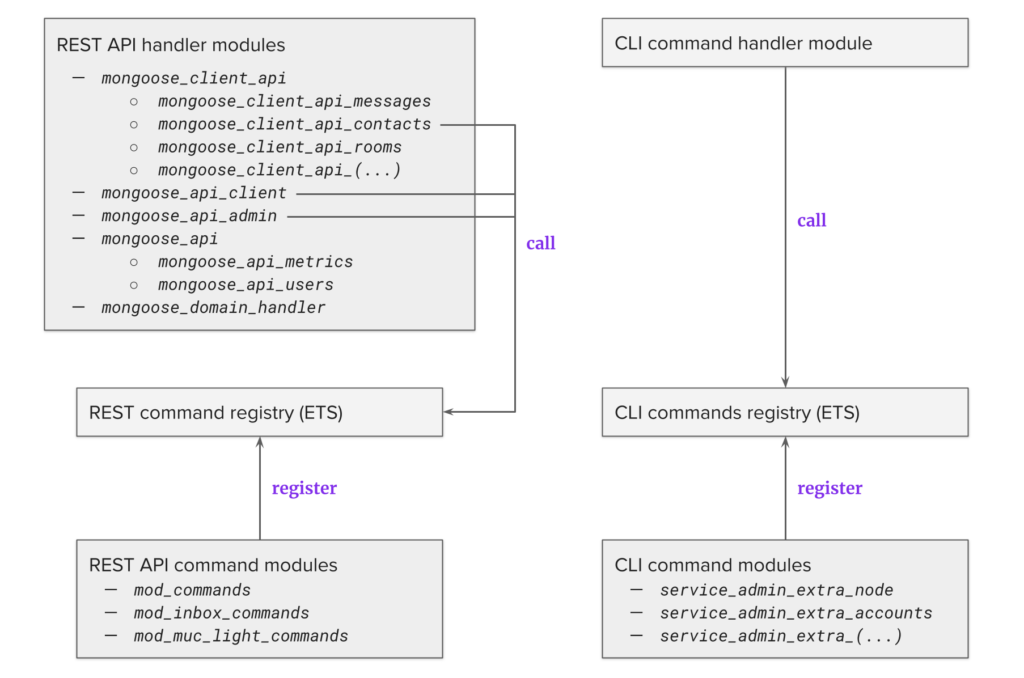
    The REST API is pictured on the left. The top block contains a list of HTTP handlers that need to be configured in the TOML configuration file, mongooseim.tom l .

    There are two handler types here:

    • Admin API : mongoose_api_admin, mongoose_api, mongoose_domain_handler
    • User (client) API : mongoose_client_api, mongoose_api_client

    The module names can be confusing. This is because the API was developed in a few iterations over the years, and the design patterns have changed a few times. By default, the Client and Admin APIs are enabled for different HTTP listeners. This setup is recommended because the administrative API should be protected from being accessed by regular users. Some of them, like mongoose_client_api , contain several command categories that can be enabled individually. The handler modules are responsible for executing these commands, and they are doing so by either directly calling internal modules, or by executing commands registered in the REST command registry. The latter is more organized, but command registration is quite complicated. As a result, only some handler modules are doing so (as shown in the diagram). To register the appropriate commands in the REST command registry, you would configure the respective extensions modules, e.g. mod_commands contains most of the commands, but if you wanted to manage chat rooms, you’d need to enable mod_muc_light_commands .

    The CLI is shown on the right side of the diagram. The command handler is a module that gets called by Erlang RPC, which executes the commands registered in the CLI commands registry. To have them registered, you need to configure specific command categories in service_admin_extra .

    It is evident from the diagram that REST API logic is completely disjoint from the CLI one. Command registries are separate, and although they both use the Erlang ETS tables to store the commands, they have very different command formats. As a result, if the same command is available in both interfaces, it would need to be implemented twice. Code reuse is possible, but not enforced, so most often the logic is not shared. The configuration is also very different for both.

    Finally, and most importantly, many commands are implemented only for the Client REST API, only for the Admin REST API, or only for the CLI. We addressed all of these issues in the new release, so let’s see what the improved architecture looks like.

    MongooseIM 6.0: Introducing GraphQL

    The architecture of the new GraphQL interfaces is shown in the following diagram.
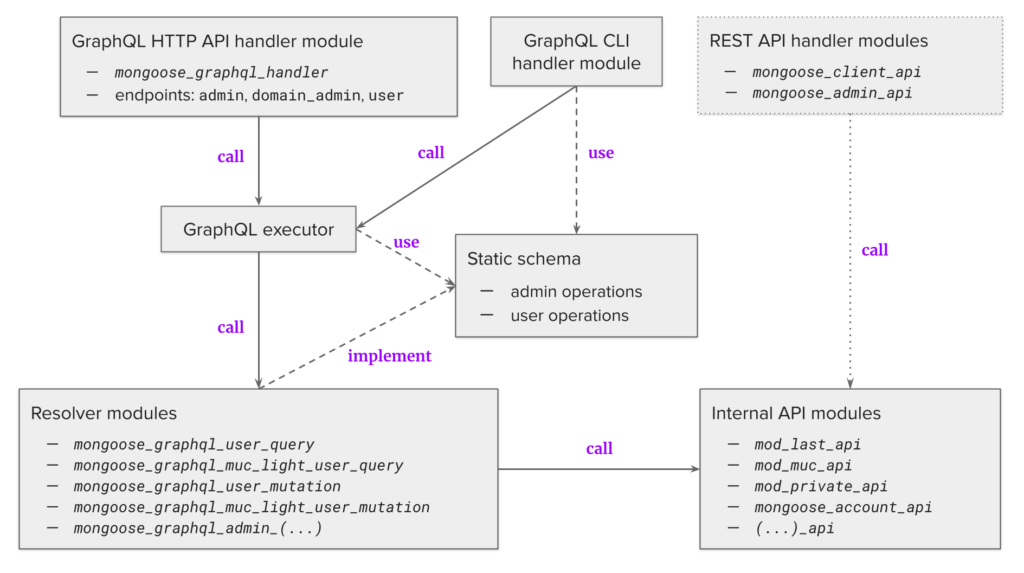
    The GraphQL API is handled by mongoose_graphql_handler , which is configured for an HTTP listener , and can be enabled for three different endpoints: Admin, Domain Admin and User.

    Let’s see how each of them is configured by default:

    The password-protected Admin endpoint is listening at 127.0.0.1:5551.

    [[listen.http]]
      ip_address = "127.0.0.1"
      port = 5551
    
      [[listen.http.handlers.mongoose_graphql_handler]]
    	host = "localhost"
    	path = "/api/graphql"
    	schema_endpoint = "admin"
    	username = "admin"
    	password = "secret"
    

    The Domain Admin is a new level between Admin and User, and is meant to be used by administrators of single XMPP domains. Domain credentials are configured by the global administrator with the Admin interface, and the domain administrator has to provide them when accessing the Domain Admin interface.

    [[listen.http]]
      ip_address = "0.0.0.0"
      port = 5541
    
      [[listen.http.handlers.mongoose_graphql_handler]]
    	host = "_"
    	path = "/api/graphql"
    	schema_endpoint = "domain_admin"
    

    Finally, the User endpoint requires providing the credentials of a specific XMPP user, and allows user-specific commands to be executed.

    [[listen.http]]
      ip_address = "0.0.0.0"
      port = 5561
    
      [[listen.http.handlers.mongoose_graphql_handler]]
    	host = "_"
    	path = "/api/graphql"
    	schema_endpoint = "user"
    

    The handlers are calling the GraphQL executor, which performs operations declared statically in two schemas: Admin and User. The Domain Admin uses the Admin schema, but there are special @protected directives which guarantee that a domain administrator can only execute these operations for their own domain. The commands are implemented as three different GraphQL operation types:

    • Queries for requesting information from the server, e.g. a user can request archived messages.
    • Mutations for performing an action on the server, e.g. a user can send a message.
    • Subscriptions for requesting a stream of updates from the server, e.g. a user can subscribe for incoming messages.

    Operation logic is defined in the resolver modules, which in turn call the internal API modules to execute the logic. This way there can be no ad-hoc calls to arbitrary internal logic in the resolver modules. There is no command registry required anymore, and a special @use directive in the schema ensures that modules and services required by each executed command are enabled.

    The GraphQL-based CLI handler module exposes the GraphQL commands from the Admin schema. Each command uses an automatically generated GraphQL query. This means that the same administrative commands are present in the HTTP GraphQL API and in the CLI. The old CLI is deprecated, and will be removed soon. The REST API will be still available for some time, but it will be phased out as well. In version 6.0, it was reworked to use the internal API modules, and it no longer requires the REST command registry. Thanks to the static schema, we could use SpectaQL to automatically generate the documentation for the Admin and User APIs. Another feature is the GraphiQL UI, which lets you experiment with the API in your browser. You can use browser plugins such as Altair as well.

    CLI and API in numbers

    All the operations offered by the old CLI and API are now available in the new GraphQL interfaces. We also added many new commands:

    Legacy CLI Legacy REST API GraphQL API and CLI
    Admin commands 56 32 114
    User commands 16 55

    Starting with the Admin (and Domain Admin) interfaces, we can compare the functionality offered by the legacy CLI, legacy REST API and the new GraphQL API. The diagram below shows the number of commands offered by each interface:
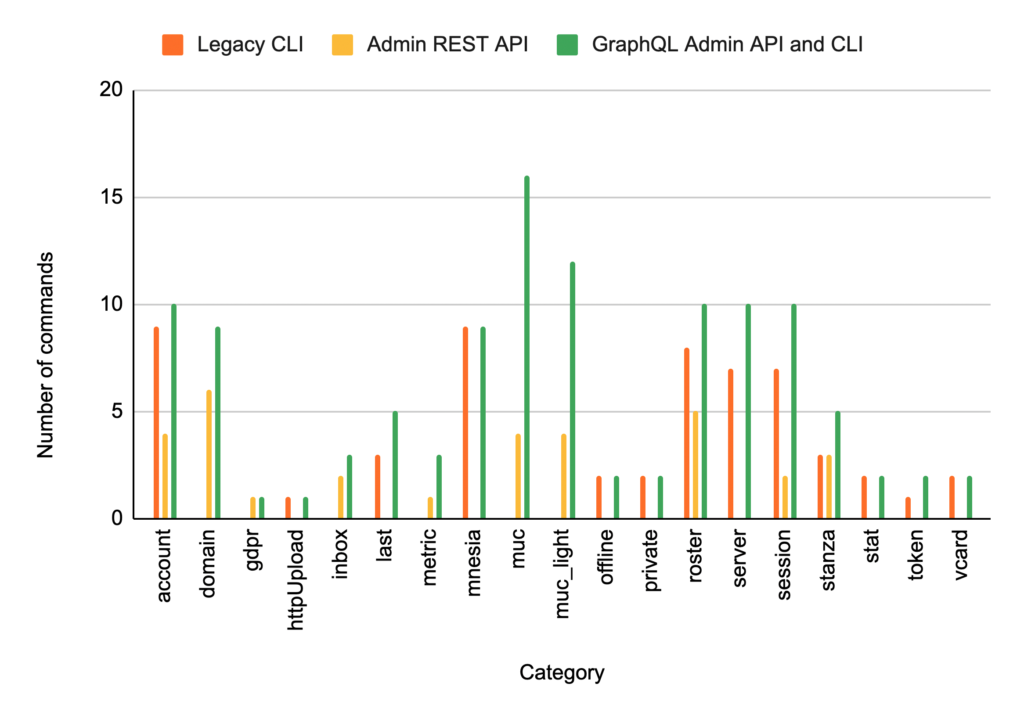
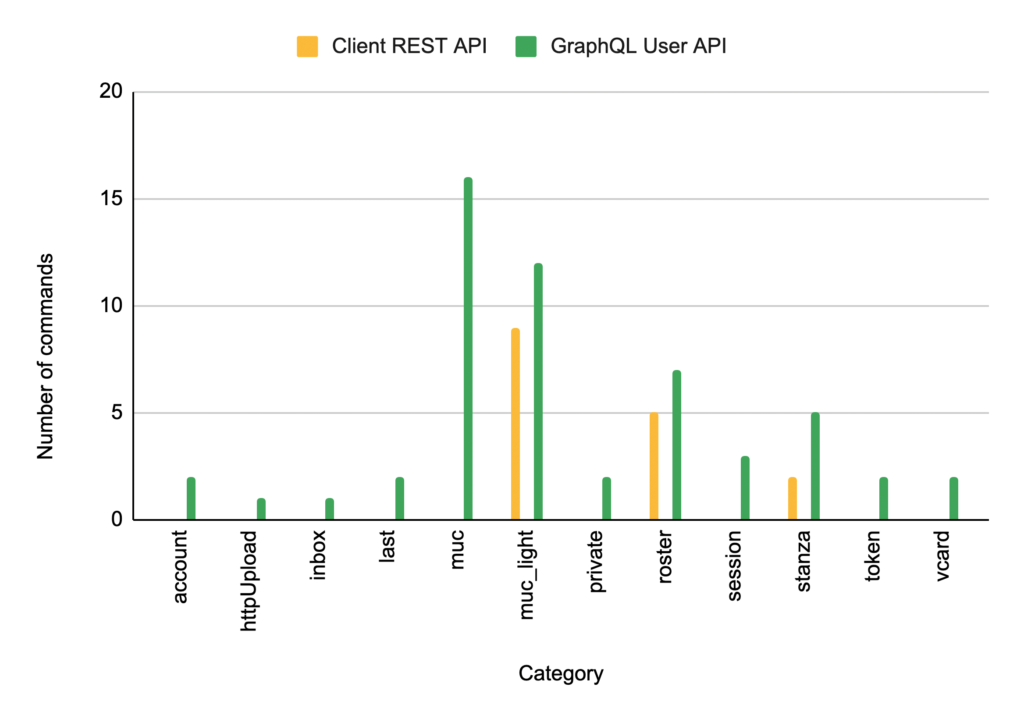
    For example, the domain category was unavailable with the legacy CLI, and the REST API offered four commands allowing you to add, remove, enable and disable dynamic XMPP domains. The new GraphQL commands offer them all, but also add two new ones, responsible for setting and removing domain-admin passwords. For some categories, like muc and muc_light (both implementing multi-user chat) we offer many more commands than before, allowing you to configure and use MongooseIM in new ways. The comparison looks similar for the User API:
    CLI and API in action

    The command line interface is the easiest one to use. To start, you only need to call the mongooseimctl command.

    Let’s assume that we need to add a new user, but we don’t know how to do so:

    $ mongooseimctl
    Usage: mongooseimctl [category] command [arguments]
    
    Most MongooseIM commands are grouped into the following categories:
      account     Account management 
      domain      Dynamic domain management 
      gdpr        Personal data management according to GDPR 
      httpUpload  Generating upload/download URLs for the files 
      inbox       Inbox bin flushing 
      last        Last activity management 
      metric      Browse metrics 
      mnesia      Mnesia internal database management 
      muc         MUC room management 
      muc_light   MUC Light room management 
      offline     Deleting old Offline messages 
      private     User private storage management 
      roster      User roster/contacts management 
      server      Server info and management 
      session     User session management 
      stanza      Sending stanzas and querying MAM 
      stat        Server statistics 
      token       OAUTH user token management 
      vcard       vCard management 
    
    To list the commands in a particular category:
      mongooseimctl category
    
    (...)
    

    The account category is the one we are interested in.

    $ mongooseimctl account
    Usage: mongooseimctl account command arguments
    
    The following commands are available in the category 'account':
      banUser             Ban an account: kick sessions and set a random password 
      changeUserPassword  Change the password of a user 
      checkPassword       Check if a password is correct 
      checkPasswordHash   Check if a password hash is correct (allowed methods: md5, sha)
      checkUser           Check if a user exists 
      countUsers          Get number of users per domain 
      listUsers           List users per domain 
      registerUser        Register a user. Username will be generated when skipped 
      removeUser          Remove the user's account along with all the associated personal data 
    
    To list the arguments for a particular command:
      mongooseimctl account command --help
    

    Now we know that the command is called registerUser .

    $ mongooseimctl account registerUser --help
    Usage: mongooseimctl account registerUser arguments
    
    Each argument has the format: --name value
    Available arguments are listed below with the corresponding GraphQL types:
      domain    DomainName! 
      password  String! 
      username  UserName 
    
    Scalar values do not need quoting unless they contain special characters or spaces.
    Complex input types are passed as JSON maps or lists, depending on the type.
    When a type is followed by '!', the corresponding argument is required.
    

    The arguments are listed with their GraphQL types. Both DomainName and UserName are essentially strings, but there are more complex types as well. To learn more about a particular type, use our online documentation .

    Knowing the arguments, you can create the user now:

    $ mongooseimctl account registerUser --username alice --domain localhost --password mysecret
    {
      "data" : {
        "account" : {
          "registerUser" : {
            "message" : "User alice@localhost successfully registered",
            "jid" : "alice@localhost"
          }
        }
      }
    }
    

    Now, let’s explore one more interface – the web UI provided by GraphiQL . Assuming that you have the GraphQL handlers set up with the default configuration, you can open http://localhost:5551/api/graphql in your browser, and enter the following query:
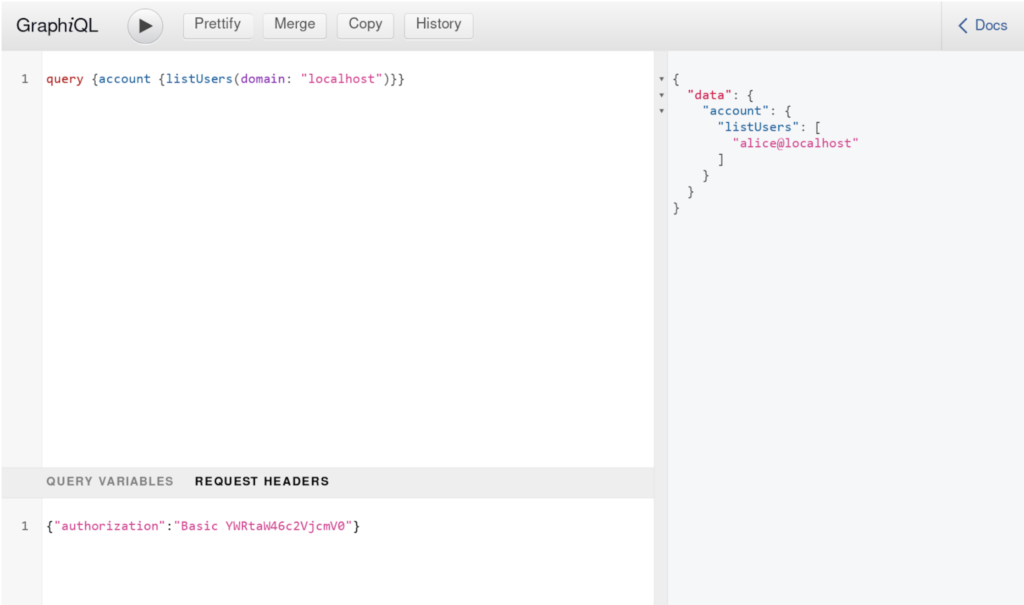
    You need to provide the authorization header as well. This one uses the default credentials, which you should of course change in your production environment. On the right you can see the results including the newly created user. You can use the Docs tab to learn more about a particular command.

    More than just the new API

    We have barely scratched the surface of the new features available in MongooseIM 6.0. Apart from the ones presented, these are some of the other improvements you can see in our latest release:

    • Dynamic domain removal is now asynchronous and incremental, which is useful if there is a lot of data to clean up.
    • Better pagination support for Inbox .
    • Internal rework of hooks and handlers.
    • Various improvements and fixes – see the Release Notes for details. We merged almost 200 pull requests since the last release.

    We are now working on more exciting features, so stay tuned, because we will have more news soon.

    The post GraphQL interfaces in MongooseIM 6.0 appeared first on Erlang Solutions .

    • Pl chevron_right

      Erlang Solutions: GraphQL interfaces in MongooseIM 6.0

      news.movim.eu / PlanetJabber • 19 December 2022 • 9 minutes

    MongooseIM is a robust, scalable and highly extensible instant messaging server. Recent releases have improved its configurability and opened new use cases, and the latest version 6.0 continues that trend. By introducing the brand new GraphQL API, we made MongooseIM much easier to integrate with external web services. The entry barrier is also lower than ever because of the automatically generated API documentation, interactive web UI, and the new Command Line Interface (CLI), that can execute predefined GraphQL operations for you, providing help when necessary. The latest changes are exciting, but to fully understand and appreciate them, let’s start with summarizing the state of the API and CLI in the previous version 5.1.

    MongooseIM 5.1: API and CLI before the changes

    The primary interface exposed by MongooseIM is the c2s (client-to-server) listener using XMPP – an open, battle-proven, well-adopted and extensible protocol with an active community behind it. While we believe that XMPP is an excellent choice for an interface to which end user devices connect, there are important use cases when other interfaces might be useful:

    1. An administrator can use the Command Line Interface ( CLI ) to manage the server and its extensions.
    2. A user device or a consumer-facing Web UI can use the REST API to perform operations that don’t require an XMPP connection.
    3. An administrative web service can use the REST API to manage the server and its extensions.

    The diagram below shows the architecture of the interfaces that allow such operations:

    The REST API is pictured on the left. The top block contains a list of HTTP handlers that need to be configured in the TOML configuration file, mongooseim.tom l .

    There are two handler types here:

    • Admin API : mongoose_api_admin, mongoose_api, mongoose_domain_handler
    • User (client) API : mongoose_client_api, mongoose_api_client

    The module names can be confusing. This is because the API was developed in a few iterations over the years, and the design patterns have changed a few times. By default, the Client and Admin APIs are enabled for different HTTP listeners. This setup is recommended because the administrative API should be protected from being accessed by regular users. Some of them, like mongoose_client_api , contain several command categories that can be enabled individually. The handler modules are responsible for executing these commands, and they are doing so by either directly calling internal modules, or by executing commands registered in the REST command registry. The latter is more organized, but command registration is quite complicated. As a result, only some handler modules are doing so (as shown in the diagram). To register the appropriate commands in the REST command registry, you would configure the respective extensions modules, e.g. mod_commands contains most of the commands, but if you wanted to manage chat rooms, you’d need to enable mod_muc_light_commands .

    The CLI is shown on the right side of the diagram. The command handler is a module that gets called by Erlang RPC, which executes the commands registered in the CLI commands registry. To have them registered, you need to configure specific command categories in service_admin_extra .

    It is evident from the diagram that REST API logic is completely disjoint from the CLI one. Command registries are separate, and although they both use the Erlang ETS tables to store the commands, they have very different command formats. As a result, if the same command is available in both interfaces, it would need to be implemented twice. Code reuse is possible, but not enforced, so most often the logic is not shared. The configuration is also very different for both.

    Finally, and most importantly, many commands are implemented only for the Client REST API, only for the Admin REST API, or only for the CLI. We addressed all of these issues in the new release, so let’s see what the improved architecture looks like.

    MongooseIM 6.0: Introducing GraphQL

    The architecture of the new GraphQL interfaces is shown in the following diagram.

    The GraphQL API is handled by mongoose_graphql_handler , which is configured for an HTTP listener , and can be enabled for three different endpoints: Admin, Domain Admin and User.

    Let’s see how each of them is configured by default:

    The password-protected Admin endpoint is listening at 127.0.0.1:5551.

    [[listen.http]]
      ip_address = "127.0.0.1"
      port = 5551
    
      [[listen.http.handlers.mongoose_graphql_handler]]
    	host = "localhost"
    	path = "/api/graphql"
    	schema_endpoint = "admin"
    	username = "admin"
    	password = "secret"
    

    The Domain Admin is a new level between Admin and User, and is meant to be used by administrators of single XMPP domains. Domain credentials are configured by the global administrator with the Admin interface, and the domain administrator has to provide them when accessing the Domain Admin interface.

    [[listen.http]]
      ip_address = "0.0.0.0"
      port = 5541
    
      [[listen.http.handlers.mongoose_graphql_handler]]
    	host = "_"
    	path = "/api/graphql"
    	schema_endpoint = "domain_admin"
    

    Finally, the User endpoint requires providing the credentials of a specific XMPP user, and allows user-specific commands to be executed.

    [[listen.http]]
      ip_address = "0.0.0.0"
      port = 5561
    
      [[listen.http.handlers.mongoose_graphql_handler]]
    	host = "_"
    	path = "/api/graphql"
    	schema_endpoint = "user"
    

    The handlers are calling the GraphQL executor, which performs operations declared statically in two schemas: Admin and User. The Domain Admin uses the Admin schema, but there are special @protected directives which guarantee that a domain administrator can only execute these operations for their own domain. The commands are implemented as three different GraphQL operation types:

    • Queries for requesting information from the server, e.g. a user can request archived messages.
    • Mutations for performing an action on the server, e.g. a user can send a message.
    • Subscriptions for requesting a stream of updates from the server, e.g. a user can subscribe for incoming messages.

    Operation logic is defined in the resolver modules, which in turn call the internal API modules to execute the logic. This way there can be no ad-hoc calls to arbitrary internal logic in the resolver modules. There is no command registry required anymore, and a special @use directive in the schema ensures that modules and services required by each executed command are enabled.

    The GraphQL-based CLI handler module exposes the GraphQL commands from the Admin schema. Each command uses an automatically generated GraphQL query. This means that the same administrative commands are present in the HTTP GraphQL API and in the CLI. The old CLI is deprecated, and will be removed soon. The REST API will be still available for some time, but it will be phased out as well. In version 6.0, it was reworked to use the internal API modules, and it no longer requires the REST command registry. Thanks to the static schema, we could use SpectaQL to automatically generate the documentation for the Admin and User APIs. Another feature is the GraphiQL UI, which lets you experiment with the API in your browser. You can use browser plugins such as Altair as well.

    CLI and API in numbers

    All the operations offered by the old CLI and API are now available in the new GraphQL interfaces. We also added many new commands:

    Legacy CLI Legacy REST API GraphQL API and CLI
    Admin commands 56 32 114
    User commands 16 55

    Starting with the Admin (and Domain Admin) interfaces, we can compare the functionality offered by the legacy CLI, legacy REST API and the new GraphQL API. The diagram below shows the number of commands offered by each interface:

    For example, the domain category was unavailable with the legacy CLI, and the REST API offered four commands allowing you to add, remove, enable and disable dynamic XMPP domains. The new GraphQL commands offer them all, but also add two new ones, responsible for setting and removing domain-admin passwords. For some categories, like muc and muc_light (both implementing multi-user chat) we offer many more commands than before, allowing you to configure and use MongooseIM in new ways. The comparison looks similar for the User API:

    CLI and API in action

    The command line interface is the easiest one to use. To start, you only need to call the mongooseimctl command.

    Let’s assume that we need to add a new user, but we don’t know how to do so:

    $ mongooseimctl
    Usage: mongooseimctl [category] command [arguments]
    
    Most MongooseIM commands are grouped into the following categories:
      account     Account management 
      domain      Dynamic domain management 
      gdpr        Personal data management according to GDPR 
      httpUpload  Generating upload/download URLs for the files 
      inbox       Inbox bin flushing 
      last        Last activity management 
      metric      Browse metrics 
      mnesia      Mnesia internal database management 
      muc         MUC room management 
      muc_light   MUC Light room management 
      offline     Deleting old Offline messages 
      private     User private storage management 
      roster      User roster/contacts management 
      server      Server info and management 
      session     User session management 
      stanza      Sending stanzas and querying MAM 
      stat        Server statistics 
      token       OAUTH user token management 
      vcard       vCard management 
    
    To list the commands in a particular category:
      mongooseimctl category
    
    (...)
    

    The account category is the one we are interested in.

    $ mongooseimctl account
    Usage: mongooseimctl account command arguments
    
    The following commands are available in the category 'account':
      banUser             Ban an account: kick sessions and set a random password 
      changeUserPassword  Change the password of a user 
      checkPassword       Check if a password is correct 
      checkPasswordHash   Check if a password hash is correct (allowed methods: md5, sha)
      checkUser           Check if a user exists 
      countUsers          Get number of users per domain 
      listUsers           List users per domain 
      registerUser        Register a user. Username will be generated when skipped 
      removeUser          Remove the user's account along with all the associated personal data 
    
    To list the arguments for a particular command:
      mongooseimctl account command --help
    

    Now we know that the command is called registerUser .

    $ mongooseimctl account registerUser --help
    Usage: mongooseimctl account registerUser arguments
    
    Each argument has the format: --name value
    Available arguments are listed below with the corresponding GraphQL types:
      domain    DomainName! 
      password  String! 
      username  UserName 
    
    Scalar values do not need quoting unless they contain special characters or spaces.
    Complex input types are passed as JSON maps or lists, depending on the type.
    When a type is followed by '!', the corresponding argument is required.
    

    The arguments are listed with their GraphQL types. Both DomainName and UserName are essentially strings, but there are more complex types as well. To learn more about a particular type, use our online documentation .

    Knowing the arguments, you can create the user now:

    $ mongooseimctl account registerUser --username alice --domain localhost --password mysecret
    {
      "data" : {
        "account" : {
          "registerUser" : {
            "message" : "User alice@localhost successfully registered",
            "jid" : "alice@localhost"
          }
        }
      }
    }
    

    Now, let’s explore one more interface – the web UI provided by GraphiQL . Assuming that you have the GraphQL handlers set up with the default configuration, you can open http://localhost:5551/api/graphql in your browser, and enter the following query:

    You need to provide the authorization header as well. This one uses the default credentials, which you should of course change in your production environment. On the right you can see the results including the newly created user. You can use the Docs tab to learn more about a particular command.

    More than just the new API

    We have barely scratched the surface of the new features available in MongooseIM 6.0. Apart from the ones presented, these are some of the other improvements you can see in our latest release:

    • Dynamic domain removal is now asynchronous and incremental, which is useful if there is a lot of data to clean up.
    • Better pagination support for Inbox .
    • Internal rework of hooks and handlers.
    • Various improvements and fixes – see the Release Notes for details. We merged almost 200 pull requests since the last release.

    We are now working on more exciting features, so stay tuned, because we will have more news soon.

    The post GraphQL interfaces in MongooseIM 6.0 appeared first on Erlang Solutions .
    • Pl chevron_right

      Erlang Solutions: GraphQL interfaces in MongooseIM 6.0

      news.movim.eu / PlanetJabber • 19 December 2022 • 9 minutes

    MongooseIM is a robust, scalable and highly extensible instant messaging server. Recent releases have improved its configurability and opened new use cases, and the latest version 6.0 continues that trend. By introducing the brand new GraphQL API, we made MongooseIM much easier to integrate with external web services. The entry barrier is also lower than ever because of the automatically generated API documentation, interactive web UI, and the new Command Line Interface (CLI), that can execute predefined GraphQL operations for you, providing help when necessary. The latest changes are exciting, but to fully understand and appreciate them, let’s start with summarizing the state of the API and CLI in the previous version 5.1.

    MongooseIM 5.1: API and CLI before the changes

    The primary interface exposed by MongooseIM is the c2s (client-to-server) listener using XMPP – an open, battle-proven, well-adopted and extensible protocol with an active community behind it. While we believe that XMPP is an excellent choice for an interface to which end user devices connect, there are important use cases when other interfaces might be useful:

    1. An administrator can use the Command Line Interface ( CLI ) to manage the server and its extensions.
    2. A user device or a consumer-facing Web UI can use the REST API to perform operations that don’t require an XMPP connection.
    3. An administrative web service can use the REST API to manage the server and its extensions.

    The diagram below shows the architecture of the interfaces that allow such operations:

    The REST API is pictured on the left. The top block contains a list of HTTP handlers that need to be configured in the TOML configuration file, mongooseim.tom l .

    There are two handler types here:

    • Admin API : mongoose_api_admin, mongoose_api, mongoose_domain_handler
    • User (client) API : mongoose_client_api, mongoose_api_client

    The module names can be confusing. This is because the API was developed in a few iterations over the years, and the design patterns have changed a few times. By default, the Client and Admin APIs are enabled for different HTTP listeners. This setup is recommended because the administrative API should be protected from being accessed by regular users. Some of them, like mongoose_client_api , contain several command categories that can be enabled individually. The handler modules are responsible for executing these commands, and they are doing so by either directly calling internal modules, or by executing commands registered in the REST command registry. The latter is more organized, but command registration is quite complicated. As a result, only some handler modules are doing so (as shown in the diagram). To register the appropriate commands in the REST command registry, you would configure the respective extensions modules, e.g. mod_commands contains most of the commands, but if you wanted to manage chat rooms, you’d need to enable mod_muc_light_commands .

    The CLI is shown on the right side of the diagram. The command handler is a module that gets called by Erlang RPC, which executes the commands registered in the CLI commands registry. To have them registered, you need to configure specific command categories in service_admin_extra .

    It is evident from the diagram that REST API logic is completely disjoint from the CLI one. Command registries are separate, and although they both use the Erlang ETS tables to store the commands, they have very different command formats. As a result, if the same command is available in both interfaces, it would need to be implemented twice. Code reuse is possible, but not enforced, so most often the logic is not shared. The configuration is also very different for both.

    Finally, and most importantly, many commands are implemented only for the Client REST API, only for the Admin REST API, or only for the CLI. We addressed all of these issues in the new release, so let’s see what the improved architecture looks like.

    MongooseIM 6.0: Introducing GraphQL

    The architecture of the new GraphQL interfaces is shown in the following diagram.

    The GraphQL API is handled by mongoose_graphql_handler , which is configured for an HTTP listener , and can be enabled for three different endpoints: Admin, Domain Admin and User.

    Let’s see how each of them is configured by default:

    The password-protected Admin endpoint is listening at 127.0.0.1:5551.

    [[listen.http]]
      ip_address = "127.0.0.1"
      port = 5551
    
      [[listen.http.handlers.mongoose_graphql_handler]]
    	host = "localhost"
    	path = "/api/graphql"
    	schema_endpoint = "admin"
    	username = "admin"
    	password = "secret"
    

    The Domain Admin is a new level between Admin and User, and is meant to be used by administrators of single XMPP domains. Domain credentials are configured by the global administrator with the Admin interface, and the domain administrator has to provide them when accessing the Domain Admin interface.

    [[listen.http]]
      ip_address = "0.0.0.0"
      port = 5541
    
      [[listen.http.handlers.mongoose_graphql_handler]]
    	host = "_"
    	path = "/api/graphql"
    	schema_endpoint = "domain_admin"
    

    Finally, the User endpoint requires providing the credentials of a specific XMPP user, and allows user-specific commands to be executed.

    [[listen.http]]
      ip_address = "0.0.0.0"
      port = 5561
    
      [[listen.http.handlers.mongoose_graphql_handler]]
    	host = "_"
    	path = "/api/graphql"
    	schema_endpoint = "user"
    

    The handlers are calling the GraphQL executor, which performs operations declared statically in two schemas: Admin and User. The Domain Admin uses the Admin schema, but there are special @protected directives which guarantee that a domain administrator can only execute these operations for their own domain. The commands are implemented as three different GraphQL operation types:

    • Queries for requesting information from the server, e.g. a user can request archived messages.
    • Mutations for performing an action on the server, e.g. a user can send a message.
    • Subscriptions for requesting a stream of updates from the server, e.g. a user can subscribe for incoming messages.

    Operation logic is defined in the resolver modules, which in turn call the internal API modules to execute the logic. This way there can be no ad-hoc calls to arbitrary internal logic in the resolver modules. There is no command registry required anymore, and a special @use directive in the schema ensures that modules and services required by each executed command are enabled.

    The GraphQL-based CLI handler module exposes the GraphQL commands from the Admin schema. Each command uses an automatically generated GraphQL query. This means that the same administrative commands are present in the HTTP GraphQL API and in the CLI. The old CLI is deprecated, and will be removed soon. The REST API will be still available for some time, but it will be phased out as well. In version 6.0, it was reworked to use the internal API modules, and it no longer requires the REST command registry. Thanks to the static schema, we could use SpectaQL to automatically generate the documentation for the Admin and User APIs. Another feature is the GraphiQL UI, which lets you experiment with the API in your browser. You can use browser plugins such as Altair as well.

    CLI and API in numbers

    All the operations offered by the old CLI and API are now available in the new GraphQL interfaces. We also added many new commands:

    Legacy CLI Legacy REST API GraphQL API and CLI
    Admin commands 56 32 114
    User commands 16 55

    Starting with the Admin (and Domain Admin) interfaces, we can compare the functionality offered by the legacy CLI, legacy REST API and the new GraphQL API. The diagram below shows the number of commands offered by each interface:

    For example, the domain category was unavailable with the legacy CLI, and the REST API offered four commands allowing you to add, remove, enable and disable dynamic XMPP domains. The new GraphQL commands offer them all, but also add two new ones, responsible for setting and removing domain-admin passwords. For some categories, like muc and muc_light (both implementing multi-user chat) we offer many more commands than before, allowing you to configure and use MongooseIM in new ways. The comparison looks similar for the User API:

    CLI and API in action

    The command line interface is the easiest one to use. To start, you only need to call the mongooseimctl command.

    Let’s assume that we need to add a new user, but we don’t know how to do so:

    $ mongooseimctl
    Usage: mongooseimctl [category] command [arguments]
    
    Most MongooseIM commands are grouped into the following categories:
      account     Account management 
      domain      Dynamic domain management 
      gdpr        Personal data management according to GDPR 
      httpUpload  Generating upload/download URLs for the files 
      inbox       Inbox bin flushing 
      last        Last activity management 
      metric      Browse metrics 
      mnesia      Mnesia internal database management 
      muc         MUC room management 
      muc_light   MUC Light room management 
      offline     Deleting old Offline messages 
      private     User private storage management 
      roster      User roster/contacts management 
      server      Server info and management 
      session     User session management 
      stanza      Sending stanzas and querying MAM 
      stat        Server statistics 
      token       OAUTH user token management 
      vcard       vCard management 
    
    To list the commands in a particular category:
      mongooseimctl category
    
    (...)
    

    The account category is the one we are interested in.

    $ mongooseimctl account
    Usage: mongooseimctl account command arguments
    
    The following commands are available in the category 'account':
      banUser             Ban an account: kick sessions and set a random password 
      changeUserPassword  Change the password of a user 
      checkPassword       Check if a password is correct 
      checkPasswordHash   Check if a password hash is correct (allowed methods: md5, sha)
      checkUser           Check if a user exists 
      countUsers          Get number of users per domain 
      listUsers           List users per domain 
      registerUser        Register a user. Username will be generated when skipped 
      removeUser          Remove the user's account along with all the associated personal data 
    
    To list the arguments for a particular command:
      mongooseimctl account command --help
    

    Now we know that the command is called registerUser .

    $ mongooseimctl account registerUser --help
    Usage: mongooseimctl account registerUser arguments
    
    Each argument has the format: --name value
    Available arguments are listed below with the corresponding GraphQL types:
      domain    DomainName! 
      password  String! 
      username  UserName 
    
    Scalar values do not need quoting unless they contain special characters or spaces.
    Complex input types are passed as JSON maps or lists, depending on the type.
    When a type is followed by '!', the corresponding argument is required.
    

    The arguments are listed with their GraphQL types. Both DomainName and UserName are essentially strings, but there are more complex types as well. To learn more about a particular type, use our online documentation .

    Knowing the arguments, you can create the user now:

    $ mongooseimctl account registerUser --username alice --domain localhost --password mysecret
    {
      "data" : {
        "account" : {
          "registerUser" : {
            "message" : "User alice@localhost successfully registered",
            "jid" : "alice@localhost"
          }
        }
      }
    }
    

    Now, let’s explore one more interface – the web UI provided by GraphiQL . Assuming that you have the GraphQL handlers set up with the default configuration, you can open http://localhost:5551/api/graphql in your browser, and enter the following query:

    You need to provide the authorization header as well. This one uses the default credentials, which you should of course change in your production environment. On the right you can see the results including the newly created user. You can use the Docs tab to learn more about a particular command.

    More than just the new API

    We have barely scratched the surface of the new features available in MongooseIM 6.0. Apart from the ones presented, these are some of the other improvements you can see in our latest release:

    • Dynamic domain removal is now asynchronous and incremental, which is useful if there is a lot of data to clean up.
    • Better pagination support for Inbox .
    • Internal rework of hooks and handlers.
    • Various improvements and fixes – see the Release Notes for details. We merged almost 200 pull requests since the last release.

    We are now working on more exciting features, so stay tuned, because we will have more news soon.

    The post GraphQL interfaces in MongooseIM 6.0 appeared first on Erlang Solutions .

    • Pl chevron_right

      Erlang Solutions: Change data capture with Postgres & Elixir

      news.movim.eu / PlanetJabber • 13 December 2022 • 19 minutes

    CDC is the process of identifying and capturing data changes from the database.

    With CDC, changes to data can be tracked in near real-time, and that information can be used to support a variety of use cases, including auditing, replication, and synchronisation.


    A good example of a use case for CDC is to consider an application which inserts a record into the database and pushes an event to a message queue after the record has been inserted (write-twice).

    Imagine you’re working on an e-commerce application and after an order is created and inserted into the database, you push an OrderCreated event to a message queue. The consumers of the event might do things such as create pick orders for the warehouse, schedule transports for delivery and send an order confirmation email to the customer.

    But what if the application crashes after the order has been inserted into the database but before managing to push the event to the message queue? This is possible due to the fact that you can’t atomically insert the record AND push the message in the same transaction, so if the application crashes after inserting the record to the database but before pushing the event to the queue, the event is lost.

    There are of course workarounds to circumvent this: a simple solution is to “outbox” the event into an outbox table in the same transaction as writing the record, andhen, rely on a CDC process to capture the change to the outbox table and push the event to the message queue. The transaction is atomic and the CDC process can assure the event

    gets delivered to the message queue at-least-once.

    In order to capture changes, CDC typically uses one of two methods: log-based or trigger-based.

    Log-based CDC involves reading the transaction logs of the database to identify changed data, which is the method we’ll use here by utilising Postgres Logical Replication.

    Postgres replication

    There are two modes of replication in Postgres:

    1. Physical replication – Every change from the primary are streamed to replicas via the WAL (Write Ahead Log). This replication is performed byte-by-byte with exact block addresses.

    2. Logical replication – In logical replication the subscriber receives each individual transactional change (i.e. INSERT, UPDATE, or DELETE statements) to the database.

    The WAL is still streamed but it encodes the logical operations so that they can be decoded by the subscriber without having to know Postgres internals.

    One of the great things about logical replication is that it can be used to only replicate specific tables or rows, meaning that you have complete control over what is being replicated.

    To enable logical replication the `wal_level` need to be set:

    ```sql
    -- determines how much information is written to the wal. 
    -- Each 'level' inherits the level below it; 'logical' is the highest level
    
    ALTER SYSTEM SET wal_level=logical;
    
    -- simultaneously running WAL sender processes
    ALTER SYSTEM SET max_wal_senders='10';
    
    -- simultaneously defined replication slots
    ALTER SYSTEM SET max_replication_slots='10';
    ```
    

    The changes require a restart to the Postgres instance.

    After the system has been restarted the `wal_level` can be verified with:

    ```sql
    SHOW wal_level;
     wal_level 
    -----------
     logical
    (1 row)
    

    In order to subscribe to changes a [publication](https://www.postgresql.org/docs/current/sql-createpublication.html) must be created. A publication is a group of tables in which we would like to receive data changes for.

    Let’s create a simple table and define a publication for it:

    ```sql
    CREATE TABLE articles (id serial PRIMARY KEY, title text, description text, body text);
    CREATE PUBLICATION articles_pub FOR TABLE articles;
    ```
    

    To tell postgres to retain WAL segments we must create a [replication slot](https://www.postgresql.org/docs/current/logicaldecoding-explanation.html).

    The replication slot represents a stream of changes from one or more publications and is used to prevent data loss in the event of a server failure, as they are crash safe.


    Replication Protocol

    In order to get a feel for the protocol and messages being sent we can use [`pg_recvlogical`](https://www.postgresql.org/docs/current/app-pgrecvlogical.html) to start a replication subscriber:

    ```sh
    # Start and use the publication defined above
    # output is written to stdout
    pg_recvlogical --start \
      --host='localhost' \
      --port='5432' \
      --username='postgres' \
      --dbname='postgres' \
      --option=publication_names='articles_pub' \
      --option=proto_version=1 \
      --create-slot \
      --if-not-exists \
      --slot=articles_slot \
      --plugin=pgoutput \
      --file=-
    ```
    

    Insert a record:

    ```sql
    INSERT INTO articles (title, description, body)
        VALUES ('Postgres replication', 'Using logical replication', 'Foo bar baz');
    ```
    

    Each row in the output corresponds to a replication messages received through the subscription:

    ```
    B(egin) - Begin transaction 
    R(elation) - Table, schema, columns and their types
    I(insert) - Data being inserted
    C(ommit) - Commit transaction
    ```


    ```
    B
    
    Rarticlesdidtitledescriptionbody
    It35tPostgres replicationtUsing logical replicationtFoo bar baz
    C
    ```
    

    If we insert multiple records in a transaction we should have two I in between B and C:

    ```sql
    BEGIN;
    INSERT INTO articles (title, description, body) VALUES ('First', 'desc', 'Foo');
    
    INSERT INTO articles (title, description, body) VALUES ('Second', 'desc', 'Bar');
    COMMIT;
    ```
    
    And the ouput:
    ```
    C
    B
    
    It37tFirsttdesctFoo
    It38tSecondtdesctBar
    C
    ```


    The relation i.e table information was not transmitted since we already received the relation when inserting the first record.

    Postgres only sends the relation the first time it’s encountered during the session. The subscriber is expected to cache a previously sent relation.

    Now that we have a feel for how Logical replication works, let’s implement it in Elixir!

    Implementing the replication connection

    Create a new Elixir project:

    ```
    mix new cdc
    ```
    
    We'll add the following dependencies to `mix.exs`
    
    ```elixir
    defp deps do
      {:postgrex, "~> 0.16.4"},
      # decode/encode replication messages
      {:postgrex_pgoutput, "~> 0.1.0"}
    end
    ```
    
    
    `postgrex` supports replication through the [`Postgrex.ReplicationConnection`](https://hexdocs.pm/postgrex/Postgrex.ReplicationConnection.html) process.
    
    
    ```elixir
    defmodule CDC.Replication do
      use Postgrex.ReplicationConnection
      require Logger
    
      defstruct [
        :publications,
        :slot,
        :state
      ]
    
      def start_link(opts) do
        conn_opts = [auto_reconnect: true]
        publications = opts[:publications] || raise ArgumentError, message: "`:publications` is required"
        slot = opts[:slot] || raise ArgumentError, message: "`:slot` is required"
    
        Postgrex.ReplicationConnection.start_link(
          __MODULE__,
          {slot, publications},
          conn_opts ++ opts
        )
      end
    
      @impl true
      def init({slot, pubs}) do
        {:ok, %__MODULE__{slot: slot, publications: pubs}}
      end
    
      
      @impl true
      def handle_connect(%__MODULE__{slot: slot} = state) do
        query = "CREATE_REPLICATION_SLOT #{slot} TEMPORARY LOGICAL pgoutput NOEXPORT_SNAPSHOT"
    
        Logger.debug("[create slot] query=#{query}")
    
        {:query, query, %{state | state: :create_slot}}
      end
    
      @impl true
      def handle_result([%Postgrex.Result{} | _], %__MODULE__{state: :create_slot, publications: pubs, slot: slot} = state) do
        opts = [proto_version: 1, publication_names: pubs]
    
        query = "START_REPLICATION SLOT #{slot} LOGICAL 0/0 #{escape_options(opts)}"
    
        Logger.debug("[start streaming] query=#{query}")
    
        {:stream, query, [], %{state | state: :streaming}}
      end
    
      @impl true
      def handle_data(msg, state) do
        Logger.debug("Received msg=#{inspect(msg, limit: :infinity, pretty: true)}")
        {:noreply, [], state}
      end
    
      defp escape_options([]),
        do: ""
    
      defp escape_options(opts) do
        parts =
          Enum.map_intersperse(opts, ", ", fn {k, v} -> [Atom.to_string(k), ?\s, escape_string(v)] end)
    
        [?\s, ?(, parts, ?)]
      end
    
      defp escape_string(value) do
        [?', :binary.replace(to_string(value), "'", "''", [:global]), ?']
      end
    end
    ```
    

    The code is available on GitHub

    Let’s try it out:

    ```elixir
    opts = [
      slot: "articles_slot_elixir",
      publications: ["articles_pub"],
      host: "localhost",
      database: "postgres",
      username: "postgres",
      password: "postgres",
      port: 5432,
    ]
    
    CDC.Replication.start_link(opts)
    ```
    

    When we start the process the following is happening:

    1. Once we are connected to postgres the callback `handle_connect/1` is called, a temporary logical replication slot is created.

    2. `handle_result/2` is called with the result from the query in ‘1’. If the slot was created successfully we start streaming from the slot and go into streaming mode. The requested position ‘0/0’ means that Postgres picks the position.

    3. Any replication messages sent from postgres are received in the `handle_data/2` callback.

    Replication messages

    There are two types of messages a subscriber receives:

    1. `primary_keep_alive` – A checkin message, if `reply == 1` the subscriber is expected to reply to the message with a `standy_status_update` to avoid a timeout disconnect.

    The `standy_status_update` contains the current [LSN](https://www.postgresql.org/docs/current/datatype-pg-lsn.html) the subscriber has processed.

    Postgres uses this message to determine which WAL segments can be safely removed.

    2. `xlog_data` – Contains the data messages for each step in a transaction.

    Since we are not responding to the `primary_keep_alive` messages the process gets disconnected and restarts
    .

    Let’s fix it by decoding the messages and start replying with `standby_status_update` messages.

    ```elixir
    defmodule CDC.Replication do
      use Postgrex.ReplicationConnection
    
      require Postgrex.PgOutput.Messages
      alias Postgrex.PgOutput.{Messages, Lsn}
    
      require Logger
    
      defstruct [
        :publications,
        :slot,
        :state
      ]
    
      def start_link(opts) do
        conn_opts = [auto_reconnect: true]
        publications = opts[:publications] || raise ArgumentError, message: "`:publications` is required"
        slot = opts[:slot] || raise ArgumentError, message: "`:slot` is required"
    
        Postgrex.ReplicationConnection.start_link(
          __MODULE__,
          {slot, publications},
          conn_opts ++ opts
        )
      end
    
      @impl true
      def init({slot, pubs}) do
        {:ok, %__MODULE__{slot: slot, publications: pubs}}
      end
    
      @impl true
      def handle_connect(%__MODULE__{slot: slot} = state) do
        query = "CREATE_REPLICATION_SLOT #{slot} TEMPORARY LOGICAL pgoutput NOEXPORT_SNAPSHOT"
    
        Logger.debug("[create slot] query=#{query}")
    
        {:query, query, %{state | state: :create_slot}}
      end
    
      @impl true
      def handle_result(
            [%Postgrex.Result{} | _],
            %__MODULE__{state: :create_slot, publications: pubs, slot: slot} = state
          ) do
        opts = [proto_version: 1, publication_names: pubs]
    
        query = "START_REPLICATION SLOT #{slot} LOGICAL 0/0 #{escape_options(opts)}"
    
        Logger.debug("[start streaming] query=#{query}")
    
        {:stream, query, [], %{state | state: :streaming}}
      end
    
      @impl true
      def handle_data(msg, state) do
        return_msgs =
          msg
          |> Messages.decode()
          |> handle_msg()
    
        {:noreply, return_msgs, state}
      end
    
      #
      defp handle_msg(Messages.msg_primary_keep_alive(server_wal: lsn, reply: 1)) do
        Logger.debug("msg_primary_keep_alive message reply=true")
        <<lsn::64>> = Lsn.encode(lsn)
    
        [standby_status_update(lsn)]
      end
    
      defp handle_msg(Messages.msg_primary_keep_alive(reply: 0)), do: []
    
      defp handle_msg(Messages.msg_xlog_data(data: data)) do
        Logger.debug("xlog_data message: #{inspect(data, pretty: true)}")
        []
      end
    
      defp standby_status_update(lsn) do
        [
          wal_recv: lsn + 1,
          wal_flush: lsn + 1,
          wal_apply: lsn + 1,
          system_clock: Messages.now(),
          reply: 0
        ]
        |> Messages.msg_standby_status_update()
        |> Messages.encode()
      end
    
      
    defp escape_options([]),
        do: ""
    
      defp escape_options(opts) do
        parts =
          Enum.map_intersperse(opts, ", ", fn {k, v} -> [Atom.to_string(k), ?\s, escape_string(v)] end)
    
        [?\s, ?(, parts, ?)]
      end
    
      defp escape_string(value) do
        [?', :binary.replace(to_string(value), "'", "''", [:global]), ?']
      end
    end
    ```


    `handle_data/2` decodes the message and passes it to `handle_msg/1`.  If it’s a `primary_keep_alive` we respond with a `standby_status_update`.

    The LSN denotes a byte position in the WAL.

    The subscriber responds with the LSN it has currently handled, since we are not tracking the messages we receive, we just ack with the LSN sent from the server.

    Next we’ll handle `xlog_data` messages, the idea here is that we’ll capture each operation into a Transaction struct.

    Capturing transactions

    The `CDC.Protocol` module will handle `xlog_data` messages and track the state of the transaction.

    ```elixir
    defmodule CDC.Protocol do
      import Postgrex.PgOutput.Messages
      require Logger
    
      alias CDC.Tx
      alias Postgrex.PgOutput.Lsn
    
      
    @type t :: %__MODULE__{
              tx: Tx.t(),
              relations: map()
            }
    
      defstruct [
        :tx,
        relations: %{}
      ]
    
      @spec new() :: t()
      def new do
        %__MODULE__{}
      end
    
      def handle_message(msg, state) when is_binary(msg) do
        msg
        |> decode()
        |> handle_message(state)
      end
    
      def handle_message(msg_primary_keep_alive(reply: 0), state), do: {[], nil, state}
      def handle_message(msg_primary_keep_alive(server_wal: lsn, reply: 1), state) do
        Logger.debug("msg_primary_keep_alive message reply=true")
        <<lsn::64>> = Lsn.encode(lsn)
    
        {[standby_status_update(lsn)], nil, state}
      end
    
      def handle_message(msg, %__MODULE__{tx: nil, relations: relations} = state) do
        tx =
          [relations: relations, decode: true]
          |> Tx.new()
          |> Tx.build(msg)
    
        {[], nil, %{state | tx: tx}}
      end
    
      def handle_message(msg, %__MODULE__{tx: tx} = state) do
        case Tx.build(tx, msg) do
          %Tx{state: :commit, relations: relations} ->
            tx = Tx.finalize(tx)
            relations = Map.merge(state.relations, relations)
            {[], tx, %{state | tx: nil, relations: relations}}
    
          tx ->
            {[], nil, %{state | tx: tx}}
        end
      end
    
      defp standby_status_update(lsn) do
        [
          wal_recv: lsn + 1,
          wal_flush: lsn + 1,
          wal_apply: lsn + 1,
          system_clock: now(),
          reply: 0
        ]
        |> msg_standby_status_update()
        |> encode()
      end
    end
    ```
    `CDC.Tx` handles messages received within a transaction, begin, relation, insert/update/delete and commit.
    
    
    ```elixir
    defmodule CDC.Tx do
      import Postgrex.PgOutput.Messages
      alias Postgrex.PgOutput.Lsn
    
      alias __MODULE__.Operation
    
      @type t :: %__MODULE__{
              operations: [Operation.t()],
              relations: map(),
              timestamp: term(),
              xid: pos_integer(),
              state: :begin | :commit,
              lsn: Lsn.t(),
              end_lsn: Lsn.t()
            }
    
      defstruct [
        :timestamp,
        :xid,
        :lsn,
        :end_lsn,
        relations: %{},
        operations: [],
        state: :begin,
        decode: true
      ]
    
      def new(opts \\ []) do
        struct(__MODULE__, opts)
      end
    
      def finalize(%__MODULE__{state: :commit, operations: ops} = tx) do
        %{tx | operations: Enum.reverse(ops)}
      end
    
      def finalize(%__MODULE__{} = tx), do: tx
    
      @spec build(t(), tuple()) :: t()
      def build(tx, msg_xlog_data(data: data)) do
        build(tx, data)
      end
    
      def build(tx, msg_begin(lsn: lsn, timestamp: ts, xid: xid)) do
        %{tx | lsn: lsn, timestamp: ts, xid: xid, state: :begin}
      end
    
      def build(%__MODULE__{state: :begin, relations: relations} = tx, msg_relation(id: id) = rel) do
        %{tx | relations: Map.put(relations, id, rel)}
      end
    
      def build(%__MODULE__{state: :begin, lsn: tx_lsn} = tx, msg_commit(lsn: lsn, end_lsn: end_lsn))
          when tx_lsn == lsn do
        %{tx | state: :commit, end_lsn: end_lsn}
      end
    
      def build(%__MODULE__{state: :begin} = builder, msg_insert(relation_id: id) = msg),
        do: build_op(builder, id, msg)
    
      def build(%__MODULE__{state: :begin} = builder, msg_update(relation_id: id) = msg),
        do: build_op(builder, id, msg)
    
      def build(%__MODULE__{state: :begin} = builder, msg_delete(relation_id: id) = msg),
        do: build_op(builder, id, msg)
    
      # skip unknown messages
      def build(%__MODULE__{} = tx, _msg), do: tx
    
      defp build_op(%__MODULE__{state: :begin, relations: rels, decode: decode} = tx, id, msg) do
        rel = Map.fetch!(rels, id)
        op = Operation.from_msg(msg, rel, decode)
    
        %{tx | operations: [op | tx.operations]}
      end
    end
    ```
    
    
    `CDC.Tx.Operation` handles INSERT/UPDATE/DELETE messages and decodes the data by combining it with the relation 
    
    
    ```elixir
    defmodule CDC.Tx.Operation do
      @moduledoc "Describes a change (INSERT, UPDATE, DELETE) within a transaction."
    
      import Postgrex.PgOutput.Messages
      alias Postgrex.PgOutput.Type, as: PgType
    
      @type t :: %__MODULE__{}
      defstruct [
        :type,
        :schema,
        :namespace,
        :table,
        :record,
        :old_record,
        :timestamp
      ]
    
      @spec from_msg(tuple(), tuple(), decode :: boolean()) :: t()
      def from_msg(
            msg_insert(data: data),
            msg_relation(columns: columns, namespace: ns, name: name),
            decode?
          ) do
        %__MODULE__{
          type: :insert,
          namespace: ns,
          schema: into_schema(columns),
          table: name,
          record: cast(data, columns, decode?),
          old_record: %{}
        }
      end
    
      def from_msg(
            msg_update(change_data: data, old_data: old_data),
            msg_relation(columns: columns, namespace: ns, name: name),
            decode?
          ) do
        %__MODULE__{
          type: :update,
          namespace: ns,
          table: name,
          schema: into_schema(columns),
          record: cast(data, columns, decode?),
          old_record: cast(columns, old_data, decode?)
        }
      end
    
      def from_msg(
            msg_delete(old_data: data),
            msg_relation(columns: columns, namespace: ns, name: name),
            decode?
          ) do
        %__MODULE__{
          type: :delete,
          namespace: ns,
          schema: into_schema(columns),
          table: name,
          record: %{},
          old_record: cast(data, columns, decode?)
        }
      end
    
      defp into_schema(columns) do
        for c <- columns do
          c
          |> column()
          |> Enum.into(%{})
        end
      end
    
      defp cast(data, columns, decode?) do
        Enum.zip_reduce([data, columns], %{}, fn [text, typeinfo], acc ->
          key = column(typeinfo, :name)
    
          value =
            if decode? do
              t =
                typeinfo
                |> column(:type)
                |> PgType.type_info()
    
              PgType.decode(text, t)
            else
              text
            end
    
          Map.put(acc, key, value)
        end)
      end
    end
    ```
    

    As before, the `primary_keep_alive` message with `reply == 1` sends a `standby_status_update`. When we receive an `xlog_data` message, we create a new `%Tx{}` which we use to “build” the transaction until we receive a `msg_commit` which marks the end of the transaction.

    Any insert, update, delete messages creates an `CDC.Tx.Operation` in the transaction, each operation contains a `relation_id` which is used to look up the relation from `tx.relations`.

    The operation together with the relation enables us to decode the data. Column and type information is retrieved from the relation and is used to decode the values into elixir terms.
    .

    Once we are in a `commit` state we merge `Tx.relations` with `Protocol.relations` since a relation message will only be transmitted the first time a table is encountered during the connection session, `Protocol.relations` contains all `msg_relation` we’ve been sent during the session.

    The `CDC.Replication` module now looks like this:

    ```elixir
    defmodule CDC.Replication do
      use Postgrex.ReplicationConnection
    
      alias CDC.Protocol
    
      require Logger
    
      defstruct [
        :publications,
        :protocol,
        :slot,
        :state
      ]
    
      def start_link(opts) do
        conn_opts = [auto_reconnect: true]
        publications = opts[:publications] || raise ArgumentError, message: "`:publications` is required"
        slot = opts[:slot] || raise ArgumentError, message: "`:slot` is required"
    
        Postgrex.ReplicationConnection.start_link(
          __MODULE__,
          {slot, publications},
          conn_opts ++ opts
        )
      end
    
      @impl true
      def init({slot, pubs}) do
        {:ok,
         %__MODULE__{
           slot: slot,
           publications: pubs,
           protocol: Protocol.new()
         }}
      end
    
      @impl true
      def handle_connect(%__MODULE__{slot: slot} = state) do
        query = "CREATE_REPLICATION_SLOT #{slot} TEMPORARY LOGICAL pgoutput NOEXPORT_SNAPSHOT"
    
        Logger.debug("[create slot] query=#{query}")
    
        {:query, query, %{state | state: :create_slot}}
      end
    
      @impl true
      def handle_result(
            [%Postgrex.Result{} | _],
            %__MODULE__{state: :create_slot, publications: pubs, slot: slot} = state
          ) do
        opts = [proto_version: 1, publication_names: pubs]
    
        query = "START_REPLICATION SLOT #{slot} LOGICAL 0/0 #{escape_options(opts)}"
    
        Logger.debug("[start streaming] query=#{query}")
    
        {:stream, query, [], %{state | state: :streaming}}
      end
    
      @impl true
      def handle_data(msg, state) do
        {return_msgs, tx, protocol} = Protocol.handle_message(msg, state.protocol)
    
        if not is_nil(tx) do
          Logger.debug("Tx: #{inspect(tx, pretty: true)}")
        end
    
        {:noreply, return_msgs, %{state | protocol: protocol}}
      end
    
      
    defp escape_options([]),
        do: ""
    
      defp escape_options(opts) do
        parts =
          Enum.map_intersperse(opts, ", ", fn {k, v} -> [Atom.to_string(k), ?\s, escape_string(v)] end)
    
        [?\s, ?(, parts, ?)]
      end
    
      defp escape_string(value) do
        [?', :binary.replace(to_string(value), "'", "''", [:global]), ?']
      end
    end
    ```
    

    `handle_data/2` calls `Protocol.handle_message/1` which returns a tuple with three elements `{messages_to_send :: [binary()], complete_transaction :: CDC.Tx.t() | nil, CDC.Protocol.t()}`

    For now we just inspect the transaction when it’s emitted from `Protocol.handle_message/3`, let’s try it out:

    ```elixir
    Interactive Elixir (1.14.0) - press Ctrl+C to exit (type h() ENTER for help)
    opts = [
      slot: "articles_slot_elixir",
      publications: ["articles_pub"],
      host: "localhost",
      database: "postgres",
      username: "postgres",
      password: "postgres",
      port: 5432,
    ]
    
    {:ok, _} = CDC.Replication.start_link(opts)
    {:ok, pid} = Postgrex.start_link(opts)
    
    insert_query = """
    INSERT INTO articles (title, description, body) 
    VALUES ('Postgres replication', 'Using logical replication', 'with Elixir!')
    """
    
    _ = Postgrex.query!(pid, insert_query, [])
      
    14:03:48.020 [debug] Tx: %CDC.Tx{
      timestamp: ~U[2022-10-31 13:03:48Z],
      xid: 494,
      lsn: {0, 22981920},
      end_lsn: nil,
      relations: %{
        16386 => {:msg_relation, 16386, "public", "articles", :default,
         [
           {:column, [:key], "id", :int4, -1},
           {:column, [], "title", :text, -1},
           {:column, [], "description", :text, -1},
           {:column, [], "body", :text, -1}
         ]}
      },
      operations: [
        %CDC.Tx.Operation{
          type: :insert,
          schema: [
            %{flags: [:key], modifier: -1, name: "id", type: :int4},
            %{flags: [], modifier: -1, name: "title", type: :text},
            %{flags: [], modifier: -1, name: "description", type: :text},
            %{flags: [], modifier: -1, name: "body", type: :text}
          ],
          namespace: "public",
          table: "articles",
          record: %{
            "body" => "with Elixir!",
            "description" => "Using logical replication",
            "id" => 6,
            "title" => "Postgres replication"
          },
          old_record: %{},
          timestamp: nil
        }
      ],
      state: :begin,
      decode: true
    }
    ```
    

    Each change in the transaction is stored in `Tx.operations`, `operation.record` is the decoded row as a map.
    Finally let’s implement a way to subscribe to changes from `CDC.Replication`:

    defmodule CDC.Replication do
      use Postgrex.ReplicationConnection
    
      alias CDC.Protocol
    
      require Logger
    
      defstruct [
        :publications,
        :protocol,
        :slot,
        :state,
        subscribers: %{}
      ]
    
      def start_link(opts) do
        conn_opts = [auto_reconnect: true]
        publications = opts[:publications] || raise ArgumentError, message: "`:publications` is required"
        slot = opts[:slot] || raise ArgumentError, message: "`:slot` is required"
    
        Postgrex.ReplicationConnection.start_link(
          __MODULE__,
          {slot, publications},
          conn_opts ++ opts
        )
      end
    
      def subscribe(pid, opts \\ []) do
        Postgrex.ReplicationConnection.call(pid, :subscribe, Keyword.get(opts, :timeout, 5_000))
      end
    
      def unsubscribe(pid, ref, opts \\ []) do
        Postgrex.ReplicationConnection.call(
          pid,
          {:unsubscribe, ref},
          Keyword.get(opts, :timeout, 5_000)
        )
      end
    
      @impl true
      def init({slot, pubs}) do
        {:ok,
         %__MODULE__{
           slot: slot,
           publications: pubs,
           protocol: Protocol.new()
         }}
      end
    
      @impl true
      def handle_connect(%__MODULE__{slot: slot} = state) do
        query = "CREATE_REPLICATION_SLOT #{slot} TEMPORARY LOGICAL pgoutput NOEXPORT_SNAPSHOT"
    
        Logger.debug("[create slot] query=#{query}")
    
        {:query, query, %{state | state: :create_slot}}
      end
    
      @impl true
      def handle_result(
            [%Postgrex.Result{} | _],
            %__MODULE__{state: :create_slot, publications: pubs, slot: slot} = state
          ) do
        opts = [proto_version: 1, publication_names: pubs]
    
        query = "START_REPLICATION SLOT #{slot} LOGICAL 0/0 #{escape_options(opts)}"
    
        Logger.debug("[start streaming] query=#{query}")
    
        {:stream, query, [], %{state | state: :streaming}}
      end
    
      @impl true
      def handle_data(msg, state) do
        {return_msgs, tx, protocol} = Protocol.handle_message(msg, state.protocol)
    
        if not is_nil(tx) do
          notify(tx, state.subscribers)
        end
    
        {:noreply, return_msgs, %{state | protocol: protocol}}
      end
    
      # Replies must be sent using `reply/2`
      # https://hexdocs.pm/postgrex/Postgrex.ReplicationConnection.html#reply/2
      @impl true
      def handle_call(:subscribe, {pid, _} = from, state) do
        ref = Process.monitor(pid)
    
        state = put_in(state.subscribers[ref], pid)
    
        Postgrex.ReplicationConnection.reply(from, {:ok, ref})
    
        {:noreply, state}
      end
    
      def handle_call({:unsubscribe, ref}, from, state) do
        {reply, new_state} =
          case state.subscribers do
            %{^ref => _pid} ->
              Process.demonitor(ref, [:flush])
    
              {_, state} = pop_in(state.subscribers[ref])
              {:ok, state}
    
            _ ->
              {:error, state}
          end
    
        from && Postgrex.ReplicationConnection.reply(from, reply)
    
        {:noreply, new_state}
      end
    
      @impl true
      def handle_info({:DOWN, ref, :process, _, _}, state) do
        handle_call({:unsubscribe, ref}, nil, state)
      end
    
      defp notify(tx, subscribers) do
        for {ref, pid} <- subscribers do
          send(pid, {:notification, self(), ref, tx})
        end
    
        :ok
      end
    
      defp escape_options([]),
        do: ""
    
      defp escape_options(opts) do
        parts =
          Enum.map_intersperse(opts, ", ", fn {k, v} -> [Atom.to_string(k), ?\s, escape_string(v)] end)
    
        [?\s, ?(, parts, ?)]
      end
    
      defp escape_string(value) do
        [?', :binary.replace(to_string(value), "'", "''", [:global]), ?']
      end
    end
    

    And we can use it like this:

    ```elixir
    opts = [
      slot: "articles_slot",
      publications: ["articles_pub"],
      host: "localhost",
      database: "postgres",
      username: "postgres",
      password: "postgres",
      port: 5432,
    ]
    
    {:ok, pid} = CDC.Replication.start_link(opts)
    {:ok, pg_pid} = Postgrex.start_link(opts)
    {:ok, ref} = CDC.Replication.subscribe(pid)
    
    insert_query = """
    INSERT INTO articles (title, description, body) 
    VALUES ('Postgres replication', 'Using logical replication', 'with Elixir!')
    """
    
    _ = Postgrex.query!(pg_pid, insert_query, [])
    flush()
    
    {:notification, #PID<0.266.0>, #Reference<0.2499916608.3416784901.94813>,
     %CDC.Tx{
       timestamp: ~U[2022-10-31 13:26:35Z],
       xid: 495,
       lsn: {0, 22983536},
       end_lsn: nil,
       relations: %{
         16386 => {:msg_relation, 16386, "public", "articles", :default,
          [
            {:column, [:key], "id", :int4, -1},
            {:column, [], "title", :text, -1},
            {:column, [], "description", :text, -1},
            {:column, [], "body", :text, -1}
          ]}
       },
       operations: [
         %CDC.Tx.Operation{
           type: :insert,
           schema: [
             %{flags: [:key], modifier: -1, name: "id", type: :int4},
             %{flags: [], modifier: -1, name: "title", type: :text},
             %{flags: [], modifier: -1, name: "description", type: :text},
             %{flags: [], modifier: -1, name: "body", type: :text}
           ],
           namespace: "public",
           table: "articles",
           record: %{
             "body" => "with Elixir!",
             "description" => "Using logical replication",
             "id" => 7,
             "title" => "Postgres replication"
           },
           old_record: %{},
           timestamp: nil
         }
       ],
       state: :begin,
       decode: true
     }}
    ```
    

    Conclusion

    If you’re looking for a way to capture changes from your database with minimal changes to your existing setup, Changing Data Capture is definitely worth considering. With Elixir and postgrex we’ve implemented a mini Debezium in ~400 LOC. Full source is available here( https://github.com/drowzy/postgrex_pgoutput/tree/main/examples/cdc).

    If you need help with your Elixir implementation our world-leading team of experts is always here to help. Contact us today to find out how we can help you.

    The post Change data capture with Postgres & Elixir appeared first on Erlang Solutions .

    • Pl chevron_right

      Erlang Solutions: Change data capture with Postgres & Elixir

      news.movim.eu / PlanetJabber • 13 December 2022 • 19 minutes

    CDC is the process of identifying and capturing data changes from the database.

    With CDC, changes to data can be tracked in near real-time, and that information can be used to support a variety of use cases, including auditing, replication, and synchronisation.


    A good example of a use case for CDC is to consider an application which inserts a record into the database and pushes an event to a message queue after the record has been inserted (write-twice).

    Imagine you’re working on an e-commerce application and after an order is created and inserted into the database, you push an OrderCreated event to a message queue. The consumers of the event might do things such as create pick orders for the warehouse, schedule transports for delivery and send an order confirmation email to the customer.

    But what if the application crashes after the order has been inserted into the database but before managing to push the event to the message queue? This is possible due to the fact that you can’t atomically insert the record AND push the message in the same transaction, so if the application crashes after inserting the record to the database but before pushing the event to the queue, the event is lost.

    There are of course workarounds to circumvent this: a simple solution is to “outbox” the event into an outbox table in the same transaction as writing the record, andhen, rely on a CDC process to capture the change to the outbox table and push the event to the message queue. The transaction is atomic and the CDC process can assure the event

    gets delivered to the message queue at-least-once.

    In order to capture changes, CDC typically uses one of two methods: log-based or trigger-based.

    Log-based CDC involves reading the transaction logs of the database to identify changed data, which is the method we’ll use here by utilising Postgres Logical Replication.

    Postgres replication

    There are two modes of replication in Postgres:

    1. Physical replication – Every change from the primary are streamed to replicas via the WAL (Write Ahead Log). This replication is performed byte-by-byte with exact block addresses.

    2. Logical replication – In logical replication the subscriber receives each individual transactional change (i.e. INSERT, UPDATE, or DELETE statements) to the database.

    The WAL is still streamed but it encodes the logical operations so that they can be decoded by the subscriber without having to know Postgres internals.

    One of the great things about logical replication is that it can be used to only replicate specific tables or rows, meaning that you have complete control over what is being replicated.

    To enable logical replication the `wal_level` need to be set:

    ```sql
    -- determines how much information is written to the wal. 
    -- Each 'level' inherits the level below it; 'logical' is the highest level
    
    ALTER SYSTEM SET wal_level=logical;
    
    -- simultaneously running WAL sender processes
    ALTER SYSTEM SET max_wal_senders='10';
    
    -- simultaneously defined replication slots
    ALTER SYSTEM SET max_replication_slots='10';
    ```
    

    The changes require a restart to the Postgres instance.

    After the system has been restarted the `wal_level` can be verified with:

    ```sql
    SHOW wal_level;
     wal_level 
    -----------
     logical
    (1 row)
    

    In order to subscribe to changes a [publication](https://www.postgresql.org/docs/current/sql-createpublication.html) must be created. A publication is a group of tables in which we would like to receive data changes for.

    Let’s create a simple table and define a publication for it:

    ```sql
    CREATE TABLE articles (id serial PRIMARY KEY, title text, description text, body text);
    CREATE PUBLICATION articles_pub FOR TABLE articles;
    ```
    

    To tell postgres to retain WAL segments we must create a [replication slot](https://www.postgresql.org/docs/current/logicaldecoding-explanation.html).

    The replication slot represents a stream of changes from one or more publications and is used to prevent data loss in the event of a server failure, as they are crash safe.


    Replication Protocol

    In order to get a feel for the protocol and messages being sent we can use [`pg_recvlogical`](https://www.postgresql.org/docs/current/app-pgrecvlogical.html) to start a replication subscriber:

    ```sh
    # Start and use the publication defined above
    # output is written to stdout
    pg_recvlogical --start \
      --host='localhost' \
      --port='5432' \
      --username='postgres' \
      --dbname='postgres' \
      --option=publication_names='articles_pub' \
      --option=proto_version=1 \
      --create-slot \
      --if-not-exists \
      --slot=articles_slot \
      --plugin=pgoutput \
      --file=-
    ```
    

    Insert a record:

    ```sql
    INSERT INTO articles (title, description, body)
        VALUES ('Postgres replication', 'Using logical replication', 'Foo bar baz');
    ```
    

    Each row in the output corresponds to a replication messages received through the subscription:

    ```
    B(egin) - Begin transaction 
    R(elation) - Table, schema, columns and their types
    I(insert) - Data being inserted
    C(ommit) - Commit transaction
    ```


    ```
    B
    
    Rarticlesdidtitledescriptionbody
    It35tPostgres replicationtUsing logical replicationtFoo bar baz
    C
    ```
    

    If we insert multiple records in a transaction we should have two I in between B and C:

    ```sql
    BEGIN;
    INSERT INTO articles (title, description, body) VALUES ('First', 'desc', 'Foo');
    
    INSERT INTO articles (title, description, body) VALUES ('Second', 'desc', 'Bar');
    COMMIT;
    ```
    
    And the ouput:
    ```
    C
    B
    
    It37tFirsttdesctFoo
    It38tSecondtdesctBar
    C
    ```


    The relation i.e table information was not transmitted since we already received the relation when inserting the first record.

    Postgres only sends the relation the first time it’s encountered during the session. The subscriber is expected to cache a previously sent relation.

    Now that we have a feel for how Logical replication works, let’s implement it in Elixir!

    Implementing the replication connection

    Create a new Elixir project:

    ```
    mix new cdc
    ```
    
    We'll add the following dependencies to `mix.exs`
    
    ```elixir
    defp deps do
      {:postgrex, "~> 0.16.4"},
      # decode/encode replication messages
      {:postgrex_pgoutput, "~> 0.1.0"}
    end
    ```
    
    
    `postgrex` supports replication through the [`Postgrex.ReplicationConnection`](https://hexdocs.pm/postgrex/Postgrex.ReplicationConnection.html) process.
    
    
    ```elixir
    defmodule CDC.Replication do
      use Postgrex.ReplicationConnection
      require Logger
    
      defstruct [
        :publications,
        :slot,
        :state
      ]
    
      def start_link(opts) do
        conn_opts = [auto_reconnect: true]
        publications = opts[:publications] || raise ArgumentError, message: "`:publications` is required"
        slot = opts[:slot] || raise ArgumentError, message: "`:slot` is required"
    
        Postgrex.ReplicationConnection.start_link(
          __MODULE__,
          {slot, publications},
          conn_opts ++ opts
        )
      end
    
      @impl true
      def init({slot, pubs}) do
        {:ok, %__MODULE__{slot: slot, publications: pubs}}
      end
    
      
      @impl true
      def handle_connect(%__MODULE__{slot: slot} = state) do
        query = "CREATE_REPLICATION_SLOT #{slot} TEMPORARY LOGICAL pgoutput NOEXPORT_SNAPSHOT"
    
        Logger.debug("[create slot] query=#{query}")
    
        {:query, query, %{state | state: :create_slot}}
      end
    
      @impl true
      def handle_result([%Postgrex.Result{} | _], %__MODULE__{state: :create_slot, publications: pubs, slot: slot} = state) do
        opts = [proto_version: 1, publication_names: pubs]
    
        query = "START_REPLICATION SLOT #{slot} LOGICAL 0/0 #{escape_options(opts)}"
    
        Logger.debug("[start streaming] query=#{query}")
    
        {:stream, query, [], %{state | state: :streaming}}
      end
    
      @impl true
      def handle_data(msg, state) do
        Logger.debug("Received msg=#{inspect(msg, limit: :infinity, pretty: true)}")
        {:noreply, [], state}
      end
    
      defp escape_options([]),
        do: ""
    
      defp escape_options(opts) do
        parts =
          Enum.map_intersperse(opts, ", ", fn {k, v} -> [Atom.to_string(k), ?\s, escape_string(v)] end)
    
        [?\s, ?(, parts, ?)]
      end
    
      defp escape_string(value) do
        [?', :binary.replace(to_string(value), "'", "''", [:global]), ?']
      end
    end
    ```
    

    The code is available on GitHub

    Let’s try it out:

    ```elixir
    opts = [
      slot: "articles_slot_elixir",
      publications: ["articles_pub"],
      host: "localhost",
      database: "postgres",
      username: "postgres",
      password: "postgres",
      port: 5432,
    ]
    
    CDC.Replication.start_link(opts)
    ```
    

    When we start the process the following is happening:

    1. Once we are connected to postgres the callback `handle_connect/1` is called, a temporary logical replication slot is created.

    2. `handle_result/2` is called with the result from the query in ‘1’. If the slot was created successfully we start streaming from the slot and go into streaming mode. The requested position ‘0/0’ means that Postgres picks the position.

    3. Any replication messages sent from postgres are received in the `handle_data/2` callback.

    Replication messages

    There are two types of messages a subscriber receives:

    1. `primary_keep_alive` – A checkin message, if `reply == 1` the subscriber is expected to reply to the message with a `standy_status_update` to avoid a timeout disconnect.

    The `standy_status_update` contains the current [LSN](https://www.postgresql.org/docs/current/datatype-pg-lsn.html) the subscriber has processed.

    Postgres uses this message to determine which WAL segments can be safely removed.

    2. `xlog_data` – Contains the data messages for each step in a transaction.

    Since we are not responding to the `primary_keep_alive` messages the process gets disconnected and restarts
    .

    Let’s fix it by decoding the messages and start replying with `standby_status_update` messages.

    ```elixir
    defmodule CDC.Replication do
      use Postgrex.ReplicationConnection
    
      require Postgrex.PgOutput.Messages
      alias Postgrex.PgOutput.{Messages, Lsn}
    
      require Logger
    
      defstruct [
        :publications,
        :slot,
        :state
      ]
    
      def start_link(opts) do
        conn_opts = [auto_reconnect: true]
        publications = opts[:publications] || raise ArgumentError, message: "`:publications` is required"
        slot = opts[:slot] || raise ArgumentError, message: "`:slot` is required"
    
        Postgrex.ReplicationConnection.start_link(
          __MODULE__,
          {slot, publications},
          conn_opts ++ opts
        )
      end
    
      @impl true
      def init({slot, pubs}) do
        {:ok, %__MODULE__{slot: slot, publications: pubs}}
      end
    
      @impl true
      def handle_connect(%__MODULE__{slot: slot} = state) do
        query = "CREATE_REPLICATION_SLOT #{slot} TEMPORARY LOGICAL pgoutput NOEXPORT_SNAPSHOT"
    
        Logger.debug("[create slot] query=#{query}")
    
        {:query, query, %{state | state: :create_slot}}
      end
    
      @impl true
      def handle_result(
            [%Postgrex.Result{} | _],
            %__MODULE__{state: :create_slot, publications: pubs, slot: slot} = state
          ) do
        opts = [proto_version: 1, publication_names: pubs]
    
        query = "START_REPLICATION SLOT #{slot} LOGICAL 0/0 #{escape_options(opts)}"
    
        Logger.debug("[start streaming] query=#{query}")
    
        {:stream, query, [], %{state | state: :streaming}}
      end
    
      @impl true
      def handle_data(msg, state) do
        return_msgs =
          msg
          |> Messages.decode()
          |> handle_msg()
    
        {:noreply, return_msgs, state}
      end
    
      #
      defp handle_msg(Messages.msg_primary_keep_alive(server_wal: lsn, reply: 1)) do
        Logger.debug("msg_primary_keep_alive message reply=true")
        <<lsn::64>> = Lsn.encode(lsn)
    
        [standby_status_update(lsn)]
      end
    
      defp handle_msg(Messages.msg_primary_keep_alive(reply: 0)), do: []
    
      defp handle_msg(Messages.msg_xlog_data(data: data)) do
        Logger.debug("xlog_data message: #{inspect(data, pretty: true)}")
        []
      end
    
      defp standby_status_update(lsn) do
        [
          wal_recv: lsn + 1,
          wal_flush: lsn + 1,
          wal_apply: lsn + 1,
          system_clock: Messages.now(),
          reply: 0
        ]
        |> Messages.msg_standby_status_update()
        |> Messages.encode()
      end
    
      
    defp escape_options([]),
        do: ""
    
      defp escape_options(opts) do
        parts =
          Enum.map_intersperse(opts, ", ", fn {k, v} -> [Atom.to_string(k), ?\s, escape_string(v)] end)
    
        [?\s, ?(, parts, ?)]
      end
    
      defp escape_string(value) do
        [?', :binary.replace(to_string(value), "'", "''", [:global]), ?']
      end
    end
    ```


    `handle_data/2` decodes the message and passes it to `handle_msg/1`.  If it’s a `primary_keep_alive` we respond with a `standby_status_update`.

    The LSN denotes a byte position in the WAL.

    The subscriber responds with the LSN it has currently handled, since we are not tracking the messages we receive, we just ack with the LSN sent from the server.

    Next we’ll handle `xlog_data` messages, the idea here is that we’ll capture each operation into a Transaction struct.

    Capturing transactions

    The `CDC.Protocol` module will handle `xlog_data` messages and track the state of the transaction.

    ```elixir
    defmodule CDC.Protocol do
      import Postgrex.PgOutput.Messages
      require Logger
    
      alias CDC.Tx
      alias Postgrex.PgOutput.Lsn
    
      
    @type t :: %__MODULE__{
              tx: Tx.t(),
              relations: map()
            }
    
      defstruct [
        :tx,
        relations: %{}
      ]
    
      @spec new() :: t()
      def new do
        %__MODULE__{}
      end
    
      def handle_message(msg, state) when is_binary(msg) do
        msg
        |> decode()
        |> handle_message(state)
      end
    
      def handle_message(msg_primary_keep_alive(reply: 0), state), do: {[], nil, state}
      def handle_message(msg_primary_keep_alive(server_wal: lsn, reply: 1), state) do
        Logger.debug("msg_primary_keep_alive message reply=true")
        <<lsn::64>> = Lsn.encode(lsn)
    
        {[standby_status_update(lsn)], nil, state}
      end
    
      def handle_message(msg, %__MODULE__{tx: nil, relations: relations} = state) do
        tx =
          [relations: relations, decode: true]
          |> Tx.new()
          |> Tx.build(msg)
    
        {[], nil, %{state | tx: tx}}
      end
    
      def handle_message(msg, %__MODULE__{tx: tx} = state) do
        case Tx.build(tx, msg) do
          %Tx{state: :commit, relations: relations} ->
            tx = Tx.finalize(tx)
            relations = Map.merge(state.relations, relations)
            {[], tx, %{state | tx: nil, relations: relations}}
    
          tx ->
            {[], nil, %{state | tx: tx}}
        end
      end
    
      defp standby_status_update(lsn) do
        [
          wal_recv: lsn + 1,
          wal_flush: lsn + 1,
          wal_apply: lsn + 1,
          system_clock: now(),
          reply: 0
        ]
        |> msg_standby_status_update()
        |> encode()
      end
    end
    ```
    `CDC.Tx` handles messages received within a transaction, begin, relation, insert/update/delete and commit.
    
    
    ```elixir
    defmodule CDC.Tx do
      import Postgrex.PgOutput.Messages
      alias Postgrex.PgOutput.Lsn
    
      alias __MODULE__.Operation
    
      @type t :: %__MODULE__{
              operations: [Operation.t()],
              relations: map(),
              timestamp: term(),
              xid: pos_integer(),
              state: :begin | :commit,
              lsn: Lsn.t(),
              end_lsn: Lsn.t()
            }
    
      defstruct [
        :timestamp,
        :xid,
        :lsn,
        :end_lsn,
        relations: %{},
        operations: [],
        state: :begin,
        decode: true
      ]
    
      def new(opts \\ []) do
        struct(__MODULE__, opts)
      end
    
      def finalize(%__MODULE__{state: :commit, operations: ops} = tx) do
        %{tx | operations: Enum.reverse(ops)}
      end
    
      def finalize(%__MODULE__{} = tx), do: tx
    
      @spec build(t(), tuple()) :: t()
      def build(tx, msg_xlog_data(data: data)) do
        build(tx, data)
      end
    
      def build(tx, msg_begin(lsn: lsn, timestamp: ts, xid: xid)) do
        %{tx | lsn: lsn, timestamp: ts, xid: xid, state: :begin}
      end
    
      def build(%__MODULE__{state: :begin, relations: relations} = tx, msg_relation(id: id) = rel) do
        %{tx | relations: Map.put(relations, id, rel)}
      end
    
      def build(%__MODULE__{state: :begin, lsn: tx_lsn} = tx, msg_commit(lsn: lsn, end_lsn: end_lsn))
          when tx_lsn == lsn do
        %{tx | state: :commit, end_lsn: end_lsn}
      end
    
      def build(%__MODULE__{state: :begin} = builder, msg_insert(relation_id: id) = msg),
        do: build_op(builder, id, msg)
    
      def build(%__MODULE__{state: :begin} = builder, msg_update(relation_id: id) = msg),
        do: build_op(builder, id, msg)
    
      def build(%__MODULE__{state: :begin} = builder, msg_delete(relation_id: id) = msg),
        do: build_op(builder, id, msg)
    
      # skip unknown messages
      def build(%__MODULE__{} = tx, _msg), do: tx
    
      defp build_op(%__MODULE__{state: :begin, relations: rels, decode: decode} = tx, id, msg) do
        rel = Map.fetch!(rels, id)
        op = Operation.from_msg(msg, rel, decode)
    
        %{tx | operations: [op | tx.operations]}
      end
    end
    ```
    
    
    `CDC.Tx.Operation` handles INSERT/UPDATE/DELETE messages and decodes the data by combining it with the relation 
    
    
    ```elixir
    defmodule CDC.Tx.Operation do
      @moduledoc "Describes a change (INSERT, UPDATE, DELETE) within a transaction."
    
      import Postgrex.PgOutput.Messages
      alias Postgrex.PgOutput.Type, as: PgType
    
      @type t :: %__MODULE__{}
      defstruct [
        :type,
        :schema,
        :namespace,
        :table,
        :record,
        :old_record,
        :timestamp
      ]
    
      @spec from_msg(tuple(), tuple(), decode :: boolean()) :: t()
      def from_msg(
            msg_insert(data: data),
            msg_relation(columns: columns, namespace: ns, name: name),
            decode?
          ) do
        %__MODULE__{
          type: :insert,
          namespace: ns,
          schema: into_schema(columns),
          table: name,
          record: cast(data, columns, decode?),
          old_record: %{}
        }
      end
    
      def from_msg(
            msg_update(change_data: data, old_data: old_data),
            msg_relation(columns: columns, namespace: ns, name: name),
            decode?
          ) do
        %__MODULE__{
          type: :update,
          namespace: ns,
          table: name,
          schema: into_schema(columns),
          record: cast(data, columns, decode?),
          old_record: cast(columns, old_data, decode?)
        }
      end
    
      def from_msg(
            msg_delete(old_data: data),
            msg_relation(columns: columns, namespace: ns, name: name),
            decode?
          ) do
        %__MODULE__{
          type: :delete,
          namespace: ns,
          schema: into_schema(columns),
          table: name,
          record: %{},
          old_record: cast(data, columns, decode?)
        }
      end
    
      defp into_schema(columns) do
        for c <- columns do
          c
          |> column()
          |> Enum.into(%{})
        end
      end
    
      defp cast(data, columns, decode?) do
        Enum.zip_reduce([data, columns], %{}, fn [text, typeinfo], acc ->
          key = column(typeinfo, :name)
    
          value =
            if decode? do
              t =
                typeinfo
                |> column(:type)
                |> PgType.type_info()
    
              PgType.decode(text, t)
            else
              text
            end
    
          Map.put(acc, key, value)
        end)
      end
    end
    ```
    

    As before, the `primary_keep_alive` message with `reply == 1` sends a `standby_status_update`. When we receive an `xlog_data` message, we create a new `%Tx{}` which we use to “build” the transaction until we receive a `msg_commit` which marks the end of the transaction.

    Any insert, update, delete messages creates an `CDC.Tx.Operation` in the transaction, each operation contains a `relation_id` which is used to look up the relation from `tx.relations`.

    The operation together with the relation enables us to decode the data. Column and type information is retrieved from the relation and is used to decode the values into elixir terms.
    .

    Once we are in a `commit` state we merge `Tx.relations` with `Protocol.relations` since a relation message will only be transmitted the first time a table is encountered during the connection session, `Protocol.relations` contains all `msg_relation` we’ve been sent during the session.

    The `CDC.Replication` module now looks like this:

    ```elixir
    defmodule CDC.Replication do
      use Postgrex.ReplicationConnection
    
      alias CDC.Protocol
    
      require Logger
    
      defstruct [
        :publications,
        :protocol,
        :slot,
        :state
      ]
    
      def start_link(opts) do
        conn_opts = [auto_reconnect: true]
        publications = opts[:publications] || raise ArgumentError, message: "`:publications` is required"
        slot = opts[:slot] || raise ArgumentError, message: "`:slot` is required"
    
        Postgrex.ReplicationConnection.start_link(
          __MODULE__,
          {slot, publications},
          conn_opts ++ opts
        )
      end
    
      @impl true
      def init({slot, pubs}) do
        {:ok,
         %__MODULE__{
           slot: slot,
           publications: pubs,
           protocol: Protocol.new()
         }}
      end
    
      @impl true
      def handle_connect(%__MODULE__{slot: slot} = state) do
        query = "CREATE_REPLICATION_SLOT #{slot} TEMPORARY LOGICAL pgoutput NOEXPORT_SNAPSHOT"
    
        Logger.debug("[create slot] query=#{query}")
    
        {:query, query, %{state | state: :create_slot}}
      end
    
      @impl true
      def handle_result(
            [%Postgrex.Result{} | _],
            %__MODULE__{state: :create_slot, publications: pubs, slot: slot} = state
          ) do
        opts = [proto_version: 1, publication_names: pubs]
    
        query = "START_REPLICATION SLOT #{slot} LOGICAL 0/0 #{escape_options(opts)}"
    
        Logger.debug("[start streaming] query=#{query}")
    
        {:stream, query, [], %{state | state: :streaming}}
      end
    
      @impl true
      def handle_data(msg, state) do
        {return_msgs, tx, protocol} = Protocol.handle_message(msg, state.protocol)
    
        if not is_nil(tx) do
          Logger.debug("Tx: #{inspect(tx, pretty: true)}")
        end
    
        {:noreply, return_msgs, %{state | protocol: protocol}}
      end
    
      
    defp escape_options([]),
        do: ""
    
      defp escape_options(opts) do
        parts =
          Enum.map_intersperse(opts, ", ", fn {k, v} -> [Atom.to_string(k), ?\s, escape_string(v)] end)
    
        [?\s, ?(, parts, ?)]
      end
    
      defp escape_string(value) do
        [?', :binary.replace(to_string(value), "'", "''", [:global]), ?']
      end
    end
    ```
    

    `handle_data/2` calls `Protocol.handle_message/1` which returns a tuple with three elements `{messages_to_send :: [binary()], complete_transaction :: CDC.Tx.t() | nil, CDC.Protocol.t()}`

    For now we just inspect the transaction when it’s emitted from `Protocol.handle_message/3`, let’s try it out:

    ```elixir
    Interactive Elixir (1.14.0) - press Ctrl+C to exit (type h() ENTER for help)
    opts = [
      slot: "articles_slot_elixir",
      publications: ["articles_pub"],
      host: "localhost",
      database: "postgres",
      username: "postgres",
      password: "postgres",
      port: 5432,
    ]
    
    {:ok, _} = CDC.Replication.start_link(opts)
    {:ok, pid} = Postgrex.start_link(opts)
    
    insert_query = """
    INSERT INTO articles (title, description, body) 
    VALUES ('Postgres replication', 'Using logical replication', 'with Elixir!')
    """
    
    _ = Postgrex.query!(pid, insert_query, [])
      
    14:03:48.020 [debug] Tx: %CDC.Tx{
      timestamp: ~U[2022-10-31 13:03:48Z],
      xid: 494,
      lsn: {0, 22981920},
      end_lsn: nil,
      relations: %{
        16386 => {:msg_relation, 16386, "public", "articles", :default,
         [
           {:column, [:key], "id", :int4, -1},
           {:column, [], "title", :text, -1},
           {:column, [], "description", :text, -1},
           {:column, [], "body", :text, -1}
         ]}
      },
      operations: [
        %CDC.Tx.Operation{
          type: :insert,
          schema: [
            %{flags: [:key], modifier: -1, name: "id", type: :int4},
            %{flags: [], modifier: -1, name: "title", type: :text},
            %{flags: [], modifier: -1, name: "description", type: :text},
            %{flags: [], modifier: -1, name: "body", type: :text}
          ],
          namespace: "public",
          table: "articles",
          record: %{
            "body" => "with Elixir!",
            "description" => "Using logical replication",
            "id" => 6,
            "title" => "Postgres replication"
          },
          old_record: %{},
          timestamp: nil
        }
      ],
      state: :begin,
      decode: true
    }
    ```
    

    Each change in the transaction is stored in `Tx.operations`, `operation.record` is the decoded row as a map.
    Finally let’s implement a way to subscribe to changes from `CDC.Replication`:

    defmodule CDC.Replication do
      use Postgrex.ReplicationConnection
    
      alias CDC.Protocol
    
      require Logger
    
      defstruct [
        :publications,
        :protocol,
        :slot,
        :state,
        subscribers: %{}
      ]
    
      def start_link(opts) do
        conn_opts = [auto_reconnect: true]
        publications = opts[:publications] || raise ArgumentError, message: "`:publications` is required"
        slot = opts[:slot] || raise ArgumentError, message: "`:slot` is required"
    
        Postgrex.ReplicationConnection.start_link(
          __MODULE__,
          {slot, publications},
          conn_opts ++ opts
        )
      end
    
      def subscribe(pid, opts \\ []) do
        Postgrex.ReplicationConnection.call(pid, :subscribe, Keyword.get(opts, :timeout, 5_000))
      end
    
      def unsubscribe(pid, ref, opts \\ []) do
        Postgrex.ReplicationConnection.call(
          pid,
          {:unsubscribe, ref},
          Keyword.get(opts, :timeout, 5_000)
        )
      end
    
      @impl true
      def init({slot, pubs}) do
        {:ok,
         %__MODULE__{
           slot: slot,
           publications: pubs,
           protocol: Protocol.new()
         }}
      end
    
      @impl true
      def handle_connect(%__MODULE__{slot: slot} = state) do
        query = "CREATE_REPLICATION_SLOT #{slot} TEMPORARY LOGICAL pgoutput NOEXPORT_SNAPSHOT"
    
        Logger.debug("[create slot] query=#{query}")
    
        {:query, query, %{state | state: :create_slot}}
      end
    
      @impl true
      def handle_result(
            [%Postgrex.Result{} | _],
            %__MODULE__{state: :create_slot, publications: pubs, slot: slot} = state
          ) do
        opts = [proto_version: 1, publication_names: pubs]
    
        query = "START_REPLICATION SLOT #{slot} LOGICAL 0/0 #{escape_options(opts)}"
    
        Logger.debug("[start streaming] query=#{query}")
    
        {:stream, query, [], %{state | state: :streaming}}
      end
    
      @impl true
      def handle_data(msg, state) do
        {return_msgs, tx, protocol} = Protocol.handle_message(msg, state.protocol)
    
        if not is_nil(tx) do
          notify(tx, state.subscribers)
        end
    
        {:noreply, return_msgs, %{state | protocol: protocol}}
      end
    
      # Replies must be sent using `reply/2`
      # https://hexdocs.pm/postgrex/Postgrex.ReplicationConnection.html#reply/2
      @impl true
      def handle_call(:subscribe, {pid, _} = from, state) do
        ref = Process.monitor(pid)
    
        state = put_in(state.subscribers[ref], pid)
    
        Postgrex.ReplicationConnection.reply(from, {:ok, ref})
    
        {:noreply, state}
      end
    
      def handle_call({:unsubscribe, ref}, from, state) do
        {reply, new_state} =
          case state.subscribers do
            %{^ref => _pid} ->
              Process.demonitor(ref, [:flush])
    
              {_, state} = pop_in(state.subscribers[ref])
              {:ok, state}
    
            _ ->
              {:error, state}
          end
    
        from && Postgrex.ReplicationConnection.reply(from, reply)
    
        {:noreply, new_state}
      end
    
      @impl true
      def handle_info({:DOWN, ref, :process, _, _}, state) do
        handle_call({:unsubscribe, ref}, nil, state)
      end
    
      defp notify(tx, subscribers) do
        for {ref, pid} <- subscribers do
          send(pid, {:notification, self(), ref, tx})
        end
    
        :ok
      end
    
      defp escape_options([]),
        do: ""
    
      defp escape_options(opts) do
        parts =
          Enum.map_intersperse(opts, ", ", fn {k, v} -> [Atom.to_string(k), ?\s, escape_string(v)] end)
    
        [?\s, ?(, parts, ?)]
      end
    
      defp escape_string(value) do
        [?', :binary.replace(to_string(value), "'", "''", [:global]), ?']
      end
    end
    

    And we can use it like this:

    ```elixir
    opts = [
      slot: "articles_slot",
      publications: ["articles_pub"],
      host: "localhost",
      database: "postgres",
      username: "postgres",
      password: "postgres",
      port: 5432,
    ]
    
    {:ok, pid} = CDC.Replication.start_link(opts)
    {:ok, pg_pid} = Postgrex.start_link(opts)
    {:ok, ref} = CDC.Replication.subscribe(pid)
    
    insert_query = """
    INSERT INTO articles (title, description, body) 
    VALUES ('Postgres replication', 'Using logical replication', 'with Elixir!')
    """
    
    _ = Postgrex.query!(pg_pid, insert_query, [])
    flush()
    
    {:notification, #PID<0.266.0>, #Reference<0.2499916608.3416784901.94813>,
     %CDC.Tx{
       timestamp: ~U[2022-10-31 13:26:35Z],
       xid: 495,
       lsn: {0, 22983536},
       end_lsn: nil,
       relations: %{
         16386 => {:msg_relation, 16386, "public", "articles", :default,
          [
            {:column, [:key], "id", :int4, -1},
            {:column, [], "title", :text, -1},
            {:column, [], "description", :text, -1},
            {:column, [], "body", :text, -1}
          ]}
       },
       operations: [
         %CDC.Tx.Operation{
           type: :insert,
           schema: [
             %{flags: [:key], modifier: -1, name: "id", type: :int4},
             %{flags: [], modifier: -1, name: "title", type: :text},
             %{flags: [], modifier: -1, name: "description", type: :text},
             %{flags: [], modifier: -1, name: "body", type: :text}
           ],
           namespace: "public",
           table: "articles",
           record: %{
             "body" => "with Elixir!",
             "description" => "Using logical replication",
             "id" => 7,
             "title" => "Postgres replication"
           },
           old_record: %{},
           timestamp: nil
         }
       ],
       state: :begin,
       decode: true
     }}
    ```
    

    Conclusion

    If you’re looking for a way to capture changes from your database with minimal changes to your existing setup, Changing Data Capture is definitely worth considering. With Elixir and postgrex we’ve implemented a mini Debezium in ~400 LOC. Full source is available here( https://github.com/drowzy/postgrex_pgoutput/tree/main/examples/cdc).

    If you need help with your Elixir implementation our world-leading team of experts is always here to help. Contact us today to find out how we can help you.

    The post Change data capture with Postgres & Elixir appeared first on Erlang Solutions .

    • Pl chevron_right

      Erlang Solutions: Change data capture with Postgres & Elixir

      news.movim.eu / PlanetJabber • 13 December 2022 • 19 minutes

    CDC is the process of identifying and capturing data changes from the database.

    With CDC, changes to data can be tracked in near real-time, and that information can be used to support a variety of use cases, including auditing, replication, and synchronisation.


    A good example of a use case for CDC is to consider an application which inserts a record into the database and pushes an event to a message queue after the record has been inserted (write-twice).

    Imagine you’re working on an e-commerce application and after an order is created and inserted into the database, you push an OrderCreated event to a message queue. The consumers of the event might do things such as create pick orders for the warehouse, schedule transports for delivery and send an order confirmation email to the customer.

    But what if the application crashes after the order has been inserted into the database but before managing to push the event to the message queue? This is possible due to the fact that you can’t atomically insert the record AND push the message in the same transaction, so if the application crashes after inserting the record to the database but before pushing the event to the queue, the event is lost.

    There are of course workarounds to circumvent this: a simple solution is to “outbox” the event into an outbox table in the same transaction as writing the record, andhen, rely on a CDC process to capture the change to the outbox table and push the event to the message queue. The transaction is atomic and the CDC process can assure the event

    gets delivered to the message queue at-least-once.

    In order to capture changes, CDC typically uses one of two methods: log-based or trigger-based.

    Log-based CDC involves reading the transaction logs of the database to identify changed data, which is the method we’ll use here by utilising Postgres Logical Replication.

    Postgres replication

    There are two modes of replication in Postgres:

    1. Physical replication – Every change from the primary are streamed to replicas via the WAL (Write Ahead Log). This replication is performed byte-by-byte with exact block addresses.

    2. Logical replication – In logical replication the subscriber receives each individual transactional change (i.e. INSERT, UPDATE, or DELETE statements) to the database.

    The WAL is still streamed but it encodes the logical operations so that they can be decoded by the subscriber without having to know Postgres internals.

    One of the great things about logical replication is that it can be used to only replicate specific tables or rows, meaning that you have complete control over what is being replicated.

    To enable logical replication the `wal_level` need to be set:

    ```sql
    -- determines how much information is written to the wal. 
    -- Each 'level' inherits the level below it; 'logical' is the highest level
    
    ALTER SYSTEM SET wal_level=logical;
    
    -- simultaneously running WAL sender processes
    ALTER SYSTEM SET max_wal_senders='10';
    
    -- simultaneously defined replication slots
    ALTER SYSTEM SET max_replication_slots='10';
    ```
    

    The changes require a restart to the Postgres instance.

    After the system has been restarted the `wal_level` can be verified with:

    ```sql
    SHOW wal_level;
     wal_level 
    -----------
     logical
    (1 row)
    

    In order to subscribe to changes a [publication](https://www.postgresql.org/docs/current/sql-createpublication.html) must be created. A publication is a group of tables in which we would like to receive data changes for.

    Let’s create a simple table and define a publication for it:

    ```sql
    CREATE TABLE articles (id serial PRIMARY KEY, title text, description text, body text);
    CREATE PUBLICATION articles_pub FOR TABLE articles;
    ```
    

    To tell postgres to retain WAL segments we must create a [replication slot](https://www.postgresql.org/docs/current/logicaldecoding-explanation.html).

    The replication slot represents a stream of changes from one or more publications and is used to prevent data loss in the event of a server failure, as they are crash safe.


    Replication Protocol

    In order to get a feel for the protocol and messages being sent we can use [`pg_recvlogical`](https://www.postgresql.org/docs/current/app-pgrecvlogical.html) to start a replication subscriber:

    ```sh
    # Start and use the publication defined above
    # output is written to stdout
    pg_recvlogical --start \
      --host='localhost' \
      --port='5432' \
      --username='postgres' \
      --dbname='postgres' \
      --option=publication_names='articles_pub' \
      --option=proto_version=1 \
      --create-slot \
      --if-not-exists \
      --slot=articles_slot \
      --plugin=pgoutput \
      --file=-
    ```
    

    Insert a record:

    ```sql
    INSERT INTO articles (title, description, body)
        VALUES ('Postgres replication', 'Using logical replication', 'Foo bar baz');
    ```
    

    Each row in the output corresponds to a replication messages received through the subscription:

    ```
    B(egin) - Begin transaction 
    R(elation) - Table, schema, columns and their types
    I(insert) - Data being inserted
    C(ommit) - Commit transaction
    ```


    ```
    B
    
    Rarticlesdidtitledescriptionbody
    It35tPostgres replicationtUsing logical replicationtFoo bar baz
    C
    ```
    

    If we insert multiple records in a transaction we should have two I in between B and C:

    ```sql
    BEGIN;
    INSERT INTO articles (title, description, body) VALUES ('First', 'desc', 'Foo');
    
    INSERT INTO articles (title, description, body) VALUES ('Second', 'desc', 'Bar');
    COMMIT;
    ```
    
    And the ouput:
    ```
    C
    B
    
    It37tFirsttdesctFoo
    It38tSecondtdesctBar
    C
    ```


    The relation i.e table information was not transmitted since we already received the relation when inserting the first record.

    Postgres only sends the relation the first time it’s encountered during the session. The subscriber is expected to cache a previously sent relation.

    Now that we have a feel for how Logical replication works, let’s implement it in Elixir!

    Implementing the replication connection

    Create a new Elixir project:

    ```
    mix new cdc
    ```
    
    We'll add the following dependencies to `mix.exs`
    
    ```elixir
    defp deps do
      {:postgrex, "~> 0.16.4"},
      # decode/encode replication messages
      {:postgrex_pgoutput, "~> 0.1.0"}
    end
    ```
    
    
    `postgrex` supports replication through the [`Postgrex.ReplicationConnection`](https://hexdocs.pm/postgrex/Postgrex.ReplicationConnection.html) process.
    
    
    ```elixir
    defmodule CDC.Replication do
      use Postgrex.ReplicationConnection
      require Logger
    
      defstruct [
        :publications,
        :slot,
        :state
      ]
    
      def start_link(opts) do
        conn_opts = [auto_reconnect: true]
        publications = opts[:publications] || raise ArgumentError, message: "`:publications` is required"
        slot = opts[:slot] || raise ArgumentError, message: "`:slot` is required"
    
        Postgrex.ReplicationConnection.start_link(
          __MODULE__,
          {slot, publications},
          conn_opts ++ opts
        )
      end
    
      @impl true
      def init({slot, pubs}) do
        {:ok, %__MODULE__{slot: slot, publications: pubs}}
      end
    
      
      @impl true
      def handle_connect(%__MODULE__{slot: slot} = state) do
        query = "CREATE_REPLICATION_SLOT #{slot} TEMPORARY LOGICAL pgoutput NOEXPORT_SNAPSHOT"
    
        Logger.debug("[create slot] query=#{query}")
    
        {:query, query, %{state | state: :create_slot}}
      end
    
      @impl true
      def handle_result([%Postgrex.Result{} | _], %__MODULE__{state: :create_slot, publications: pubs, slot: slot} = state) do
        opts = [proto_version: 1, publication_names: pubs]
    
        query = "START_REPLICATION SLOT #{slot} LOGICAL 0/0 #{escape_options(opts)}"
    
        Logger.debug("[start streaming] query=#{query}")
    
        {:stream, query, [], %{state | state: :streaming}}
      end
    
      @impl true
      def handle_data(msg, state) do
        Logger.debug("Received msg=#{inspect(msg, limit: :infinity, pretty: true)}")
        {:noreply, [], state}
      end
    
      defp escape_options([]),
        do: ""
    
      defp escape_options(opts) do
        parts =
          Enum.map_intersperse(opts, ", ", fn {k, v} -> [Atom.to_string(k), ?\s, escape_string(v)] end)
    
        [?\s, ?(, parts, ?)]
      end
    
      defp escape_string(value) do
        [?', :binary.replace(to_string(value), "'", "''", [:global]), ?']
      end
    end
    ```
    

    The code is available on GitHub

    Let’s try it out:

    ```elixir
    opts = [
      slot: "articles_slot_elixir",
      publications: ["articles_pub"],
      host: "localhost",
      database: "postgres",
      username: "postgres",
      password: "postgres",
      port: 5432,
    ]
    
    CDC.Replication.start_link(opts)
    ```
    

    When we start the process the following is happening:

    1. Once we are connected to postgres the callback `handle_connect/1` is called, a temporary logical replication slot is created.

    2. `handle_result/2` is called with the result from the query in ‘1’. If the slot was created successfully we start streaming from the slot and go into streaming mode. The requested position ‘0/0’ means that Postgres picks the position.

    3. Any replication messages sent from postgres are received in the `handle_data/2` callback.

    Replication messages

    There are two types of messages a subscriber receives:

    1. `primary_keep_alive` – A checkin message, if `reply == 1` the subscriber is expected to reply to the message with a `standy_status_update` to avoid a timeout disconnect.

    The `standy_status_update` contains the current [LSN](https://www.postgresql.org/docs/current/datatype-pg-lsn.html) the subscriber has processed.

    Postgres uses this message to determine which WAL segments can be safely removed.

    2. `xlog_data` – Contains the data messages for each step in a transaction.

    Since we are not responding to the `primary_keep_alive` messages the process gets disconnected and restarts
    .

    Let’s fix it by decoding the messages and start replying with `standby_status_update` messages.

    ```elixir
    defmodule CDC.Replication do
      use Postgrex.ReplicationConnection
    
      require Postgrex.PgOutput.Messages
      alias Postgrex.PgOutput.{Messages, Lsn}
    
      require Logger
    
      defstruct [
        :publications,
        :slot,
        :state
      ]
    
      def start_link(opts) do
        conn_opts = [auto_reconnect: true]
        publications = opts[:publications] || raise ArgumentError, message: "`:publications` is required"
        slot = opts[:slot] || raise ArgumentError, message: "`:slot` is required"
    
        Postgrex.ReplicationConnection.start_link(
          __MODULE__,
          {slot, publications},
          conn_opts ++ opts
        )
      end
    
      @impl true
      def init({slot, pubs}) do
        {:ok, %__MODULE__{slot: slot, publications: pubs}}
      end
    
      @impl true
      def handle_connect(%__MODULE__{slot: slot} = state) do
        query = "CREATE_REPLICATION_SLOT #{slot} TEMPORARY LOGICAL pgoutput NOEXPORT_SNAPSHOT"
    
        Logger.debug("[create slot] query=#{query}")
    
        {:query, query, %{state | state: :create_slot}}
      end
    
      @impl true
      def handle_result(
            [%Postgrex.Result{} | _],
            %__MODULE__{state: :create_slot, publications: pubs, slot: slot} = state
          ) do
        opts = [proto_version: 1, publication_names: pubs]
    
        query = "START_REPLICATION SLOT #{slot} LOGICAL 0/0 #{escape_options(opts)}"
    
        Logger.debug("[start streaming] query=#{query}")
    
        {:stream, query, [], %{state | state: :streaming}}
      end
    
      @impl true
      def handle_data(msg, state) do
        return_msgs =
          msg
          |> Messages.decode()
          |> handle_msg()
    
        {:noreply, return_msgs, state}
      end
    
      #
      defp handle_msg(Messages.msg_primary_keep_alive(server_wal: lsn, reply: 1)) do
        Logger.debug("msg_primary_keep_alive message reply=true")
        <<lsn::64>> = Lsn.encode(lsn)
    
        [standby_status_update(lsn)]
      end
    
      defp handle_msg(Messages.msg_primary_keep_alive(reply: 0)), do: []
    
      defp handle_msg(Messages.msg_xlog_data(data: data)) do
        Logger.debug("xlog_data message: #{inspect(data, pretty: true)}")
        []
      end
    
      defp standby_status_update(lsn) do
        [
          wal_recv: lsn + 1,
          wal_flush: lsn + 1,
          wal_apply: lsn + 1,
          system_clock: Messages.now(),
          reply: 0
        ]
        |> Messages.msg_standby_status_update()
        |> Messages.encode()
      end
    
      
    defp escape_options([]),
        do: ""
    
      defp escape_options(opts) do
        parts =
          Enum.map_intersperse(opts, ", ", fn {k, v} -> [Atom.to_string(k), ?\s, escape_string(v)] end)
    
        [?\s, ?(, parts, ?)]
      end
    
      defp escape_string(value) do
        [?', :binary.replace(to_string(value), "'", "''", [:global]), ?']
      end
    end
    ```


    `handle_data/2` decodes the message and passes it to `handle_msg/1`.  If it’s a `primary_keep_alive` we respond with a `standby_status_update`.

    The LSN denotes a byte position in the WAL.

    The subscriber responds with the LSN it has currently handled, since we are not tracking the messages we receive, we just ack with the LSN sent from the server.

    Next we’ll handle `xlog_data` messages, the idea here is that we’ll capture each operation into a Transaction struct.

    Capturing transactions

    The `CDC.Protocol` module will handle `xlog_data` messages and track the state of the transaction.

    ```elixir
    defmodule CDC.Protocol do
      import Postgrex.PgOutput.Messages
      require Logger
    
      alias CDC.Tx
      alias Postgrex.PgOutput.Lsn
    
      
    @type t :: %__MODULE__{
              tx: Tx.t(),
              relations: map()
            }
    
      defstruct [
        :tx,
        relations: %{}
      ]
    
      @spec new() :: t()
      def new do
        %__MODULE__{}
      end
    
      def handle_message(msg, state) when is_binary(msg) do
        msg
        |> decode()
        |> handle_message(state)
      end
    
      def handle_message(msg_primary_keep_alive(reply: 0), state), do: {[], nil, state}
      def handle_message(msg_primary_keep_alive(server_wal: lsn, reply: 1), state) do
        Logger.debug("msg_primary_keep_alive message reply=true")
        <<lsn::64>> = Lsn.encode(lsn)
    
        {[standby_status_update(lsn)], nil, state}
      end
    
      def handle_message(msg, %__MODULE__{tx: nil, relations: relations} = state) do
        tx =
          [relations: relations, decode: true]
          |> Tx.new()
          |> Tx.build(msg)
    
        {[], nil, %{state | tx: tx}}
      end
    
      def handle_message(msg, %__MODULE__{tx: tx} = state) do
        case Tx.build(tx, msg) do
          %Tx{state: :commit, relations: relations} ->
            tx = Tx.finalize(tx)
            relations = Map.merge(state.relations, relations)
            {[], tx, %{state | tx: nil, relations: relations}}
    
          tx ->
            {[], nil, %{state | tx: tx}}
        end
      end
    
      defp standby_status_update(lsn) do
        [
          wal_recv: lsn + 1,
          wal_flush: lsn + 1,
          wal_apply: lsn + 1,
          system_clock: now(),
          reply: 0
        ]
        |> msg_standby_status_update()
        |> encode()
      end
    end
    ```
    `CDC.Tx` handles messages received within a transaction, begin, relation, insert/update/delete and commit.
    
    
    ```elixir
    defmodule CDC.Tx do
      import Postgrex.PgOutput.Messages
      alias Postgrex.PgOutput.Lsn
    
      alias __MODULE__.Operation
    
      @type t :: %__MODULE__{
              operations: [Operation.t()],
              relations: map(),
              timestamp: term(),
              xid: pos_integer(),
              state: :begin | :commit,
              lsn: Lsn.t(),
              end_lsn: Lsn.t()
            }
    
      defstruct [
        :timestamp,
        :xid,
        :lsn,
        :end_lsn,
        relations: %{},
        operations: [],
        state: :begin,
        decode: true
      ]
    
      def new(opts \\ []) do
        struct(__MODULE__, opts)
      end
    
      def finalize(%__MODULE__{state: :commit, operations: ops} = tx) do
        %{tx | operations: Enum.reverse(ops)}
      end
    
      def finalize(%__MODULE__{} = tx), do: tx
    
      @spec build(t(), tuple()) :: t()
      def build(tx, msg_xlog_data(data: data)) do
        build(tx, data)
      end
    
      def build(tx, msg_begin(lsn: lsn, timestamp: ts, xid: xid)) do
        %{tx | lsn: lsn, timestamp: ts, xid: xid, state: :begin}
      end
    
      def build(%__MODULE__{state: :begin, relations: relations} = tx, msg_relation(id: id) = rel) do
        %{tx | relations: Map.put(relations, id, rel)}
      end
    
      def build(%__MODULE__{state: :begin, lsn: tx_lsn} = tx, msg_commit(lsn: lsn, end_lsn: end_lsn))
          when tx_lsn == lsn do
        %{tx | state: :commit, end_lsn: end_lsn}
      end
    
      def build(%__MODULE__{state: :begin} = builder, msg_insert(relation_id: id) = msg),
        do: build_op(builder, id, msg)
    
      def build(%__MODULE__{state: :begin} = builder, msg_update(relation_id: id) = msg),
        do: build_op(builder, id, msg)
    
      def build(%__MODULE__{state: :begin} = builder, msg_delete(relation_id: id) = msg),
        do: build_op(builder, id, msg)
    
      # skip unknown messages
      def build(%__MODULE__{} = tx, _msg), do: tx
    
      defp build_op(%__MODULE__{state: :begin, relations: rels, decode: decode} = tx, id, msg) do
        rel = Map.fetch!(rels, id)
        op = Operation.from_msg(msg, rel, decode)
    
        %{tx | operations: [op | tx.operations]}
      end
    end
    ```
    
    
    `CDC.Tx.Operation` handles INSERT/UPDATE/DELETE messages and decodes the data by combining it with the relation 
    
    
    ```elixir
    defmodule CDC.Tx.Operation do
      @moduledoc "Describes a change (INSERT, UPDATE, DELETE) within a transaction."
    
      import Postgrex.PgOutput.Messages
      alias Postgrex.PgOutput.Type, as: PgType
    
      @type t :: %__MODULE__{}
      defstruct [
        :type,
        :schema,
        :namespace,
        :table,
        :record,
        :old_record,
        :timestamp
      ]
    
      @spec from_msg(tuple(), tuple(), decode :: boolean()) :: t()
      def from_msg(
            msg_insert(data: data),
            msg_relation(columns: columns, namespace: ns, name: name),
            decode?
          ) do
        %__MODULE__{
          type: :insert,
          namespace: ns,
          schema: into_schema(columns),
          table: name,
          record: cast(data, columns, decode?),
          old_record: %{}
        }
      end
    
      def from_msg(
            msg_update(change_data: data, old_data: old_data),
            msg_relation(columns: columns, namespace: ns, name: name),
            decode?
          ) do
        %__MODULE__{
          type: :update,
          namespace: ns,
          table: name,
          schema: into_schema(columns),
          record: cast(data, columns, decode?),
          old_record: cast(columns, old_data, decode?)
        }
      end
    
      def from_msg(
            msg_delete(old_data: data),
            msg_relation(columns: columns, namespace: ns, name: name),
            decode?
          ) do
        %__MODULE__{
          type: :delete,
          namespace: ns,
          schema: into_schema(columns),
          table: name,
          record: %{},
          old_record: cast(data, columns, decode?)
        }
      end
    
      defp into_schema(columns) do
        for c <- columns do
          c
          |> column()
          |> Enum.into(%{})
        end
      end
    
      defp cast(data, columns, decode?) do
        Enum.zip_reduce([data, columns], %{}, fn [text, typeinfo], acc ->
          key = column(typeinfo, :name)
    
          value =
            if decode? do
              t =
                typeinfo
                |> column(:type)
                |> PgType.type_info()
    
              PgType.decode(text, t)
            else
              text
            end
    
          Map.put(acc, key, value)
        end)
      end
    end
    ```
    

    As before, the `primary_keep_alive` message with `reply == 1` sends a `standby_status_update`. When we receive an `xlog_data` message, we create a new `%Tx{}` which we use to “build” the transaction until we receive a `msg_commit` which marks the end of the transaction.

    Any insert, update, delete messages creates an `CDC.Tx.Operation` in the transaction, each operation contains a `relation_id` which is used to look up the relation from `tx.relations`.

    The operation together with the relation enables us to decode the data. Column and type information is retrieved from the relation and is used to decode the values into elixir terms.
    .

    Once we are in a `commit` state we merge `Tx.relations` with `Protocol.relations` since a relation message will only be transmitted the first time a table is encountered during the connection session, `Protocol.relations` contains all `msg_relation` we’ve been sent during the session.

    The `CDC.Replication` module now looks like this:

    ```elixir
    defmodule CDC.Replication do
      use Postgrex.ReplicationConnection
    
      alias CDC.Protocol
    
      require Logger
    
      defstruct [
        :publications,
        :protocol,
        :slot,
        :state
      ]
    
      def start_link(opts) do
        conn_opts = [auto_reconnect: true]
        publications = opts[:publications] || raise ArgumentError, message: "`:publications` is required"
        slot = opts[:slot] || raise ArgumentError, message: "`:slot` is required"
    
        Postgrex.ReplicationConnection.start_link(
          __MODULE__,
          {slot, publications},
          conn_opts ++ opts
        )
      end
    
      @impl true
      def init({slot, pubs}) do
        {:ok,
         %__MODULE__{
           slot: slot,
           publications: pubs,
           protocol: Protocol.new()
         }}
      end
    
      @impl true
      def handle_connect(%__MODULE__{slot: slot} = state) do
        query = "CREATE_REPLICATION_SLOT #{slot} TEMPORARY LOGICAL pgoutput NOEXPORT_SNAPSHOT"
    
        Logger.debug("[create slot] query=#{query}")
    
        {:query, query, %{state | state: :create_slot}}
      end
    
      @impl true
      def handle_result(
            [%Postgrex.Result{} | _],
            %__MODULE__{state: :create_slot, publications: pubs, slot: slot} = state
          ) do
        opts = [proto_version: 1, publication_names: pubs]
    
        query = "START_REPLICATION SLOT #{slot} LOGICAL 0/0 #{escape_options(opts)}"
    
        Logger.debug("[start streaming] query=#{query}")
    
        {:stream, query, [], %{state | state: :streaming}}
      end
    
      @impl true
      def handle_data(msg, state) do
        {return_msgs, tx, protocol} = Protocol.handle_message(msg, state.protocol)
    
        if not is_nil(tx) do
          Logger.debug("Tx: #{inspect(tx, pretty: true)}")
        end
    
        {:noreply, return_msgs, %{state | protocol: protocol}}
      end
    
      
    defp escape_options([]),
        do: ""
    
      defp escape_options(opts) do
        parts =
          Enum.map_intersperse(opts, ", ", fn {k, v} -> [Atom.to_string(k), ?\s, escape_string(v)] end)
    
        [?\s, ?(, parts, ?)]
      end
    
      defp escape_string(value) do
        [?', :binary.replace(to_string(value), "'", "''", [:global]), ?']
      end
    end
    ```
    

    `handle_data/2` calls `Protocol.handle_message/1` which returns a tuple with three elements `{messages_to_send :: [binary()], complete_transaction :: CDC.Tx.t() | nil, CDC.Protocol.t()}`

    For now we just inspect the transaction when it’s emitted from `Protocol.handle_message/3`, let’s try it out:

    ```elixir
    Interactive Elixir (1.14.0) - press Ctrl+C to exit (type h() ENTER for help)
    opts = [
      slot: "articles_slot_elixir",
      publications: ["articles_pub"],
      host: "localhost",
      database: "postgres",
      username: "postgres",
      password: "postgres",
      port: 5432,
    ]
    
    {:ok, _} = CDC.Replication.start_link(opts)
    {:ok, pid} = Postgrex.start_link(opts)
    
    insert_query = """
    INSERT INTO articles (title, description, body) 
    VALUES ('Postgres replication', 'Using logical replication', 'with Elixir!')
    """
    
    _ = Postgrex.query!(pid, insert_query, [])
      
    14:03:48.020 [debug] Tx: %CDC.Tx{
      timestamp: ~U[2022-10-31 13:03:48Z],
      xid: 494,
      lsn: {0, 22981920},
      end_lsn: nil,
      relations: %{
        16386 => {:msg_relation, 16386, "public", "articles", :default,
         [
           {:column, [:key], "id", :int4, -1},
           {:column, [], "title", :text, -1},
           {:column, [], "description", :text, -1},
           {:column, [], "body", :text, -1}
         ]}
      },
      operations: [
        %CDC.Tx.Operation{
          type: :insert,
          schema: [
            %{flags: [:key], modifier: -1, name: "id", type: :int4},
            %{flags: [], modifier: -1, name: "title", type: :text},
            %{flags: [], modifier: -1, name: "description", type: :text},
            %{flags: [], modifier: -1, name: "body", type: :text}
          ],
          namespace: "public",
          table: "articles",
          record: %{
            "body" => "with Elixir!",
            "description" => "Using logical replication",
            "id" => 6,
            "title" => "Postgres replication"
          },
          old_record: %{},
          timestamp: nil
        }
      ],
      state: :begin,
      decode: true
    }
    ```
    

    Each change in the transaction is stored in `Tx.operations`, `operation.record` is the decoded row as a map.
    Finally let’s implement a way to subscribe to changes from `CDC.Replication`:

    defmodule CDC.Replication do
      use Postgrex.ReplicationConnection
    
      alias CDC.Protocol
    
      require Logger
    
      defstruct [
        :publications,
        :protocol,
        :slot,
        :state,
        subscribers: %{}
      ]
    
      def start_link(opts) do
        conn_opts = [auto_reconnect: true]
        publications = opts[:publications] || raise ArgumentError, message: "`:publications` is required"
        slot = opts[:slot] || raise ArgumentError, message: "`:slot` is required"
    
        Postgrex.ReplicationConnection.start_link(
          __MODULE__,
          {slot, publications},
          conn_opts ++ opts
        )
      end
    
      def subscribe(pid, opts \\ []) do
        Postgrex.ReplicationConnection.call(pid, :subscribe, Keyword.get(opts, :timeout, 5_000))
      end
    
      def unsubscribe(pid, ref, opts \\ []) do
        Postgrex.ReplicationConnection.call(
          pid,
          {:unsubscribe, ref},
          Keyword.get(opts, :timeout, 5_000)
        )
      end
    
      @impl true
      def init({slot, pubs}) do
        {:ok,
         %__MODULE__{
           slot: slot,
           publications: pubs,
           protocol: Protocol.new()
         }}
      end
    
      @impl true
      def handle_connect(%__MODULE__{slot: slot} = state) do
        query = "CREATE_REPLICATION_SLOT #{slot} TEMPORARY LOGICAL pgoutput NOEXPORT_SNAPSHOT"
    
        Logger.debug("[create slot] query=#{query}")
    
        {:query, query, %{state | state: :create_slot}}
      end
    
      @impl true
      def handle_result(
            [%Postgrex.Result{} | _],
            %__MODULE__{state: :create_slot, publications: pubs, slot: slot} = state
          ) do
        opts = [proto_version: 1, publication_names: pubs]
    
        query = "START_REPLICATION SLOT #{slot} LOGICAL 0/0 #{escape_options(opts)}"
    
        Logger.debug("[start streaming] query=#{query}")
    
        {:stream, query, [], %{state | state: :streaming}}
      end
    
      @impl true
      def handle_data(msg, state) do
        {return_msgs, tx, protocol} = Protocol.handle_message(msg, state.protocol)
    
        if not is_nil(tx) do
          notify(tx, state.subscribers)
        end
    
        {:noreply, return_msgs, %{state | protocol: protocol}}
      end
    
      # Replies must be sent using `reply/2`
      # https://hexdocs.pm/postgrex/Postgrex.ReplicationConnection.html#reply/2
      @impl true
      def handle_call(:subscribe, {pid, _} = from, state) do
        ref = Process.monitor(pid)
    
        state = put_in(state.subscribers[ref], pid)
    
        Postgrex.ReplicationConnection.reply(from, {:ok, ref})
    
        {:noreply, state}
      end
    
      def handle_call({:unsubscribe, ref}, from, state) do
        {reply, new_state} =
          case state.subscribers do
            %{^ref => _pid} ->
              Process.demonitor(ref, [:flush])
    
              {_, state} = pop_in(state.subscribers[ref])
              {:ok, state}
    
            _ ->
              {:error, state}
          end
    
        from && Postgrex.ReplicationConnection.reply(from, reply)
    
        {:noreply, new_state}
      end
    
      @impl true
      def handle_info({:DOWN, ref, :process, _, _}, state) do
        handle_call({:unsubscribe, ref}, nil, state)
      end
    
      defp notify(tx, subscribers) do
        for {ref, pid} <- subscribers do
          send(pid, {:notification, self(), ref, tx})
        end
    
        :ok
      end
    
      defp escape_options([]),
        do: ""
    
      defp escape_options(opts) do
        parts =
          Enum.map_intersperse(opts, ", ", fn {k, v} -> [Atom.to_string(k), ?\s, escape_string(v)] end)
    
        [?\s, ?(, parts, ?)]
      end
    
      defp escape_string(value) do
        [?', :binary.replace(to_string(value), "'", "''", [:global]), ?']
      end
    end
    

    And we can use it like this:

    ```elixir
    opts = [
      slot: "articles_slot",
      publications: ["articles_pub"],
      host: "localhost",
      database: "postgres",
      username: "postgres",
      password: "postgres",
      port: 5432,
    ]
    
    {:ok, pid} = CDC.Replication.start_link(opts)
    {:ok, pg_pid} = Postgrex.start_link(opts)
    {:ok, ref} = CDC.Replication.subscribe(pid)
    
    insert_query = """
    INSERT INTO articles (title, description, body) 
    VALUES ('Postgres replication', 'Using logical replication', 'with Elixir!')
    """
    
    _ = Postgrex.query!(pg_pid, insert_query, [])
    flush()
    
    {:notification, #PID<0.266.0>, #Reference<0.2499916608.3416784901.94813>,
     %CDC.Tx{
       timestamp: ~U[2022-10-31 13:26:35Z],
       xid: 495,
       lsn: {0, 22983536},
       end_lsn: nil,
       relations: %{
         16386 => {:msg_relation, 16386, "public", "articles", :default,
          [
            {:column, [:key], "id", :int4, -1},
            {:column, [], "title", :text, -1},
            {:column, [], "description", :text, -1},
            {:column, [], "body", :text, -1}
          ]}
       },
       operations: [
         %CDC.Tx.Operation{
           type: :insert,
           schema: [
             %{flags: [:key], modifier: -1, name: "id", type: :int4},
             %{flags: [], modifier: -1, name: "title", type: :text},
             %{flags: [], modifier: -1, name: "description", type: :text},
             %{flags: [], modifier: -1, name: "body", type: :text}
           ],
           namespace: "public",
           table: "articles",
           record: %{
             "body" => "with Elixir!",
             "description" => "Using logical replication",
             "id" => 7,
             "title" => "Postgres replication"
           },
           old_record: %{},
           timestamp: nil
         }
       ],
       state: :begin,
       decode: true
     }}
    ```
    

    Conclusion

    If you’re looking for a way to capture changes from your database with minimal changes to your existing setup, Changing Data Capture is definitely worth considering. With Elixir and postgrex we’ve implemented a mini Debezium in ~400 LOC. Full source is available here( https://github.com/drowzy/postgrex_pgoutput/tree/main/examples/cdc).

    If you need help with your Elixir implementation our world-leading team of experts is always here to help. Contact us today to find out how we can help you.

    The post Change data capture with Postgres & Elixir appeared first on Erlang Solutions .

    • Pl chevron_right

      Ignite Realtime Blog: Spark 3.0.1 Released

      news.movim.eu / PlanetJabber • 12 December 2022 • 1 minute

    The Ignite Realtime community is happy to announce the release of Spark 3.0.1 version.

    This release contains mostly fixes. macOS now uses the default FlatLaf LaF. The user can also choose the type of tabs “scroll” as in Spark 3.0.0 or “wrap” as in Spark 2.X. See screenshot below. And also for some users, Spark not saved history.

    spark3.0.1 (2)

    To do this, go to File → Preferences → Chat
    image

    Full list of changes can be found in the changelog .

    We encourage users and developers to get involved with Spark project by providing feedback in the forums or submitting pull requests on our GitHub page.

    You can download Spark from the Downloads page. Below are the sha256 checksums:

    55b5efaaaa59e661d7e94b0f4168d37d383cd521c8a954a36fa7943339e197f6 *spark_3_0_1-64bit.exe
    5a6c2a10df14d1892216de188e1c2558ebd5f05ff4529f00fcb65ce30f2d4bce *spark_3_0_1-64bit.msi
    172b6fca86b43c370a7de1c7e2c05d6581341e656474b7bea868f5927804efb8 *spark_3_0_1-arm.exe
    b837ce77016e2a438e1dd9f2ef2d7752985b777be8dd4152296d7e48fc285fbb *spark_3_0_1-with-jre.dmg
    bf9ba305aaf5e763eca5fc8332c73b5c155b49e03a28c5352777aa577bf66a41 *spark_3_0_1-with-jre.exe
    a496956254bd65a87f65a266cf50e4b6c6ad71a371565ba91dc1e236cee39b8c *spark_3_0_1-with-jre.msi
    02001b7c17780c7aeb6d37f66efe898d291043fbbc201bb958f8af9b3b9abf52 *spark_3_0_1.deb
    7aa635154a4d34c401e871641626e7db3e48938d48f62f64d023c77d10fc1e89 *spark_3_0_1.dmg
    41ce2b95c0e43808359943f899a34054a72b570efd1183ff41848b79e26f2f38 *spark_3_0_1.exe
    5afdc4b1ab3ae6b77349b9d3e86003179af6b47b960535544843dd8542fd37f0 *spark_3_0_1.msi
    1e0f51db2d836ef3041ce354a7c7bbeec3b220781e8750cf1e027ad5ecf50cbc *spark_3_0_1.rpm
    ca35cb357f2e928db638f5eac2066f364b5c4af23bd558df1e6c18ae3854e6b7 *spark_3_0_1.sh
    ace373ad59d8fb928d6841a61ac06353a05c4374d9d30df86b875b0e77e9bbc4 *spark_3_0_1.tar.gz
    

    For other release announcements and news follow us on Twitter

    1 post - 1 participant

    Read full topic

    • Pl chevron_right

      Ignite Realtime Blog: Spark 3.0.1 Released

      news.movim.eu / PlanetJabber • 12 December 2022 • 1 minute

    The Ignite Realtime community is happy to announce the release of Spark 3.0.1 version.

    This release contains mostly fixes. macOS now uses the default FlatLaf LaF. The user can also choose the type of tabs “scroll” as in Spark 3.0.0 or “wrap” as in Spark 2.X. See screenshot below. And also for some users, Spark not saved history.

    spark3.0.1 (2)

    To do this, go to File → Preferences → Chat
    image

    Full list of changes can be found in the changelog .

    We encourage users and developers to get involved with Spark project by providing feedback in the forums or submitting pull requests on our GitHub page.

    You can download Spark from the Downloads page. Below are the sha256 checksums:

    55b5efaaaa59e661d7e94b0f4168d37d383cd521c8a954a36fa7943339e197f6 *spark_3_0_1-64bit.exe
    5a6c2a10df14d1892216de188e1c2558ebd5f05ff4529f00fcb65ce30f2d4bce *spark_3_0_1-64bit.msi
    172b6fca86b43c370a7de1c7e2c05d6581341e656474b7bea868f5927804efb8 *spark_3_0_1-arm.exe
    b837ce77016e2a438e1dd9f2ef2d7752985b777be8dd4152296d7e48fc285fbb *spark_3_0_1-with-jre.dmg
    bf9ba305aaf5e763eca5fc8332c73b5c155b49e03a28c5352777aa577bf66a41 *spark_3_0_1-with-jre.exe
    a496956254bd65a87f65a266cf50e4b6c6ad71a371565ba91dc1e236cee39b8c *spark_3_0_1-with-jre.msi
    02001b7c17780c7aeb6d37f66efe898d291043fbbc201bb958f8af9b3b9abf52 *spark_3_0_1.deb
    7aa635154a4d34c401e871641626e7db3e48938d48f62f64d023c77d10fc1e89 *spark_3_0_1.dmg
    41ce2b95c0e43808359943f899a34054a72b570efd1183ff41848b79e26f2f38 *spark_3_0_1.exe
    5afdc4b1ab3ae6b77349b9d3e86003179af6b47b960535544843dd8542fd37f0 *spark_3_0_1.msi
    1e0f51db2d836ef3041ce354a7c7bbeec3b220781e8750cf1e027ad5ecf50cbc *spark_3_0_1.rpm
    ca35cb357f2e928db638f5eac2066f364b5c4af23bd558df1e6c18ae3854e6b7 *spark_3_0_1.sh
    ace373ad59d8fb928d6841a61ac06353a05c4374d9d30df86b875b0e77e9bbc4 *spark_3_0_1.tar.gz
    

    For other release announcements and news follow us on Twitter

    1 post - 1 participant

    Read full topic

    • Pl chevron_right

      Ignite Realtime Blog: Spark 3.0.1 Released

      news.movim.eu / PlanetJabber • 12 December 2022 • 1 minute

    The Ignite Realtime community is happy to announce the release of Spark 3.0.1 version.

    This release contains mostly fixes. macOS now uses the default FlatLaf LaF. The user can also choose the type of tabs “scroll” as in Spark 3.0.0 or “wrap” as in Spark 2.X. See screenshot below. And also for some users, Spark not saved history.

    spark3.0.1 (2)

    To do this, go to File → Preferences → Chat
    image

    Full list of changes can be found in the changelog .

    We encourage users and developers to get involved with Spark project by providing feedback in the forums or submitting pull requests on our GitHub page.

    You can download Spark from the Downloads page. Below are the sha256 checksums:

    55b5efaaaa59e661d7e94b0f4168d37d383cd521c8a954a36fa7943339e197f6 *spark_3_0_1-64bit.exe
    5a6c2a10df14d1892216de188e1c2558ebd5f05ff4529f00fcb65ce30f2d4bce *spark_3_0_1-64bit.msi
    172b6fca86b43c370a7de1c7e2c05d6581341e656474b7bea868f5927804efb8 *spark_3_0_1-arm.exe
    b837ce77016e2a438e1dd9f2ef2d7752985b777be8dd4152296d7e48fc285fbb *spark_3_0_1-with-jre.dmg
    bf9ba305aaf5e763eca5fc8332c73b5c155b49e03a28c5352777aa577bf66a41 *spark_3_0_1-with-jre.exe
    a496956254bd65a87f65a266cf50e4b6c6ad71a371565ba91dc1e236cee39b8c *spark_3_0_1-with-jre.msi
    02001b7c17780c7aeb6d37f66efe898d291043fbbc201bb958f8af9b3b9abf52 *spark_3_0_1.deb
    7aa635154a4d34c401e871641626e7db3e48938d48f62f64d023c77d10fc1e89 *spark_3_0_1.dmg
    41ce2b95c0e43808359943f899a34054a72b570efd1183ff41848b79e26f2f38 *spark_3_0_1.exe
    5afdc4b1ab3ae6b77349b9d3e86003179af6b47b960535544843dd8542fd37f0 *spark_3_0_1.msi
    1e0f51db2d836ef3041ce354a7c7bbeec3b220781e8750cf1e027ad5ecf50cbc *spark_3_0_1.rpm
    ca35cb357f2e928db638f5eac2066f364b5c4af23bd558df1e6c18ae3854e6b7 *spark_3_0_1.sh
    ace373ad59d8fb928d6841a61ac06353a05c4374d9d30df86b875b0e77e9bbc4 *spark_3_0_1.tar.gz
    

    For other release announcements and news follow us on Twitter

    1 post - 1 participant

    Read full topic